
ആമുഖം
Welcome to the user manual for your new TECNO Spark 20 Pro 5G smartphone. This guide provides essential information to help you set up, operate, maintain, and troubleshoot your device. Please read through this manual carefully to ensure optimal performance and longevity of your smartphone.

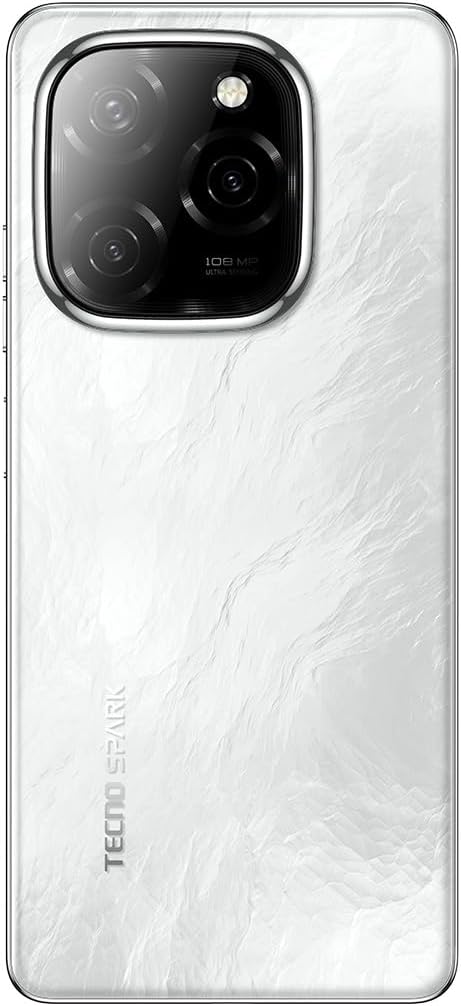
ചിത്രം: മുന്നിലും പിന്നിലും view of the TECNO Spark 20 Pro 5G smartphone, showcasing അതിന്റെ രൂപകൽപ്പനയും ക്യാമറ മൊഡ്യൂളും.
1. സജ്ജീകരണം
1.1 പാക്കേജ് ഉള്ളടക്കം
ആരംഭിക്കുന്നതിന് മുമ്പ്, പാക്കേജിൽ എല്ലാ ഇനങ്ങളും ഉണ്ടെന്ന് ഉറപ്പാക്കുക:
- TECNO Spark 20 Pro 5G Smartphone
- യുഎസ്ബി ടൈപ്പ്-സി കേബിൾ
- പവർ അഡാപ്റ്റർ (33W)
- സിം എജക്ടർ ഉപകരണം
- ക്വിക്ക് സ്റ്റാർട്ട് ഗൈഡ് (ബാധകമെങ്കിൽ)
- വാറൻ്റി കാർഡ് (ബാധകമെങ്കിൽ)
1.2 സിം കാർഡ് ചേർക്കൽ
- നിങ്ങളുടെ ഉപകരണത്തിന്റെ വശത്ത് സിം കാർഡ് ട്രേ കണ്ടെത്തുക.
- ട്രേയുടെ അടുത്തുള്ള ചെറിയ ദ്വാരത്തിലേക്ക് സിം എജക്റ്റർ ഉപകരണം തിരുകുക, ട്രേ പുറത്തേക്ക് വരുന്നത് വരെ സൌമ്യമായി അമർത്തുക.
- Place your Nano SIM card into the designated slot on the tray. Ensure the gold contacts face downwards.
- ട്രേ അതിന്റെ സ്ഥാനത്ത് ക്ലിക്കായി വരുന്നത് വരെ ശ്രദ്ധാപൂർവ്വം ഫോണിലേക്ക് തിരികെ തള്ളുക.

ചിത്രം: വശം view of the smartphone showing the SIM card tray and power/volume buttons.
1.3 പ്രാരംഭ ചാർജിംഗും പവർ ഓണും
ആദ്യ ഉപയോഗത്തിന് മുമ്പ് നിങ്ങളുടെ ഉപകരണം പൂർണ്ണമായും ചാർജ് ചെയ്യാൻ ശുപാർശ ചെയ്യുന്നു.
- Connect the USB Type-C cable to the phone's charging port and the power adapter.
- ഒരു മതിൽ ഔട്ട്ലെറ്റിലേക്ക് പവർ അഡാപ്റ്റർ പ്ലഗ് ചെയ്യുക.
- Once sufficiently charged, press and hold the Power button (located on the side) until the TECNO logo appears.
- ഭാഷാ തിരഞ്ഞെടുപ്പ്, വൈ-ഫൈ കണക്ഷൻ, ഗൂഗിൾ അക്കൗണ്ട് സജ്ജീകരണം എന്നിവയുൾപ്പെടെയുള്ള പ്രാരംഭ സജ്ജീകരണം പൂർത്തിയാക്കാൻ ഓൺ-സ്ക്രീൻ നിർദ്ദേശങ്ങൾ പാലിക്കുക.
ചിത്രം: താഴെ view of the smartphone, highlighting the USB Type-C charging port and speaker grille.
2. നിങ്ങളുടെ ഉപകരണം പ്രവർത്തിപ്പിക്കുന്നു
2.1 അടിസ്ഥാന നാവിഗേഷൻ
Your TECNO Spark 20 Pro 5G runs on Android 14 with HiOS 14. Navigate using touch gestures:
- ടാപ്പ് ചെയ്യുക: ഒരു ഇനം തിരഞ്ഞെടുക്കുകയോ ഒരു ആപ്പ് തുറക്കുകയോ ചെയ്യുക.
- സ്വൈപ്പ്: സ്ക്രീനുകളിലൂടെയോ ലിസ്റ്റുകളിലൂടെയോ സ്ക്രോൾ ചെയ്യുക.
- പിഞ്ച്: ചിത്രങ്ങൾ സൂം ഇൻ ചെയ്യുകയോ ഔട്ട് ചെയ്യുകയോ ചെയ്യുക, web പേജുകൾ.
- ലോംഗ് പ്രസ്സ്: സന്ദർഭോചിത മെനുകൾ ആക്സസ് ചെയ്യുക അല്ലെങ്കിൽ ഐക്കണുകൾ നീക്കുക.
2.2 ക്യാമറ പ്രവർത്തനങ്ങൾ
The device features a 108MP Ultra Clear rear camera and an 8MP front camera with dual LED flash.
- പിൻ ക്യാമറ: Open the Camera app, select "Photo" for standard shots, "Pro" for advanced settings, or "Macro" for close-up photography.
- മുൻ ക്യാമറ: Switch to the front camera for selfies. The dual LED flash assists in low-light conditions.
- വീഡിയോ റെക്കോർഡിംഗ്: Select "Video" mode to record in up to 4K resolution.

ചിത്രം: പിൻഭാഗം view of the smartphone, highlighting the 108MP camera system with its triple lens setup.
2.3 5G Connectivity
Experience high-speed internet with 5G connectivity, supported by 10 5G bands, Linkbooming, and Smart 5G 3.0 technology for wider coverage and faster speeds.
- Ensure your SIM card supports 5G and your network provider offers 5G services in your area.
- Access network settings to manage 5G preferences.
2.4 ഓഡിയോയും ഡിസ്പ്ലേയും
- ഓഡിയോ: Enjoy immersive sound with Dolby Atmos and dual stereo speakers, featuring Hi-Res Audio certification.
- ഡിസ്പ്ലേ: The 6.78-inch LTPS display offers a 120Hz adaptive refresh rate for smooth scrolling and gaming. The Dynamic Port 2.0 provides interactive notifications.
2.5 സുരക്ഷാ സവിശേഷതകൾ
Unlock your device securely using the side-mounted fingerprint sensor.
- പോകുക Settings > Security & Privacy > Fingerprint Unlock to set up your fingerprint.
3. പരിപാലനം
3.1 നിങ്ങളുടെ ഉപകരണം വൃത്തിയാക്കൽ
- ഫോണിന്റെ സ്ക്രീനും ബോഡിയും വൃത്തിയാക്കാൻ മൃദുവായ, ലിന്റ് രഹിത തുണി ഉപയോഗിക്കുക.
- കഠിനമായ രാസവസ്തുക്കളോ ഉരച്ചിലുകളോ ഉപയോഗിക്കുന്നത് ഒഴിവാക്കുക.
- The device has an IP53 rating, meaning it is resistant to dust and splashing water, but it is not waterproof. Avoid submerging it in water.
3.2 ബാറ്ററി കെയർ
- ബാറ്ററി ലൈഫ് വർദ്ധിപ്പിക്കാൻ, ഫോൺ ഉയർന്ന താപനിലയിൽ തുറന്നുകാട്ടുന്നത് ഒഴിവാക്കുക.
- Use the original 33W fast charger for optimal charging performance.
- ബാറ്ററി ഇടയ്ക്കിടെ പൂർണ്ണമായും കളയുന്നത് ഒഴിവാക്കുക.
3.3 സോഫ്റ്റ്വെയർ അപ്ഡേറ്റുകൾ
നിങ്ങളുടെ ഉപകരണത്തിന് ഏറ്റവും പുതിയ സവിശേഷതകളും സുരക്ഷാ പാച്ചുകളും ഉണ്ടെന്ന് ഉറപ്പാക്കാൻ പതിവായി സോഫ്റ്റ്വെയർ അപ്ഡേറ്റുകൾ പരിശോധിച്ച് ഇൻസ്റ്റാൾ ചെയ്യുക.
- പോകുക ക്രമീകരണങ്ങൾ > സിസ്റ്റം > സോഫ്റ്റ്വെയർ അപ്ഡേറ്റ് ലഭ്യമായ അപ്ഡേറ്റുകൾ പരിശോധിക്കാൻ.
4. പ്രശ്നപരിഹാരം
| പ്രശ്നം | സാധ്യമായ പരിഹാരം |
|---|---|
| ഉപകരണം പവർ ഓണാക്കുന്നില്ല. | ബാറ്ററി ചാർജ്ജ് ചെയ്തിട്ടുണ്ടെന്ന് ഉറപ്പാക്കുക. കുറഞ്ഞത് 10 മിനിറ്റെങ്കിലും ചാർജറുമായി കണക്റ്റ് ചെയ്യുക, തുടർന്ന് വീണ്ടും പവർ ചെയ്യാൻ ശ്രമിക്കുക. എന്നിട്ടും പ്രവർത്തിക്കുന്നില്ലെങ്കിൽ, പവർ ബട്ടൺ 10-15 സെക്കൻഡ് അമർത്തിപ്പിടിച്ച് നിർബന്ധിതമായി റീബൂട്ട് ചെയ്യുക. |
| Wi-Fi-ലേക്ക് കണക്റ്റ് ചെയ്യാൻ കഴിയില്ല. | Check if Wi-Fi is enabled in settings. Restart your router and phone. Forget the network and reconnect. |
| മോശം 5G സിഗ്നൽ. | Ensure you are in a 5G coverage area. Check your SIM card is properly inserted. Contact your network provider for assistance. |
| ക്യാമറ പ്രവർത്തിക്കുന്നില്ല. | Restart the phone. Clear the cache and data of the Camera app (Settings > Apps > Camera > Storage > Clear Cache/Data). |
| ബാറ്ററി പെട്ടെന്ന് തീരുന്നു. | Close background apps. Reduce screen brightness. Disable unnecessary features like GPS, Bluetooth, or Wi-Fi when not in use. Check battery usage in settings to identify power-hungry apps. |
5 സ്പെസിഫിക്കേഷനുകൾ
| ഫീച്ചർ | വിശദാംശങ്ങൾ |
|---|---|
| ബ്രാൻഡ് | ടെക്നോ |
| മോഡലിൻ്റെ പേര് | സ്പാർക്ക് 20 പ്രോ |
| ഓപ്പറേറ്റിംഗ് സിസ്റ്റം | Android 14, HiOS 14 |
| റാം വലിപ്പം | 16 GB (8GB physical + 8GB memory fusion) |
| സംഭരണ ശേഷി | 256 ജിബി (യുഎഫ്എസ് 2.2) |
| പ്രോസസർ മോഡൽ | MediaTek Dimensity 6080 5G (6nm) |
| സിപിയു വേഗത | 2.4 GHz |
| സ്ക്രീൻ വലിപ്പം | 6.78 ഇഞ്ച് |
| ഡിസ്പ്ലേ റെസല്യൂഷൻ | 3840 x 2160 (4K) |
| പുതുക്കിയ നിരക്ക് | 120 Hz Adaptive |
| ഡിസ്പ്ലേ തരം | LCD (LTPS) |
| പിൻ ക്യാമറ റെസല്യൂഷൻ | 108 മെഗാപിക്സലുകൾ |
| ഫ്രണ്ട് ക്യാമറ റെസല്യൂഷൻ | 8 മെഗാപിക്സലുകൾ |
| ക്യാമറ സവിശേഷതകൾ | Macro mode, Integrated Flash (Dual LED for front camera) |
| വീഡിയോ ക്യാപ്ചർ റെസല്യൂഷൻ | 4K |
| ബാറ്ററി ശേഷി | 5000 mAh (ലിഥിയം പോളിമർ) |
| ചാർജിംഗ് | 33W ഫാസ്റ്റ് ചാർജിംഗ്, 10W റിവേഴ്സ് ചാർജിംഗ് |
| സെല്ലുലാർ ടെക്നോളജി | 5G |
| കണക്റ്റിവിറ്റി | 5G, Wi-Fi, USB Type-C, 3.5mm Headphone Jack |
| സിം കാർഡ് സ്ലോട്ടുകൾ | Single SIM (Nano) |
| ബയോമെട്രിക് സുരക്ഷ | വിരലടയാള തിരിച്ചറിയൽ |
| ജല പ്രതിരോധ നില | IP53 (സ്പ്ലാഷ് റെസിസ്റ്റന്റ്) |
| ഉൾപ്പെടുത്തിയ ഘടകങ്ങൾ | USB Cable, Power Adapter |
| ഉൽപ്പന്ന അളവുകൾ | 16.9 x 7.6 x 0.9 സെ.മീ |
| ഇനത്തിൻ്റെ ഭാരം | 199 ഗ്രാം |
| നിർമ്മാണ വർഷം | 2024 |
6. വാറൻ്റി വിവരങ്ങൾ
Your TECNO Spark 20 Pro 5G smartphone comes with a ഒരു വർഷത്തെ പരിമിത വാറൻ്റി വാങ്ങിയ തീയതി മുതൽ. സാധാരണ ഉപയോഗത്തിലുള്ള നിർമ്മാണ വൈകല്യങ്ങൾക്ക് ഈ വാറന്റി പരിരക്ഷ നൽകുന്നു. ദുരുപയോഗം, അപകടങ്ങൾ, അനധികൃത അറ്റകുറ്റപ്പണികൾ, അല്ലെങ്കിൽ സാധാരണ തേയ്മാനം എന്നിവ മൂലമുണ്ടാകുന്ന നാശനഷ്ടങ്ങൾക്ക് ഇത് പരിരക്ഷ നൽകുന്നില്ല.
Please retain your proof of purchase for warranty claims. For detailed terms and conditions, refer to the warranty card included in your product package or visit the official Tecno webസൈറ്റ്.
7. പിന്തുണ
For further assistance, technical support, or service inquiries, please contact Tecno customer support through one of the following channels:
- ഉദ്യോഗസ്ഥൻ Webസൈറ്റ്: സന്ദർശിക്കുക Tecno official webസൈറ്റ് പതിവുചോദ്യങ്ങൾ, പിന്തുണാ ഉറവിടങ്ങൾ, ബന്ധപ്പെടാനുള്ള വിവരങ്ങൾ എന്നിവയ്ക്കായി.
- ഇമെയിൽ പിന്തുണ: നിങ്ങളുടെ വാറന്റി കാർഡോ ഉദ്യോഗസ്ഥനോ കാണുക webനിർദ്ദിഷ്ട ഇമെയിൽ വിലാസങ്ങൾക്കായുള്ള സൈറ്റ്.
- സേവന കേന്ദ്രങ്ങൾ: Locate authorized service centers in your region via the Tecno webസൈറ്റ്.
When contacting support, please have your device model (Spark 20 Pro) and serial number ready.