
എച്ച്കെ11
RRP Creation Hk11 Pro Max Ultra 2 Smart Watch User Manual
Model: Hk11 Pro Max Ultra 2
ആമുഖം
This user manual provides comprehensive instructions for the RRP Creation Hk11 Pro Max Ultra 2 Smart Watch. It covers essential information regarding product setup, operation, maintenance, and troubleshooting to ensure optimal performance and user experience. Please read this manual carefully before using your new smartwatch.
ബോക്സിൽ എന്താണുള്ളത്
Upon opening the package, please verify that all components are present and in good condition. The standard package contents include:
- Hk11 Pro Max Ultra 2 Smart Watch
- വയർലെസ് ചാർജർ
- Extra Band (two pairs of straps are included as per product description)
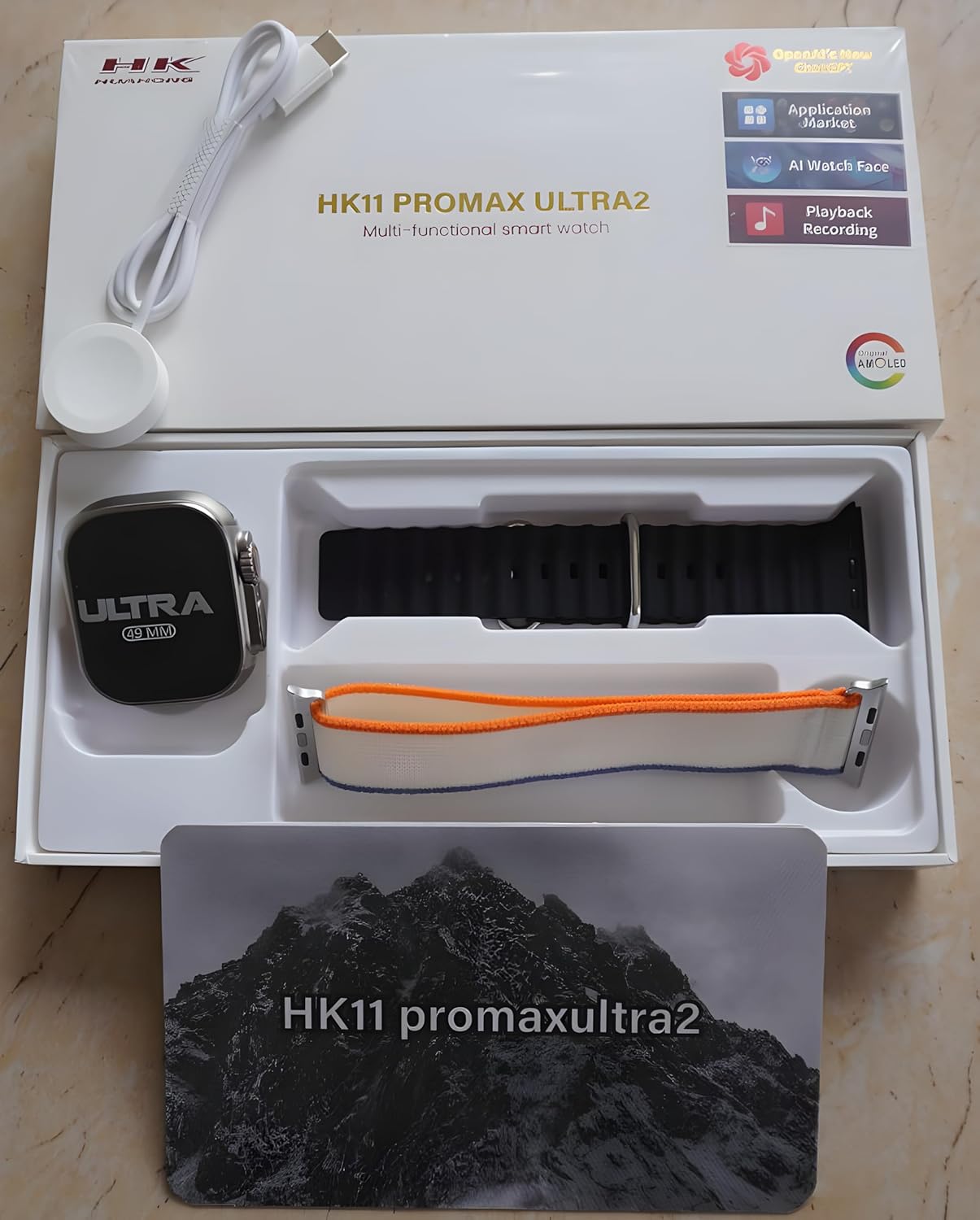
Figure 1: Package Contents. The image displays the Hk11 Pro Max Ultra 2 Smart Watch, two pairs of interchangeable straps, and the wireless charging puck, all neatly arranged within the product packaging.
ഉൽപ്പന്നം കഴിഞ്ഞുview
The Hk11 Pro Max Ultra 2 Smart Watch features a robust design with advanced functionalities. Key components include:

Figure 2: Product Packaging. This image shows the white retail box for the HK11 Pro Max Ultra 2 Multi-functional smart watch, highlighting its key features like OpenAI's new ChatGPT, Application Market, AI Watch Face, Playback Recording, and AMOLED display.
- ഡിസ്പ്ലേ: 2.12-inch Super AMOLED full touch screen with 485*520 resolution.
- കേസ്: Durable Titanium alloy.
- Buttons/Crown: Typically located on the side for navigation and function access.
- സെൻസറുകൾ: Heart rate monitor, pedometer, compass, thermometer.
- ചാർജിംഗ് പോർട്ട്: Wireless charging area on the back.
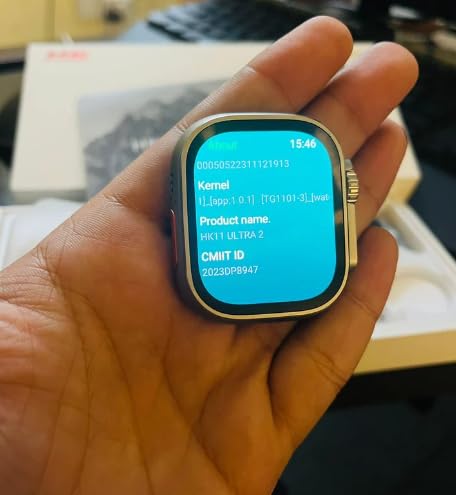
Figure 3: Smart Watch Display. This image shows the smartwatch screen displaying system information, including Kernel version, Product name (HK11 Ultra 2), and CMIIT ID.
സജ്ജീകരണ ഗൈഡ്
1. സ്മാർട്ട് വാച്ച് ചാർജ് ചെയ്യുന്നു
Before initial use, fully charge your smartwatch. Place the watch on the provided wireless charger. Ensure the charging contacts on the watch align with the charger. The display will indicate charging status. A full charge typically takes approximately 2-3 hours.
2. പവർ ഓൺ/ഓഫ്
- പവർ ഓൺ: Press and hold the side button (usually the crown) for a few seconds until the screen lights up.
- പവർ ഓഫ്: സൈഡ് ബട്ടൺ അമർത്തിപ്പിടിക്കുക, തുടർന്ന് സ്ക്രീനിൽ "പവർ ഓഫ്" ഓപ്ഷൻ തിരഞ്ഞെടുക്കുക.
3. നിങ്ങളുടെ സ്മാർട്ട്ഫോണുമായി ജോടിയാക്കൽ
To unlock the full functionality of your smartwatch, pair it with your smartphone via Bluetooth.
- നിങ്ങളുടെ സ്മാർട്ട്ഫോണിന്റെ ബ്ലൂടൂത്ത് പ്രവർത്തനക്ഷമമാക്കിയിട്ടുണ്ടെന്ന് ഉറപ്പാക്കുക.
- On your smartwatch, navigate to the Bluetooth settings or the pairing screen.
- On your smartphone, open the Bluetooth settings and search for available devices. Select "Hk11 Pro Max Ultra 2" or a similar device name from the list.
- നിങ്ങളുടെ വാച്ചിലും സ്മാർട്ട്ഫോണിലും ജോടിയാക്കൽ അഭ്യർത്ഥന സ്ഥിരീകരിക്കുക.
- For optimal performance and access to all features, download the companion application (if available, check the watch's manual or packaging for app name) from your phone's app store (compatible with Android 5.0 and above, and iOS 10.0 and above).
പ്രവർത്തന നിർദ്ദേശങ്ങൾ
ഡിസ്പ്ലേയും നാവിഗേഷനും
- ടച്ച് സ്ക്രീൻ: മെനുകളിലൂടെയും സ്ക്രീനുകളിലൂടെയും നാവിഗേറ്റ് ചെയ്യാൻ ഇടത്തോട്ടോ വലത്തോട്ടോ മുകളിലേക്കോ താഴേക്കോ സ്വൈപ്പ് ചെയ്യുക. ഇനങ്ങൾ തിരഞ്ഞെടുക്കാൻ ടാപ്പ് ചെയ്യുക.
- സൈഡ് ബട്ടൺ/കിരീടം: Press to return to the home screen, or rotate to scroll through lists (functionality may vary).
- ആംഗ്യ നിയന്ത്രണം: The watch supports gesture control for certain functions (e.g., raising wrist to wake screen).
പ്രധാന സവിശേഷതകളും പ്രവർത്തനങ്ങളും
Your Hk11 Pro Max Ultra 2 Smart Watch offers a wide range of features to enhance your daily life and health monitoring:
- കോൾ മാനേജ്മെൻ്റ്: Answer, dial, and receive calls directly from your wrist via Bluetooth 5.2.
- അറിയിപ്പുകൾ: Receive push messages and message reminders from your paired smartphone.
- ഹൃദയമിടിപ്പ് നിരീക്ഷണം: Continuously track your heart rate.
- രക്തസമ്മർദ്ദ നിരീക്ഷണം: Monitor your blood pressure (for reference only, not a medical device).
- സ്ലീപ്പ് ട്രാക്കർ: ഉറക്കത്തിന്റെ ഗുണനിലവാരം മെച്ചപ്പെടുത്താൻ സഹായിക്കുന്നതിന് നിങ്ങളുടെ ഉറക്ക രീതികൾ വിശകലനം ചെയ്യുക.
- Fitness Tracker/Pedometer: Track steps, distance, and calories burned.
- മൾട്ടി-സ്പോർട്സ് മോഡുകൾ: Dedicated modes for various activities to track performance.
- കോമ്പസ്: നാവിഗേഷനായി ബിൽറ്റ്-ഇൻ കോമ്പസ്.
- തെർമോമീറ്റർ: Measure ambient temperature.
- റിമോട്ട് കൺട്രോൾ: നിങ്ങളുടെ സ്മാർട്ട്ഫോണിൽ സംഗീത പ്ലേബാക്ക് നിയന്ത്രിക്കുക.
- Alarm Clock & Countdown: Set alarms and use countdown timers.
- കലണ്ടർ: Access calendar functions.
- ഇഷ്ടാനുസൃതമാക്കൽ: Multiple dial switch options to personalize your watch face.
പരിപാലനവും പരിചരണവും
Proper care will extend the life and maintain the performance of your smartwatch.
- വൃത്തിയാക്കൽ: Wipe the watch and straps regularly with a soft, dry, lint-free cloth. For stubborn dirt, slightly dampതുണിയിൽ വെള്ളം ഒഴിക്കുക. കഠിനമായ രാസവസ്തുക്കളോ ഉരച്ചിലുകളോ ഉള്ള വസ്തുക്കൾ ഉപയോഗിക്കുന്നത് ഒഴിവാക്കുക.
- ജല പ്രതിരോധം: While smartwatches often have some water resistance, avoid prolonged exposure to water, swimming, or showering with the watch unless explicitly stated as waterproof for such activities. Refer to product specifications for exact water resistance ratings.
- താപനില: ഉയർന്ന താപനിലയിൽ (ചൂട് അല്ലെങ്കിൽ തണുപ്പ്) അല്ലെങ്കിൽ നേരിട്ടുള്ള സൂര്യപ്രകാശം ദീർഘനേരം വാച്ച് ഏൽക്കുന്നത് ഒഴിവാക്കുക.
- ചാർജിംഗ്: Always use the original wireless charger provided. Do not attempt to charge with damaged cables or chargers.
- സംഭരണം: ദീർഘനേരം ഉപയോഗിക്കാത്തപ്പോൾ, വാച്ച് തണുത്തതും വരണ്ടതുമായ സ്ഥലത്ത് സൂക്ഷിക്കുക.
ട്രബിൾഷൂട്ടിംഗ്
If you encounter issues with your smartwatch, refer to the following common troubleshooting steps:
| പ്രശ്നം | സാധ്യമായ കാരണം | പരിഹാരം |
|---|---|---|
| വാച്ച് ഓണാക്കുന്നില്ല. | ബാറ്ററി കുറവാണ്; സോഫ്റ്റ്വെയർ തകരാറ്. | Charge the watch for at least 30 minutes. If still unresponsive, try a forced restart (refer to specific model instructions, usually holding down a button for 10-15 seconds). |
| സ്മാർട്ട്ഫോണുമായി ജോടിയാക്കാൻ കഴിയില്ല. | Bluetooth off; watch not in pairing mode; interference. | Ensure Bluetooth is on for both devices. Put watch in pairing mode. Restart both devices. Clear previous Bluetooth connections on your phone. |
| അറിയിപ്പുകൾ ലഭിച്ചില്ല. | App permissions; Bluetooth disconnected; DND mode. | Check app notification permissions on your phone. Ensure Bluetooth connection is stable. Disable Do Not Disturb mode on both devices. |
| കൃത്യമല്ലാത്ത ആരോഗ്യ ഡാറ്റ. | അനുചിതമായ ഫിറ്റ്; സെൻസർ തടസ്സം. | വാച്ച് നിങ്ങളുടെ കൈത്തണ്ടയിൽ നന്നായി ധരിച്ചിട്ടുണ്ടെന്ന് ഉറപ്പാക്കുക, അധികം ഇറുകിയതോ അധികം അയഞ്ഞതോ അല്ല. വാച്ചിന്റെ പിൻഭാഗത്തുള്ള സെൻസർ വൃത്തിയാക്കുക. |
| ചെറിയ ബാറ്ററി ലൈഫ്. | Frequent use of features; high brightness; old firmware. | Reduce screen brightness. Limit continuous heart rate monitoring. Turn off unnecessary features. Ensure firmware is updated. |
ഈ ഘട്ടങ്ങൾ പരീക്ഷിച്ചതിനുശേഷവും പ്രശ്നം നിലനിൽക്കുകയാണെങ്കിൽ, ദയവായി ഉപഭോക്തൃ പിന്തുണയുമായി ബന്ധപ്പെടുക.
സ്പെസിഫിക്കേഷനുകൾ
Detailed technical specifications for the Hk11 Pro Max Ultra 2 Smart Watch:
| ഫീച്ചർ | വിശദാംശങ്ങൾ |
|---|---|
| ഡിസ്പ്ലേ സ്ക്രീൻ | 2.12 inch Super AMOLED Full Touch Screen |
| റെസലൂഷൻ | 485*520 പിക്സലുകൾ |
| ബ്ലൂടൂത്ത് പതിപ്പ് | 5.2 |
| മെമ്മറി | 256എംബി |
| വലിപ്പം | 49 മി.മീ |
| അനുയോജ്യമായ സിസ്റ്റങ്ങൾ | Android 5.0 (above), iOS 10.0 (inclusive) and above |
| ബാറ്ററി ശേഷി | 480mAh |
| കേസ് മെറ്റീരിയൽ | ടൈറ്റാനിയം അലോയ് |
| സാധാരണ ബാറ്ററി ലൈഫ് | 2-3 ദിവസം |
| സ്റ്റാൻഡ്ബൈ സമയം | 3 ദിവസം വരെ |
| പ്രത്യേക സവിശേഷതകൾ | Compass, Thermometer, Calendar, Alarm Clock, Power Reserve, Remote Control, Countdown, Sleep Tracker, Fitness Tracker, Passometer, Call Reminder, Answer Call, Push Message, Message Reminder, Dial Call, Heart Rate Tracker, Moisture Measurement, Gesture control, Heart Rate Monitor |
| ചാർജിംഗ് തരം | വയർലെസ് ചാർജർ |
വാറൻ്റിയും പിന്തുണയും
For information regarding warranty coverage and customer support, please refer to the warranty card included with your product or contact the retailer/manufacturer directly. Keep your purchase receipt as proof of purchase.
Manufacturer: RRP cration, nawada fatehpur Sec-86 Gurgaon
Model: Hk11
ASIN: B0D4R3WCDH
Ask a question about this manual
Ask about setup, troubleshooting, compatibility, parts, safety, or missing instructions. Manuals+ will review the question and use this page’s manual context to help answer it.