
Fookoo DCM102
Fookoo DCM102 Wireless Backup Camera System User Manual
Model: DCM102 | Brand: Fookoo
1. ആമുഖം
The Fookoo DCM102 Wireless Backup Camera System is designed to enhance driving safety and convenience for various vehicles, including RVs, trucks, and campers. This system features a 10.1-inch IPS touchscreen monitor and two HD 1080P cameras with magnetic bases for quick and easy installation. With its built-in rechargeable battery and solar panel, it offers extended operation without complex wiring.
Key features include a robust 2.4GHz wireless signal, IP69 waterproof cameras with night vision, loop recording capabilities, and parking assistance. This manual provides detailed instructions for setup, operation, maintenance, and troubleshooting to ensure optimal performance of your Fookoo DCM102 system.
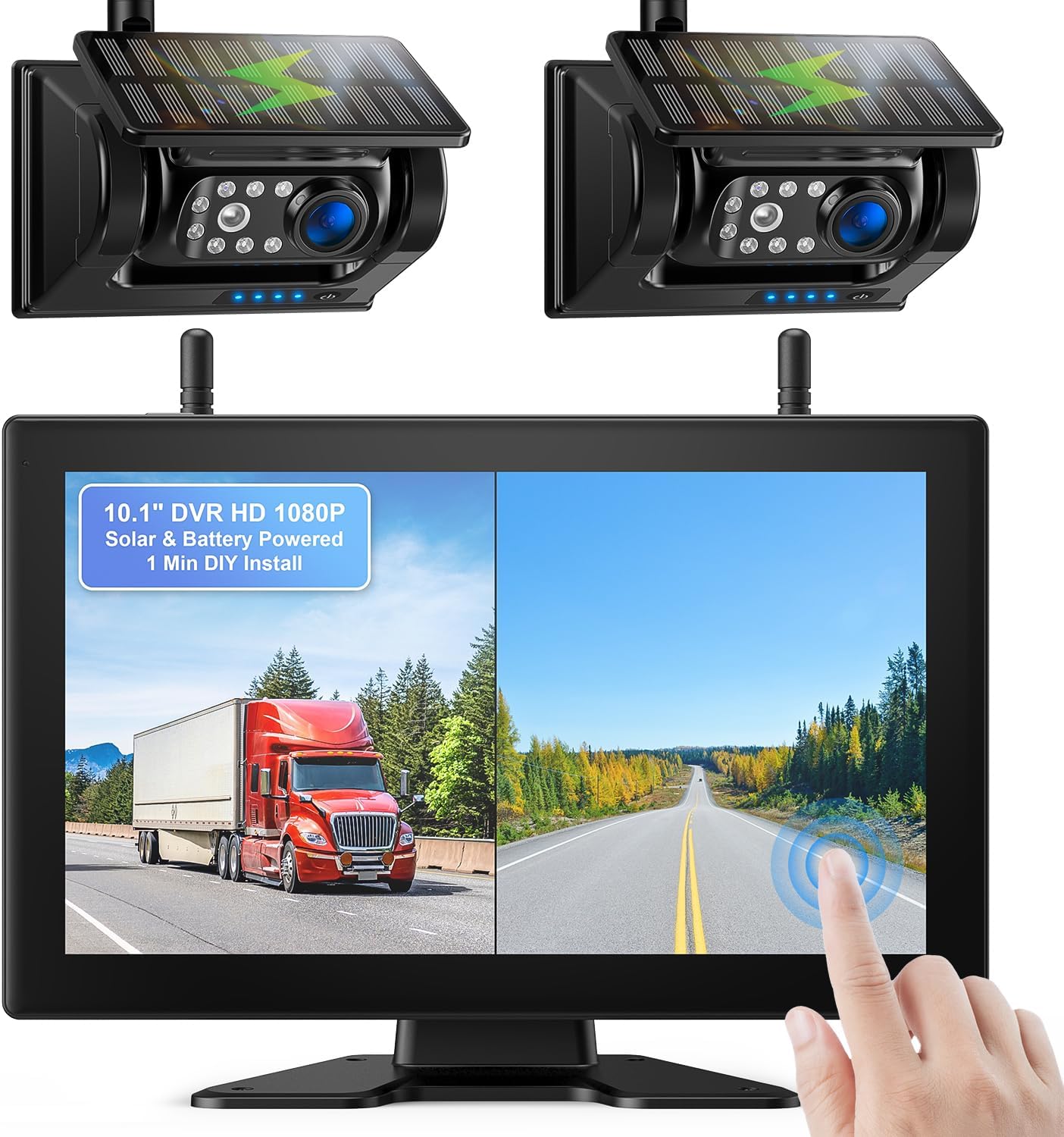
ചിത്രം 1.1: ഓവർview of the Fookoo DCM102 Wireless Backup Camera System.
2. പാക്കേജ് ഉള്ളടക്കം
താഴെ ലിസ്റ്റ് ചെയ്തിരിക്കുന്ന എല്ലാ ഇനങ്ങളും നിങ്ങളുടെ പാക്കേജിൽ ഉൾപ്പെടുത്തിയിട്ടുണ്ടെന്ന് ദയവായി പരിശോധിക്കുക. ഏതെങ്കിലും ഇനങ്ങൾ നഷ്ടപ്പെട്ടിട്ടുണ്ടെങ്കിലോ കേടായിട്ടുണ്ടെങ്കിലോ, ദയവായി ഉപഭോക്തൃ പിന്തുണയുമായി ബന്ധപ്പെടുക.
- 10.1-inch Monitor (x1)
- Solar Magnetic Camera (x2)
- Car Charger with USB Port (x1)
- ടൈപ്പ്-സി കേബിൾ (x2)
- Hardwired Power Cord (x1)
- AC Adapter (x2)
- Suction Cup Mount & Adapter (x1)
- A-shaped Bracket & Screws (x1)
- ആന്റിന (x4)
- Installation Kit (x1)
- Instructions Manual (x1)

Figure 2.1: All components included in the Fookoo DCM102 system package.
3. സജ്ജീകരണവും ഇൻസ്റ്റാളേഷനും
3.1 ക്യാമറ ഇൻസ്റ്റാളേഷൻ
The Fookoo DCM102 cameras feature a strong magnetic base for quick and easy installation. No drilling or complex wiring is required for power, as the cameras are battery-powered with solar charging capabilities.
- Ensure the camera is fully charged before initial use. Use the provided Type-C cable and AC adapter if necessary.
- Identify a suitable metallic surface on your vehicle (e.g., rear bumper, trailer hitch, or any flat metal area) where the camera can securely attach.
- Place the camera firmly onto the chosen metallic surface. The strong magnetic base will hold it in place.
- ആവശ്യമുള്ളത് നേടുന്നതിന് ക്യാമറ ആംഗിൾ ക്രമീകരിക്കുക. viewവീക്ഷണം.
- For optimal battery life, position the camera where the solar panel receives maximum sunlight exposure.

Figure 3.1: Magnetic camera with solar panel and battery details.

Figure 3.2: Camera power efficiency with solar charging.
3.2 ഇൻസ്റ്റലേഷൻ നിരീക്ഷിക്കുക
The 10.1-inch IPS touchscreen monitor can be installed using either the suction cup mount or the A-shaped bracket, depending on your preference and vehicle's dashboard configuration.
- സക്ഷൻ കപ്പ് മൗണ്ട്: Attach the suction cup mount to a clean, smooth surface on your windshield or dashboard. Secure the monitor to the mount.
- A-shaped Bracket: Use the provided screws to secure the A-shaped bracket to a flat surface on your dashboard. Attach the monitor to the bracket.
- Connect the monitor to your vehicle's power source using the included car charger with a USB port.
- Adjust the monitor's position and angle for optimal viewനിങ്ങളുടെ ഡ്രൈവിംഗിന് തടസ്സമാകാതെ പ്രവർത്തിക്കുന്നു view.

Figure 3.3: The 10.1-inch IPS touchscreen monitor.
3.3 Initial Pairing (if necessary)
The cameras and monitor are typically pre-paired at the factory. If you experience connection issues, follow these steps to re-pair:
- Power on both the monitor and the camera.
- On the monitor, navigate to the system settings.
- Select the "Pairing" or "Add Camera" option.
- ജോടിയാക്കൽ പ്രക്രിയ പൂർത്തിയാക്കാൻ ഓൺ-സ്ക്രീൻ നിർദ്ദേശങ്ങൾ പാലിക്കുക.
4. ഓപ്പറേഷൻ
4.1 പവർ ഓൺ/ഓഫ്
The system is designed for convenience. When the monitor is turned off, the camera automatically enters sleep mode to conserve power. When the monitor is turned on, the camera automatically activates.
- പവർ ഓണാക്കാൻ: Connect the monitor to power, and it will automatically turn on.
- പവർ ഓഫ് ചെയ്യാൻ: Disconnect the monitor from power, or use the power button on the monitor if available.
4.2 ടച്ച്സ്ക്രീൻ ഇന്റർഫേസ്
The 10.1-inch IPS touchscreen monitor provides an intuitive interface for controlling the system. Simply touch the screen to access various functions and settings.

Figure 4.1: Touchscreen interface with main functions.
4.3 Dual-Split Screen Mode
The system supports a dual-split screen mode, allowing you to view images from two cameras simultaneously. This feature helps reduce blind spots and provides a more comprehensive view നിങ്ങളുടെ ചുറ്റുപാടുകളുടെ.
- To activate dual-split screen, select the corresponding option on the touchscreen interface.
- You can switch between single camera view and dual-split view ആവശ്യാനുസരണം.

Figure 4.2: Dual-split screen functionality with two cameras.
4.4 ലൂപ്പ് റെക്കോർഡിംഗ്
The monitor can record driving conditions to an SD card (supports 32-128GB, sold separately). The loop recording function ensures continuous recording by overwriting the oldest footagSD കാർഡ് നിറയുമ്പോൾ.
- Insert a compatible SD card into the designated slot on the monitor.
- Access the "Record" or "DVR" section on the touchscreen to manage recording settings and playback recorded videos.
4.5 Parking Assistance
The system provides parking lines on the monitor display to assist with safer and faster parking maneuvers. These lines serve as a visual guide for distance and alignment.
- Parking lines are automatically displayed when the camera is active.
- Refer to the parking lines to gauge your vehicle's position relative to obstacles.
4.6 നൈറ്റ് വിഷൻ
Equipped with 7 infrared lights and a photoreceptor, the cameras automatically activate night vision in low-light conditions, providing clear, high-definition images to ensure driving safety at night.
5. പരിപാലനം
- വൃത്തിയാക്കൽ: ക്യാമറ ലെൻസും മോണിറ്റർ സ്ക്രീനും ഒരു സോഫ്റ്റ്, ഡി ക്ലീനർ ഉപയോഗിച്ച് പതിവായി വൃത്തിയാക്കുക.amp തുണി. പ്രതലങ്ങളിൽ പോറലുകൾ ഉണ്ടാക്കാൻ സാധ്യതയുള്ള ഉരച്ചിലുകൾ ഉണ്ടാക്കുന്ന ക്ലീനറുകൾ ഒഴിവാക്കുക.
- ബാറ്ററി കെയർ: The camera's built-in 9600mAh battery is designed for extended use with solar panel assistance. For optimal battery longevity, ensure the solar panel is clean and exposed to sunlight. If prolonged periods of low light occur, use the provided Type-C cable and charger to fully recharge the camera.
- വാട്ടർപ്രൂഫ് റേറ്റിംഗ്: The cameras are IP69 waterproof, designed to withstand harsh weather conditions. However, avoid submerging the cameras in water for extended periods.
- സംഭരണം: If storing the system for an extended period, ensure both the cameras and monitor are fully charged and stored in a cool, dry place.
6. പ്രശ്നപരിഹാരം
| പ്രശ്നം | സാധ്യമായ കാരണം | പരിഹാരം |
|---|---|---|
| മോണിറ്ററിൽ ചിത്രമില്ല | Camera not powered on; Signal interference; Camera/monitor not paired. | Ensure camera battery is charged. Move camera/monitor closer. Re-pair camera and monitor (refer to Section 3.3). |
| ചിത്രം മിന്നിമറയുന്നു അല്ലെങ്കിൽ അസ്ഥിരമാണ് | Weak signal; Obstructions between camera and monitor. | Ensure antennas are properly attached. Reduce distance or remove obstructions. |
| മോശം രാത്രി കാഴ്ച നിലവാരം | Dirty camera lens; Insufficient ambient light for IR activation. | Clean camera lens. Ensure no obstructions are blocking the IR lights. |
| Camera battery drains quickly | Insufficient solar charging; Frequent use in low-light conditions. | Ensure solar panel is clean and exposed to direct sunlight. Recharge via Type-C cable more frequently. |
| Monitor not responding to touch | Software glitch; Screen protector interference. | Restart the monitor. Ensure screen is clean and free of debris. Remove and reapply screen protector if applicable. |
7 സ്പെസിഫിക്കേഷനുകൾ
| ഫീച്ചർ | വിശദാംശങ്ങൾ |
|---|---|
| മോഡൽ | DCM102 (DCMX1002) |
| മോണിറ്റർ വലിപ്പം | 10.1 Inches IPS Touchscreen |
| വീഡിയോ ക്യാപ്ചർ റെസല്യൂഷൻ | 1080p HD |
| Camera Battery Capacity | 9600mAh (റീചാർജ് ചെയ്യാവുന്നത്) |
| ചാർജിംഗ് രീതി | Solar Panel Assisted, Type-C Cable |
| വയർലെസ് സിഗ്നൽ | 2.4GHz Dual-Antenna |
| ക്യാമറ വാട്ടർപ്രൂഫ് റേറ്റിംഗ് | IP69 |
| Viewing ആംഗിൾ | 130 ഡിഗ്രി |
| മൗണ്ടിംഗ് തരം | Magnetic Mount (Camera), Suction Cup/Bracket (Monitor) |
| പിന്തുണയ്ക്കുന്ന SD കാർഡ് | 32-128GB (for Loop Recording) |
| ഉൽപ്പന്ന അളവുകൾ | 27.18 x 18.29 x 16 cm; 2.86 kg (Overall package/system) |
| വാല്യംtage | 12 വോൾട്ട് (DC) |
8. വാറൻ്റിയും പിന്തുണയും
Fookoo provides comprehensive customer support for the DCM102 Wireless Backup Camera System.
- വാറൻ്റി: The product comes with 24 months replacement support.
- വിൽപ്പനാനന്തര സേവനം: Lifetime after-sales service is provided.
- ബന്ധപ്പെടുക: If you encounter any issues, have questions, or require assistance, please reach out to Fookoo customer service. They are available 24 hours a day to ensure customer satisfaction.
Ask a question about this manual
Ask about setup, troubleshooting, compatibility, parts, safety, or missing instructions. Manuals+ will review the question and use this page’s manual context to help answer it.