
1. ആമുഖം
This manual provides detailed instructions for installing, setting up, and operating your meross 3 Way Smart Dimmer Switch Kit. This kit includes both a main and a secondary switch, designed for controlling lights from two different locations. The smart dimmer switches offer dimming capabilities from 1% to 100% and are compatible with various smart home platforms.
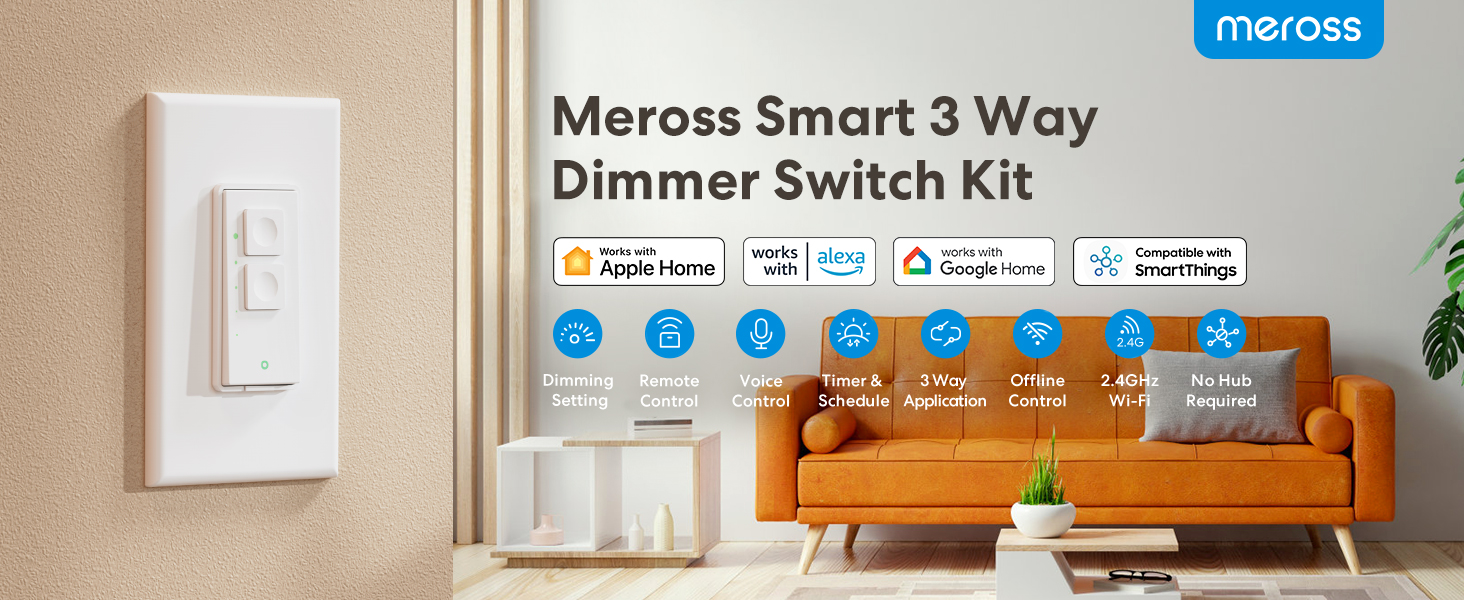
Image: Meross Smart 3 Way Dimmer Switch Kit highlighting key features.
2 സുരക്ഷാ വിവരങ്ങൾ
WARNING: This is an electrical shock hazard. Follow installation instructions carefully. Ensure power is turned off before electrical work.
- ന്യൂട്രൽ വയർ ആവശ്യമാണ്: The Smart Dimmer Switch Kit requires a neutral wire (typically white) in your electrical box for proper operation. If you are unsure, consult a qualified electrician.
- 3-Way Application Only: This kit is designed exclusively for 3-way installations. The main switch cannot function with other standard 3-way switches.
- Wi-Fi അനുയോജ്യത: The device operates on 2.4GHz Wi-Fi networks only. It does NOT support 5GHz Wi-Fi.
- ബൾബ് അനുയോജ്യത: Max 400W for Incandescent (INC) bulbs, max 150W for CFL and LED bulbs. Not compatible with smart bulbs.
- അഗ്നി സുരക്ഷ: Features fire-retardant housing with a UL94-V0 fire rating.

Image: Key compatibility and installation requirements for the smart dimmer switch.
3. പാക്കേജ് ഉള്ളടക്കം
Your meross 3 Way Smart Dimmer Switch Kit typically includes the following items:
- 1 x Main Smart Dimmer Switch
- 1 x Secondary Smart Dimmer Switch (Add-on Switch)
- 2 x Wall Plates (Screwless design)
- വയർ പരിപ്പ്
- മൗണ്ടിംഗ് സ്ക്രൂകൾ
- Wire Labels (Neutral, Lin, Lout, Ground)
- 1 x ദ്രുത ഇൻസ്റ്റലേഷൻ ഗൈഡ്
4. ഉൽപ്പന്നം കഴിഞ്ഞുview
The meross Smart Dimmer Switch Kit provides intelligent control over your lighting. It features physical buttons for manual operation and integrates seamlessly with popular smart home ecosystems for voice and app control. The switches are designed for a clean, modern look with screwless faceplates.

ചിത്രം: മുൻഭാഗം view of the meross Smart Dimmer Switch.
പ്രധാന സവിശേഷതകൾ:
- മങ്ങിക്കൽ നിയന്ത്രണം: പ്രകാശത്തിന്റെ തെളിച്ചം 1% മുതൽ 100% വരെ ക്രമീകരിക്കുക.
- Multi-Compatible: Works with LED, CFL, and Incandescent (INC) bulbs.
- ത്രീ-വേ പ്രവർത്തനം: Control lights from two distinct locations.
- സ്മാർട്ട് ഹോം ഇൻ്റഗ്രേഷൻ: Compatible with Apple HomeKit, Amazon Alexa, Google Assistant, and SmartThings.
- ശബ്ദ നിയന്ത്രണം: Use voice commands with Siri, Alexa, or Google Assistant.
- റിമോട്ട് കൺട്രോൾ: Manage lights from anywhere via the Meross app.
- ഷെഡ്യൂളിംഗ്: Set custom schedules, timers, and sunrise/sunset routines.
- വൈഫൈ കണക്റ്റിവിറ്റി: Connects directly to your 2.4GHz Wi-Fi network; no additional hub required.

Image: Dimmable and multi-compatible features of the smart switch.
5. ഇൻസ്റ്റലേഷൻ
Before beginning installation, ensure you have read and understood all safety warnings. If you are not comfortable with electrical wiring, please consult a qualified electrician.
പ്രീ-ഇൻസ്റ്റലേഷൻ ചെക്ക്ലിസ്റ്റ്:
- ന്യൂട്രൽ വയർ പരിശോധിക്കുക: Confirm your electrical box has a neutral wire (usually white). This is mandatory for the meross smart dimmer switch.
- പവർ ഓഫ്: ALWAYS turn off power at the circuit breaker before starting any electrical work.
- ഉപകരണങ്ങൾ: Gather necessary tools such as a screwdriver, wire strippers, and voltagഇ ടെസ്റ്റർ.
Wiring Instructions (3-Way Application):
The meross 3 Way Smart Dimmer Kit consists of a Master Switch and an Add-on Switch. Follow the wiring diagram provided in your Quick Installation Guide and below. Use the included wire nuts and labels for clear and secure connections.

Image: Detailed wiring diagram for the smart dimmer switch, highlighting the neutral wire connection.

Image: 3-Way wiring diagram for Master and Add-on Switches.
- Identify and label your wires: Live (Line), Load, Neutral, and Ground.
- Connect the wires from the meross switches to your home's wiring according to the diagram.
- Secure the switches into the electrical box using the provided screws.
- Attach the screwless faceplates for a clean finish.
- സർക്യൂട്ട് ബ്രേക്കറിൽ വൈദ്യുതി പുനഃസ്ഥാപിക്കുക.
6. Setup (App Configuration)
Once the switches are physically installed, you can configure them using the meross app and integrate them with your preferred smart home system.
Initial Setup with Meross App:
- Download the meross app from the App Store or Google Play.
- Create a meross account or log in.
- Follow the in-app instructions to add your new smart dimmer switches. Ensure your smartphone is connected to a 2.4GHz Wi-Fi network during this process.
HomeKit Remote Control Setup:
To enable remote control for HomeKit, you need a HomeKit hub device:
- A HomePod, HomePod mini, Apple TV 4K, or Apple TV HD.
- Set up one of these Apple devices as a HomeKit bridge and connect it to your home Wi-Fi network.
- The HomeKit bridge must remain online and connected to Wi-Fi for remote control functionality.

Image: Setting up HomeKit remote control with Apple devices. For more information, visit ആപ്പിൾ പിന്തുണ.
7. പ്രവർത്തിക്കുന്നു
Your meross Smart Dimmer Switches offer multiple ways to control your lighting.
സ്വമേധയാലുള്ള നിയന്ത്രണം:
Press the physical buttons on the switch to turn lights on/off or adjust brightness. The top button typically increases brightness, and the bottom button decreases it.
ശബ്ദ നിയന്ത്രണം:
Integrate your switches with Apple HomeKit, Amazon Alexa, or Google Assistant for hands-free control.
- സിരി: "Hey Siri, turn on the living room light."
- അലക്സ: "അലക്സാ, കിടപ്പുമുറിയിലെ വെളിച്ചം 50% ആയി കുറയ്ക്കൂ."
- Google അസിസ്റ്റൻ്റ്: "ഹേ ഗൂഗിൾ, അടുക്കളയിലെ ലൈറ്റ് ഓഫ് ചെയ്യൂ."

Image: Voice control in action with smart assistants.
റിമോട്ട് കൺട്രോൾ:
Control your lights from anywhere using the meross app on your smartphone or the Apple Home app (if HomeKit is configured with a hub).

Image: Remote control of lights via the Meross app.
Scheduling and Scenes:
Set up custom schedules, timers, and scenes to automate your lighting based on your daily routine or preferences. Schedules can operate even if your internet connection is temporarily down.
- ടൈമറുകൾ: Set lights to turn on/off after a specific duration.
- ഷെഡ്യൂളുകൾ: Program lights to activate or deactivate at set times.
- സൂര്യോദയം സൂര്യാസ്തമയം: Automate lights to follow natural light cycles.

Image: Scene and schedule features for automated lighting control.
8. പരിപാലനം
To ensure optimal performance and longevity of your meross Smart Dimmer Switches, follow these simple maintenance guidelines:
- വൃത്തിയാക്കൽ: Gently wipe the switch and faceplate with a soft, dry cloth. Avoid using harsh chemicals or abrasive cleaners.
- കണക്ഷൻ പരിശോധന: Periodically ensure all wiring connections are secure and free from damage.
- ഫേംവെയർ അപ്ഡേറ്റുകൾ: Keep your meross app and switch firmware updated to benefit from the latest features and security enhancements.
9. പ്രശ്നപരിഹാരം
If you encounter issues with your meross Smart Dimmer Switch, refer to the following common troubleshooting steps:
- വൈദ്യുതിയില്ല/പ്രതികരിക്കുന്നില്ല:
- Ensure power is on at the circuit breaker.
- Check all wiring connections for tightness and correctness, especially the neutral wire.
- Locate the small power reboot button (if present) on the switch and press it once to perform a soft reboot.
- വൈഫൈ കണക്റ്റിവിറ്റി പ്രശ്നങ്ങൾ:
- നിങ്ങളുടെ വൈഫൈ നെറ്റ്വർക്ക് 2.4GHz ആണെന്ന് സ്ഥിരീകരിക്കുക. സ്വിച്ച് 5GHz പിന്തുണയ്ക്കുന്നില്ല.
- നിങ്ങളുടെ വൈ-ഫൈ റൂട്ടർ പരിധിക്കുള്ളിലാണെന്നും ശരിയായി പ്രവർത്തിക്കുന്നുണ്ടെന്നും ഉറപ്പാക്കുക.
- നിങ്ങളുടെ വൈഫൈ റൂട്ടർ പുനരാരംഭിച്ച് വീണ്ടും കണക്റ്റുചെയ്യാൻ ശ്രമിക്കുക.
- If the indicator light is red, it may signal a connectivity problem.
- HomeKit Remote Control Not Working:
- Verify your HomeKit hub (HomePod, Apple TV) is online and connected to your home Wi-Fi network.
- Ensure the HomeKit hub is powered on and not disconnected from Wi-Fi.
- മങ്ങൽ പ്രശ്നങ്ങൾ:
- Confirm your bulbs are dimmable and compatible with the switch (LED, CFL, INC). Smart bulbs are not supported.
- മൊത്തം വാട്ട് പരിശോധിക്കുകtage of connected bulbs does not exceed the switch's maximum capacity (400W for INC, 150W for CFL/LED).
10 സ്പെസിഫിക്കേഷനുകൾ
| ഫീച്ചർ | സ്പെസിഫിക്കേഷൻ |
|---|---|
| മോഡൽ നമ്പർ | MSS570 |
| ഓപ്പറേഷൻ മോഡ് | ഓൺ-ഓഫ്-ഓൺ |
| നിലവിലെ റേറ്റിംഗ് | 4 Amps |
| ഓപ്പറേറ്റിംഗ് വോളിയംtage | 120 വോൾട്ട് |
| ബന്ധപ്പെടാനുള്ള തരം | സാധാരണയായി തുറന്നിരിക്കുന്നു |
| കണക്റ്റർ തരം | Clamp |
| അതിതീവ്രമായ | സ്പ്ദ്ത് |
| അളവുകൾ (L x W x H) | 4.7 x 2.8 x 1.5 ഇഞ്ച് |
| സർക്യൂട്ട് തരം | 3-വഴി |
| ആക്യുവേറ്റർ തരം | ഡിമ്മർ സ്വിച്ച് |
| കോൺടാക്റ്റ് മെറ്റീരിയൽ | ചെമ്പ് |
| അന്താരാഷ്ട്ര സംരക്ഷണ റേറ്റിംഗ് | IP00 |
| താപനില പരിധി | 32 to 104 Degrees Fahrenheit |
| കൺട്രോളർ തരം | ആമസോൺ അലക്സ, ആപ്പിൾ ഹോംകിറ്റ്, ഗൂഗിൾ അസിസ്റ്റന്റ് |
| നിയന്ത്രണ രീതി | ശബ്ദം |
| കണക്റ്റിവിറ്റി പ്രോട്ടോക്കോൾ | വൈഫൈ (2.4GHz മാത്രം) |
| നിറം | വെള്ള |
| വാട്ട്tage | 480 വാട്ട്സ് |
| ഇനത്തിൻ്റെ ഭാരം | 9.8 ഔൺസ് |
11. വാറൻ്റിയും പിന്തുണയും
For detailed warranty information, technical support, and frequently asked questions, please visit the official meross webസൈറ്റിൽ ബന്ധപ്പെടുക അല്ലെങ്കിൽ അവരുടെ ഉപഭോക്തൃ സേവനവുമായി നേരിട്ട് ബന്ധപ്പെടുക. വാറന്റി ക്ലെയിമുകൾക്കായി നിങ്ങളുടെ വാങ്ങൽ രസീത് സൂക്ഷിക്കുക.