
1. ആമുഖം
Thank you for choosing the Acekool PAC-M07 Portable Air Conditioner. This 3-in-1 unit provides cooling, dehumidification, and fan functions to enhance your indoor comfort. This manual contains important information regarding the safe operation, installation, use, and maintenance of your appliance. Please read it thoroughly before use and keep it for future reference.
2 സുരക്ഷാ വിവരങ്ങൾ
To reduce the risk of fire, electrical shock, or injury, always follow these basic precautions:
- ഉപകരണം പ്രവർത്തിപ്പിക്കുന്നതിന് മുമ്പ് എല്ലാ നിർദ്ദേശങ്ങളും ശ്രദ്ധാപൂർവ്വം വായിക്കുക.
- വൈദ്യുതി വിതരണം വോള്യവുമായി പൊരുത്തപ്പെടുന്നുണ്ടെന്ന് ഉറപ്പാക്കുകtagഇ റേറ്റിംഗ് ലേബലിൽ വ്യക്തമാക്കിയിരിക്കുന്നു.
- Always plug the unit into a grounded electrical outlet. Do not use extension cords or adapter plugs.
- Do not operate the unit if the power cord or plug is damaged. Contact qualified service personnel for repair.
- ഉപകരണം താപ സ്രോതസ്സുകൾ, നേരിട്ടുള്ള സൂര്യപ്രകാശം, കത്തുന്ന വസ്തുക്കൾ എന്നിവയിൽ നിന്ന് അകറ്റി നിർത്തുക.
- Do not block the air inlets or outlets. Maintain at least 20 cm clearance from walls and furniture.
- Unplug the unit from the power outlet before cleaning, maintenance, or moving.
- Do not use the appliance in wet environments such as bathrooms or laundry rooms.
- The refrigerant R290 is flammable. Handle with care and ensure proper ventilation during installation and maintenance.
- ഈ ഉപകരണം, അവരുടെ സുരക്ഷയ്ക്ക് ഉത്തരവാദിയായ ഒരു വ്യക്തി ഉപകരണത്തിൻ്റെ ഉപയോഗത്തെ സംബന്ധിച്ച മേൽനോട്ടമോ നിർദ്ദേശമോ നൽകിയിട്ടില്ലെങ്കിൽ, ശാരീരികമോ ഇന്ദ്രിയപരമോ മാനസികമോ ആയ കഴിവുകൾ കുറഞ്ഞതോ അനുഭവത്തിൻ്റെയും അറിവിൻ്റെയും അഭാവം ഉള്ള വ്യക്തികൾക്ക് (കുട്ടികൾ ഉൾപ്പെടെ) ഉപയോഗിക്കാൻ ഉദ്ദേശിച്ചുള്ളതല്ല.
3. പാക്കേജ് ഉള്ളടക്കം
എല്ലാ ഇനങ്ങളും നിലവിലുണ്ടെന്നും നല്ല നിലയിലാണെന്നും ഉറപ്പാക്കുക:
- Acekool Portable Air Conditioner Unit
- എക്സ്ഹോസ്റ്റ് ഹോസ്
- Window Sealing Kit (Window slide plate, exhaust hose adapter, window adapter)
- റിമോട്ട് കൺട്രോൾ
- ഡ്രെയിൻ ഹോസ് (തുടർച്ചയായ ഡ്രെയിനേജിനായി)
- ഉപയോക്തൃ മാനുവൽ
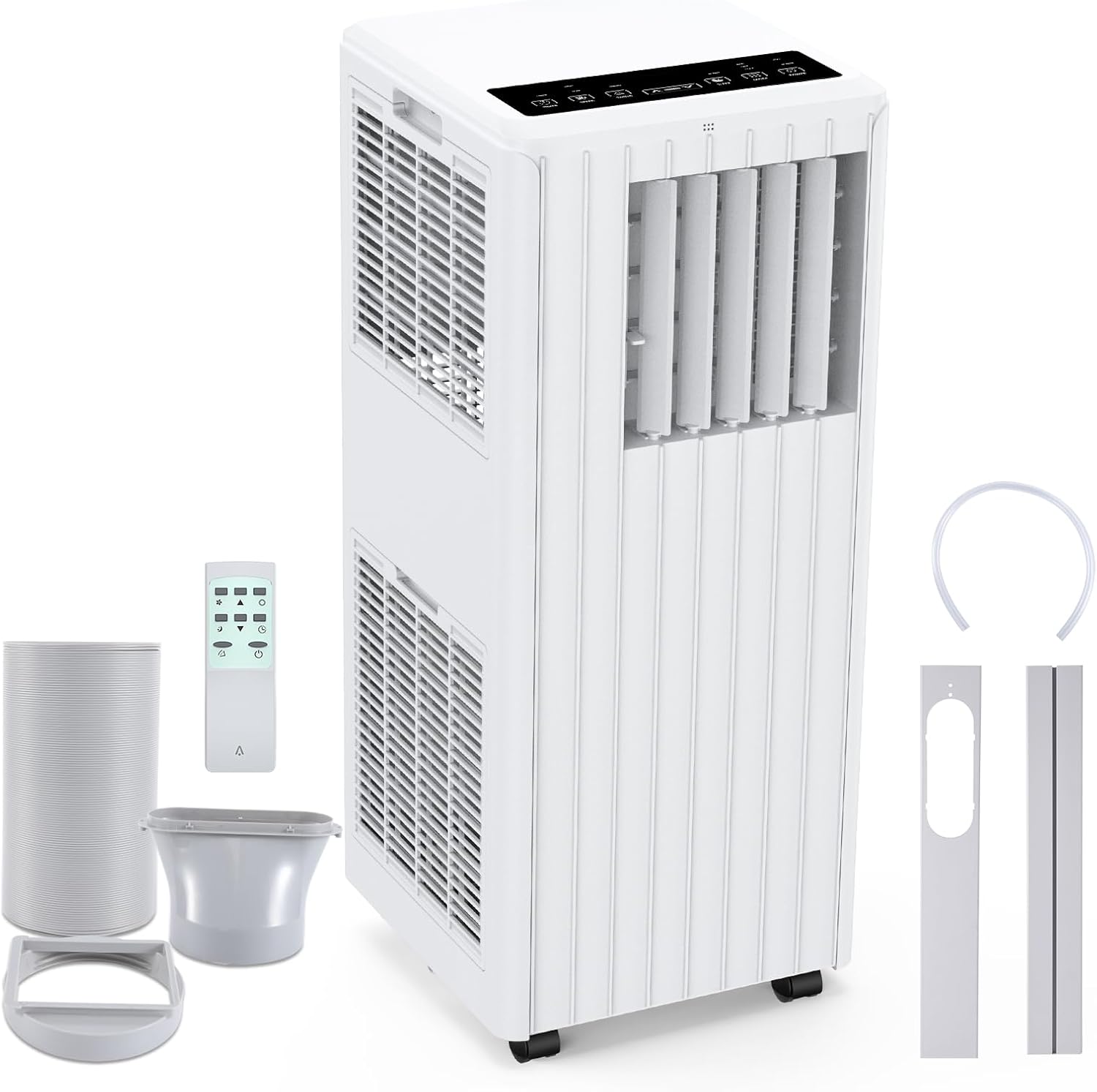
Image: Portable Air Conditioner unit with exhaust hose, window kit, remote control, and drain hose.
4. ഉൽപ്പന്ന സവിശേഷതകൾ
The Acekool PAC-M07 offers a range of features for optimal comfort:
- ശക്തമായ തണുപ്പിക്കൽ: 7000 BTU cooling capacity, ideal for rooms up to 250 sq ft.
- 3-ഇൻ-1 പ്രവർത്തനം: Offers Cooling, Fan, and Dehumidifier modes.
- കാര്യക്ഷമമായ ഡീഹ്യുമിഡിഫിക്കേഷൻ: പ്രതിദിനം 36 ലിറ്റർ വരെ ഈർപ്പം നീക്കം ചെയ്യുന്നു.
- ക്രമീകരിക്കാവുന്ന ഫാൻ വേഗത: Two fan speeds (Low/High) for customized airflow.
- Digital Display & Remote Control: Easy operation via the control panel or included remote.
- 24-മണിക്കൂർ ടൈമർ: യൂണിറ്റ് യാന്ത്രികമായി ഓണാക്കാനോ ഓഫാക്കാനോ പ്രോഗ്രാം ചെയ്യുക.
- സ്ലീപ്പ് മോഡ്: Provides quiet operation and gradual temperature adjustment for comfortable sleep.
- ഓട്ടോ-ഇവാപ്പറേഷൻ സിസ്റ്റം: Reduces the need for manual drainage by evaporating condensate.
- ഓട്ടോമാറ്റിക് ഡിഫ്രോസ്റ്റ്: ബാഷ്പീകരണ കോയിലുകളിൽ ഐസ് അടിഞ്ഞുകൂടുന്നത് തടയുന്നു.
- കഴുകാവുന്ന എയർ ഫിൽറ്റർ: Removable and antibacterial filter ensures clean air.
- പോർട്ടബിൾ ഡിസൈൻ: Integrated handle and four smooth-rolling wheels for easy movement.
- പരിസ്ഥിതി സൗഹൃദ റഫ്രിജറൻ്റ്: Uses R290 refrigerant, which is environmentally safe.

Image: Visual representation of the 3-in-1 operation system: Cooling, Dehumidifying, and Fan modes.

Image: The unit operating in Sleep Mode at night, emphasizing features like automatic shut-off, 24-hour smart timer, and ultra-quiet performance.
5. സജ്ജീകരണം
5.1 പ്ലേസ്മെൻ്റ്
Place the air conditioner on a flat, stable surface. Ensure there is at least 20 cm (8 inches) of space around the unit for proper airflow. Avoid placing it in direct sunlight or near heat sources.
5.2 എക്സ്ഹോസ്റ്റ് ഹോസ് ഇൻസ്റ്റാളേഷൻ
- എക്സ്ഹോസ്റ്റ് ഹോസിന്റെ ഒരു അറ്റത്ത് എക്സ്ഹോസ്റ്റ് ഹോസ് അഡാപ്റ്റർ സ്ക്രൂ ചെയ്യുക.
- എക്സ്ഹോസ്റ്റ് ഹോസിന്റെ മറ്റേ അറ്റം എയർ കണ്ടീഷണർ യൂണിറ്റിന്റെ പിൻഭാഗത്തുള്ള എക്സ്ഹോസ്റ്റ് ഔട്ട്ലെറ്റുമായി ബന്ധിപ്പിക്കുക.
5.3 വിൻഡോ കിറ്റ് ഇൻസ്റ്റാളേഷൻ
- Adjust the window slide plate to fit your window opening. Secure it in place.
- Attach the window adapter to the opening in the window slide plate.
- Connect the exhaust hose (with adapter) to the window adapter, ensuring a tight seal to prevent hot air from re-entering the room.
5.4 Drainage Setup (Optional for Dehumidifier Mode)
For continuous dehumidification or if the internal water tank fills up frequently, you can set up continuous drainage:
- യൂണിറ്റിന്റെ പിൻഭാഗത്ത് തുടർച്ചയായ ഡ്രെയിൻ ഔട്ട്ലെറ്റ് കണ്ടെത്തുക.
- റബ്ബർ സ്റ്റോപ്പർ നീക്കം ചെയ്യുക.
- Connect the provided drain hose to the outlet.
- Direct the other end of the drain hose into a suitable container or floor drain, ensuring it is lower than the unit's drain outlet for gravity flow.

Image: Step-by-step guide illustrating the easy installation process, including connecting the exhaust hose and window kit.
6. പ്രവർത്തന നിർദ്ദേശങ്ങൾ
6.1 നിയന്ത്രണ പാനൽ
യൂണിറ്റിന് മുകളിലുള്ള നിയന്ത്രണ പാനൽ എല്ലാ പ്രവർത്തനങ്ങളും കൈകാര്യം ചെയ്യാൻ നിങ്ങളെ അനുവദിക്കുന്നു.

ചിത്രം: വിശദമായത് view of the control panel display with labels for each button and function.
- പവർ ബട്ടൺ: യൂണിറ്റ് ഓണാക്കുകയോ ഓഫാക്കുകയോ ചെയ്യുന്നു.
- മോഡ് ബട്ടൺ: Cycles through Cooling, Fan, and Dehumidifier modes.
- സ്പീഡ് ബട്ടൺ: Adjusts fan speed (Low/High) in Cooling and Fan modes.
- ടൈമർ ബട്ടൺ: ഓട്ടോ-ഓൺ അല്ലെങ്കിൽ ഓട്ടോ-ഓഫ് ടൈമർ (1-24 മണിക്കൂർ) സജ്ജമാക്കുന്നു.
- സ്വിംഗ് ബട്ടൺ: ഓട്ടോമാറ്റിക് ലൂവർ സ്വിംഗ് സജീവമാക്കുന്നു അല്ലെങ്കിൽ നിർജ്ജീവമാക്കുന്നു.
- സ്ലീപ്പ് ബട്ടൺ: Activates Sleep Mode for quieter operation and energy saving.
- മുകളിലേക്കും താഴേക്കും ഉള്ള അമ്പടയാളങ്ങൾ: Adjusts temperature settings in Cooling mode or timer duration.
6.2 വിദൂര നിയന്ത്രണം
ഉൾപ്പെടുത്തിയിരിക്കുന്ന റിമോട്ട് കൺട്രോൾ ദൂരെ നിന്ന് എല്ലാ പ്രവർത്തനങ്ങളിലേക്കും സൗകര്യപ്രദമായ പ്രവേശനം നൽകുന്നു.

Image: The portable air conditioner unit shown with its remote control.
6.3 ഓപ്പറേറ്റിംഗ് മോഡുകൾ
- കൂളിംഗ് മോഡ്: Press the MODE button until the snowflake icon appears. Use the UP/DOWN arrows to set your desired temperature (16-32°C).
- ഫാൻ മോഡ്: Press the MODE button until the fan icon appears. Use the SPEED button to select Low or High fan speed.
- ഡീഹ്യൂമിഡിഫയർ മോഡ്: Press the MODE button until the water drop icon appears. The unit will operate to remove excess moisture from the air.
7. പരിപാലനം
പതിവ് അറ്റകുറ്റപ്പണികൾ മികച്ച പ്രകടനം ഉറപ്പാക്കുകയും നിങ്ങളുടെ എയർ കണ്ടീഷണറിന്റെ ആയുസ്സ് വർദ്ധിപ്പിക്കുകയും ചെയ്യുന്നു.
7.1 എയർ ഫിൽട്ടർ വൃത്തിയാക്കൽ
ഉപയോഗത്തെ ആശ്രയിച്ച് എയർ ഫിൽറ്റർ രണ്ടാഴ്ച കൂടുമ്പോഴോ അതിലധികമോ തവണ വൃത്തിയാക്കണം.
- യൂണിറ്റ് ഓഫ് ചെയ്ത് പവർ ഔട്ട്ലെറ്റിൽ നിന്ന് അത് അൺപ്ലഗ് ചെയ്യുക.
- Locate the air filter panel (usually on the back or side of the unit).
- എയർ ഫിൽറ്റർ പതുക്കെ പുറത്തെടുക്കുക.
- ഫിൽട്ടർ ഒഴുകുന്ന വെള്ളത്തിൽ കഴുകുക (വളരെ വൃത്തികെട്ടതാണെങ്കിൽ ചൂടുള്ള, സോപ്പ് വെള്ളത്തിൽ).
- ഫിൽറ്റർ വീണ്ടും ഇടുന്നതിനുമുമ്പ് പൂർണ്ണമായും വായുവിൽ ഉണങ്ങാൻ അനുവദിക്കുക. നേരിട്ട് സൂര്യപ്രകാശം ഏൽക്കരുത്.

Image: A hand demonstrating the removal of the washable air filter from the unit.
7.2 വാട്ടർ ഡ്രെയിനേജ്
The unit features an auto-evaporation system, but in high humidity conditions or dehumidifier mode, the internal water tank may fill. When the 'FULL' indicator lights up, the unit will stop operating.
- യൂണിറ്റ് ഓഫാക്കി അത് അൺപ്ലഗ് ചെയ്യുക.
- Place a shallow pan or tray under the drain outlet.
- വെള്ളം പുറത്തേക്ക് ഒഴുകാൻ അനുവദിക്കുന്നതിന് ഡ്രെയിൻ പ്ലഗ് നീക്കം ചെയ്യുക.
- വെള്ളം വറ്റിക്കഴിഞ്ഞാൽ, ഡ്രെയിൻ പ്ലഗ് സുരക്ഷിതമായി മാറ്റിസ്ഥാപിക്കുക.
7.3 സംഭരണം
യൂണിറ്റ് ദീർഘനേരം സൂക്ഷിക്കുകയാണെങ്കിൽ:
- യൂണിറ്റിൽ നിന്ന് എല്ലാ വെള്ളവും ഊറ്റി കളയുക.
- എയർ ഫിൽട്ടർ വൃത്തിയാക്കുക.
- Store the unit upright in a dry, cool place, away from direct sunlight.
8. പ്രശ്നപരിഹാരം
ഉപഭോക്തൃ പിന്തുണയുമായി ബന്ധപ്പെടുന്നതിന് മുമ്പ്, പൊതുവായ പ്രശ്നങ്ങൾക്ക് ഇനിപ്പറയുന്ന ട്രബിൾഷൂട്ടിംഗ് ഗൈഡ് പരിശോധിക്കുക:
| പ്രശ്നം | സാധ്യമായ കാരണം | പരിഹാരം |
|---|---|---|
| യൂണിറ്റ് ഓണാക്കുന്നില്ല | വൈദ്യുതി വിതരണം ഇല്ല പവർ കോർഡ് പ്ലഗിൻ ചെയ്തിട്ടില്ല സർക്യൂട്ട് ബ്രേക്കർ തകർന്നു | പവർ ഔട്ട്ലെറ്റ് പരിശോധിക്കുക പവർ കോർഡ് സുരക്ഷിതമായി പ്ലഗ് ഇൻ ചെയ്തിട്ടുണ്ടെന്ന് ഉറപ്പാക്കുക സർക്യൂട്ട് ബ്രേക്കർ പുനഃസജ്ജമാക്കുക |
| യൂണിറ്റ് ഫലപ്രദമായി തണുക്കുന്നില്ല. | എയർ ഫിൽട്ടർ വൃത്തികെട്ടതാണ് താപനില ക്രമീകരണം വളരെ ഉയർന്നതാണ് ജനാലകൾ/വാതിലുകൾ തുറന്നിരിക്കുന്നു എക്സ്ഹോസ്റ്റ് ഹോസ് ശരിയായി ഇൻസ്റ്റാൾ ചെയ്തിട്ടില്ല മുറിയുടെ വലിപ്പം വളരെ വലുതാണ് | ശുദ്ധമായ എയർ ഫിൽട്ടർ സെറ്റ് താപനില കുറയ്ക്കുക എല്ലാ ജാലകങ്ങളും വാതിലുകളും അടയ്ക്കുക Ensure exhaust hose is properly sealed Verify unit capacity matches room size |
| വെള്ളം ചോർച്ച | ഡ്രെയിൻ പ്ലഗ് സുരക്ഷിതമല്ല Continuous drain hose blocked or improperly connected | ഡ്രെയിൻ പ്ലഗ് കർശനമായി അടച്ചിട്ടുണ്ടെന്ന് ഉറപ്പാക്കുക Check drain hose for kinks or blockages; ensure proper downward slope |
| ശബ്ദായമാനമായ പ്രവർത്തനം | യൂണിറ്റ് പരന്ന പ്രതലത്തിലല്ല. Obstruction in fan or air vents | ഒരു ലെവൽ പ്രതലത്തിൽ യൂണിറ്റ് സ്ഥാപിക്കുക എന്തെങ്കിലും തടസ്സങ്ങൾ ഉണ്ടോയെന്ന് പരിശോധിക്കുകയും നീക്കം ചെയ്യുകയും ചെയ്യുക |
| റിമോട്ട് കൺട്രോൾ പ്രവർത്തിക്കുന്നില്ല | ബാറ്ററികൾ ഡെഡ് അല്ലെങ്കിൽ തെറ്റായി ചേർത്തിരിക്കുന്നു റിമോട്ടിനും യൂണിറ്റിനും ഇടയിലുള്ള തടസ്സം | ബാറ്ററികൾ മാറ്റിസ്ഥാപിക്കുക; ശരിയായ പോളാരിറ്റി ഉറപ്പാക്കുക. Remove any objects blocking the signal path |
9 സ്പെസിഫിക്കേഷനുകൾ
| ഫീച്ചർ | സ്പെസിഫിക്കേഷൻ |
|---|---|
| ബ്രാൻഡ് | അസെക്കൂൾ |
| മോഡൽ നമ്പർ | PAC-M07 |
| തണുപ്പിക്കൽ ശേഷി | 7000 ബി.ടി.യു |
| നിർജ്ജലീകരണ ശേഷി | 36 ലിറ്റർ/ദിവസം |
| മോഡുകൾ | Cooling, Fan, Dehumidifier |
| ഫാൻ വേഗത | 2 (താഴ്ന്ന, ഉയർന്ന) |
| Temperature Range (Cooling) | 16-32 °C |
| റഫ്രിജറൻ്റ് | R-290 |
| വാല്യംtage | 220 വോൾട്ട് |
| വാട്ട്tage | 780 വാട്ട്സ് |
| ശബ്ദ നില | 48 ഡെസിബെൽ |
| ഉൽപ്പന്ന അളവുകൾ (D x W x H) | 29.9 x 28.8 x 69.6 സെ.മീ |
| ഇനത്തിൻ്റെ ഭാരം | 22.5 കിലോഗ്രാം |
| നിയന്ത്രണ രീതി | Remote Control, Digital Display |
| ഫിൽട്ടർ തരം | Removable, Antibacterial Air Filter |
10. വാറൻ്റിയും പിന്തുണയും
Your Acekool PAC-M07 Portable Air Conditioner comes with a limited warranty. Please refer to the warranty card included in your package for specific terms and conditions.
For technical support, troubleshooting assistance, or warranty claims, please contact Acekool customer service through the contact information provided in your warranty documentation or on the official Acekool website. Please have your model number (PAC-M07) and purchase details ready when contacting support.