
ISOUND-5378, B-6609, CHT912
Instruction Manual for Universal Replacement Remote Control
Compatible with I.Sound ISOUND-5378, Bush B-6609, and Craig CHT912 Raylan Bluetooth Soundbar Home Theater Systems
ആമുഖം
This manual provides essential information for the proper setup, operation, and maintenance of your new replacement infrared remote control. This remote is designed to be compatible with specific soundbar home theater systems, including I.Sound ISOUND-5378, Bush B-6609, and Craig CHT912 Raylan models. Please read this manual thoroughly before use to ensure optimal performance and longevity of your remote control.
പ്രധാന കുറിപ്പ്: This remote control operates via infrared (IR) technology. Ensure there are no obstructions between the remote and the soundbar's IR receiver. This remote does not include batteries or a detailed instruction manual for the original soundbar system. Functionality may vary slightly from the original remote depending on the specific soundbar model.
ഉൽപ്പന്നം കഴിഞ്ഞുview
The remote control features a standard layout for controlling various functions of compatible soundbar systems. Familiarize yourself with the button layout as shown below.
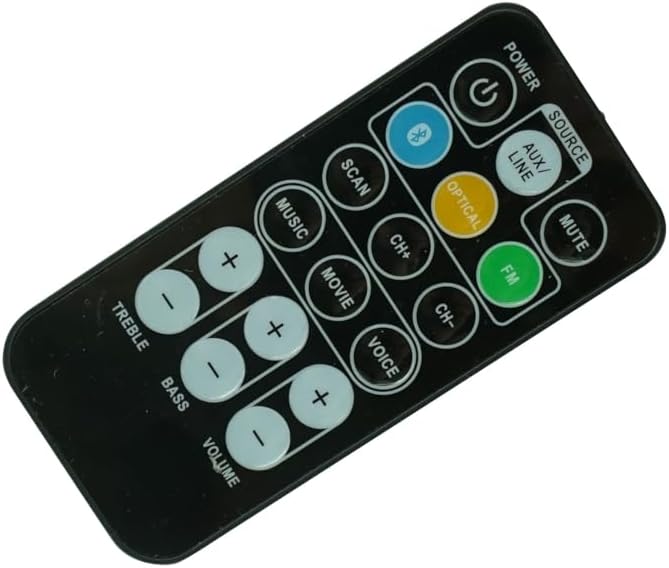
ചിത്രം 1: ഫ്രണ്ട് view of the remote control. This image displays the full button layout, including Power, Source, Mute, Bluetooth, Scan, Channel Up/Down, Music, Movie, Voice, FM, Optical, Aux/Line, Treble, Bass, and Volume controls.

ചിത്രം 2: Alternative front view of the remote control. This perspective provides a slightly different angle of the remote's face, highlighting the ergonomic design and button placement.
ബട്ടൺ പ്രവർത്തനങ്ങൾ:
- പവർ: Turns the soundbar system on or off.
- SOURCE / AUX/LINE / OPTICAL / FM / BLUETOOTH: Selects the audio input source (e.g., Auxiliary, Line-in, Optical, FM Radio, Bluetooth).
- മ്യൂട്ട്: ശബ്ദം നിശബ്ദമാക്കുകയോ അൺമ്യൂട്ടുചെയ്യുകയോ ചെയ്യുന്നു.
- സ്കാൻ: Initiates a scan for FM radio stations.
- CH+ / CH-: Navigates through channels or tracks (functionality depends on source).
- MUSIC / MOVIE / VOICE: Selects preset equalizer modes optimized for different audio content.
- TREBLE (+/-): Adjusts the high-frequency audio level.
- BASS (+/-): Adjusts the low-frequency audio level.
- വോളിയം (+/-): Increases or decreases the overall volume level.
സജ്ജമാക്കുക
ബാറ്ററി ഇൻസ്റ്റാളേഷൻ:
റിമോട്ട് കൺട്രോളിന് ആവശ്യമാണ് two (2) CR2 batteries (not included) for operation. Follow these steps to install the batteries:
- റിമോട്ട് കൺട്രോളിന്റെ പിൻഭാഗത്ത് ബാറ്ററി കമ്പാർട്ട്മെന്റ് കണ്ടെത്തുക.
- Gently slide the battery compartment cover downwards or in the direction indicated by an arrow to open it.
- Insert two CR2 batteries, ensuring the positive (+) and negative (-) terminals align correctly with the markings inside the compartment.
- സുരക്ഷിതമായി ക്ലിക്ക് ചെയ്യുന്നതുവരെ ബാറ്ററി കമ്പാർട്ട്മെന്റ് കവർ തിരികെ സ്ഥലത്തേക്ക് സ്ലൈഡ് ചെയ്യുക.

ചിത്രം 3: തിരികെ view of the remote control with the battery compartment open. This image illustrates where the batteries are inserted and the orientation markings.
കുറിപ്പ്: എപ്പോഴും പുതിയ ബാറ്ററികൾ ഉപയോഗിക്കുക, രണ്ട് ബാറ്ററികളും ഒരേ സമയം മാറ്റി സ്ഥാപിക്കുക. പഴയതും പുതിയതുമായ ബാറ്ററികളോ വ്യത്യസ്ത തരം ബാറ്ററികളോ കൂട്ടിക്കലർത്തരുത്.
അനുയോജ്യത പരിശോധന:
Before attempting to use the remote, ensure your soundbar system's model number is one of the compatible models: I.Sound ISOUND-5378, Bush B-6609, or Craig CHT912 Raylan. While this remote is designed for these models, slight variations in soundbar firmware may affect the full functionality of every button. If your soundbar model is not listed, contact the seller for compatibility verification.
പ്രവർത്തന നിർദ്ദേശങ്ങൾ
Point the remote control directly at the IR receiver on your soundbar system. Ensure there are no obstacles between the remote and the soundbar.
അടിസ്ഥാന പ്രവർത്തനങ്ങൾ:
- പവർ ഓൺ/ഓഫ്: അമർത്തുക പവർ button once to turn the soundbar on or off.
- ഉറവിട തിരഞ്ഞെടുപ്പ്: അമർത്തുക ഉറവിടം button repeatedly to cycle through available input sources (e.g., AUX/LINE, OPTICAL, FM, BLUETOOTH). Alternatively, some remotes may have dedicated buttons for each source.
- നിശബ്ദമാക്കുക/അൺമ്യൂട്ടുചെയ്യുക: അമർത്തുക നിശബ്ദമാക്കുക button to temporarily silence the audio. Press it again to restore the sound.
ഓഡിയോ ക്രമീകരണങ്ങൾ:
- വോളിയം നിയന്ത്രണം: അമർത്തുക വോളിയം + വോളിയം വർദ്ധിപ്പിക്കാനും ഒപ്പം വോളിയം - അത് കുറയ്ക്കാൻ.
- ട്രിബിൾ അഡ്ജസ്റ്റ്മെൻ്റ്: ഉപയോഗിക്കുക ട്രെബിൾ + ഒപ്പം TREBLE - buttons to fine-tune the high-frequency audio output.
- ബാസ് അഡ്ജസ്റ്റ്മെൻ്റ്: ഉപയോഗിക്കുക ബാസ് + ഒപ്പം BASS - buttons to adjust the low-frequency audio output.
Mode and Navigation:
- ശബ്ദ മോഡുകൾ: അമർത്തുക സംഗീതം, സിനിമ, അല്ലെങ്കിൽ ശബ്ദം to switch between pre-configured audio equalization settings for different content types.
- Channel/Track Navigation: ഉപയോഗിക്കുക CH+ ഒപ്പം CH- to navigate through radio stations in FM mode or tracks when playing media from certain sources.
- FM Scan: അമർത്തുക സ്കാൻ ചെയ്യുക button to automatically search for and save available FM radio stations.
മെയിൻ്റനൻസ്
റിമോട്ട് വൃത്തിയാക്കൽ:
റിമോട്ട് കൺട്രോൾ വൃത്തിയാക്കാൻ, മൃദുവായതും ഉണങ്ങിയതുമായ ഒരു തുണി ഉപയോഗിക്കുക. കഠിനമായ അഴുക്കിന്, ചെറുതായി dampതുണിയിൽ വെള്ളം അല്ലെങ്കിൽ നേരിയതും ഉരച്ചിലുകൾ ഇല്ലാത്തതുമായ ക്ലീനർ ഉപയോഗിക്കുക. കഠിനമായ രാസവസ്തുക്കളോ ലായകങ്ങളോ അബ്രസീവ് ക്ലീനിംഗ് പാഡുകളോ ഉപയോഗിക്കരുത്, കാരണം ഇവ റിമോട്ടിന്റെ ഉപരിതലത്തിനോ ആന്തരിക ഘടകങ്ങളോ കേടുവരുത്തും.
ബാറ്ററി മാറ്റിസ്ഥാപിക്കൽ:
Replace batteries when the remote's range decreases significantly or if it stops responding. Refer to the "Battery Installation" section under "Setup" for detailed instructions. Always dispose of used batteries responsibly according to local regulations.
സംഭരണം:
When not in use for extended periods, it is recommended to remove the batteries from the remote control to prevent leakage, which can damage the device. Store the remote in a cool, dry place away from direct sunlight and extreme temperatures.
ട്രബിൾഷൂട്ടിംഗ്
| പ്രശ്നം | സാധ്യമായ കാരണം | പരിഹാരം |
|---|---|---|
| റിമോട്ട് പ്രതികരിക്കുന്നില്ല. | ഡെഡ് അല്ലെങ്കിൽ തെറ്റായി ഇൻസ്റ്റാൾ ചെയ്ത ബാറ്ററികൾ. | Replace batteries with new CR2 batteries, ensuring correct polarity. |
| വിദൂര ദൂരം മോശമാണ്. | Low batteries; Obstruction between remote and soundbar. | Replace batteries. Ensure a clear line of sight to the soundbar's IR receiver. |
| ചില ബട്ടണുകൾ പ്രവർത്തിക്കുന്നില്ല. | Incompatibility with specific soundbar model features; Remote defect. | Verify soundbar model compatibility. Note that some advanced functions may not be supported by a replacement remote. If basic functions fail, contact seller. |
| സൗണ്ട്ബാർ ഓണാക്കുന്നില്ല. | Soundbar is unplugged or powered off; Remote issue. | Check soundbar's power connection. Ensure soundbar is not in standby mode. Test remote with new batteries. |
സ്പെസിഫിക്കേഷനുകൾ
- ഉൽപ്പന്ന തരം: Replacement Infrared (IR) Remote Control
- അനുയോജ്യത: I.Sound ISOUND-5378, Bush B-6609, Craig CHT912 Raylan Bluetooth Soundbar Home Theater Systems
- കണക്റ്റിവിറ്റി ടെക്നോളജി: ഇൻഫ്രാറെഡ്
- ഊർജ്ജ സ്രോതസ്സ്: 2 x CR2 Batteries (not included)
- നിർമ്മാതാവ്: SZHKHXD ഡെവലപ്മെന്റ് കോർപ്പറേഷൻ
- പ്രത്യേക സവിശേഷത: Direct replacement for specified soundbar models
പിന്തുണ
For any questions, concerns, or troubleshooting assistance not covered in this manual, please contact the seller directly through the platform where the purchase was made. Provide your order details and a clear description of the issue for prompt support.
വിൽപ്പനക്കാരന്റെ കോൺടാക്റ്റ്: Refer to your purchase history or order details for seller contact information.
Ask a question about this manual
Ask about setup, troubleshooting, compatibility, parts, safety, or missing instructions. Manuals+ will review the question and use this page’s manual context to help answer it.