
ആമുഖം
This manual provides detailed instructions for the Keychron K10 Max Wireless Custom Mechanical Keyboard. It covers initial setup, operational procedures, maintenance, and troubleshooting to ensure optimal performance and user experience.
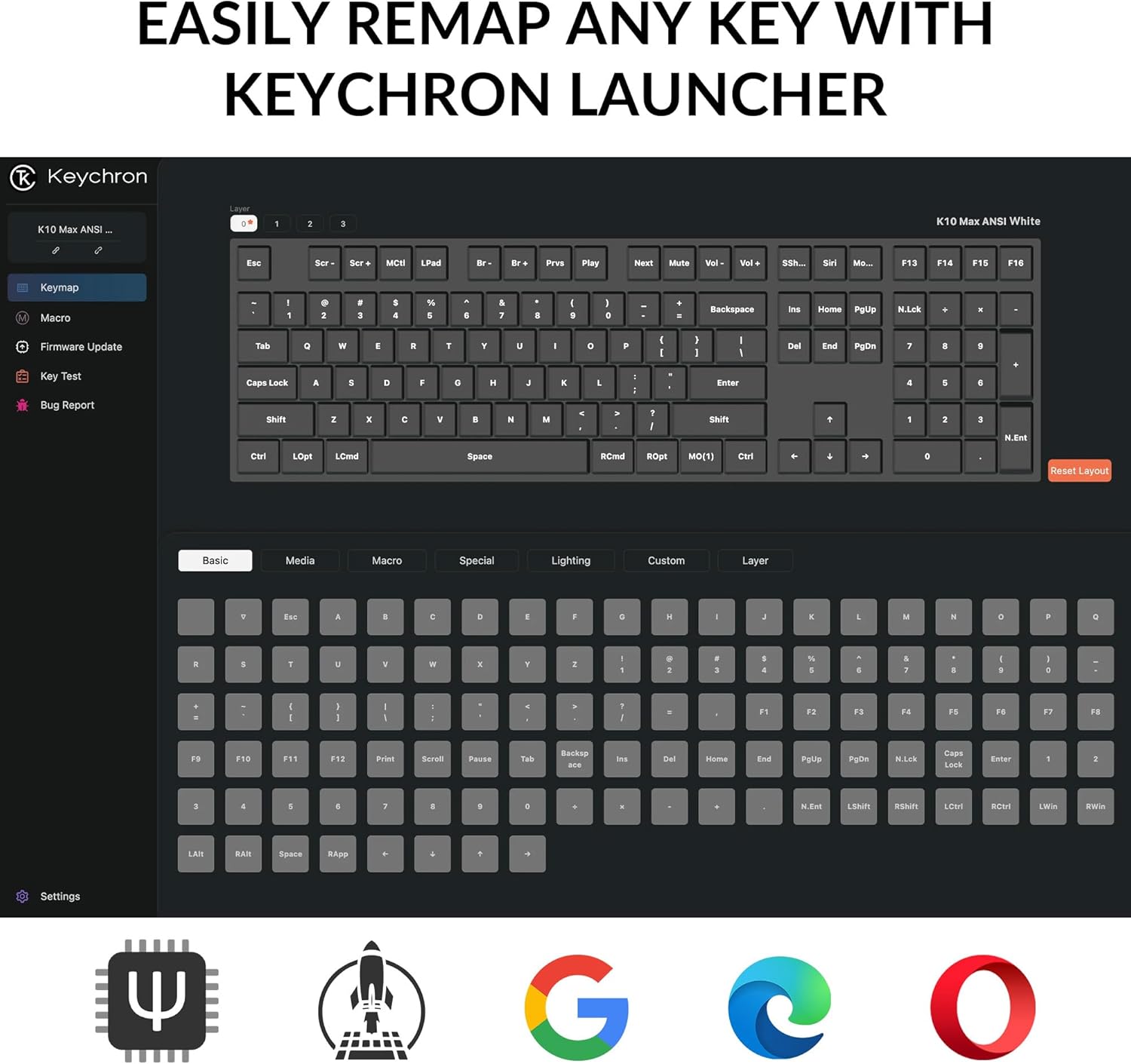
Image: The Keychron K10 Max keyboard positioned on a desk, demonstrating its full-size layout in a typical workspace setup with a laptop and tablet.
സജ്ജമാക്കുക
പാക്കേജ് ഉള്ളടക്കം
പാക്കേജിൽ എല്ലാ ഇനങ്ങളും ഉണ്ടെന്ന് ഉറപ്പാക്കുക:
- കീക്രോൺ കെ10 മാക്സ് വയർലെസ് മെക്കാനിക്കൽ കീബോർഡ്
- ടൈപ്പ്-എ മുതൽ ടൈപ്പ്-സി വരെയുള്ള കേബിൾ
- Type-A 2.4GHz Receiver
- റിസീവറിനായുള്ള വിപുലീകരണ അഡാപ്റ്റർ
- കീക്യാപ്പ്-സ്വിച്ച് പുള്ളർ
- Hex Key & Screwdriver
- വിൻഡോസ് ഒഎസിനുള്ള അധിക കീക്യാപ്പുകൾ

Image: An illustration detailing the contents of the Keychron K10 Max package, including the keyboard, cables, receiver, tools, and extra keycaps.
പ്രാരംഭ കണക്ഷൻ
The K10 Max supports three connection modes: 2.4 GHz wireless, Bluetooth 5.1, and wired USB-C.
- വയർഡ് കണക്ഷൻ: Connect the keyboard to your device using the provided Type-A to Type-C cable. The keyboard will automatically switch to wired mode.
- 2.4 GHz വയർലെസ് കണക്ഷൻ:
- Plug the Type-A 2.4GHz receiver into an available USB port on your computer.
- Ensure the keyboard's mode switch (located on the back/side) is set to 2.4 GHz.
- The keyboard should connect automatically. This mode offers a fast 1000 Hz polling rate for gaming.
- ബ്ലൂടൂത്ത് കണക്ഷൻ:
- കീബോർഡിന്റെ മോഡ് സ്വിച്ച് ബ്ലൂടൂത്തിലേക്ക് സജ്ജമാക്കുക.
- On your device (computer, phone, tablet), search for Bluetooth devices and select "Keychron K10 Max".
- The keyboard can connect to up to three devices via Bluetooth 5.1. Use Fn + 1, Fn + 2, or Fn + 3 to switch between paired devices.

Image: The Keychron K10 Max keyboard highlighting its versatile connectivity options: USB Wired, 2.4GHz wireless, and Bluetooth 5.1.
ഓപ്പറേറ്റിംഗ് സിസ്റ്റം അനുയോജ്യത
The K10 Max is fully optimized for both macOS and Windows. A toggle switch is located on the back/side of the keyboard to select the appropriate operating system mode. Extra keycaps for Windows are included for a seamless experience.

ചിത്രം: വിശദമായ ഒരു ചിത്രം view of the keyboard's side switch, indicating settings for Windows and macOS compatibility, along with the USB-C port.
പ്രവർത്തന നിർദ്ദേശങ്ങൾ
QMK Firmware and Keychron Launcher
The K10 Max utilizes QMK open-source firmware, allowing for extensive customization. The Keychron Launcher is a web-based application that enables key remapping, macro creation, and firmware updates. Access the Keychron Launcher via your web browser to personalize your keyboard settings.

Image: A visual representation of the Keychron Launcher application, demonstrating its key remapping functionality for customizing keyboard layouts.
ഹോട്ട്-സ്വാപ്പ് ചെയ്യാവുന്ന സ്വിച്ചുകൾ
The keyboard features hot-swappable Keychron Super Banana switches, allowing you to change switches without soldering. This enables customization of typing feel and sound. The switches are designed with a transparent top housing for enhanced backlight effects.

Image: A close-up shot illustrating the hot-swappable feature, with a keycap and switch removed to show the underlying mechanism.
PBT Keycaps and Backlighting
The K10 Max comes with double-shot PBT keycaps, offering a comfortable feel and excellent oil resistance for durability. The keyboard features south-facing white LED backlighting, which enhances visibility and ensures compatibility with most aftermarket keycaps.

ചിത്രം: വിശദമായ ഒരു ചിത്രം view of the OSA Profile Double-Shot PBT Keycaps, highlighting their texture and design on the keyboard.

Image: The Keychron K10 Max keyboard with its south-facing white backlight activated, showcasing the illumination of the keys.
മെയിൻ്റനൻസ്
കീബോർഡ് വൃത്തിയാക്കുന്നു
To clean your keyboard, first disconnect it from all power sources. Use a soft, lint-free cloth lightly dampened with water or a mild cleaning solution. For cleaning between keycaps, a can of compressed air can be used to remove dust and debris. Avoid spraying liquids directly onto the keyboard.
സ്വിച്ചുകളും കീക്യാപ്പുകളും മാറ്റിസ്ഥാപിക്കൽ
The K10 Max features hot-swappable switches. Use the provided keycap-switch puller to carefully remove keycaps and switches. When inserting new switches, ensure the pins are straight and align correctly with the sockets to prevent damage. Apply gentle, even pressure until the switch is fully seated.

Image: An exploded diagram illustrating the internal layers and components of the Keychron K10 Max keyboard, from keycaps to the bottom case.
ട്രബിൾഷൂട്ടിംഗ്
കണക്റ്റിവിറ്റി പ്രശ്നങ്ങൾ
- 2.4 GHz / Bluetooth Disconnection:
- കീബോർഡ് ചാർജ് ചെയ്തിട്ടുണ്ടെന്ന് ഉറപ്പാക്കുക.
- Verify the mode switch on the keyboard is set to the correct connection type (2.4 GHz or Bluetooth).
- For 2.4 GHz, ensure the receiver is securely plugged into a USB port.
- ബ്ലൂടൂത്തിന്, നിങ്ങളുടെ ഉപകരണത്തിൽ ബ്ലൂടൂത്ത് പ്രവർത്തനക്ഷമമാക്കിയിട്ടുണ്ടെന്നും കീബോർഡ് ജോടിയാക്കിയിട്ടുണ്ടെന്നും ഉറപ്പാക്കുക. ആവശ്യമെങ്കിൽ വീണ്ടും ജോടിയാക്കാൻ ശ്രമിക്കുക.
- Move the keyboard closer to the receiver or Bluetooth device to rule out interference.
- വയർ കണക്ഷൻ കണ്ടെത്തിയില്ല:
- Ensure the USB-C cable is fully inserted into both the keyboard and your device.
- മറ്റൊരു USB പോർട്ട് അല്ലെങ്കിൽ കേബിൾ പരീക്ഷിക്കുക.
Key Not Registering
- If a specific key is not registering, it may indicate an issue with the switch.
- Carefully remove the keycap and then the switch using the provided puller.
- Inspect the switch pins for bends or damage. Straighten gently if bent.
- Reinsert the switch, ensuring it is properly seated.
- If the issue persists, try swapping the problematic switch with a known working switch from another key to determine if the switch itself is faulty.
ഫേംവെയർ അപ്ഡേറ്റുകൾ
Regularly check for firmware updates via the Keychron Launcher web application. Updates can resolve bugs and introduce new features. Follow the instructions provided within the Keychron Launcher for a safe update process.
സ്പെസിഫിക്കേഷനുകൾ
| ഫീച്ചർ | വിശദാംശങ്ങൾ |
|---|---|
| മോഡലിൻ്റെ പേര് | കീക്രോൺ കെ10 മാക്സ് |
| ലേഔട്ട് | 100% Full-Size (108 Keys) |
| കണക്റ്റിവിറ്റി | 2.4 GHz വയർലെസ്, ബ്ലൂടൂത്ത് 5.1, USB-C വയേർഡ് |
| പോളിംഗ് നിരക്ക് | 1000 Hz (2.4 GHz and Wired) / 90 Hz (Bluetooth Mode) |
| സ്വിച്ചുകൾ | Keychron Super Banana (Tactile), Hot-swappable (3-pin & 5-pin MX mechanical switches) |
| കീകാപ്പുകൾ | OSA Double-shot PBT Keycaps |
| ബാക്ക്ലൈറ്റ് | South-facing White LED (Single Color) |
| എൻ-കീ റോൾഓവർ (NKRO) | അതെ |
| അനുയോജ്യമായ OS | macOS, Windows, Linux |
| ഫ്രെയിം മെറ്റീരിയൽ | എബിഎസ് |
| അളവുകൾ | 17.61 x 5.5 ഇഞ്ച് (447.37 mm x 139.82 mm) |
| ഭാരം | 1530 g ± 10 g (3.37 lb ± 0.02 lb) |
| എം.സി.യു | ARM കോർടെക്സ്-M4 32-ബിറ്റ് STM32F402 (256KB ഫ്ലാഷ്) |
വാറൻ്റി വിവരങ്ങൾ
Keychron products are covered by a manufacturer's warranty against defects in materials and workmanship. For specific warranty terms and conditions, please refer to the official Keychron webസൈറ്റിൽ ബന്ധപ്പെടുക അല്ലെങ്കിൽ ഉപഭോക്തൃ പിന്തുണയുമായി ബന്ധപ്പെടുക. വാറന്റി ക്ലെയിമുകൾക്കായി നിങ്ങളുടെ വാങ്ങിയതിന്റെ തെളിവ് സൂക്ഷിക്കുക.
ഉപഭോക്തൃ പിന്തുണ
For further assistance, technical support, or to access the latest drivers and firmware, please visit the official Keychron support page:
കീക്രോണിൽ നിങ്ങൾക്ക് സഹായകരമായ ഉറവിടങ്ങളും കമ്മ്യൂണിറ്റി ഫോറങ്ങളും കണ്ടെത്താനാകും. webസൈറ്റ്.