
1. ആമുഖം
This manual provides detailed instructions for the installation, operation, and maintenance of your Labgear 6-Port Gigabit PoE Network Switch (Model 60052PI). This unmanaged switch is designed to simplify network setups by integrating power and data delivery over a single Ethernet cable, making it suitable for various environments including offices, homes, and industrial settings. Please read this manual thoroughly before using the device to ensure proper setup and optimal performance.
2. ഉൽപ്പന്നം കഴിഞ്ഞുview
The Labgear 6-Port Gigabit PoE Network Switch features 4 Gigabit PoE ports and 2 Gigabit uplink ports, offering robust connectivity and power for your network devices.
പ്രധാന സവിശേഷതകൾ:
- പവർ ഓവർ ഇതർനെറ്റ് (PoE): Delivers power and data simultaneously over a single Ethernet cable to compatible devices.
- ഗിഗാബൈറ്റ് വേഗത: Supports 10/100/1000Mbps data transfer rates for high-speed network performance.
- വിപുലീകൃത ട്രാൻസ്മിഷൻ ശ്രേണി: Features an AI extend mode for data transmission up to 300 meters at a reduced speed (10Mbps) on PoE ports.
- AI Watchdog: Automatically monitors PoE devices and restarts unresponsive ones to ensure continuous operation.
- VLAN പിന്തുണ: Enhances network security and performance by segmenting the network and isolating ports.
- Unmanaged Design: Plug-and-play functionality requires no complex configuration.
- ഡ്യൂറബിൾ മെറ്റൽ ഹൗസിംഗ്: ശക്തമായ സംരക്ഷണവും കാര്യക്ഷമമായ താപ വിസർജ്ജനവും നൽകുന്നു.
പാക്കേജ് ഉള്ളടക്കം:
- Labgear 6-Port Gigabit PoE Network Switch (Model 60052PI)
- പവർ കേബിൾ
- ഇൻസ്ട്രക്ഷൻ മാനുവൽ
ശാരീരിക വിവരണം:
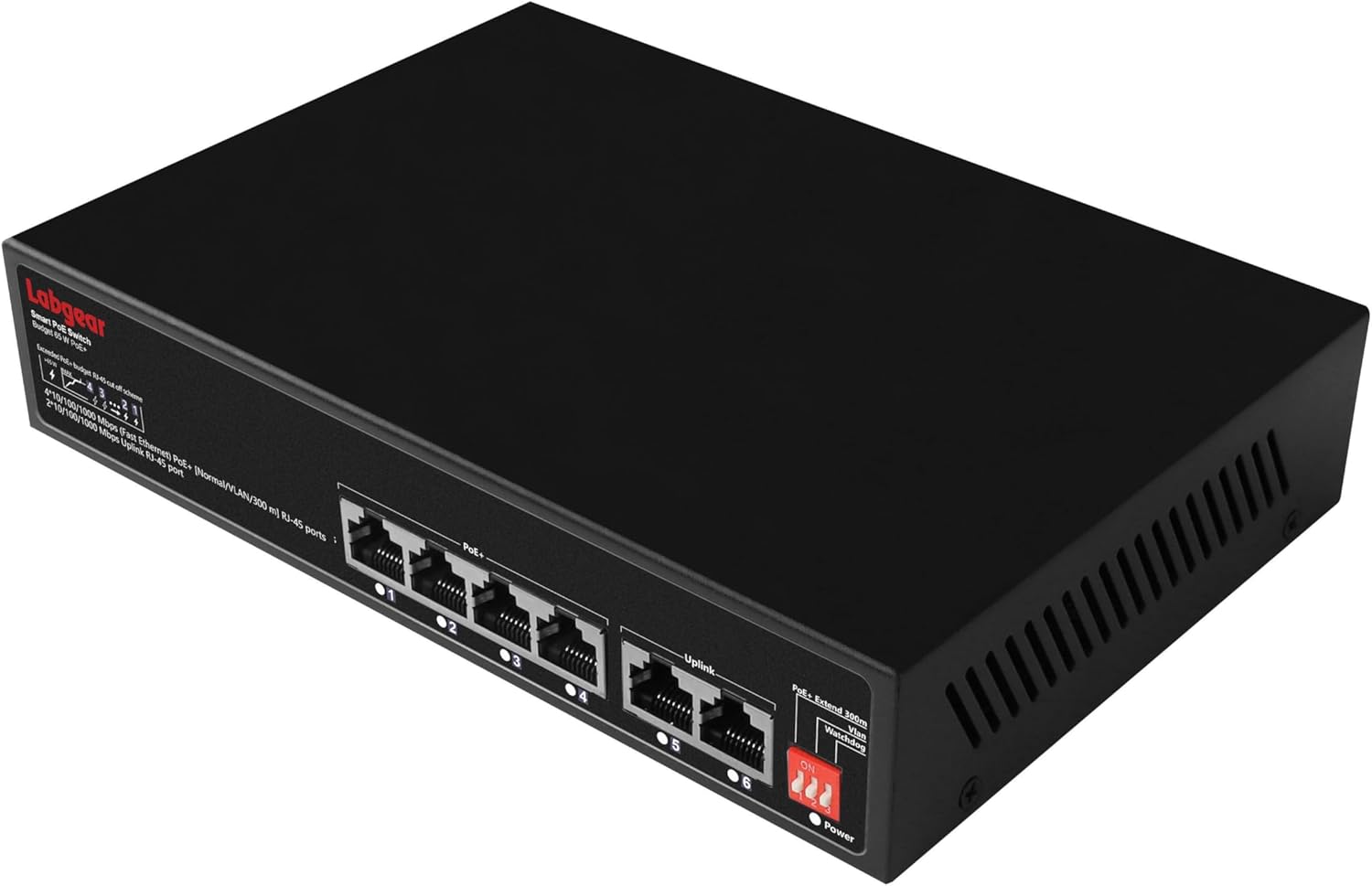
ചിത്രം 2.1: ഫ്രണ്ട് view of the Labgear 6-Port Gigabit PoE Network Switch, showing the six RJ45 ports and LED indicators.

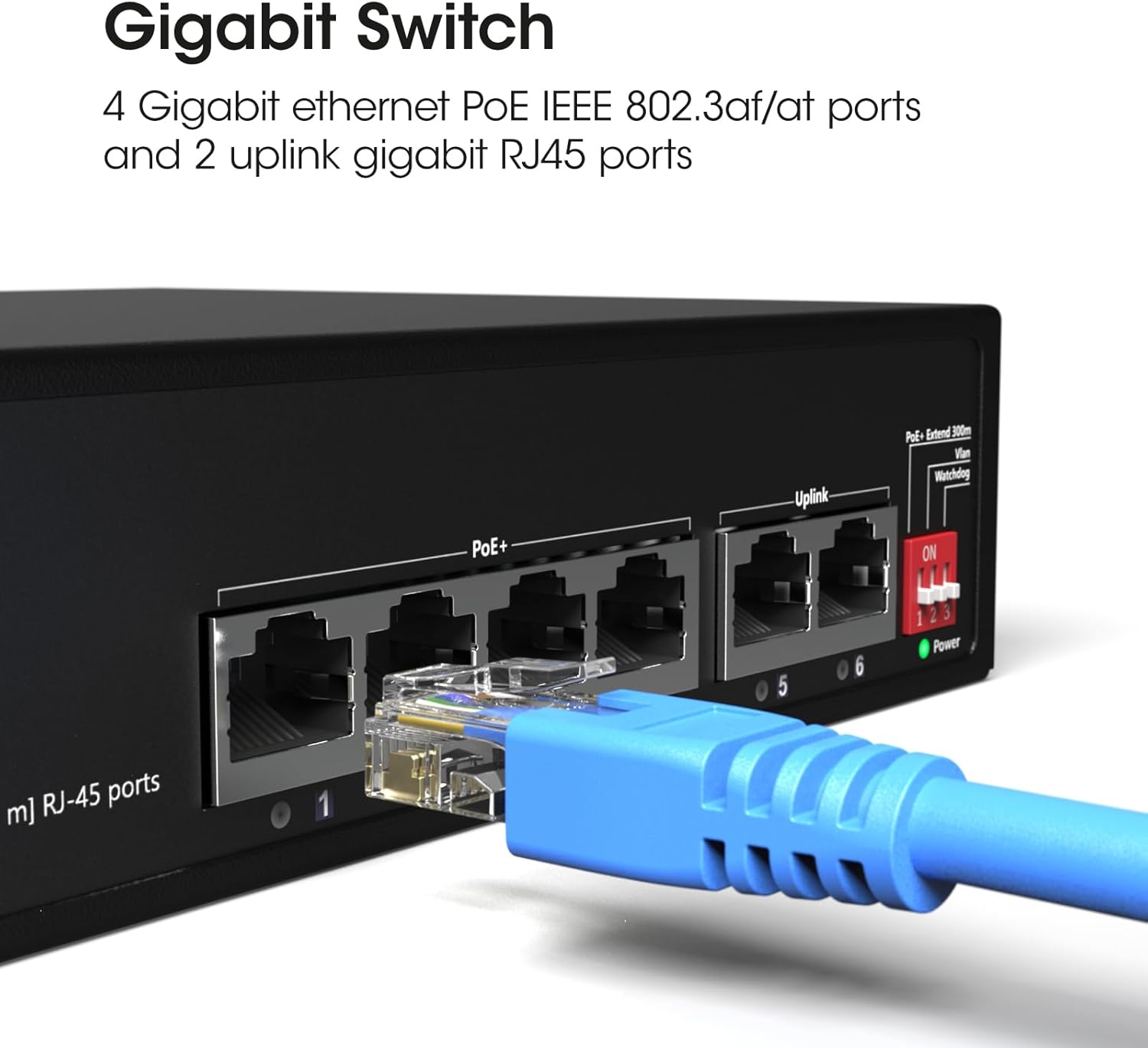
ചിത്രം 2.2: എ വിശദമായി view of the switch's ports, illustrating the 4 Gigabit Ethernet PoE ports (1-4) and 2 uplink Gigabit RJ45 ports (5-6). A blue Ethernet cable is shown connected to one of the ports.

ചിത്രം 2.3: ഇത് view highlights the side of the switch, featuring the DIP switches that control functions like PoE+ Extend 300m, VLAN, and Watchdog, which are crucial for configuring the device's operational mode.
3. സജ്ജീകരണം
3.1 പ്ലേസ്മെൻ്റ്
- Place the switch on a stable, flat surface or mount it to a wall using appropriate hardware (not included).
- അമിതമായി ചൂടാകുന്നത് തടയാൻ ഉപകരണത്തിന് ചുറ്റും മതിയായ വായുസഞ്ചാരം ഉറപ്പാക്കുക.
- Keep the switch away from direct sunlight, heat sources, and moisture.
3.2 ബന്ധിപ്പിക്കുന്ന പവർ
- Connect the provided power cable to the power input port on the switch.
- Plug the other end of the power cable into a standard electrical outlet.
- Verify that the Power LED indicator on the switch illuminates, indicating that the device is receiving power.
3.3 നെറ്റ്വർക്ക് ഉപകരണങ്ങൾ ബന്ധിപ്പിക്കുന്നു
- Connect your PoE-compatible devices (e.g., IP cameras, wireless access points) to ports 1-4 using standard Ethernet cables. These ports will provide both data and power.
- Connect your router, NVR, or other network backbone devices to the uplink ports (5-6) using standard Ethernet cables. These ports are for data transmission only.
- Ensure all cable connections are secure. The Link/Act LEDs for connected ports should illuminate, indicating an active connection.
ചിത്രം 3.1: The Labgear switch with several network cables connected, indicating active Power Over Ethernet (PoE) connections and data transmission.
3.4 ഡിഐപി സ്വിച്ച് കോൺഫിഗറേഷൻ
The switch features DIP switches on its side panel to enable advanced functionalities. Configure these switches മുമ്പ് powering on the device for the settings to take effect.
| മാറുക | സ്ഥാനം | ഫംഗ്ഷൻ | വിവരണം |
|---|---|---|---|
| 1 | ON | PoE+ Extend 300m | Extends PoE transmission distance up to 300 meters at 10Mbps for ports 1-4. |
| ഓഫ് | സാധാരണ മോഡ് | Standard PoE transmission up to 100 meters at Gigabit speeds for ports 1-4. | |
| 2 | ON | VLAN | Enables port isolation for ports 1-4, preventing direct communication between them while allowing communication with uplink ports. |
| ഓഫ് | സാധാരണ മോഡ് | All ports can communicate freely. | |
| 3 | ON | വാച്ച്ഡോഗ് | Activates AI Watchdog feature for ports 1-4, automatically detecting and restarting unresponsive PoE devices. |
| ഓഫ് | സാധാരണ മോഡ് | AI Watchdog feature is disabled. |
4. പ്രവർത്തന നിർദ്ദേശങ്ങൾ
4.1 അടിസ്ഥാന പ്രവർത്തനം
Once powered on and connected, the Labgear 6-Port Gigabit PoE Network Switch operates automatically. It is an unmanaged switch, meaning it requires no software configuration. Data and power (for PoE devices) will be transmitted as soon as devices are connected to the appropriate ports.
4.2 LED സൂചകങ്ങൾ
- പവർ എൽഇഡി: Illuminates when the switch is powered on.
- ലിങ്ക്/ആക്റ്റ് LED-കൾ (ഓരോ പോർട്ടിലും):
- കട്ടിയുള്ള പച്ച: A device is connected and active.
- മിന്നുന്ന പച്ച: ഡാറ്റ കൈമാറ്റം ചെയ്യുകയോ സ്വീകരിക്കുകയോ ചെയ്യുന്നു.
- ഓഫ്: No device is connected or the connected device is inactive.
- PoE LEDs (ports 1-4):
- കട്ടിയുള്ള പച്ച: ബന്ധിപ്പിച്ച ഉപകരണത്തിലേക്ക് PoE പവർ വിതരണം ചെയ്യുന്നു.
- മിന്നുന്ന പച്ച: PoE power is being supplied, and data is being transmitted.
- ഓഫ്: No PoE device is connected or no power is being supplied.
4.3 Advanced Features (DIP Switch Controlled)
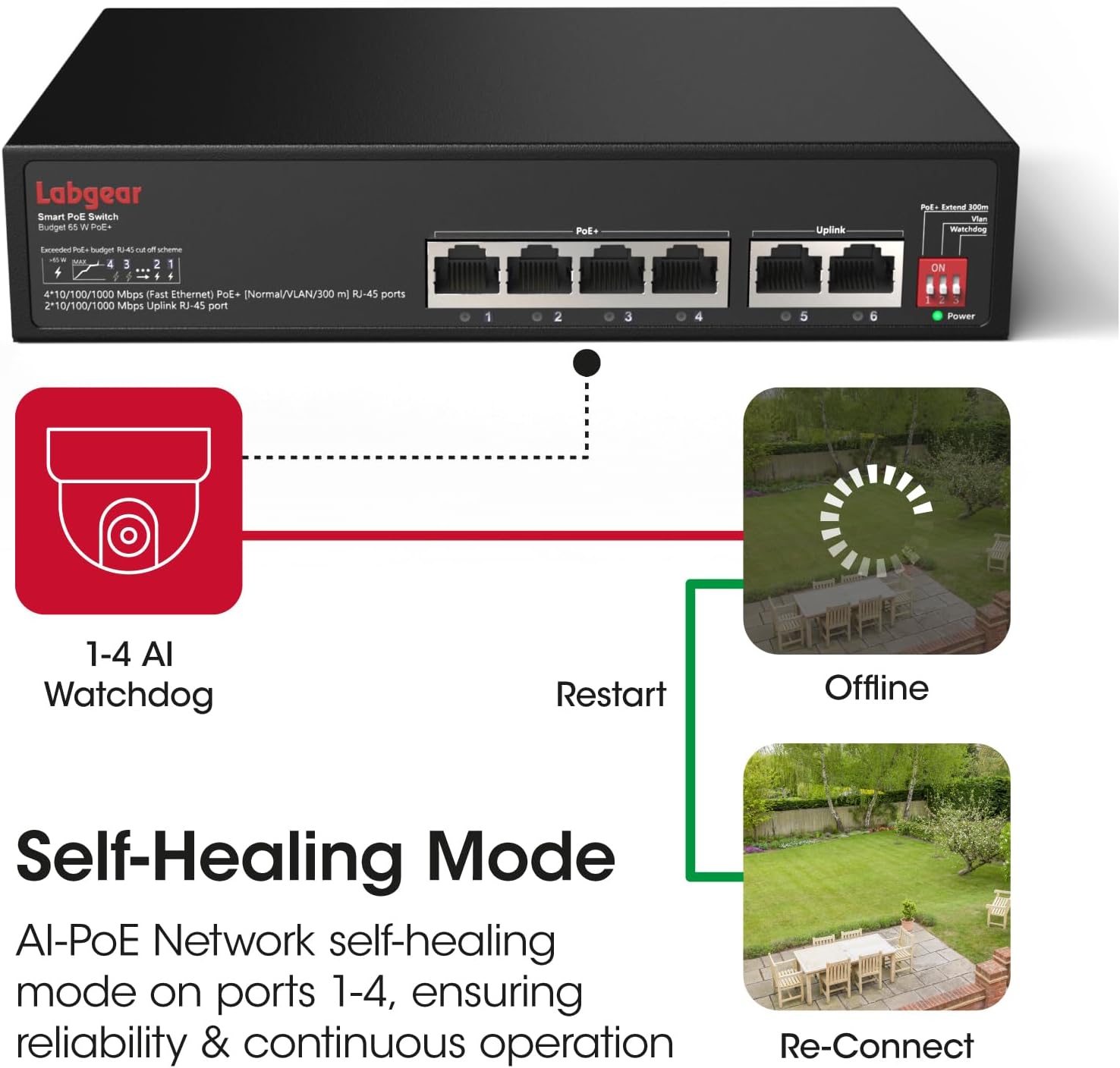
ചിത്രം 4.1: A visual representation of the AI Watchdog feature, demonstrating how the switch automatically detects and restarts unresponsive PoE devices, such as surveillance cameras, to ensure continuous operation.

ചിത്രം 4.2: This diagram illustrates the switch's VLAN support for network segmentation and its compatibility with a range of devices, including cameras, computers, printers, access points, extenders, and routers.
- PoE+ Extend 300m: When DIP switch 1 is ON, ports 1-4 operate in extended mode, allowing PoE devices to be placed up to 300 meters away. Note that in this mode, the data rate for these ports is reduced to 10Mbps. For distances up to 100 meters, keep DIP switch 1 OFF for full Gigabit speed.
- VLAN: With DIP switch 2 ON, ports 1-4 are isolated from each other. This means devices connected to ports 1-4 cannot communicate directly with each other but can still communicate with devices connected to the uplink ports (5-6). This feature is useful for enhancing security in surveillance systems or segmenting network traffic.
- വാച്ച്ഡോഗ്: When DIP switch 3 is ON, the AI Watchdog function is enabled for ports 1-4. The switch will continuously monitor the status of connected PoE devices. If a device becomes unresponsive, the switch will automatically cut and restore power to that port, effectively restarting the device to restore functionality.
5. പരിപാലനം
5.1 വൃത്തിയാക്കൽ
- Ensure the switch is powered off and unplugged before cleaning.
- ഉപകരണത്തിൻ്റെ പുറംഭാഗം തുടയ്ക്കാൻ മൃദുവായതും ഉണങ്ങിയതുമായ തുണി ഉപയോഗിക്കുക.
- ലിക്വിഡ് ക്ലീനറുകളോ എയറോസോൾ സ്പ്രേകളോ ഉപയോഗിക്കരുത്, കാരണം അവ ഉപകരണത്തിന് കേടുവരുത്തും.
5.2 പരിസ്ഥിതി പരിഗണനകൾ
- Operate the switch within its specified temperature and humidity ranges.
- Avoid placing the switch in areas with excessive dust, vibration, or electromagnetic interference.
6. പ്രശ്നപരിഹാരം
പൊതുവായ പ്രശ്നങ്ങളും പരിഹാരങ്ങളും:
- ശക്തിയില്ല:
- പവർ കേബിൾ സ്വിച്ചിലേക്കും പവർ ഔട്ട്ലെറ്റിലേക്കും സുരക്ഷിതമായി ബന്ധിപ്പിച്ചിട്ടുണ്ടെന്ന് ഉറപ്പാക്കുക.
- പവർ ഔട്ട്ലെറ്റ് പ്രവർത്തനക്ഷമമാണോയെന്ന് പരിശോധിക്കുക.
- ഒരു പോർട്ടിൽ ലിങ്ക്/പ്രവർത്തനം ഇല്ല:
- രണ്ട് അറ്റത്തും ഇതർനെറ്റ് കേബിൾ കണക്ഷൻ പരിശോധിക്കുക. മറ്റൊരു കേബിൾ പരീക്ഷിക്കുക.
- ബന്ധിപ്പിച്ചിരിക്കുന്ന ഉപകരണം ഓണാണെന്നും ശരിയായി പ്രവർത്തിക്കുന്നുണ്ടെന്നും ഉറപ്പാക്കുക.
- Verify that the DIP switches are configured appropriately for your network setup (e.g., if in extended mode, the connected device must support 10Mbps).
- PoE ഉപകരണത്തിന് പവർ ലഭിക്കുന്നില്ല:
- Ensure the device is connected to a PoE port (1-4).
- Confirm the connected device is PoE-compatible (IEEE 802.3af/at standard).
- Check the total power budget (65W) and individual port power limits (up to 30W per port) to ensure it's not exceeded.
- If AI Watchdog is enabled, ensure it's not causing intermittent restarts if the device is stable.
- കുറഞ്ഞ നെറ്റ്വർക്ക് വേഗത:
- If DIP switch 1 (Extend 300m) is ON, ports 1-4 will operate at 10Mbps. Turn it OFF for Gigabit speeds if the distance is within 100 meters.
- ഒപ്റ്റിമൽ പ്രകടനത്തിനായി കണക്റ്റുചെയ്തിരിക്കുന്ന എല്ലാ ഉപകരണങ്ങളും കേബിളുകളും ഗിഗാബിറ്റ് ഇതർനെറ്റിനെ പിന്തുണയ്ക്കുന്നുണ്ടെന്ന് ഉറപ്പാക്കുക.
7 സ്പെസിഫിക്കേഷനുകൾ
| ഫീച്ചർ | സ്പെസിഫിക്കേഷൻ |
|---|---|
| മോഡൽ നമ്പർ | 60052PI |
| തുറമുഖങ്ങൾ | 4 x 10/100/1000Mbps PoE RJ45 Ports, 2 x 10/100/1000Mbps Uplink RJ45 Ports |
| PoE സ്റ്റാൻഡേർഡ് | IEEE 802.3af / at |
| PoE പവർ ബജറ്റ് | 65W total, up to 30W per port |
| ഡാറ്റ കൈമാറ്റ നിരക്ക് | 10/100/1000 Mbps (ഗിഗാബിറ്റ് ഇഥർനെറ്റ്) |
| Extended Transmission | Up to 300m at 10Mbps (DIP switch controlled) |
| ഫീച്ചറുകൾ | AI Watchdog, VLAN Support, Extend Mode |
| ഇൻ്റർഫേസ് തരം | RJ45 |
| കേസ് മെറ്റീരിയൽ | ലോഹം |
| നിറം | കറുപ്പ് |
| വാല്യംtage | 48 വോൾട്ട് (DC) |
| ഇനത്തിൻ്റെ ഭാരം | 1.96 പൗണ്ട് (ഏകദേശം 0.89 കിലോഗ്രാം) |
| പാക്കേജ് അളവുകൾ | 10.04 x 8.27 x 1.77 ഇഞ്ച് (ഏകദേശം 25.5 x 21 x 4.5 സെ.മീ) |
8. വാറൻ്റിയും പിന്തുണയും
8.1 വാറൻ്റി വിവരങ്ങൾ
Labgear products are designed for reliability and performance. This product comes with a standard manufacturer's warranty. Please refer to the warranty card included in your package or visit the official Labgear webനിങ്ങളുടെ ഉൽപ്പന്നത്തിന്റെ വാറന്റി കാലയളവും കവറേജും സംബന്ധിച്ച നിർദ്ദിഷ്ട നിബന്ധനകൾക്കും വ്യവസ്ഥകൾക്കും സൈറ്റ് സന്ദർശിക്കുക.
8.2 സാങ്കേതിക പിന്തുണ
If you encounter any issues or have questions regarding the installation or operation of your Labgear 6-Port Gigabit PoE Network Switch, please contact Labgear customer support. Support contact details can typically be found on the product packaging, the official Labgear webസൈറ്റ്, അല്ലെങ്കിൽ വാറന്റി കാർഡ്.