
DOOGEE SPUNK-Q2
DOOGEE S Punk Rugged Smartphone User Manual
Model: SPUNK-Q2
ആമുഖം
This manual provides essential information for the safe and efficient operation of your DOOGEE S Punk Rugged Smartphone. Please read it thoroughly before using the device to ensure proper functionality and to prevent damage.
The DOOGEE S Punk is designed for durability and performance, featuring a robust build, powerful battery, and advanced camera capabilities, suitable for various environments and uses.
പാക്കേജ് ഉള്ളടക്കം
Upon opening the package, please verify that all items listed below are present:
- 1 x DOOGEE S Punk Cellphone
- 1 x ടൈപ്പ്-സി യുഎസ്ബി കേബിൾ
- 1 x Charger (33W)
- 1 x Packing Box / Manual / Warranty Card

Image: The DOOGEE S Punk smartphone shown with its included Type-C USB cable and 33W charger.
സജ്ജീകരണ ഗൈഡ്
1. സിം കാർഡും TF കാർഡും ഇൻസ്റ്റാൾ ചെയ്യൽ
The DOOGEE S Punk supports dual nano SIM cards or one nano SIM card and one TF (microSD) card for expandable storage up to 1TB.
- ഫോണിന്റെ വശത്ത് സിം കാർഡ് ട്രേ കണ്ടെത്തുക.
- Insert the SIM ejector tool (not included, but typically comes with SIM cards or can be a paperclip) into the small hole next to the tray and push gently until the tray pops out.
- Place your nano SIM card(s) and/or TF card into the designated slots on the tray, ensuring correct orientation.
- ഉപകരണ ബോഡിയുമായി ഫ്ലഷ് ആകുന്നതുവരെ ട്രേ ശ്രദ്ധാപൂർവ്വം ഫോണിലേക്ക് തിരികെ തള്ളുക.

ചിത്രം: ക്ലോസ്-അപ്പ് view of the DOOGEE S Punk showing the dual SIM card tray slot.
2. പ്രാരംഭ ചാർജിംഗ്
Before first use, it is recommended to fully charge your DOOGEE S Punk. The device features a 10800mAh battery with 33W fast charging support.
- ഫോണിന്റെ അടിയിലുള്ള ചാർജിംഗ് പോർട്ടിലേക്ക് ടൈപ്പ്-സി യുഎസ്ബി കേബിൾ ബന്ധിപ്പിക്കുക.
- Connect the other end of the USB cable to the provided 33W charger.
- ഒരു പവർ ഔട്ട്ലെറ്റിൽ ചാർജർ പ്ലഗ് ചെയ്യുക.
- The charging indicator on the screen will show the charging status. A full charge from 0% takes approximately 180 minutes.

Image: The DOOGEE S Punk connected to its 33W fast charger, illustrating the rapid charging capability.
3. പവർ ഓൺ/ഓഫ്
- പവർ ഓണാക്കാൻ: Press and hold the Power button (located on the right side of the phone) until the DOOGEE logo appears on the screen.
- പവർ ഓഫ് ചെയ്യാൻ: പവർ ഓപ്ഷൻ മെനു ദൃശ്യമാകുന്നതുവരെ പവർ ബട്ടൺ അമർത്തിപ്പിടിക്കുക. "പവർ ഓഫ്" ടാപ്പ് ചെയ്ത് സ്ഥിരീകരിക്കുക.
- പുനരാരംഭിക്കാൻ: From the power options menu, tap "Restart" and confirm.
പ്രവർത്തന നിർദ്ദേശങ്ങൾ
ഡിസ്പ്ലേയും നാവിഗേഷനും
The DOOGEE S Punk features a 6.58-inch FHD+ IPS display with a resolution of 1080*2408 pixels and 400 nits brightness, ensuring clear visibility even in sunlight. Navigate the Android 14 operating system using touch gestures.

Image: The 6.58-inch FHD+ display of the DOOGEE S Punk, showcasing its vibrant screen quality.
ക്യാമറ പ്രവർത്തനങ്ങൾ
Capture high-quality photos and videos with the 50MP AI main camera and 16MP front camera. The phone also includes a 2MP macro camera for detailed close-up shots.
- പിൻ ക്യാമറ: 50MP AI Main Camera + 2MP Macro Camera.
- മുൻ ക്യാമറ: 16 എംപി.
- ഷൂട്ടിംഗ് മോഡുകൾ: Panorama, Portrait, Macro, Beauty, AI Camera, Mono, Pro Mode, Intelligent Scanning, Night View.

ചിത്രം: കഴിഞ്ഞുview of the DOOGEE S Punk's camera setup, highlighting the 50MP main and 16MP front cameras.
Audio and Intelligent Lights
Experience powerful audio with the 4W super speaker, delivering up to 126 dB volume. The intelligent interaction lights on the back of the phone can be customized to respond to incoming calls, music playback, SMS notifications, and charging status, adding a dynamic visual element.
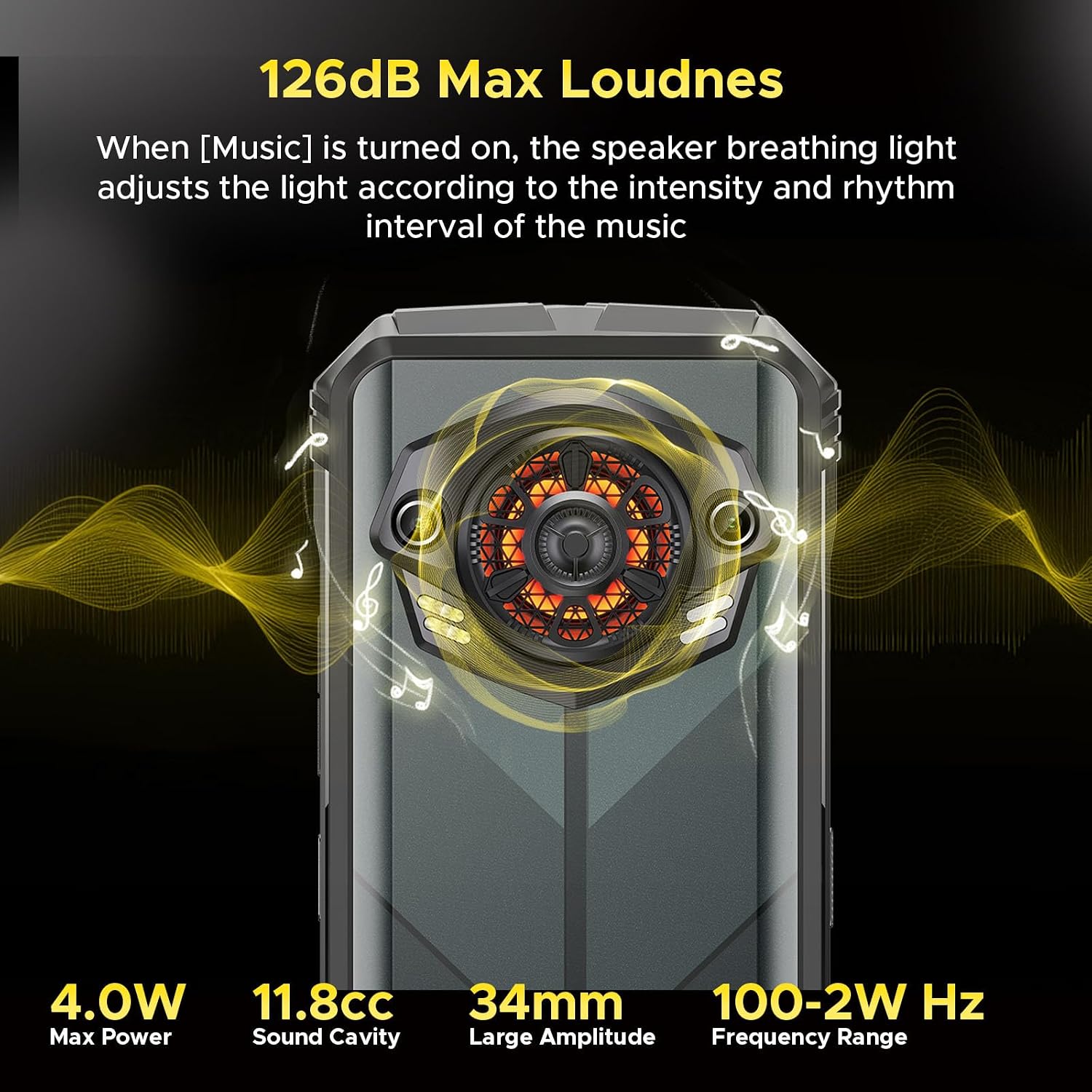
Image: Illustration of the DOOGEE S Punk's 126dB super speaker and the customizable intelligent interaction lights on the rear.

Image: The intelligent interaction lights on the DOOGEE S Punk displaying various color options and their rhythmic response to music.
Connectivity and Security
- ഇരട്ട സിം: Supports two 4G nano SIM cards for flexible network usage.
- NFC: For contactless payments (Google Pay) and quick data transfer.
- OTG: On-The-Go support allows the phone to act as a power bank for other devices (OTG cable not included).
- ജിപിഎസ്: Integrated GPS, GLONASS, Galileo, and Beidou for precise location tracking.
- അൺലോക്ക് രീതികൾ: Secure your device with face unlock or the side-mounted fingerprint recognition sensor.

Image: A collage showing various connectivity and security features of the DOOGEE S Punk, such as GPS navigation, side fingerprint recognition, Wi-Fi, Dual 4G SIM, and NFC support.
പരിപാലനവും ഈടും
The DOOGEE S Punk is built to withstand harsh environments, certified with IP68, IP69K, and MIL-STD-810H standards.
- വാട്ടർപ്രൂഫ്: IP68 rated, submersible up to 1.5 meters for 30 minutes.
- പൊടിപടലം: IP69K rated, fully protected against dust ingress.
- ഡ്രോപ്പ് പ്രൂഫ്: MIL-STD-810H compliant, withstands drops from up to 1.5 meters.
- താപനില പ്രതിരോധം: Operates reliably in temperatures ranging from -20°C to 55°C.

Image: Visual representation of the DOOGEE S Punk's rugged features, including drop-proof, dust-resistance, and IP68 waterproof capabilities, along with its wide operating temperature range.
നിങ്ങളുടെ ഉപകരണം വൃത്തിയാക്കുന്നു
To maintain the device's appearance and functionality, clean it regularly:
- സ്ക്രീനും ബോഡിയും തുടയ്ക്കാൻ മൃദുവായ, ലിന്റ് രഹിത തുണി ഉപയോഗിക്കുക.
- കഠിനമായ അഴുക്കിന്, ചെറുതായി dampതുണിയിൽ വെള്ളം ഒഴിക്കുക. കഠിനമായ രാസവസ്തുക്കളോ ഉരച്ചിലുകളോ ഉള്ള വസ്തുക്കൾ ഒഴിവാക്കുക.
- Ensure all ports are dry before charging or connecting accessories, especially after exposure to water.
ബാറ്ററി കെയർ
ബാറ്ററി ആയുസ്സ് പരമാവധിയാക്കാൻ:
- തീവ്രമായ താപനിലയിൽ (55°C ന് മുകളിലോ -20°C ന് താഴെയോ) ഫോൺ ദീർഘനേരം തുറന്നുവെക്കുന്നത് ഒഴിവാക്കുക.
- ഉപകരണത്തിനൊപ്പം നൽകിയിരിക്കുന്ന ഒറിജിനൽ ചാർജറും കേബിളും മാത്രം ഉപയോഗിക്കുക.
- Do not fully discharge the battery frequently. Charge it before it drops to very low levels.
ട്രബിൾഷൂട്ടിംഗ്
If you encounter issues with your DOOGEE S Punk, refer to the following common solutions:
ഉപകരണം പവർ ചെയ്യുന്നില്ല
- ബാറ്ററി ചാർജ്ജ് ചെയ്തിട്ടുണ്ടെന്ന് ഉറപ്പാക്കുക. ചാർജർ കണക്റ്റ് ചെയ്ത് പവർ ഓൺ ചെയ്യാൻ ശ്രമിക്കുന്നതിന് മുമ്പ് കുറച്ച് മിനിറ്റ് കാത്തിരിക്കുക.
- പുനരാരംഭിക്കാൻ നിർബന്ധിക്കുന്നതിന് പവർ ബട്ടൺ കുറഞ്ഞത് 10-15 സെക്കൻഡ് അമർത്തിപ്പിടിക്കുക.
Poor Network Connection / No Signal
- സിം കാർഡ് ശരിയായി ചേർത്തിട്ടുണ്ടോ എന്ന് പരിശോധിക്കുക.
- Verify that your carrier supports the phone's network bands (FDD: B1/2/3/4/5/7/8/18/19/20/25/26/28AB/66, TDD: B34/38/39/40/41, WCDMA: B1/2/4/5/8, GSM: B2/B3/B5/B8). Note: AT&T is not supported.
- മികച്ച നെറ്റ്വർക്ക് കവറേജ് ഉള്ള ഒരു പ്രദേശത്തേക്ക് മാറുക.
- ഫോൺ പുനരാരംഭിക്കുക.
Applications Freezing or Crashing
- Close and reopen the problematic application.
- ക്രമീകരണങ്ങൾ > ആപ്പുകൾ എന്നതിൽ ആപ്പിന്റെ കാഷെയും ഡാറ്റയും മായ്ക്കുക.
- Ensure all applications and the phone's operating system are updated to the latest version.
- If issues persist, consider a factory reset (back up your data first).
ചാർജിംഗ് പ്രശ്നങ്ങൾ
- ചാർജിംഗ് കേബിളും അഡാപ്റ്ററും സുരക്ഷിതമായി ബന്ധിപ്പിച്ചിട്ടുണ്ടെന്നും കേടുപാടുകൾ സംഭവിച്ചിട്ടില്ലെന്നും ഉറപ്പാക്കുക.
- മറ്റൊരു പവർ ഔട്ട്ലെറ്റ് പരീക്ഷിക്കുക.
- Clean the charging port gently with a soft brush to remove any debris.
- If the phone was recently exposed to water, ensure the charging port is completely dry before attempting to charge.
സ്പെസിഫിക്കേഷനുകൾ
| ഫീച്ചർ | വിശദാംശങ്ങൾ |
|---|---|
| മോഡലിൻ്റെ പേര് | SPUNK-Q2 |
| ഓപ്പറേറ്റിംഗ് സിസ്റ്റം | ആൻഡ്രോയിഡ് 14 |
| പ്രോസസ്സർ | Octa-core, 1.6 GHz |
| റാം | 16 GB (6GB + 10GB virtual memory) |
| ആന്തരിക സംഭരണം | 256 ജിബി |
| വികസിപ്പിക്കാവുന്ന സംഭരണം | TF കാർഡ് വഴി 1 TB വരെ |
| ഡിസ്പ്ലേ വലിപ്പം | 6.58 Inches FHD+ IPS |
| ഡിസ്പ്ലേ റെസല്യൂഷൻ | 1080 x 2408 പിക്സലുകൾ |
| തെളിച്ചം | 400 നിറ്റ് |
| പിൻ ക്യാമറ | 50MP AI മെയിൻ ക്യാമറ + 2MP മാക്രോ ക്യാമറ |
| മുൻ ക്യാമറ | 16എംപി |
| ബാറ്ററി ശേഷി | 10800 mAh |
| ചാർജിംഗ് | 33W ഫാസ്റ്റ് ചാർജിംഗ് |
| സ്പീക്കർ | 4W Super Speaker, 126 dB Max Loudness |
| ഈട് | IP68, IP69K, MIL-STD-810H |
| കണക്റ്റിവിറ്റി | 4G Dual SIM, Wi-Fi, Bluetooth, NFC, OTG |
| നാവിഗേഷൻ | ജിപിഎസ്, ഗ്ലോനാസ്, ഗലീലിയോ, ബീഡോ |
| അളവുകൾ | 7 x 3.26 x 0.7 ഇഞ്ച് |
| ഭാരം | 9.2 ഔൺസ് (262 ഗ്രാം) |
വാറൻ്റിയും പിന്തുണയും
DOOGEE offers comprehensive support for your S Punk smartphone:
- വാറൻ്റി: Your mobile phone is entitled to a 2-year free warranty.
- റിട്ടേണുകൾ: 30 days no-reason refund policy.
- കസ്റ്റമർ സർവീസ്: Professional team available to solve any issues you may encounter.
For further assistance, please refer to the warranty card included in your package or visit the official DOOGEE support webസൈറ്റ്.
Ask a question about this manual
Ask about setup, troubleshooting, compatibility, parts, safety, or missing instructions. Manuals+ will review the question and use this page’s manual context to help answer it.