
DOOGEE SPUNK
DOOGEE S Punk Rugged Smartphone User Manual
Model: SPUNK
1. ആമുഖം
Welcome to the user manual for your new DOOGEE S Punk Rugged Smartphone. This guide provides essential information on setting up, operating, maintaining, and troubleshooting your device. Designed for durability and high performance, the DOOGEE S Punk is built to withstand challenging environments while offering advanced smartphone functionalities.
Please read this manual thoroughly to ensure proper use and to maximize the potential of your device.
2. ബോക്സിൽ എന്താണുള്ളത്?
Upon unboxing your DOOGEE S Punk Rugged Smartphone, please verify that all the following items are included:
- 1 x DOOGEE S Punk Cellphone
- 1 x ടൈപ്പ്-സി യുഎസ്ബി കേബിൾ
- 1 x Charger (33W)
- 1 x Packing Box / Manual / Warranty Card
3. ഉൽപ്പന്നം കഴിഞ്ഞുview
The DOOGEE S Punk is engineered for robust performance and user convenience. Below are its key features and components.
3.1. ഉപകരണ ലേഔട്ട്
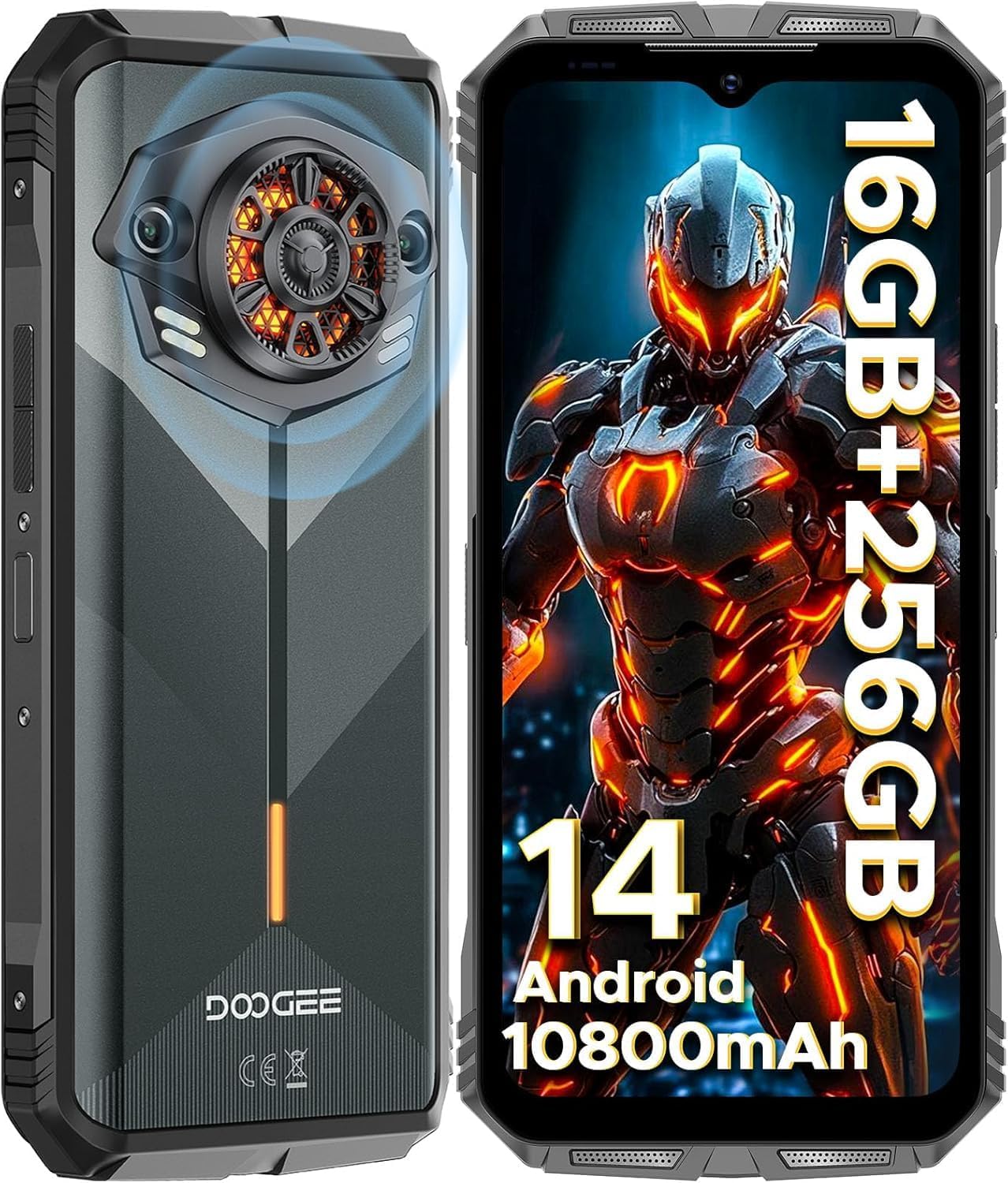
മുന്നിലും പിന്നിലും view of the DOOGEE S Punk Rugged Smartphone, highlighting its robust design and camera module.
3.2. ഡിസ്പ്ലേ
The device features a 6.58-inch FHD+ 90Hz IPS Waterdrop display with Corning Gorilla Glass for enhanced durability. It offers a resolution of 1080x2408 pixels, a pixel density of 401 PPI, and displays 16.7 million colors with a 20:9 aspect ratio. The brightness reaches 400 nits, ensuring clear visibility even in sunlight.

The 6.58-inch FHD+ 90Hz IPS Waterdrop screen with Corning Gorilla Glass, showcasing its high resolution and vibrant colors.
3.3. ഓഡിയോ സിസ്റ്റം
Equipped with a powerful 4W super speaker, the DOOGEE S Punk delivers an impressive 126 dB of sound output. This ensures clear audio for calls, music, and notifications, even in noisy environments.

വിശദമായി view of the 4W super speaker, emphasizing its large amplitude and high volume capability.
3.4. Intelligent Interaction Lights
The DOOGEE S Punk features customizable intelligent interaction lights on the rear. These lights can be configured to display different colors (red, blue, green) for various scenarios, including incoming calls, music playback, SMS notifications, and charging, adding a unique visual element to your device.

Illustration of the intelligent interaction lights on the back of the phone, showing different color effects for various notifications.
4. സജ്ജീകരണം
4.1. Inserting SIM and TF Cards
The DOOGEE S Punk supports two Nano SIM cards or one Nano SIM and one TF card for expandable storage. Locate the SIM card tray on the side of the device. Use the provided SIM ejector tool to open the tray. Carefully place your SIM card(s) and/or TF card into the designated slots, ensuring correct orientation. Close the tray securely.
4.2. പ്രാരംഭ പവർ ഓണും സജ്ജീകരണ വിസാർഡും
Press and hold the Power button until the DOOGEE logo appears. The phone will guide you through the initial setup wizard, where you can select your language, connect to Wi-Fi, set up your Google account, and configure security features like face unlock and fingerprint recognition.
5. പ്രവർത്തന നിർദ്ദേശങ്ങൾ
5.1. ആൻഡ്രോയിഡ് 14 ഓപ്പറേറ്റിംഗ് സിസ്റ്റം
The DOOGEE S Punk runs on the latest Android 14 operating system, providing a fast, smooth, and secure user experience. It features an octa-core processor for efficient multitasking and app performance.
5.2. സുരക്ഷാ സവിശേഷതകൾ
Your device offers advanced security options:
- ഫേസ് അൺലോക്ക്: Register your face for quick and convenient unlocking.
- Side Fingerprint Recognition: The fingerprint sensor is integrated into the side power button for easy access and secure unlocking.

Demonstration of the Face Unlock feature in use.

Illustration of the side-mounted fingerprint sensor for quick and secure access.
6. ക്യാമറ സവിശേഷതകൾ
Capture stunning photos and videos with the DOOGEE S Punk's versatile camera system.
6.1. പിൻ ക്യാമറ
The main rear camera is 50MP, capable of capturing high-resolution images with excellent detail. It supports various shooting modes including Panorama, Portrait, Macro, and Beauty mode.

കഴിഞ്ഞുview of the 50MP AI main camera and available shooting modes like AI Camera, Portrait, Mono, Beauty, Panorama, Pro Mode, Intelligent Scanning, and Night View.
6.2. മുൻ ക്യാമറ
The 16MP front camera is ideal for high-quality selfies and video calls, ensuring you capture your best moments anytime, anywhere.

The 16MP front camera, perfect for capturing clear selfies.
7. കണക്റ്റിവിറ്റി
The DOOGEE S Punk offers comprehensive connectivity options for seamless communication and navigation.
- ഡ്യുവൽ 4G സിം: Supports two Nano SIM cards for flexible network usage. Compatible with all UK carriers (Note: AT&T is not supported).
- NFC: Effortless connectivity for Google Pay, quick data sharing, and other NFC-enabled functions.
- ജിപിഎസ്: Integrated GPS, GLONASS, Galileo, and Beidou support for precise location tracking and navigation.
- വൈഫൈ: Supports 2.4G/5G Wi-Fi for fast internet access.
- ബ്ലൂടൂത്ത്: Bluetooth 5.0 for connecting to wireless accessories.

Visual representation of the phone's connectivity options including Dual 4G SIM, Wi-Fi 2.4G/5G, and Bluetooth 5.0.

The NFC feature, enabling effortless connectivity for payments and data transfer.

The phone's GPS capabilities, showing its utility as a navigation tool for adventures.
8. Durability and Resilience
The DOOGEE S Punk is built to withstand extreme conditions, making it an ideal companion for outdoor enthusiasts and professionals.
- IP68 & IP69K റേറ്റിംഗ്: Certified waterproof up to 1.5 meters for 30 minutes and fully dustproof.
- MIL-STD-810H Standard: 1.5 മീറ്റർ മുതൽ ഉയരം വരെയുള്ള താഴ്ചകളെ ഇത് പ്രതിരോധിക്കും.
- താപനില പ്രതിരോധം: Operates smoothly in temperatures ranging from -20°C to 55°C.

Visual representation of the phone's rugged features: drop-proof, dustproof 360°, IP68 waterproof, and extreme temperature resistance.
9. ബാറ്ററിയും ചാർജിംഗും
Experience extended usage with the DOOGEE S Punk's high-capacity battery and rapid charging capabilities.
- 10800mAh ബാറ്ററി: Provides up to 533 hours of standby time, 25 hours of talk time, 50 hours of music playback, or 24 hours of video playback.
- 33W ഫാസ്റ്റ് ചാർജിംഗ്: Charges from 0% to 40% in just 30 minutes.
- OTG പിന്തുണ: Allows the phone to act as a power bank to charge other electronic devices.

Information on the 10800mAh battery's long-lasting performance, including standby, music, video, and OTG support.

Visualizing the 33W fast charging capability, allowing for quick power-ups.
10. സംഭരണവും പ്രകടനവും
The DOOGEE S Punk offers ample storage and robust performance for all your applications and media.
- 16 ജിബി റാം: Comprising 6GB physical RAM and 10GB virtual memory for smooth multitasking.
- 256 ജിബി റോം: Expansive internal storage, expandable up to 1TB with a TF card.
- ഒക്ടാ കോർ പ്രോസസർ: Ensures fast and smooth performance for all applications.

Details on the 16GB RAM and 256GB ROM, highlighting the phone's capacity for apps, photos, and videos.
11. പ്രശ്നപരിഹാരം
This section addresses common issues you might encounter with your DOOGEE S Punk Smartphone.
11.1. ഉപകരണം ഓണാക്കുന്നില്ല
- Ensure the battery is charged. Connect the phone to the 33W charger and wait a few minutes before attempting to power on.
- നിർബന്ധിതമായി റീബൂട്ട് ചെയ്യുന്നതിന് പവർ ബട്ടൺ കുറഞ്ഞത് 10-15 സെക്കൻഡ് അമർത്തിപ്പിടിക്കുക.
11.2. മോശം കോൾ നിലവാരം അല്ലെങ്കിൽ സിഗ്നൽ ഇല്ല.
- നിങ്ങളുടെ സിം കാർഡ് ശരിയായി ചേർത്തിട്ടുണ്ടോയെന്ന് പരിശോധിക്കുക.
- Verify that your carrier is supported by the device (Note: AT&T is not supported).
- മികച്ച നെറ്റ്വർക്ക് കവറേജ് ഉള്ള ഒരു പ്രദേശത്തേക്ക് മാറുക.
- ഫോൺ പുനരാരംഭിക്കുക.
11.3. ആപ്പുകൾ ക്രാഷാകുകയോ മരവിപ്പിക്കുകയോ ചെയ്യുന്നു
- Clear the cache and data of the problematic app through Settings > Apps.
- Ensure all apps and the Android system are updated to their latest versions.
- പ്രശ്നം നിലനിൽക്കുകയാണെങ്കിൽ, ആപ്പ് അൺഇൻസ്റ്റാൾ ചെയ്ത് വീണ്ടും ഇൻസ്റ്റാൾ ചെയ്യുന്നത് പരിഗണിക്കുക.
11.4. ബാറ്ററി വേഗത്തിൽ തീർന്നു പോകുന്നു
- സ്ക്രീൻ തെളിച്ചം കുറച്ച് കുറഞ്ഞ സ്ക്രീൻ ടൈംഔട്ട് സജ്ജമാക്കുക.
- Close background apps that are not in use.
- Disable Wi-Fi, Bluetooth, and GPS when not needed.
- പവർ കൂടുതലുള്ള ആപ്പുകൾ തിരിച്ചറിയാൻ ക്രമീകരണങ്ങളിൽ ബാറ്ററി ഉപയോഗം പരിശോധിക്കുക.
11.5. Water Damage (Despite IP Rating)
While the phone is IP68/IP69K rated, it's important to ensure all ports (USB-C, SIM tray) are completely sealed before exposure to water. If water ingress occurs, immediately power off the device and allow it to dry completely before attempting to power it on or charge it. Contact customer support if the issue persists after drying.
12 സ്പെസിഫിക്കേഷനുകൾ
Detailed technical specifications for the DOOGEE S Punk Rugged Smartphone:
| ഫീച്ചർ | സ്പെസിഫിക്കേഷൻ |
|---|---|
| മോഡലിൻ്റെ പേര് | SPUNK |
| ഓപ്പറേറ്റിംഗ് സിസ്റ്റം | ആൻഡ്രോയിഡ് 14 |
| സിപിയു മോഡൽ | ഒക്ട-കോർ |
| സിപിയു വേഗത | 1.6 GHz |
| ഇൻസ്റ്റാൾ ചെയ്ത RAM മെമ്മറി വലുപ്പം | 16 ജിബി (6 ജിബി + 10 ജിബി വെർച്വൽ) |
| മെമ്മറി സ്റ്റോറേജ് കപ്പാസിറ്റി | 256 ജിബി (1 ടിബി വരെ വികസിപ്പിക്കാം) |
| സ്ക്രീൻ വലിപ്പം | 6.58 ഇഞ്ച് |
| റെസലൂഷൻ | 1920 x 1080 (FHD+) |
| പുതുക്കിയ നിരക്ക് | 90 Hz |
| ബാറ്ററി ശേഷി | 10800 മില്ലിamp മണിക്കൂറുകൾ |
| ഫോൺ ടോക്ക് ടൈം | 25 മണിക്കൂർ |
| പിൻ ക്യാമറ | 50 MP AI Main Camera |
| മുൻ ക്യാമറ | 16 എം.പി |
| കണക്റ്റിവിറ്റി ടെക്നോളജികൾ | Bluetooth, Wi-Fi, USB, NFC |
| ജിപിഎസ് | True (GPS, GLONASS, Galileo, Beidou) |
| പ്രത്യേക സവിശേഷതകൾ | Rugged Smartphone, Dual SIM, Waterproof, Built-In GPS, Intelligent Interaction Lights, 126dB Speaker |
| ഉൽപ്പന്ന അളവുകൾ | 7 x 3.26 x 0.7 ഇഞ്ച് |
| ഇനത്തിൻ്റെ ഭാരം | 1.46 പൗണ്ട് |
| നിറം | ഇരുണ്ടത് |
13. വാറൻ്റിയും പിന്തുണയും
DOOGEE is committed to providing high-quality products and excellent customer service.
- 2-വർഷ പരിമിത വാറൻ്റി: Your DOOGEE S Punk Smartphone is covered by a 2-year free warranty from the date of purchase. This warranty covers manufacturing defects and workmanship.
- 30 ദിവസത്തെ പണം തിരികെ നൽകൽ ഗ്യാരണ്ടി: If you are not satisfied with your purchase, you are entitled to a 30-day no-reason refund.
- ഉപഭോക്തൃ പിന്തുണ: For any issues or inquiries, our professional team is available for one-on-one online support. Please refer to the warranty card included in your packaging for contact details or visit the official DOOGEE webസൈറ്റ്.

DOOGEE's commitment to customer service, including warranty and support.
Ask a question about this manual
Ask about setup, troubleshooting, compatibility, parts, safety, or missing instructions. Manuals+ will review the question and use this page’s manual context to help answer it.