
1. ഉൽപ്പന്നം കഴിഞ്ഞുview
The INNOVV N1 is a portable 5.5-inch smart screen designed for motorcycles, integrating Apple CarPlay, Android Auto, GPS navigation, and a dual dash cam system. It features front and rear 1080P@30FPS recording, 5.8G Wi-Fi connectivity, IP67 waterproofing, a full-screen touch interface, and parking monitoring. This manual provides comprehensive instructions for its setup, operation, and maintenance.

Image 1.1: The INNOVV N1 smart screen display unit and two compact dash cameras.
2. പാക്കേജ് ഉള്ളടക്കം
താഴെ ലിസ്റ്റ് ചെയ്തിരിക്കുന്ന എല്ലാ ഇനങ്ങളും നിങ്ങളുടെ പാക്കേജിൽ ഉൾപ്പെടുത്തിയിട്ടുണ്ടെന്ന് ഉറപ്പാക്കുക. ഏതെങ്കിലും ഇനങ്ങൾ നഷ്ടപ്പെട്ടിട്ടുണ്ടെങ്കിലോ കേടായിട്ടുണ്ടെങ്കിലോ, ദയവായി ഉപഭോക്തൃ പിന്തുണയുമായി ബന്ധപ്പെടുക.
- DVR and Display Unit (1 pc)
- 0.6 Meter Extended Cable (2 pcs)
- 2.5 Meter Extended Cable (1 pc)
- Power Supply Cable (1 pc)
- Accessory Kit (3 pcs)
- ഉപയോക്തൃ മാനുവൽ (1 പിസി)
- GPS Module (1 pc)
- Front Camera (1 pc)
- Rear Camera (1 pc)
- TPMS Sensors (2 pcs, if included in your model)
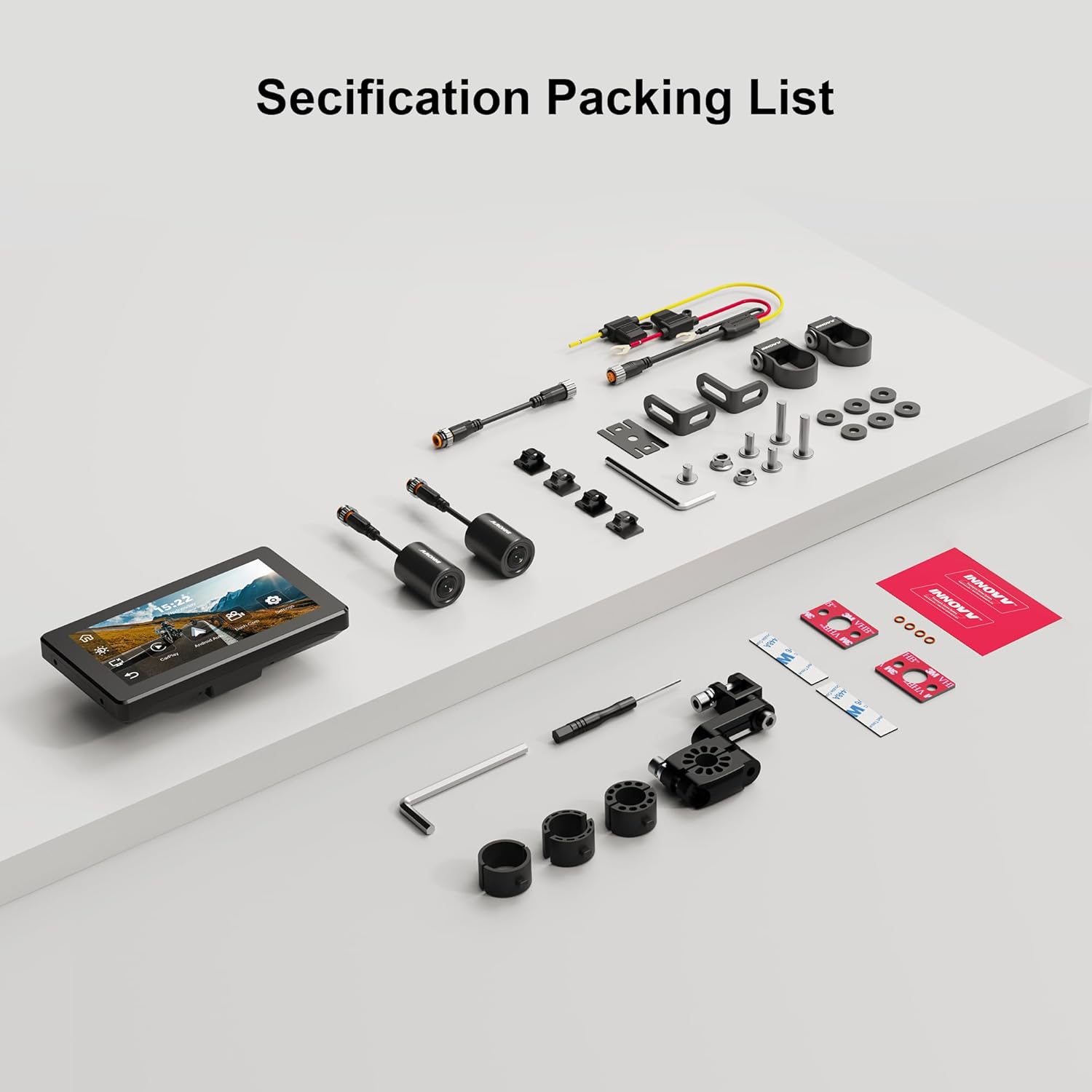
Image 2.1: A visual representation of the INNOVV N1 system components and accessories included in the package.
3. ഇൻസ്റ്റാളേഷൻ ഗൈഡ്
Proper installation ensures optimal performance and safety. It is recommended to have this device installed by a qualified professional if you are unsure about any steps.
3.1 ഡിസ്പ്ലേ യൂണിറ്റ് മൌണ്ട് ചെയ്യൽ
- Select a suitable location on your motorcycle's handlebar that does not obstruct your view അല്ലെങ്കിൽ വാഹനത്തിന്റെ നിയന്ത്രണം.
- Use the provided handlebar mount from the accessory kit to securely attach the display unit. Ensure it is firmly installed without shaking.
- ക്രമീകരിക്കുക viewഒപ്റ്റിമൽ ദൃശ്യപരതയ്ക്കായി ആംഗിൾ.

Image 3.1: The 5.5-inch display unit securely mounted on a motorcycle handlebar, showing its compact dimensions (150mm x 84.5mm).
3.2 Connecting the Cameras
- Identify the front and rear cameras. The cameras are designed for 1080P recording with a 125-degree wide-angle lens.
- Mount the front camera in a position that provides a clear, unobstructed view മുന്നോട്ടുള്ള പാതയുടെ.
- Mount the rear camera to capture the view നിങ്ങളുടെ മോട്ടോർസൈക്കിളിന് പിന്നിൽ.
- Connect the camera cables to the corresponding ports on the main DVR unit. Use the extended cables as needed.

ചിത്രം 3.2: ക്ലോസ്-അപ്പ് view of the dual 1080P cameras with 125-degree wide-angle lenses, designed for comprehensive coverage.
3.3 പവർ കണക്ഷൻ
- Connect the power supply cable to the main DVR unit.
- Route the power cable safely to your motorcycle's power source, ensuring it does not interfere with moving parts or get pinched.
3.4 GPS Module Installation
- Connect the GPS module to the designated port on the main unit.
- Mount the GPS module in a location with a clear view സിഗ്നൽ ലഭിക്കുന്നതിന് ആകാശത്തിന്റെ ഉയരം.
3.5 TPMS Sensor Installation (If Applicable)
- If your package includes TPMS sensors, install them on your motorcycle's tire valves according to the instructions provided with the sensors.
- Ensure the sensors are securely fastened to prevent air leakage.
3.6 ഇൻസ്റ്റലേഷൻ കഴിഞ്ഞുview വീഡിയോ
For a visual guide on the installation and features of the INNOVV N1, please refer to the video below:
Video 3.1: This video demonstrates the physical components, connections, and initial setup of the INNOVV N1 system, including the dash cameras, GPS module, and tire pressure sensors, along with a brief overview of its functions like CarPlay and Android Auto.
4. പ്രവർത്തന നിർദ്ദേശങ്ങൾ
Familiarize yourself with the device's functions to enhance your riding experience.
4.1 പവർ ഓൺ/ഓഫ്
- പവർ ഓൺ: The device will automatically power on when your motorcycle's ignition is turned on.
- പവർ ഓഫ്: The device will automatically power off when your motorcycle's ignition is turned off.
4.2 ടച്ച്സ്ക്രീൻ ഇന്റർഫേസ്
The 5.5-inch full-screen touch display allows for intuitive navigation. Tap icons to access different functions such as CarPlay, Android Auto, Dash Cam, and Settings.
4.3 ആപ്പിൾ കാർപ്ലേയും ആൻഡ്രോയിഡ് ഓട്ടോയും
Connect your smartphone wirelessly via Bluetooth 4.2 and 5.8G Wi-Fi to access CarPlay or Android Auto features directly on the N1 display.
- നിങ്ങളുടെ സ്മാർട്ട്ഫോണിൽ ബ്ലൂടൂത്തും വൈഫൈയും പ്രവർത്തനക്ഷമമാക്കിയിട്ടുണ്ടെന്ന് ഉറപ്പാക്കുക.
- On the N1 display, select the CarPlay or Android Auto icon.
- Follow the on-screen prompts to pair your device. For CarPlay, your iPhone must be iOS 13 or above. For Android Auto, your Android phone must be Android 11 or above and support 5G Wi-Fi.
- Once connected, you can use navigation apps, make calls, send messages, and play music through the N1 display.

Image 4.1: The INNOVV N1 display showing the Apple CarPlay and Android Auto interfaces, demonstrating seamless smartphone integration.
4.4 Dash Cam Functionality
The integrated dual dash cam records continuously in 1080P@30FPS from both front and rear cameras.
- റെക്കോർഡിംഗ്: Recording starts automatically when the device powers on.
- ലൂപ്പ് റെക്കോർഡിംഗ്: The system supports loop recording, overwriting the oldest footage when the storage card is full.
- ഇവൻ്റ് റെക്കോർഡിംഗ്: In case of sudden impact or vibration, the G-sensor will trigger event recording, locking the footagതിരുത്തിയെഴുതുന്നത് തടയാൻ ഇ.
- പ്ലേബാക്ക്: Access recorded videos through the Dash Cam menu on the display.
4.5 ജിപിഎസ് നാവിഗേഷൻ
Utilize the GPS module for accurate location tracking and navigation through connected CarPlay or Android Auto applications.
- ജിപിഎസ് മൊഡ്യൂൾ ശരിയായി ബന്ധിപ്പിച്ചിട്ടുണ്ടെന്നും വ്യക്തമായ ഒരു കണക്ഷൻ ഉണ്ടെന്നും ഉറപ്പാക്കുക. view ആകാശത്തിൻ്റെ.
- Open your preferred navigation app (e.g., Google Maps, Apple Maps) via CarPlay or Android Auto.
4.6 Parking Monitoring Mode
The N1 automatically monitors your motorcycle's status when parked. If vibrations are detected, it will record videos from the front and rear cameras, providing 24-hour parking surveillance.

Image 4.2: The INNOVV N1's parking monitoring feature, which activates 24-hour surveillance upon detecting vibrations while parked.
4.7 ടയർ പ്രഷർ മോണിറ്ററിംഗ് സിസ്റ്റം (TPMS)
If equipped, the TPMS sensors provide real-time tire pressure and temperature readings directly on the N1 display, enhancing safety.
- The display will show current tire pressure and temperature for both front and rear tires.
- Set high and low pressure alarms in the settings to receive alerts for abnormal tire conditions.
5. പരിപാലനം
Regular maintenance ensures the longevity and optimal performance of your INNOVV N1 system.
- വൃത്തിയാക്കൽ: ഒരു സോഫ്റ്റ് ഉപയോഗിക്കുക, ഡിamp cloth to clean the display and camera lenses. Avoid abrasive cleaners or solvents.
- ഫേംവെയർ അപ്ഡേറ്റുകൾ: Periodically check the INNOVV website for firmware updates to ensure your device has the latest features and bug fixes. Follow the provided instructions carefully for any updates.
- സംഭരണം: ദീർഘനേരം ഉപയോഗിക്കാത്തപ്പോൾ, നേരിട്ട് സൂര്യപ്രകാശം ഏൽക്കാത്ത ഒരു തണുത്തതും വരണ്ടതുമായ സ്ഥലത്ത് ഉപകരണം സൂക്ഷിക്കുക.
- SD കാർഡ്: Format the microSD card regularly (e.g., once a month) to maintain optimal recording performance and prevent data corruption.
6. പ്രശ്നപരിഹാരം
If you encounter issues with your INNOVV N1, refer to the table below for common problems and solutions.
| പ്രശ്നം | സാധ്യമായ കാരണം | പരിഹാരം |
|---|---|---|
| ഉപകരണം പവർ ഓണാക്കുന്നില്ല. | വൈദ്യുതി ഇല്ല; കണക്ഷൻ നഷ്ടപ്പെട്ടു. | Check power cable connection to the motorcycle and the device. Ensure ignition is on. |
| Cameras not recording or showing video. | Loose camera connection; faulty SD card; camera malfunction. | Check camera cable connections. Ensure SD card is inserted correctly and formatted. Try a different SD card. |
| CarPlay/Android Auto കണക്റ്റ് ചെയ്യുന്നില്ല. | Bluetooth/Wi-Fi off on phone; incorrect pairing; phone OS not supported. | Ensure phone's Bluetooth and Wi-Fi are on. Re-pair the device. Check phone OS version compatibility. |
| GPS signal weak or unavailable. | GPS module obstructed; faulty module. | Ensure GPS module has a clear view of the sky. Check connection. |
| TPMS not displaying readings. | Sensors not paired; low sensor battery; incorrect installation. | Ensure sensors are correctly installed and paired. Check sensor battery status. |
7. ഉൽപ്പന്ന സവിശേഷതകൾ
| ഫീച്ചർ | സ്പെസിഫിക്കേഷൻ |
|---|---|
| ഡിസ്പ്ലേ വലിപ്പം | 5.5 ഇഞ്ച് |
| റെസലൂഷൻ | 1080p (Video Recording) |
| ഓപ്പറേറ്റിംഗ് സിസ്റ്റം | Android (for internal system, supports CarPlay/Android Auto) |
| ഹ്യൂമൻ ഇന്റർഫേസ് ഇൻപുട്ട് | ടച്ച് സ്ക്രീൻ |
| ഡിസ്പ്ലേ തരം | എൽസിഡി |
| ടച്ച് സ്ക്രീൻ തരം | കപ്പാസിറ്റീവ് |
| മൗണ്ടിംഗ് തരം | ഹാൻഡിൽബാർ മൗണ്ട് |
| മാപ്പ് തരം | Street (via connected smartphone apps) |
| വാഹന സേവന തരം | മോട്ടോർസൈക്കിൾ |
| വാട്ടർപ്രൂഫ് റേറ്റിംഗ് | IP67 |
| Wi-Fi ഫ്രീക്വൻസി | 5.8G |
8. വാറൻ്റിയും പിന്തുണയും
The INNOVV N1 comes with a 12 മാസ വാറൻ്റി വാങ്ങിയ തീയതി മുതൽ, നിർമ്മാണ വൈകല്യങ്ങൾ ഉൾക്കൊള്ളുന്നു. വാറന്റി ക്ലെയിമുകൾക്കായി നിങ്ങളുടെ വാങ്ങിയതിന്റെ തെളിവ് സൂക്ഷിക്കുക.
For technical support, troubleshooting assistance, or warranty inquiries, please contact INNOVV customer service through their official webനിങ്ങൾ ഉൽപ്പന്നം വാങ്ങിയ സൈറ്റ് അല്ലെങ്കിൽ റീട്ടെയിലർ.
ഓൺലൈൻ ഉറവിടങ്ങൾ: Visit the official INNOVV website for FAQs, updated manuals, and firmware downloads.