
1. ആമുഖം
The MUSE M-179 P Alarm Clock Radio is designed to provide reliable timekeeping and audio entertainment. This device features an FM PLL radio with the capacity to store 20 preset stations. It includes a time projection function, allowing you to adjust both the angle and rotation of the projected image for optimal viewing. As an alarm clock, it offers a dual alarm system, enabling you to wake up to either your preferred radio station or a standard buzzer. Additional functions include a snooze feature for extra sleep and a sleep timer for falling asleep to music.
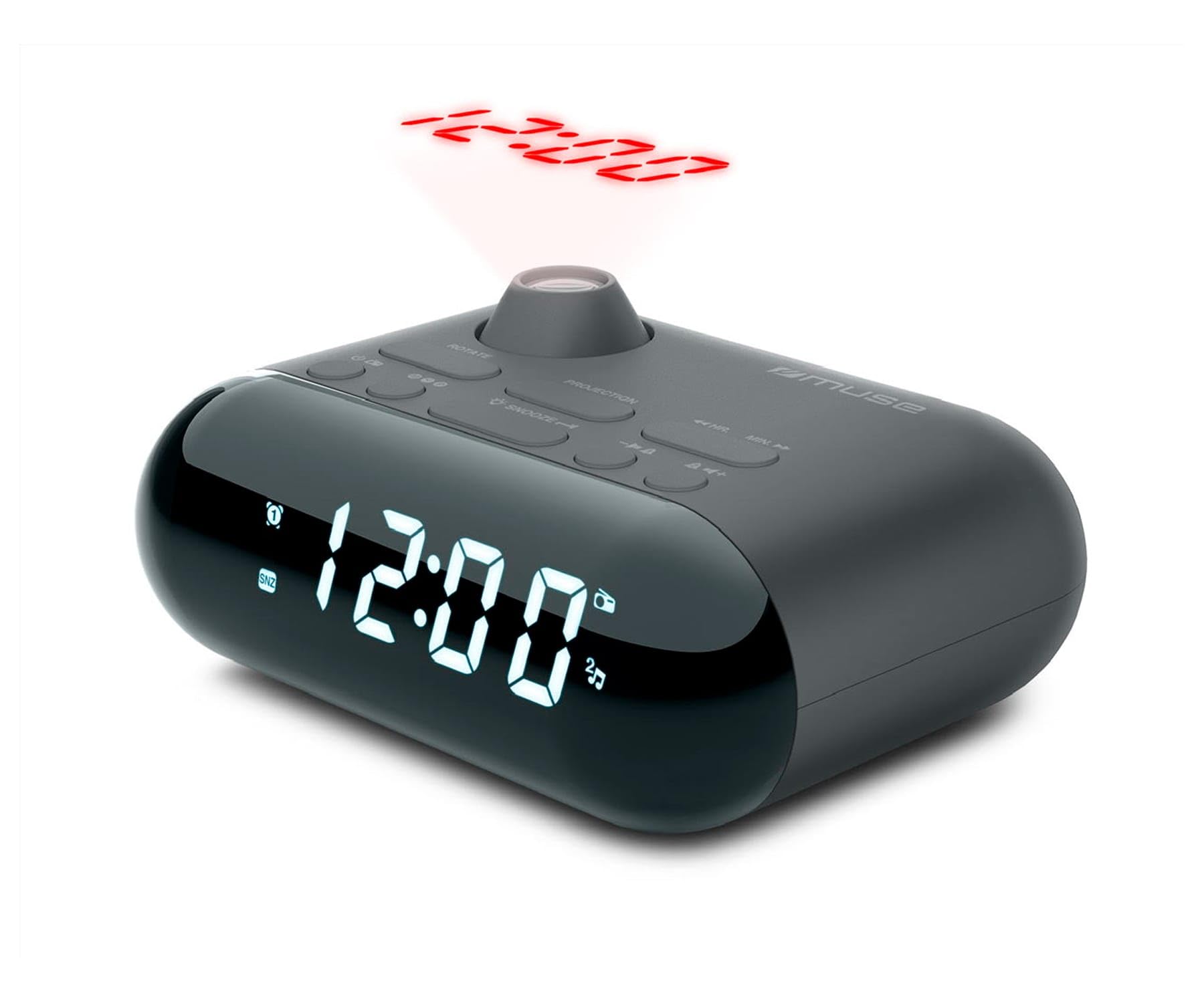
Image showing the front of the MUSE M-179 P Alarm Clock Radio, featuring the LED display and control buttons.
2. സുരക്ഷാ നിർദ്ദേശങ്ങൾ
- ഉപകരണം പ്രവർത്തിപ്പിക്കുന്നതിന് മുമ്പ് എല്ലാ നിർദ്ദേശങ്ങളും ശ്രദ്ധാപൂർവ്വം വായിക്കുക.
- ഭാവി റഫറൻസിനായി ഈ മാനുവൽ സൂക്ഷിക്കുക.
- വെള്ളം ഒഴുകുന്നതിനോ തെറിക്കുന്നതിനോ യൂണിറ്റ് തുറന്നുകാട്ടരുത്.
- ശരിയായ വായുസഞ്ചാരം ഉറപ്പാക്കുക; ഏതെങ്കിലും വായുസഞ്ചാര ദ്വാരങ്ങൾ തടയരുത്.
- റേഡിയേറ്ററുകൾ, ഹീറ്റ് രജിസ്റ്ററുകൾ, സ്റ്റൗകൾ അല്ലെങ്കിൽ മറ്റ് ഉപകരണങ്ങൾ (ഉൾപ്പെടെ) പോലുള്ള താപ സ്രോതസ്സുകൾക്ക് സമീപം യൂണിറ്റ് സ്ഥാപിക്കരുത്. ampലൈഫയറുകൾ) ചൂട് ഉത്പാദിപ്പിക്കുന്നത്.
- നിർമ്മാതാവ് വ്യക്തമാക്കിയ അറ്റാച്ച്മെൻ്റുകൾ/ആക്സസറികൾ മാത്രം ഉപയോഗിക്കുക.
- ഉപയോഗിച്ച ബാറ്ററികൾ പ്രാദേശിക നിയന്ത്രണങ്ങൾ അനുസരിച്ച് ഉത്തരവാദിത്തത്തോടെ നീക്കം ചെയ്യുക.
- Do not attempt to disassemble or modify the unit. Refer all servicing to qualified service personnel.
3. പാക്കേജ് ഉള്ളടക്കം
നിങ്ങളുടെ പാക്കേജിൽ ഇനിപ്പറയുന്ന ഇനങ്ങൾ ഉൾപ്പെടുത്തിയിട്ടുണ്ടോയെന്ന് ദയവായി പരിശോധിക്കുക:
- MUSE M-179 P Alarm Clock Radio Unit
- 1 x AA Battery (for backup or primary power, depending on model)
- ഉപയോക്തൃ മാനുവൽ (ഈ പ്രമാണം)
4. ഉൽപ്പന്ന സവിശേഷതകൾ
- Alarm Clock Radio: Integrated alarm and radio functions.
- സമയ പ്രൊജക്ഷൻ: Projects the current time onto a wall or ceiling.
- ഇരട്ട അലാറം: രണ്ട് സ്വതന്ത്ര അലാറങ്ങൾ സജ്ജമാക്കുക.
- ഉണർത്തൽ ഓപ്ഷനുകൾ: Choose to wake up to FM radio or a buzzer sound.
- PLL FM Radio: Digital tuning for stable radio reception.
- 20 FM Presets: Store up to 20 of your favorite FM radio stations.
- സ്നൂസ് പ്രവർത്തനം: അലാറം താൽക്കാലികമായി നിർത്തുക.
- സ്ലീപ്പ് ടൈമർ: Fall asleep to radio with automatic shut-off.
- Built-in Clock: Accurate timekeeping.
- പോർട്ടബിൾ ഡിസൈൻ: ഒതുക്കമുള്ളതും നീക്കാൻ എളുപ്പവുമാണ്.
5. നിയന്ത്രണങ്ങളും പ്രദർശനവും
The MUSE M-179 P features an intuitive layout for easy operation. While specific button labels may vary, common controls include:
- LED ഡിസ്പ്ലേ: Shows current time, alarm status, and radio frequency.
- സമയ സജ്ജീകരണ ബട്ടൺ: For adjusting hours and minutes.
- Alarm 1/Alarm 2 Buttons: To set and activate individual alarms.
- Snooze/Sleep Button: Activates snooze or sets the sleep timer.
- Radio/Tuning Buttons: For scanning and selecting radio stations.
- വോളിയം നിയന്ത്രണം: ഓഡിയോ ഔട്ട്പുട്ട് ക്രമീകരിക്കുന്നു.
- Projector On/Off & Adjustment: Controls the time projection feature.
6. സജ്ജീകരണം
6.1. പവർ കണക്ഷൻ
- Open the battery compartment, usually located on the bottom or back of the unit.
- Insert 1 AA battery, ensuring correct polarity (+/-). This battery powers the unit.
- ബാറ്ററി കമ്പാർട്ട്മെൻ്റ് സുരക്ഷിതമായി അടയ്ക്കുക.
6.2. പ്രാരംഭ സമയ ക്രമീകരണം
- When the unit is first powered on, the display may flash or show a default time.
- അമർത്തിപ്പിടിക്കുക ടൈം സെറ്റ് button (or similar) until the hour digits begin to flash.
- ഉപയോഗിക്കുക മണിക്കൂർ ഒപ്പം മിനിറ്റ് buttons (or tuning buttons) to adjust the hour. Pay attention to AM/PM indicators if present.
- അമർത്തുക ടൈം സെറ്റ് മണിക്കൂർ സ്ഥിരീകരിക്കുന്നതിനും മിനിറ്റ് ക്രമീകരണത്തിലേക്ക് നീങ്ങുന്നതിനും വീണ്ടും.
- Adjust the minutes using the appropriate buttons.
- അമർത്തുക ടൈം സെറ്റ് one last time to save the current time.
7. പ്രവർത്തന നിർദ്ദേശങ്ങൾ
7.1. അലാറങ്ങൾ സജ്ജമാക്കുന്നു
The M-179 P features two independent alarms (Alarm 1 and Alarm 2).
- അമർത്തിപ്പിടിക്കുക അലാറം 1 അലാറം മണിക്കൂർ അക്കങ്ങൾ മിന്നുന്നത് വരെ ബട്ടൺ അമർത്തുക.
- ഉപയോഗിക്കുക മണിക്കൂർ ഒപ്പം മിനിറ്റ് ആവശ്യമുള്ള അലാറം സമയം സജ്ജമാക്കാൻ ബട്ടണുകൾ.
- അമർത്തുക അലാറം 1 again to confirm the time and select the wake-up source (radio or buzzer). Use the tuning buttons to toggle between options.
- അമർത്തുക അലാറം 1 once more to save the settings. The alarm indicator will light up on the display.
- പ്രക്രിയ ആവർത്തിക്കുക അലാറം 2 ഉപയോഗിക്കുന്നത് അലാറം 2 ബട്ടൺ.
7.2. എഫ്എം റേഡിയോ ഉപയോഗിക്കുന്നു
- അമർത്തുക റേഡിയോ ഓൺ/ഓഫ് റേഡിയോ ഓണാക്കാനുള്ള ബട്ടൺ.
- ഉപയോഗിക്കുക ട്യൂൺ +/- ആവൃത്തി സ്വമേധയാ ക്രമീകരിക്കാനുള്ള ബട്ടണുകൾ.
- സ്റ്റേഷനുകൾക്കായി യാന്ത്രികമായി സ്കാൻ ചെയ്യാൻ, അമർത്തിപ്പിടിക്കുക ട്യൂൺ +/- button. The radio will stop at the next strong signal.
- ഒരു പ്രീസെറ്റ് സ്റ്റേഷൻ സംരക്ഷിക്കാൻ: ആവശ്യമുള്ള സ്റ്റേഷനിലേക്ക് ട്യൂൺ ചെയ്യുക, തുടർന്ന് അമർത്തിപ്പിടിക്കുക പ്രീസെറ്റ് ബട്ടൺ (അല്ലെങ്കിൽ എം.ഇ.എം). The preset number will flash. Use ട്യൂൺ +/- ഒരു പ്രീസെറ്റ് നമ്പർ (1-20) തിരഞ്ഞെടുക്കാൻ, തുടർന്ന് അമർത്തുക പ്രീസെറ്റ് സംരക്ഷിക്കാൻ വീണ്ടും.
- ഒരു പ്രീസെറ്റ് സ്റ്റേഷൻ തിരിച്ചുവിളിക്കാൻ: അമർത്തുക പ്രീസെറ്റ് സംരക്ഷിച്ച സ്റ്റേഷനുകളിലൂടെ സൈക്കിൾ ചെയ്യാൻ ആവർത്തിച്ച് ബട്ടൺ അമർത്തുക.
- ഉപയോഗിച്ച് വോളിയം ക്രമീകരിക്കുക വോളിയം +/- ബട്ടണുകൾ.
7.3. Time Projection
- കണ്ടെത്തുക പ്രൊജക്ടർ ഓൺ/ഓഫ് switch or button. Turn it on to activate the time projection.
- Adjust the projection angle by physically rotating the projector lens housing.
- ലഭ്യമെങ്കിൽ, ഉപയോഗിക്കുക ഇമേജ് റൊട്ടേഷൻ button or dial to flip the projected time display 180 degrees for optimal viewing on a ceiling or wall.
- Adjust the focus of the projected image by rotating the focus ring around the projector lens.
7.4. സ്നൂസ് ഫംഗ്ഷൻ
അലാറം മുഴങ്ങുമ്പോൾ, അമർത്തുക സ്നൂസ് ചെയ്യുക button. The alarm will temporarily stop and sound again after a few minutes (typically 5-9 minutes, depending on the model's default setting).
7.5. സ്ലീപ്പ് ടൈമർ
- റേഡിയോ പ്ലേ ചെയ്യുമ്പോൾ, അമർത്തുക ഉറങ്ങുക ബട്ടൺ.
- ആവർത്തിച്ച് അമർത്തുക ഉറങ്ങുക button to cycle through available sleep timer durations (e.g., 90, 60, 30, 15 minutes, or OFF).
- തിരഞ്ഞെടുത്ത കാലയളവിനുശേഷം റേഡിയോ സ്വയമേവ ഓഫാകും.
8. പരിപാലനം
8.1. വൃത്തിയാക്കൽ
- മൃദുവായതും ഉണങ്ങിയതുമായ തുണി ഉപയോഗിച്ച് യൂണിറ്റ് തുടയ്ക്കുക.
- അബ്രാസീവ് ക്ലീനറുകൾ, മെഴുക്, ലായകങ്ങൾ എന്നിവ ഉപയോഗിക്കരുത്.
8.2. ബാറ്ററി മാറ്റിസ്ഥാപിക്കൽ
- When the display dims or the unit malfunctions, it may be time to replace the battery.
- Open the battery compartment and replace the old AA battery with a new one, observing correct polarity.
- Dispose of the old battery according to local environmental regulations.
9. പ്രശ്നപരിഹാരം
| പ്രശ്നം | സാധ്യമായ കാരണം | പരിഹാരം |
|---|---|---|
| യൂണിറ്റ് ഓണാക്കുന്നില്ല. | ബാറ്ററി തീർന്നു അല്ലെങ്കിൽ തെറ്റായി ചേർത്തിരിക്കുന്നു. | ബാറ്ററി മാറ്റിസ്ഥാപിക്കുക അല്ലെങ്കിൽ പോളാരിറ്റി പരിശോധിക്കുക. |
| മോശം റേഡിയോ സ്വീകരണം. | ആന്റിന വികസിതമല്ല അല്ലെങ്കിൽ മോശം സിഗ്നൽ ഏരിയ. | എഫ്എം ആന്റിന പൂർണ്ണമായും നീട്ടുക. മികച്ച സ്വീകരണത്തിനായി യൂണിറ്റ് പുനഃസ്ഥാപിക്കുക. |
| അലാറം മുഴങ്ങുന്നില്ല. | അലാറം സജീവമാക്കിയിട്ടില്ല അല്ലെങ്കിൽ തെറ്റായി സജ്ജീകരിച്ചിട്ടില്ല. | Ensure alarm is set and activated (alarm indicator visible). Check alarm volume. |
| സമയ പ്രൊജക്ഷൻ മങ്ങിയതാണ്. | ഫോക്കസ് ക്രമീകരിച്ചിട്ടില്ല. | ചിത്രം വ്യക്തമാകുന്നതുവരെ പ്രൊജക്ടർ ലെൻസിലെ ഫോക്കസ് റിംഗ് തിരിക്കുക. |
| പ്രതീക്ഷിക്കുന്ന സമയം തലകീഴായി മാറിയിരിക്കുന്നു. | Image rotation needs adjustment. | Press the IMAGE ROTATION button or adjust the dial to flip the display. |
10 സ്പെസിഫിക്കേഷനുകൾ
- ബ്രാൻഡ്: മ്യൂസ്
- മോഡൽ നമ്പർ: എം-179 പി
- ഊർജ്ജ സ്രോതസ്സ്: Battery powered (1 AA battery required)
- ഡിസ്പ്ലേ തരം: എൽഇഡി
- കണക്റ്റിവിറ്റി ടെക്നോളജി: Auxiliary (3.5 mm Audio Interface)
- ട്യൂണർ തരം: FM
- പിന്തുണയ്ക്കുന്ന റേഡിയോ ബാൻഡുകൾ: FM
- പ്രത്യേക സവിശേഷതകൾ: Built-in clock, Portable
- ഉൽപ്പന്ന അളവുകൾ (L x W x H): 15 സെ.മീ x 12.4 സെ.മീ x 6.8 സെ.മീ
- ജല പ്രതിരോധ നില: Waterproof (Note: This specification should be interpreted with caution for electronic devices. Avoid direct exposure to water.)
- Internal Material: പ്ലാസ്റ്റിക്
- ശുപാർശ ചെയ്യുന്ന ഉപയോഗങ്ങൾ: ഇൻഡോർ ഉപയോഗത്തിന്
- Compatible Devices (Auxiliary): Headphones, Speaker, MP3 player, Laptop
11. വാറൻ്റിയും പിന്തുണയും
This product is covered by a standard manufacturer's warranty. For detailed warranty information, please refer to the warranty card included in your product packaging or visit the official MUSE website. For technical support, troubleshooting assistance, or to inquire about spare parts, please contact MUSE customer service through their official channels.
ഏതെങ്കിലും വാറന്റി ക്ലെയിമുകൾക്കായി നിങ്ങളുടെ വാങ്ങിയതിന്റെ തെളിവ് സൂക്ഷിക്കുക.