
ആമുഖം
This user manual provides detailed instructions for setting up, operating, and maintaining your Ninkear N15 Plus Laptop. Please read this manual thoroughly before using your device to ensure optimal performance and longevity. The Ninkear N15 Plus is a high-performance laptop featuring an Intel N100 processor, a 15.6-inch FHD IPS screen, 16GB DDR4 RAM, and a 1TB SSD, designed for efficient productivity and entertainment.
ബോക്സിൽ എന്താണുള്ളത്
പാക്കേജ് തുറക്കുമ്പോൾ, ഇനിപ്പറയുന്ന എല്ലാ ഇനങ്ങളും ഉൾപ്പെടുത്തിയിട്ടുണ്ടെന്ന് ഉറപ്പാക്കുക:
- Ninkear N15 PLUS Laptop
- ചാർജർ
- നിർദ്ദേശ മാനുവൽ (ഈ പ്രമാണം)

Image: The Ninkear N15 Plus Laptop, showcasing its sleek design and the included charger.
സജ്ജീകരണ ഗൈഡ്
1. പ്രാരംഭ ചാർജിംഗും പവർ ഓണും
- Connect the provided charger to the Type-C charging port on the laptop and plug it into a power outlet. Ensure the charging indicator light illuminates.
- Allow the laptop to charge for at least 30 minutes before initial use, or until the battery is sufficiently charged.
- Press the power button located on the keyboard to turn on the laptop. The Ninkear logo will appear, followed by the Windows 11 setup screen.
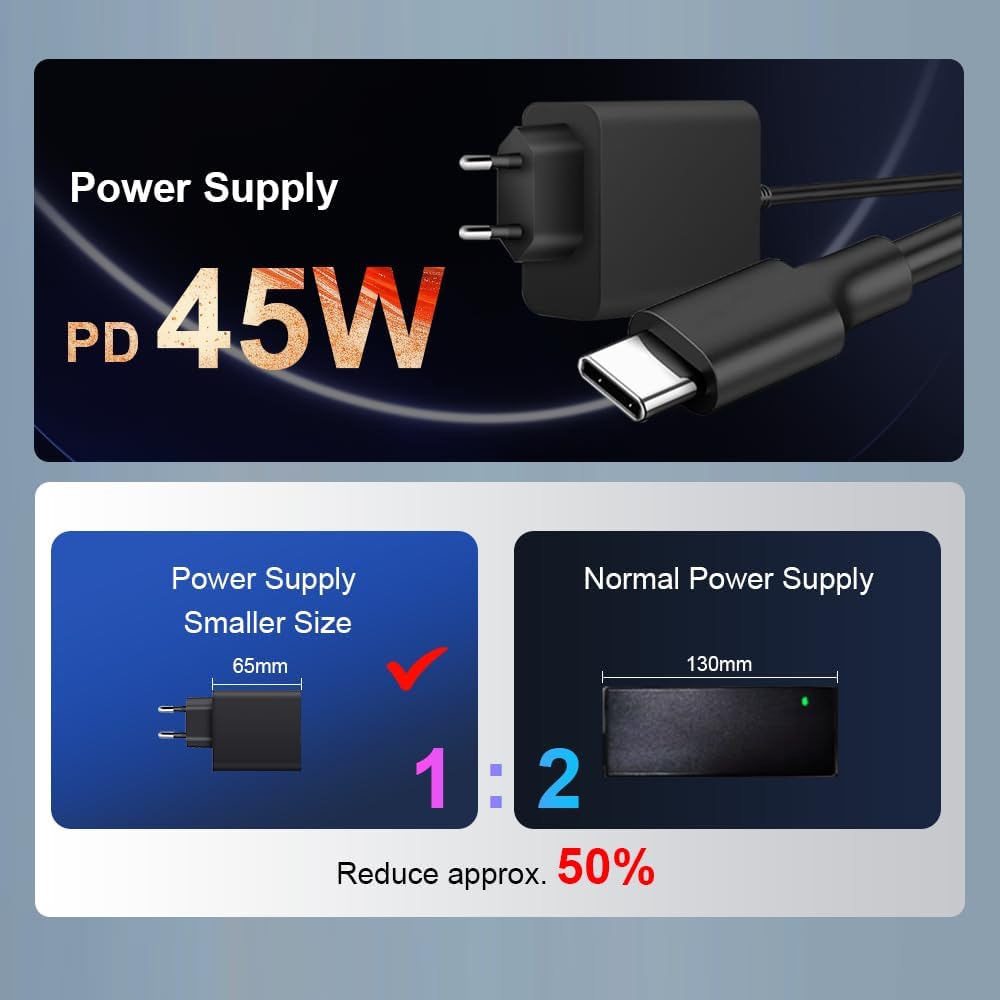
ചിത്രം: ഒരു ക്ലോസ്-അപ്പ് view of the N15 Plus laptop connected to its Type-C power supply, highlighting the compact charger design.
2. വിൻഡോസ് 11 സജ്ജീകരണം
Follow the on-screen prompts to complete the Windows 11 setup process. This typically includes:
- നിങ്ങളുടെ പ്രദേശവും കീബോർഡ് ലേഔട്ടും തിരഞ്ഞെടുക്കുന്നു.
- ഒരു Wi-Fi നെറ്റ്വർക്കിലേക്ക് കണക്റ്റുചെയ്യുന്നു.
- ഒരു Microsoft അക്കൗണ്ട് ഉപയോഗിച്ച് സൈൻ ഇൻ ചെയ്യുകയോ സൃഷ്ടിക്കുകയോ ചെയ്യുക.
- ഒരു പിൻ അല്ലെങ്കിൽ പാസ്വേഡ് സജ്ജീകരിക്കുന്നു.
- Configuring privacy settings.
Once setup is complete, your laptop is ready for use.
നിങ്ങളുടെ ലാപ്ടോപ്പ് പ്രവർത്തിപ്പിക്കുന്നു
കീബോർഡും ടച്ച്പാഡും
The N15 Plus features an ergonomic full-size keyboard with a numeric keypad for comfortable typing. The integrated touchpad supports multi-touch gestures for intuitive navigation.
- ബാക്ക്ലൈറ്റ് കീബോർഡ്: To turn the keyboard backlight on or off, press the Fn + F5 shortcut key. Three levels of backlight brightness can be adjusted as needed.

ചിത്രം: ഒരു ഓവർview of the Ninkear N15 Plus laptop, highlighting its 15.6-inch IPS screen, Intel N100 processor, 16GB DDR4 RAM, 1TB SSD, 89WH battery, Wi-Fi 6, Bluetooth 5.2, Windows 11, and diamond pattern texture.
ഫിംഗർപ്രിൻ്റ് അൺലോക്ക്
For enhanced security and quick access, the N15 Plus is equipped with a fingerprint sensor. Set up your fingerprint through Windows Hello in the system settings.
- Fingerprint unlocking takes approximately 0.5 seconds.
പ്രദർശിപ്പിക്കുക
The laptop features a 15.6-inch Full HD (1920x1080) IPS screen, providing wide viewing angles, accurate color reproduction, and consistent image quality. This display is designed to protect eyesight during extended use.
കണക്റ്റിവിറ്റി
The N15 Plus supports modern wireless standards and offers versatile ports:
- Wi-Fi 6: For fast and reliable wireless internet connection.
- ബ്ലൂടൂത്ത് 5.2: ഹെഡ്ഫോണുകൾ, മൗസുകൾ, കീബോർഡുകൾ തുടങ്ങിയ വയർലെസ് പെരിഫെറലുകൾ ബന്ധിപ്പിക്കുന്നതിന്.
- USB 3.0 പോർട്ടുകൾ: അതിവേഗ ഡാറ്റ കൈമാറ്റത്തിനായി രണ്ട് പോർട്ടുകൾ.
- എച്ച്ഡിഎംഐ പോർട്ട്: ബാഹ്യ ഡിസ്പ്ലേകളിലേക്കോ പ്രൊജക്ടറുകളിലേക്കോ ബന്ധിപ്പിക്കുന്നതിന്.
- Type-C Ports: Two Type-C interfaces. The left Type-C port supports PD charging and data transmission. The right Type-C interface supports reverse power supply, allowing you to charge other electronic devices like mobile phones.
- ഓഡിയോ ജാക്ക്: ഹെഡ്ഫോണുകൾക്കോ ബാഹ്യ സ്പീക്കറുകൾക്കോ വേണ്ടി.
- ടിഎഫ് കാർഡ് സ്ലോട്ട്: സംഭരണം വികസിപ്പിക്കുന്നതിനോ മെമ്മറി കാർഡുകളിൽ നിന്ന് ഡാറ്റ കൈമാറുന്നതിനോ വേണ്ടി.

ചിത്രം: വിശദമായത് view of the N15 Plus laptop's side ports, including Audio, TF Card slot, USB 3.0, and Type-C ports with their functionalities (PD charging, data transmission, reverse charging).
പ്രകടനവും സംഭരണവും
The N15 Plus is powered by an Intel N100 processor with 4 cores and 4 threads, offering a maximum frequency of 3.4 GHz. This configuration ensures smooth operation for productivity software and supports 4K video decoding and multi-display setups.
- റാം: കാര്യക്ഷമമായ മൾട്ടിടാസ്കിംഗിനായി 16GB DDR4 റാം.
- സംഭരണം: 1TB PCIe SSD provides ample and fast storage for your fileകൾ, ആപ്ലിക്കേഷനുകൾ, മീഡിയ എന്നിവ.

Image: A graph illustrating the performance of the Intel N100 processor compared to other Intel Jasper Lake series CPUs, showing its multi-core and single-core capabilities.

Image: Visual representation of the laptop's 16GB DDR4 RAM and 1TB M.2 SSD, emphasizing fast reading and writing speeds for smooth operation and ample സംഭരണം.
ബാറ്ററി ലൈഫ്
The N15 Plus is equipped with a built-in 11600mAh (89WH) high-capacity lithium-ion battery, offering extended usage times.
- Up to 13 hours of working use on a full charge.
- 72 മണിക്കൂർ വരെ സ്റ്റാൻഡ്ബൈ സമയം.

Image: A graphic illustrating the impressive 11600mAh battery life of the N15 Plus, showing approximately 13 hours of working time and 72 hours of standby time.

Image: A visual demonstration of the Type-C reverse charging feature, showing the laptop charging a mobile phone.
മെയിൻ്റനൻസ്
വൃത്തിയാക്കൽ
- സ്ക്രീനും പുറംഭാഗവും വൃത്തിയാക്കാൻ മൃദുവായ, ലിന്റ് രഹിത തുണി ഉപയോഗിക്കുക.
- കഠിനമായ പാടുകൾക്ക്, ചെറുതായി dampതുണിയിൽ വെള്ളം അല്ലെങ്കിൽ സ്ക്രീൻ ക്ലീനിംഗ് ലായനി ഉപയോഗിക്കുക. കഠിനമായ രാസവസ്തുക്കൾ ഒഴിവാക്കുക.
- Regularly clean the keyboard and touchpad to prevent dust and debris buildup.
സോഫ്റ്റ്വെയർ അപ്ഡേറ്റുകൾ
- Keep your Windows 11 operating system updated to ensure optimal performance, security, and compatibility.
- Check for driver updates periodically from the Ninkear support website (if applicable) or through Windows Update.
സ്റ്റോറേജ് മാനേജ്മെൻ്റ്
- അനാവശ്യമായത് പതിവായി ഇല്ലാതാക്കുക files and applications to free up storage space on your 1TB SSD.
- Consider using cloud storage or external drives for large files to maintain optimal system speed.
ട്രബിൾഷൂട്ടിംഗ്
This section addresses common issues you might encounter with your Ninkear N15 Plus Laptop.
ലാപ്ടോപ്പ് ഓണാകുന്നില്ല
- ലാപ്ടോപ്പിലേക്കും പ്രവർത്തിക്കുന്ന ഒരു പവർ ഔട്ട്ലെറ്റിലേക്കും ചാർജർ സുരക്ഷിതമായി ബന്ധിപ്പിച്ചിട്ടുണ്ടെന്ന് ഉറപ്പാക്കുക.
- മറ്റൊരു ഉപകരണം പ്ലഗ് ഇൻ ചെയ്ത് പവർ ഔട്ട്ലെറ്റ് പ്രവർത്തനക്ഷമമാണെന്ന് ഉറപ്പാക്കുക.
- Allow the laptop to charge for at least 30 minutes before attempting to power it on again.
- If the issue persists, try a different compatible Type-C charger if available.
Screen Remains Blank or Flickers
- ലാപ്ടോപ്പ് പുനരാരംഭിക്കുക.
- Ensure the display brightness is not set to minimum. Use the function keys (e.g., Fn + F2/F3 or similar, check keyboard icons) to adjust brightness.
- If connected to an external monitor, try disconnecting it or pressing Fn + F10 (or similar, check keyboard icons) to cycle display modes.
വൈഫൈ കണക്റ്റിവിറ്റി പ്രശ്നങ്ങൾ
- വിൻഡോസ് ക്രമീകരണങ്ങളിൽ വൈഫൈ പ്രവർത്തനക്ഷമമാക്കിയിട്ടുണ്ടെന്ന് ഉറപ്പാക്കുക.
- നിങ്ങളുടെ വൈഫൈ റൂട്ടറും ലാപ്ടോപ്പും പുനരാരംഭിക്കുക.
- Forget the network and reconnect, re-entering the password.
- Update your Wi-Fi drivers through Windows Update or the Ninkear support webസൈറ്റ്.
മന്ദഗതിയിലുള്ള പ്രകടനം
- പശ്ചാത്തലത്തിൽ പ്രവർത്തിക്കുന്ന അനാവശ്യ ആപ്ലിക്കേഷനുകൾ അടയ്ക്കുക.
- ഉയർന്ന CPU, RAM, അല്ലെങ്കിൽ ഡിസ്ക് ഉപയോഗം ഉപയോഗിക്കുന്ന പ്രക്രിയകൾക്കായി ടാസ്ക് മാനേജർ (Ctrl+Shift+Esc) പരിശോധിക്കുക.
- Ensure your Windows 11 is up to date.
- Run a disk cleanup and defragmentation (for HDD, though SSDs don't need defragging, Windows handles TRIM automatically).
- മാൽവെയറുകൾക്കോ വൈറസുകൾക്കോ വേണ്ടി സ്കാൻ ചെയ്യുക.
സ്പെസിഫിക്കേഷനുകൾ
| ഫീച്ചർ | വിശദാംശങ്ങൾ |
|---|---|
| ബ്രാൻഡ് | നിങ്കിയർ |
| മോഡലിൻ്റെ പേര് | N15 പ്ലസ് |
| സ്ക്രീൻ വലിപ്പം | 15.6 ഇഞ്ച് |
| സ്ക്രീൻ റെസല്യൂഷൻ | 1920 x 1080 പിക്സലുകൾ (FHD IPS) |
| പ്രോസസ്സർ | Intel Processor N100 (4 Cores, 4 Threads, up to 3.4 GHz) |
| റാം | 16GB DDR4 |
| ഹാർഡ് ഡ്രൈവ് | 1TB SSD (PCIe) |
| ഗ്രാഫിക്സ് കോപ്രൊസസർ | ഇന്റൽ യുഎച്ച്ഡി ഗ്രാഫിക്സ് (ഇന്റഗ്രേറ്റഡ്) |
| ഓപ്പറേറ്റിംഗ് സിസ്റ്റം | വിൻഡോസ് 11 |
| വയർലെസ് തരം | വൈ-ഫൈ 6 (802.11ax), ബ്ലൂടൂത്ത് 5.2 |
| USB പോർട്ടുകൾ | 2 x USB 3.0, 2 x Type-C (one with PD charging/data, one with reverse power supply) |
| മറ്റ് തുറമുഖങ്ങൾ | HDMI, Audio Jack, TF Card Slot |
| ബാറ്ററി | 11600mAh (89WH Lithium Ion) |
| ഇനത്തിൻ്റെ ഭാരം | 4.4 പൗണ്ട് |
| ഉൽപ്പന്ന അളവുകൾ | 14 x 9 x 0.25 ഇഞ്ച് |
| പ്രത്യേക സവിശേഷതകൾ | Backlit Keyboard, Fingerprint Reader, Numeric Keypad |
വാറൻ്റിയും പിന്തുണയും
Your Ninkear N15 Plus Laptop comes with a manufacturer's warranty. For detailed warranty information, please refer to the warranty card included in your product packaging or visit the official Ninkear webസൈറ്റ്.
For technical support, troubleshooting assistance beyond this manual, or service inquiries, please contact Ninkear customer support through their official channels. Keep your purchase receipt and product serial number handy when contacting support.