
EarFun HP200B
EarFun Wave Pro Active Noise Canceling Headphones
Model: HP200B
ഉപയോക്തൃ നിർദ്ദേശ മാനുവൽ
1. ഉൽപ്പന്നം കഴിഞ്ഞുview
The EarFun Wave Pro are advanced active noise-canceling over-ear Bluetooth headphones designed to deliver a premium audio experience with exceptional comfort and extended battery life. Featuring LDAC Hi-Res Audio support, AI-powered clear calls, and multipoint connection, these headphones are engineered for immersive listening and seamless connectivity.

Image: EarFun Wave Pro Active Noise Canceling Headphones in Silver Black.
2. ബോക്സിൽ എന്താണുള്ളത്?
എല്ലാ ഇനങ്ങളും ഉണ്ടെന്ന് ഉറപ്പാക്കാൻ നിങ്ങളുടെ പാക്കേജിന്റെ ഉള്ളടക്കങ്ങൾ പരിശോധിക്കുക:
- EarFun Wave Pro Bluetooth Headphones
- യാത്രാ കേസ്
- AUX ഓഡിയോ കേബിൾ
- യുഎസ്ബി-സി കേബിൾ
- ഉപയോക്തൃ മാനുവൽ

Image: The EarFun Wave Pro headphones neatly stored within their protective travel case.
3. നിയന്ത്രണങ്ങളും സൂചകങ്ങളും
The EarFun Wave Pro headphones feature intuitive controls for easy operation. Familiarize yourself with the button layout and LED indicators for optimal use.
ശാരീരിക നിയന്ത്രണങ്ങൾ
- പവർ ബട്ടൺ: പവർ ഓൺ/ഓഫ് ചെയ്യുന്നതിനും ബ്ലൂടൂത്ത് ജോടിയാക്കൽ ആരംഭിക്കുന്നതിനും ഉപയോഗിക്കുന്നു.
- വോളിയം മുകളിലേക്കും താഴേക്കും ബട്ടണുകൾ: ഓഡിയോ വോളിയം ക്രമീകരിക്കുന്നു.
- മൾട്ടി-ഫംഗ്ഷൻ ബട്ടൺ: പ്ലേബാക്ക് (പ്ലേ/താൽക്കാലികമായി നിർത്തുക, ട്രാക്കുകൾ ഒഴിവാക്കുക), കോൾ മാനേജ്മെന്റ് (കോളുകൾക്ക് ഉത്തരം നൽകുക/അവസാനിപ്പിക്കുക), വോയ്സ് അസിസ്റ്റന്റ് ആക്റ്റിവേഷൻ എന്നിവ നിയന്ത്രിക്കുന്നു.
- ANC ബട്ടൺ: Toggles between Active Noise Cancellation (ANC), Ambient Sound, and Normal modes.
LED സൂചകങ്ങൾ
The LED indicator provides information on power status, battery level, and Bluetooth connection status.
4. സജ്ജീകരണം
4.1 ഹെഡ്ഫോണുകൾ ചാർജ് ചെയ്യുന്നു
Before first use, fully charge your EarFun Wave Pro headphones. Connect the supplied USB-C cable to the charging port on the headphones and the other end to a USB power adapter (not included) or a computer's USB port.
- A full charge provides up to 80 hours of playtime with ANC off, or 55 hours with ANC on (at 60% volume).
- 10 മിനിറ്റ് പെട്ടെന്ന് ചാർജ് ചെയ്താൽ 10 മണിക്കൂർ വരെ പ്ലേബാക്ക് ലഭിക്കും.
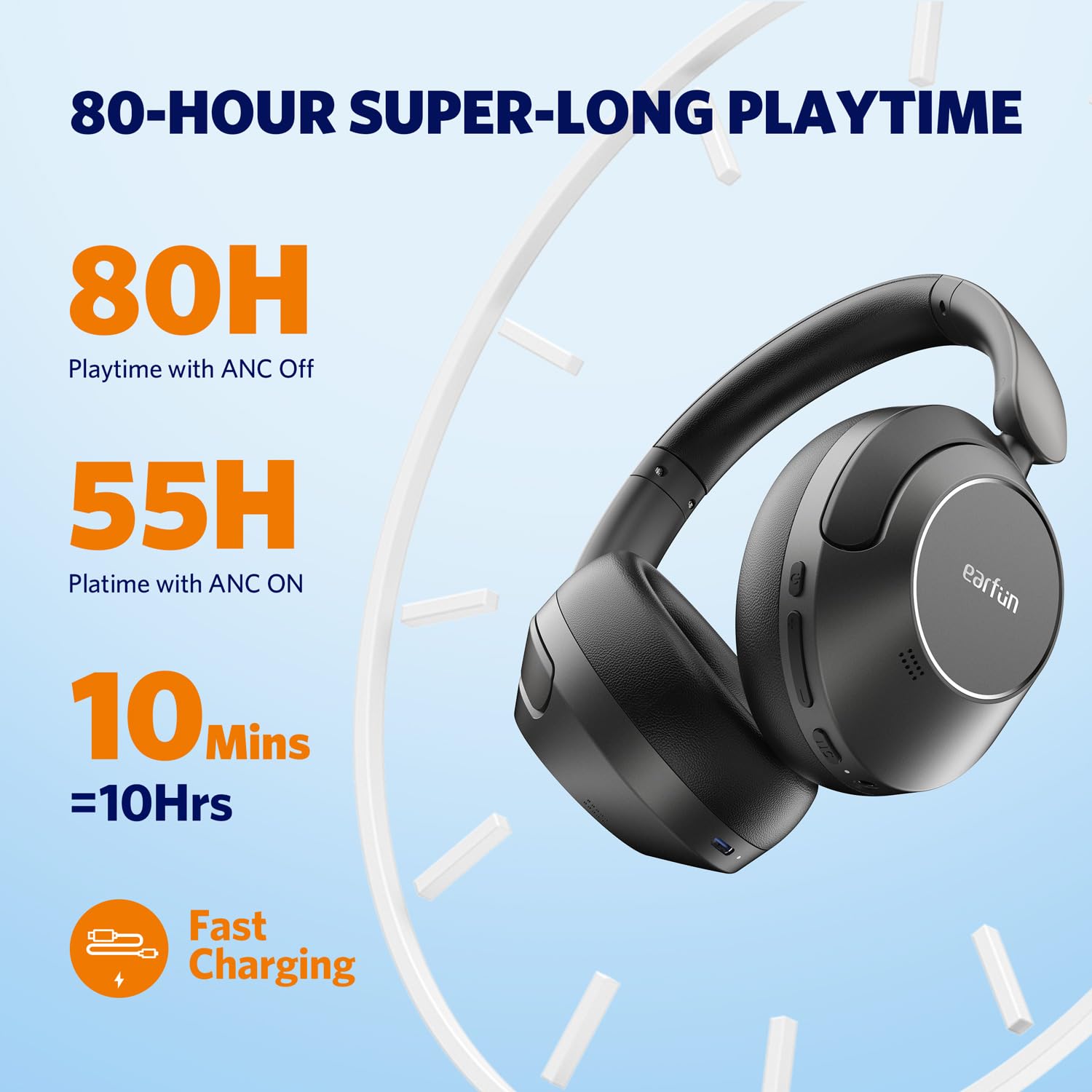
Image: Visual representation of the EarFun Wave Pro's impressive battery life, highlighting 80 hours with ANC off, 55 hours with ANC on, and 10 hours from a 10-minute quick charge.
4.2 പവർ ഓൺ/ഓഫ്
- പവർ ഓണാക്കാൻ: LED ഇൻഡിക്കേറ്റർ പ്രകാശിക്കുന്നത് വരെ ഏകദേശം 2 സെക്കൻഡ് നേരത്തേക്ക് പവർ ബട്ടൺ അമർത്തിപ്പിടിക്കുക.
- പവർ ഓഫ് ചെയ്യാൻ: LED ഇൻഡിക്കേറ്റർ ഓഫാകുന്നതുവരെ ഏകദേശം 5 സെക്കൻഡ് നേരത്തേക്ക് പവർ ബട്ടൺ അമർത്തിപ്പിടിക്കുക.
4.3 ബ്ലൂടൂത്ത് ജോടിയാക്കൽ
For first-time use, the headphones will automatically enter pairing mode when powered on. For subsequent pairing or connecting to a new device:
- ഹെഡ്ഫോണുകൾ ഓഫാണെന്ന് ഉറപ്പാക്കുക.
- ജോടിയാക്കൽ മോഡ് സൂചിപ്പിക്കുന്ന LED ഇൻഡിക്കേറ്റർ നീലയും ചുവപ്പും നിറങ്ങളിൽ മിന്നുന്നതുവരെ പവർ ബട്ടൺ 5 സെക്കൻഡ് അമർത്തിപ്പിടിക്കുക.
- On your device (smartphone, tablet, computer), enable Bluetooth and search for "EarFun Wave Pro" in the list of available devices.
- Select "EarFun Wave Pro" to connect. The LED indicator will turn solid blue once connected.

Image: EarFun Wave Pro headphones connected via Bluetooth to a smartphone, showing the 'Connected' status.
4.4 EarFun App Installation
Enhance your listening experience by downloading the custom EarFun App. The app allows you to personalize settings, customize touch controls, and manage multipoint connections.
- ഇതിനായി തിരയുക "EarFun Audio" on the Google Play Store (for Android) or Apple App Store (for iOS).
- Install the app and follow the on-screen instructions to connect your headphones.

Image: Screenshots of the EarFun App interface, demonstrating options for customizing controls, selecting noise canceling modes, and adjusting equalizer settings.
5. പ്രവർത്തന നിർദ്ദേശങ്ങൾ
5.1 സജീവ ശബ്ദം റദ്ദാക്കൽ (ANC)
The EarFun Wave Pro features QuietSmart 2.0 Active Noise Canceling Technology, reducing external noise by up to 45dB. Use the ANC button to cycle through modes:
- ANC ഓൺ: ആഴത്തിലുള്ള ശ്രവണത്തിനായി ആംബിയന്റ് ശബ്ദത്തെ തടയുന്നു.
- ആംബിയന്റ് ശബ്ദം: ഓഡിയോ കേൾക്കുമ്പോൾ നിങ്ങളുടെ ചുറ്റുപാടുകൾ കേൾക്കാൻ നിങ്ങളെ അനുവദിക്കുന്നു.
- സാധാരണ മോഡ്: ANC ഓഫാണ്.
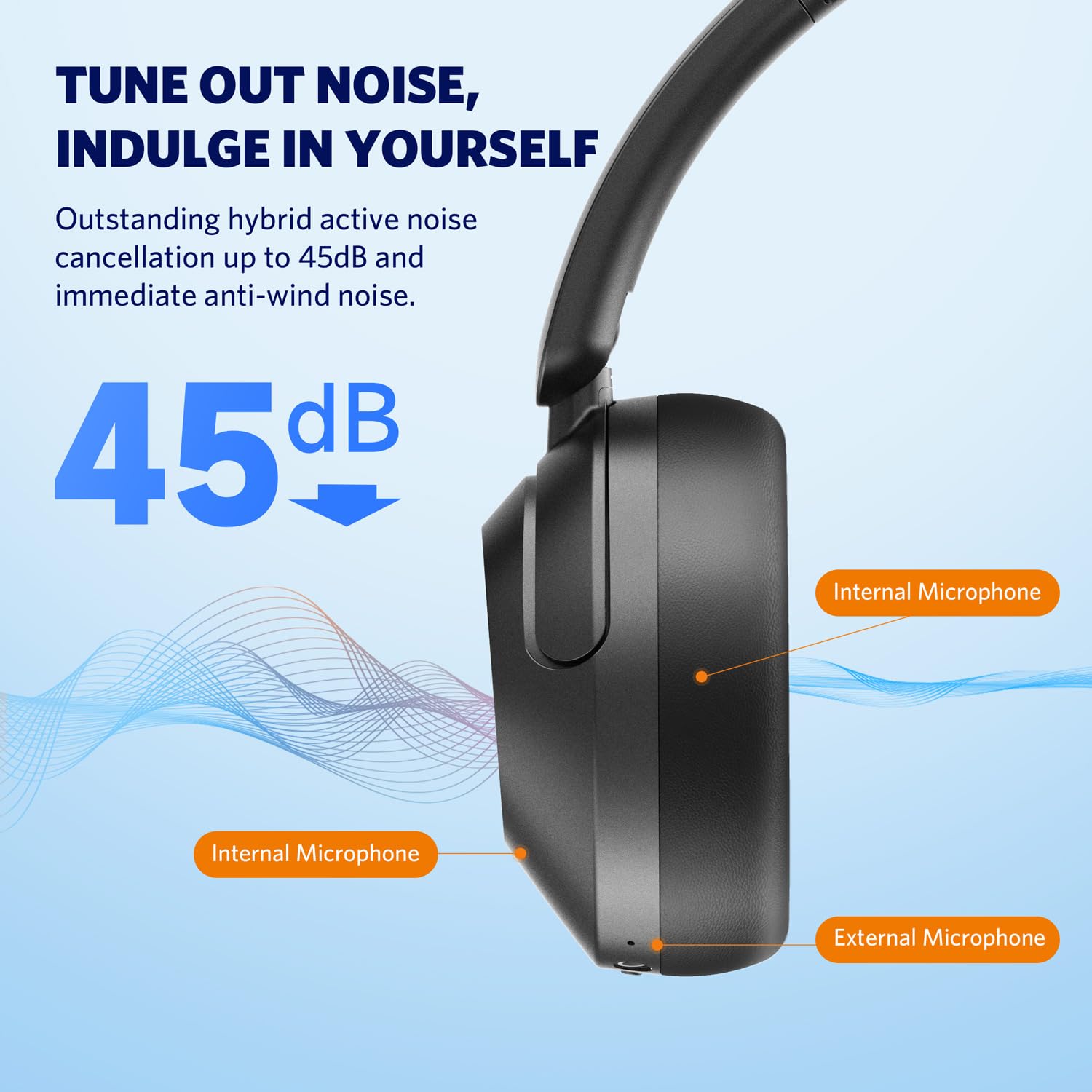
Image: Diagram illustrating the placement of internal and external microphones on the EarFun Wave Pro headphones, which contribute to the 45dB active noise cancellation.
5.2 എൽഡിഎസി ഹൈ-റെസ് ഓഡിയോ
Experience high-fidelity sound with LDAC support, transferring three times more detail than standard Bluetooth headphones. To activate LDAC, enable it within the EarFun App settings. Note that LDAC is primarily compatible with Android devices.

Image: A person enjoying music with EarFun Wave Pro headphones, highlighting the Hi-Res Audio and LDAC capabilities for rich sound details.
5.3 മൾട്ടിപോയിന്റ് കണക്ഷൻ
The EarFun Wave Pro supports multipoint connection, allowing you to seamlessly switch between two connected devices (e.g., a smartphone and a laptop). Manage connections via the EarFun App or manually.
കുറിപ്പ്: Due to chip limitations, multipoint connection and LDAC cannot be simultaneously enabled. When LDAC is activated, multipoint connection will automatically turn off, and vice versa.

Image: EarFun Wave Pro headphones connected to both a smartphone and a laptop, illustrating the multipoint connection feature.
5.4 കോളുകൾ ചെയ്യലും സ്വീകരിക്കലും
The headphones feature AI-powered 5 microphones for crystal-clear calls, reducing background noise and ampനിങ്ങളുടെ ശബ്ദം സജീവമാക്കുന്നു.
- ഉത്തരം/അവസാന കോൾ: മൾട്ടി-ഫംഗ്ഷൻ ബട്ടൺ ഒരിക്കൽ അമർത്തുക.
- കോൾ നിരസിക്കുക: മൾട്ടി-ഫംഗ്ഷൻ ബട്ടൺ 2 സെക്കൻഡ് അമർത്തിപ്പിടിക്കുക.

Image: A person using EarFun Wave Pro headphones for a call, with a graphic illustrating how AI algorithms separate voice from background noise for clear communication.
5.5 വയർഡ് കണക്ഷൻ (AUX)
You can use the EarFun Wave Pro headphones with the included 3.5mm AUX audio cable for a wired connection. This is useful when battery is low or for devices without Bluetooth.
കുറിപ്പ്: When connected via AUX, the headphones will automatically turn off, disabling ANC, touch controls, and microphones.

Image: EarFun Wave Pro headphones connected to a smartphone via the 3.5mm AUX audio cable, demonstrating wired listening capability.
6. പരിപാലനം
6.1 വൃത്തിയാക്കൽ
- മൃദുവായതും ഉണങ്ങിയതും ലിന്റ് രഹിതവുമായ തുണി ഉപയോഗിച്ച് ഹെഡ്ഫോണുകൾ തുടയ്ക്കുക.
- കഠിനമായ രാസവസ്തുക്കൾ, ക്ലീനിംഗ് ലായകങ്ങൾ അല്ലെങ്കിൽ ശക്തമായ ഡിറ്റർജന്റുകൾ ഉപയോഗിക്കരുത്.
- ഏതെങ്കിലും തുറസ്സുകളിൽ ഈർപ്പം ലഭിക്കുന്നത് ഒഴിവാക്കുക.
6.2 സംഭരണം
- Store the headphones in their travel case when not in use to protect them from dust and damage.
- തീവ്രമായ താപനിലയിലോ ഉയർന്ന ആർദ്രതയിലോ സൂക്ഷിക്കുന്നത് ഒഴിവാക്കുക.
7. പ്രശ്നപരിഹാരം
If you encounter issues with your EarFun Wave Pro headphones, refer to the following common solutions:
| പ്രശ്നം | സാധ്യമായ പരിഹാരം |
|---|---|
| ഹെഡ്ഫോണുകൾ ഓണാകുന്നില്ല | ഹെഡ്ഫോണുകൾ ചാർജ് ചെയ്തിട്ടുണ്ടെന്ന് ഉറപ്പാക്കുക. USB-C കേബിൾ ഉപയോഗിച്ച് ഒരു പവർ സ്രോതസ്സിലേക്ക് കണക്റ്റ് ചെയ്യുക. |
| ഉപകരണവുമായി ജോടിയാക്കാൻ കഴിയില്ല | Ensure headphones are in pairing mode (flashing blue/red LED). Turn off and on Bluetooth on your device. Forget previous pairings and try again. |
| ശബ്ദമോ കുറഞ്ഞ വോളിയമോ ഇല്ല | Check volume levels on both headphones and connected device. Ensure headphones are properly connected. If using AUX cable, note that headphones are off and ANC/controls are disabled. |
| കോൾ നിലവാരം മോശമാണ് | Ensure microphones are not obstructed. Move closer to your device. Check network signal strength. |
| LDAC or Multipoint not working simultaneously | These features are mutually exclusive due to chip limitations. Disable one to enable the other. |
| Intermittent audio playback with LDAC | Keep the using distance within 2 meters, or disable LDAC if interruptions persist. |
8 സ്പെസിഫിക്കേഷനുകൾ
| ഫീച്ചർ | വിശദാംശങ്ങൾ |
|---|---|
| മോഡലിൻ്റെ പേര് | EarFun Wave Pro |
| മോഡൽ നമ്പർ | HP200B |
| ശബ്ദ നിയന്ത്രണം | ആക്ടീവ് നോയ്സ് റദ്ദാക്കൽ (45dB വരെ) |
| കണക്റ്റിവിറ്റി ടെക്നോളജി | വയർലെസ് (ബ്ലൂടൂത്ത്) |
| ഹെഡ്ഫോണുകൾ ജാക്ക് | 3.5 mm ജാക്ക് |
| ഓഡിയോ ഡ്രൈവർ തരം | ഡൈനാമിക് ഡ്രൈവർ |
| ഓഡിയോ ഡ്രൈവർ വലിപ്പം | 40 മി.മീ |
| ബാറ്ററി ലൈഫ് | 80 മണിക്കൂർ വരെ (ANC ഓഫ്), 55 മണിക്കൂർ (ANC ഓൺ) |
| നിയന്ത്രണ രീതി | ടച്ച് / മീഡിയ നിയന്ത്രണം |
| മൈക്രോഫോണുകൾ | AI-Powered 5 Mics for Clear Calls |
| ഭാരം | 267 ഗ്രാം |
| നിറം | സിൽവർ ബ്ലാക്ക് |
| മെറ്റീരിയൽ | പ്ലാസ്റ്റിക് |
| മാതൃരാജ്യം | ചൈന |
9. വാറൻ്റിയും പിന്തുണയും
EarFun provides an 18-month warranty for every product. For 18 months after the date of purchase, if the product fails during normal use and cannot be resolved through corresponding measures, EarFun will provide solutions such as exchanges, returns, or refunds.
ബന്ധപ്പെടാനുള്ള വിവരങ്ങൾ:
For support or warranty inquiries, please contact EarFun directly:
- ഇമെയിൽ: service@myearfun.com
Ask a question about this manual
Ask about setup, troubleshooting, compatibility, parts, safety, or missing instructions. Manuals+ will review the question and use this page’s manual context to help answer it.