
1. ആമുഖം
The MIPRO ACT-311/ACT-32H Single-Channel Handheld Wireless System is engineered for professional audio applications, offering high-fidelity sound and dependable performance. This system features a premium condenser microphone capsule for clear, dynamic vocal reproduction. Its design prioritizes ease of use with MIPRO's patented ACT technology for rapid frequency synchronization and an Auto Scan function to identify interference-free channels. Advanced diversity technology further enhances reliability by minimizing signal dropouts. This manual provides essential information for the proper setup, operation, and maintenance of your wireless system.
2. പാക്കേജ് ഉള്ളടക്കം
Please inspect the package contents carefully. If any items are missing or damaged, contact your dealer.
- ACT-311 സിംഗിൾ-ചാനൽ റിസീവർ
- ACT-32H Handheld Wireless Microphone (Transmitter)
- റിസീവറിനുള്ള പവർ അഡാപ്റ്റർ
- Audio Cable (XLR to 1/4" Phone Jack)
- AA Batteries (for Transmitter)
- ഉപയോക്തൃ മാനുവൽ (ഈ പ്രമാണം)
3. ഉൽപ്പന്നം കഴിഞ്ഞുview
The MIPRO ACT-311/ACT-32H system consists of a receiver unit and a handheld microphone transmitter.
3.1. ACT-311 Receiver
The ACT-311 receiver processes the wireless signal from the transmitter and outputs it as an audio signal. It features a clear LCD display, control buttons, and antenna inputs.
3.2. ACT-32H Handheld Transmitter
The ACT-32H is a robust handheld microphone with an integrated wireless transmitter. It includes a power switch, battery compartment, and an ACT sync port.
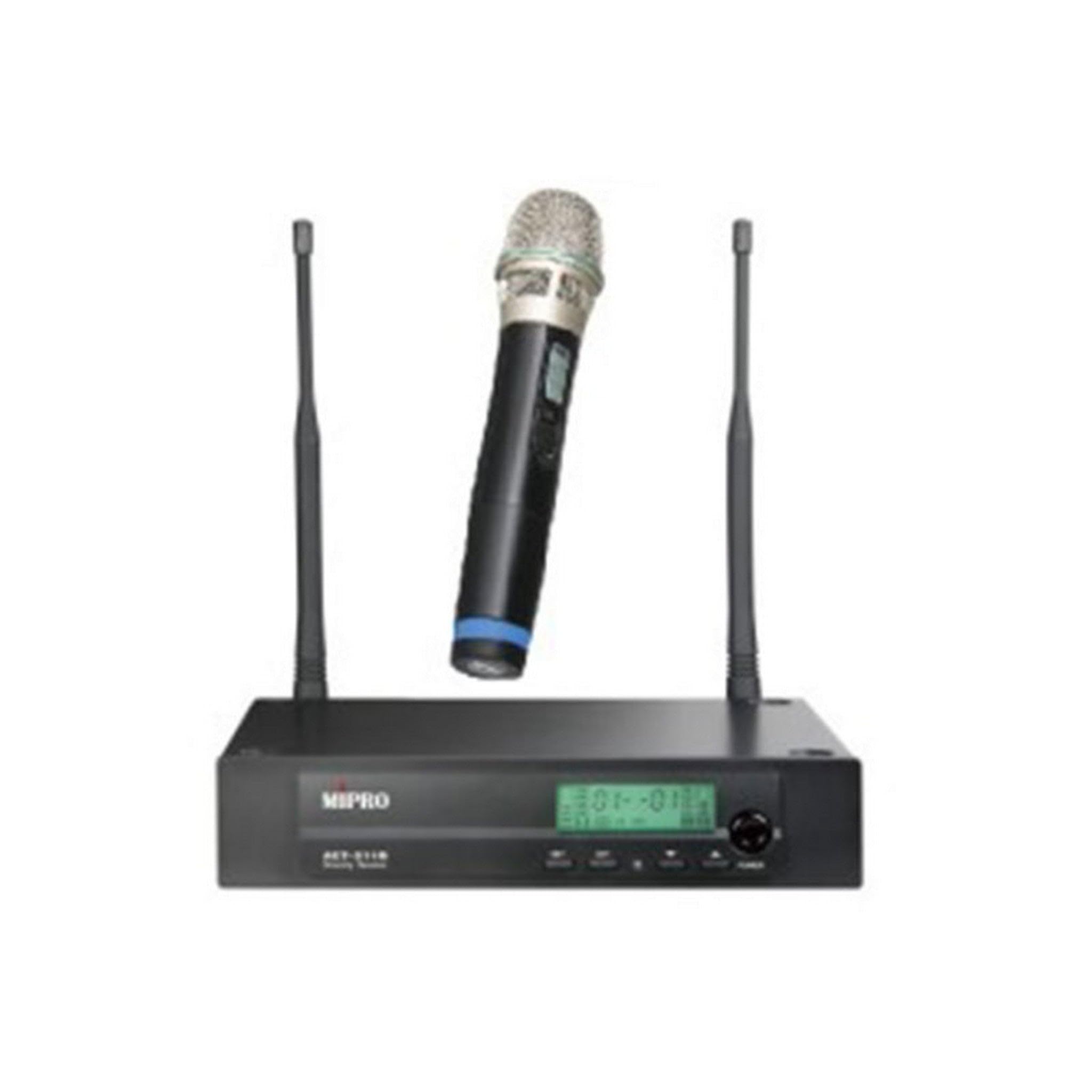
Figure 1: The MIPRO ACT-311/ACT-32H Single-Channel Handheld Wireless System, showing the receiver and handheld microphone.
4. സജ്ജീകരണം
Follow these steps to set up your MIPRO wireless system.
4.1. റിസീവർ പ്ലേസ്മെന്റ്
- Place the ACT-311 receiver in a location free from obstructions and away from potential sources of interference (e.g., computers, digital processors, other wireless devices).
- Ensure the receiver's antennas are fully extended and positioned vertically for optimal signal reception.
- Maintain a clear line of sight between the receiver and the area where the transmitter will be used.
4.2. പവർ കണക്ഷൻ
- Connect the supplied power adapter to the DC input jack on the rear panel of the ACT-311 receiver.
- Plug the power adapter into an appropriate AC power outlet.
- Do not power on the receiver yet.
4.3. ഓഡിയോ ഔട്ട്പുട്ട് കണക്ഷൻ
റിസീവറിന്റെ ഓഡിയോ ഔട്ട്പുട്ട് നിങ്ങളുടെ മിക്സറുമായി ബന്ധിപ്പിക്കുക, amplifier, or sound system.
- Balanced Output (XLR): Use an XLR cable to connect the receiver's XLR output to a balanced input on your mixer.
- Unbalanced Output (1/4" Phone Jack): Use a 1/4" phone jack cable to connect the receiver's unbalanced output to an unbalanced input on your mixer or ampജീവൻ.
4.4. ട്രാൻസ്മിറ്റർ ബാറ്ററി ഇൻസ്റ്റാളേഷൻ
- Unscrew the lower part of the ACT-32H handheld microphone to reveal the battery compartment.
- Insert two fresh AA batteries, observing the correct polarity (+/-) as indicated inside the compartment.
- Securely screw the lower part back onto the microphone.
5. പ്രവർത്തന നിർദ്ദേശങ്ങൾ
This section details how to operate your MIPRO wireless system.
5.1. പവർ ഓൺ/ഓഫ്
- Receiver (ACT-311): Press the power button on the front panel. The LCD display will illuminate.
- Transmitter (ACT-32H): Slide the power switch on the handheld microphone to the "ON" position. The power indicator will light up.
- Always power on the receiver before the transmitter, and power off the transmitter before the receiver.
5.2. Frequency Synchronization (ACT Function)
MIPRO's patented ACT (Automatic Channel Targeting) function allows for quick and precise frequency matching between the receiver and transmitter.
- Ensure both the receiver and transmitter are powered on.
- On the ACT-311 receiver, press the ആക്റ്റ് button. The ACT indicator on the receiver will flash.
- Align the ACT sync port on the ACT-32H handheld microphone (usually near the base or battery compartment) with the ACT window on the receiver.
- Hold them together within a few centimeters until the receiver's ACT indicator stops flashing and the transmitter's frequency display matches the receiver's.
- The system is now synchronized and ready for use.
5.3. Channel Selection (Auto Scan)
Use the Auto Scan function to find the clearest available frequency channel.
- On the ACT-311 receiver, press the സ്കാൻ ചെയ്യുക ബട്ടൺ.
- The receiver will automatically scan for an interference-free channel.
- Once a clear channel is found, the receiver will display it.
- Perform the ACT synchronization process (Section 5.2) to match the transmitter to this newly selected channel.
5.4. വോളിയം അഡ്ജസ്റ്റ്മെൻ്റ്
Adjust the audio output level of the receiver using the വോളിയം control knob on the front panel of the ACT-311. Start with a low volume and gradually increase it to a suitable level on your mixer or ampജീവൻ.
5.5. മൈക്രോഫോൺ ഉപയോഗം
- Hold the ACT-32H microphone approximately 2-6 inches (5-15 cm) from your mouth for optimal vocal pickup.
- Avoid covering the microphone grille with your hand, as this can affect sound quality and signal transmission.
- Be aware of the microphone's unidirectional polar pattern, which means it primarily picks up sound from the front, reducing background noise.
6. പരിപാലനം
Proper maintenance ensures the longevity and optimal performance of your wireless system.
6.1. വൃത്തിയാക്കൽ
- Wipe the receiver and transmitter with a soft, dry cloth.
- ദുശ്ശാഠ്യമുള്ള അഴുക്കിന്, ചെറുതായി ഡി ഉപയോഗിക്കുകamp തുണി പിന്നീട് നന്നായി ഉണക്കുക.
- അബ്രാസീവ് ക്ലീനറുകളോ, ലായകങ്ങളോ, കഠിനമായ രാസവസ്തുക്കളോ ഉപയോഗിക്കരുത്, കാരണം ഇവ ഫിനിഷിനോ ആന്തരിക ഘടകങ്ങളോ നശിപ്പിക്കും.
- Periodically clean the microphone grille to prevent debris buildup.
6.2. ബാറ്ററി മാറ്റിസ്ഥാപിക്കൽ
- Replace the AA batteries in the ACT-32H transmitter when the low battery indicator appears on the microphone or receiver, or if you notice a decrease in performance.
- Always use fresh, high-quality alkaline or rechargeable batteries.
- ട്രാൻസ്മിറ്റർ ദീർഘനേരം ഉപയോഗിക്കുന്നില്ലെങ്കിൽ, ചോർച്ച തടയാൻ ബാറ്ററികൾ നീക്കം ചെയ്യുക.
6.3. സംഭരണം
- Store the system in a cool, dry place, away from direct sunlight, extreme temperatures, and high humidity.
- If transporting, use a protective case to prevent physical damage.
7. പ്രശ്നപരിഹാരം
If you encounter issues with your MIPRO wireless system, refer to the following common problems and solutions.
7.1. ശബ്ദമില്ല
- പവർ പരിശോധിക്കുക: Ensure both the receiver and transmitter are powered on and their respective power indicators are lit.
- കണക്ഷനുകൾ പരിശോധിക്കുക: Verify that the receiver's audio output is correctly connected to your mixer/amplifier and that all cables are secure.
- വോളിയം പരിശോധിക്കുക: Ensure the receiver's volume control is not set to minimum and that your mixer/amplifier input gain is appropriately set.
- Check Frequency: Confirm that the transmitter and receiver are synchronized to the same frequency. Perform ACT synchronization if necessary.
- ബാറ്ററികൾ പരിശോധിക്കുക: Replace the batteries in the handheld transmitter if they are low or depleted.
7.2. Interference or Signal Dropouts
- റിസീവർ പ്ലേസ്മെന്റ്: Relocate the receiver to a higher position or away from metal objects and other electronic devices that may cause interference.
- ആൻ്റിന സ്ഥാനം: Ensure receiver antennas are fully extended and positioned correctly.
- Scan for Clear Channel: Use the Auto Scan function on the receiver to find a new, clear frequency, then re-synchronize the transmitter.
- പ്രവർത്തന ശ്രേണി: Ensure the transmitter is within the recommended operating range of the receiver.
- ബാറ്ററി നില: Low transmitter batteries can cause signal instability. Replace them if needed.
7.3. Poor Sound Quality (Distortion, Weak Signal)
- Microphone Proximity: Ensure the microphone is held at an appropriate distance from the sound source (typically 2-6 inches).
- ഗെയിൻ സെറ്റിംഗ്സ്: Adjust the input gain on your mixer/amplifier. If the signal is too hot, it can cause distortion; if too low, it will be weak.
- ബാറ്ററി നില: Weak batteries can affect audio quality. Replace them.
- തടസ്സങ്ങൾ: ട്രാൻസ്മിറ്ററിനും റിസീവറിനും ഇടയിൽ ഭൗതികമായ തടസ്സങ്ങളൊന്നുമില്ലെന്ന് ഉറപ്പാക്കുക.
8 സ്പെസിഫിക്കേഷനുകൾ
Key technical specifications for the MIPRO ACT-311/ACT-32H Wireless System.
| ഫീച്ചർ | സ്പെസിഫിക്കേഷൻ |
|---|---|
| മോഡലിൻ്റെ പേര് | ACT-311/ACT-32H |
| ബ്രാൻഡ് | മിപ്രോ |
| ചാനലുകളുടെ എണ്ണം | 1 |
| ഫ്രീക്വൻസി പ്രതികരണം | 506-530 MHz (5A Band) |
| സിഗ്നൽ-ടു-നോയിസ് അനുപാതം | 70 ഡി.ബി |
| കണക്റ്റിവിറ്റി ടെക്നോളജി | വയർലെസ് |
| മൈക്രോഫോൺ ഫോം ഫാക്ടർ | ഹാൻഡ്ഹെൽഡ് |
| പോളാർ പാറ്റേൺ | ഏകദിശ |
| Power Source (Transmitter) | ബാറ്ററി പവർഡ് (AA) |
| ഇനത്തിൻ്റെ ഭാരം | 6 pounds (System total, approximate) |
9. വാറൻ്റിയും പിന്തുണയും
MIPRO products are designed for reliability and performance. For specific warranty information, please refer to the warranty card included with your product or visit the official MIPRO webസൈറ്റ്.
If you require technical assistance or have questions not covered in this manual, please contact your authorized MIPRO dealer or MIPRO customer support.