
ഉൽപ്പന്നം കഴിഞ്ഞുview
The JSAUX 12-in-1 RGB Docking Station (Model HB1201S) is designed to expand the connectivity and enhance the gaming experience for portable gaming consoles such as the Steam Deck (OLED), ROG Ally, Legion Go, and MSI Claw. This docking station features multiple ports for video output, data transfer, network connectivity, and power delivery, along with customizable RGB lighting.

ചിത്രം: കഴിഞ്ഞുview of the JSAUX 12-in-1 RGB Docking Station, highlighting its various ports and features including Gigabit Ethernet, USB C PD (100W), USB A 3.2 (10Gbps), DisplayPort 1.4 (4K@120Hz), HDMI 2.1 (4K@120Hz), SD card slot, TF card slot, USB C 3.2 (10Gbps, no video output), IN: USB C (HOST), Retractable Stand, RGB Touch Switch, 3.5mm audio interface, USB A 2.0 (480Mbps), and RGB Light Strip.
പാക്കേജ് ഉള്ളടക്കം
- JSAUX 12-in-1 RGB Docking Station (HB1201S)
- USB-C to USB-C Host Cable
- ഉപയോക്തൃ മാനുവൽ

Video: A person unboxes the JSAUX RGB Docking Station, showing the purple transparent dock and the included USB-C to USB-C cable. This video demonstrates the physical contents of the product packaging.
സജ്ജീകരണ നിർദ്ദേശങ്ങൾ
- പവർ കണക്ഷൻ: Connect a 100W Power Delivery (PD) charger (not included) to the USB-C PD port on the docking station.
- Host Device Connection: Use the provided USB-C to USB-C cable to connect your gaming console (Steam Deck, ROG Ally, Legion Go, etc.) to the 'IN: USB C (HOST)' port on the docking station.
- ഡിസ്പ്ലേ കണക്ഷൻ:
- For single display: Connect your monitor or TV to either the HDMI (4K@120Hz) or DisplayPort (4K@120Hz) output.
- For dual display: Connect two monitors using both the HDMI and DisplayPort outputs. Note that dual-screen support maxes out at 4K@60Hz or 2K@120Hz.

Image: A Steam Deck is shown docked and connected to two external monitors, demonstrating the dual display output capability via HDMI and DisplayPort.
- ഇഥർനെറ്റ് കണക്ഷൻ: For a stable wired internet connection, connect an Ethernet cable to the Gigabit Ethernet port on the docking station.
- യുഎസ്ബി പെരിഫറലുകൾ: Connect your USB devices (keyboard, mouse, external drives, etc.) to the available USB A 3.2 (10Gbps), USB C 3.2 (10Gbps), or USB A 2.0 (480Mbps) ports.
- ഓഡിയോ ഔട്ട്പുട്ട്: Connect headphones or external speakers to the 3.5mm audio jack for audio output.
- മെമ്മറി കാർഡുകൾ: Insert SD or TF cards into their respective slots for data access. Note: Simultaneous reading of SD and TF cards is not supported.
പ്രവർത്തന നിർദ്ദേശങ്ങൾ
RGB ലൈറ്റിംഗ് മോഡുകൾ
The docking station features six dynamic RGB lighting modes. You can cycle through these modes or turn the lighting on/off using the top-mounted touch switch. For custom lighting control, connect the USB-C upstream port to a PC and use OpenRGB software.
- നേരിട്ട്
- ശ്വസനം
- മഴവില്ല് തരംഗം
- Spectrum Cycle
- Race Cycle
- സ്റ്റാക്കിംഗ്
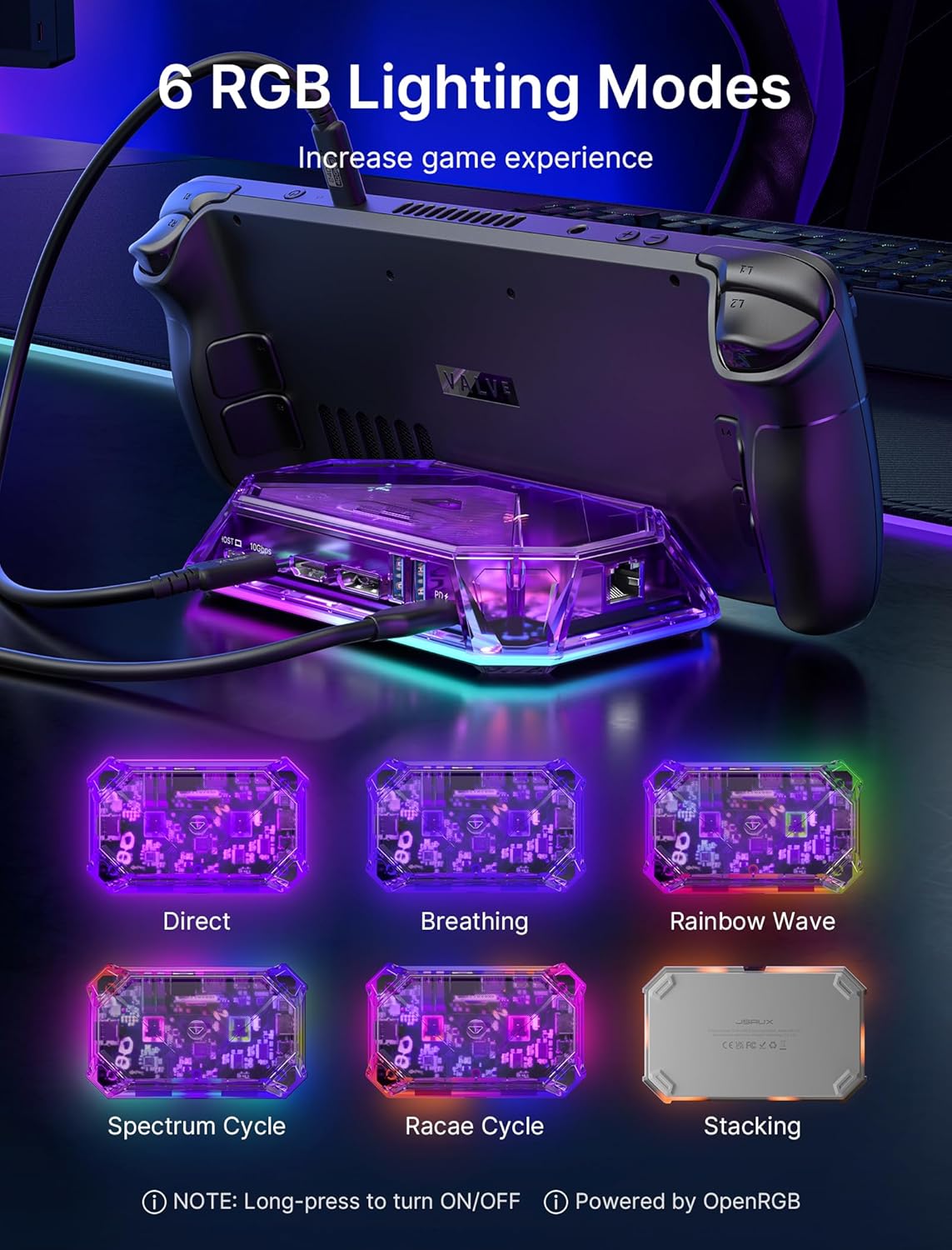
Image: The JSAUX RGB Docking Station is shown with a Steam Deck, illustrating six different RGB lighting modes: Direct, Breathing, Rainbow Wave, Spectrum Cycle, Race Cycle, and Stacking. Instructions for turning on/off and OpenRGB software are also visible.
Advanced Display Features
The HDMI and DisplayPort outputs support 4K@120Hz with advanced features for an enhanced visual experience:
- വേരിയബിൾ പുതുക്കൽ നിരക്ക് (VRR): Synchronizes display refresh rate with the console's frame rate to eliminate screen tearing and stuttering.
- സ്വയമേവ കുറഞ്ഞ ലേറ്റൻസി മോഡ് (ALLM): Automatically switches the display to a low-latency mode for smoother gaming.
- ഹൈ ഡൈനാമിക് റേഞ്ച് (HDR): Provides a wider range of colors and contrast for more vibrant and realistic images.

Image: A person is shown playing a video game on a large curved monitor, with the JSAUX docking station connected to a handheld console. The image highlights features like VRR (Variable Refresh Rate), ALLM (Auto Low Latency Mode), HDR (High Dynamic Range), and QFT (Quick Frame Transport) for an immersive experience.
ഡാറ്റാ കൈമാറ്റവും ചാർജിംഗും
The docking station offers high-speed data transfer and efficient power delivery:
- ഡാറ്റ കൈമാറ്റം: USB A 3.2 and USB C 3.2 ports support data transfer speeds up to 10Gbps.
- പവർ ഡെലിവറി: The USB C PD 3.0 port supports up to 100W fast charging for your connected console or other compatible devices.

Image: The JSAUX docking station is shown with multiple USB cables connected, emphasizing the 10Gbps data transfer speed of its USB 3.2 ports.
മെയിൻ്റനൻസ്
To ensure the longevity and optimal performance of your JSAUX 12-in-1 RGB Docking Station, follow these maintenance guidelines:
- വൃത്തിയാക്കൽ: Use a soft, dry cloth to clean the exterior of the docking station. Avoid using liquid cleaners or abrasive materials.
- സംഭരണം: നേരിട്ടുള്ള സൂര്യപ്രകാശത്തിൽ നിന്നും കടുത്ത താപനിലയിൽ നിന്നും അകന്ന് തണുത്തതും വരണ്ടതുമായ സ്ഥലത്ത് ഡോക്കിംഗ് സ്റ്റേഷൻ സൂക്ഷിക്കുക.
- ഫേംവെയർ അപ്ഡേറ്റുകൾ: Periodically check the official JSAUX website for any available firmware updates. Keeping the firmware updated can improve compatibility and performance.
- ശ്രദ്ധയോടെ കൈകാര്യം ചെയ്യുക: ഉപകരണം ഉപേക്ഷിക്കുകയോ ശക്തമായ ആഘാതങ്ങൾക്ക് വിധേയമാക്കുകയോ ചെയ്യരുത്.
ട്രബിൾഷൂട്ടിംഗ്
നിങ്ങളുടെ ഡോക്കിംഗ് സ്റ്റേഷനിൽ പ്രശ്നങ്ങൾ നേരിടുകയാണെങ്കിൽ, ഇനിപ്പറയുന്ന പൊതുവായ പ്രശ്നങ്ങളും പരിഹാരങ്ങളും പരിശോധിക്കുക:
| പ്രശ്നം | സാധ്യമായ കാരണം | പരിഹാരം |
|---|---|---|
| No video output or flickering screen | Loose cable connection, incompatible display settings, power issue. | Ensure all cables (USB-C host, HDMI/DisplayPort, power) are securely connected. Check your console's display settings and the monitor's input source. Verify the power adapter provides sufficient wattage (100W PD recommended). Try a different HDMI/DisplayPort cable. |
| USB ഉപകരണങ്ങൾ തിരിച്ചറിഞ്ഞില്ല. | Loose connection, device driver issue, power limitation. | Reconnect the USB device. Ensure your console's drivers are up to date. If using multiple high-power USB devices, ensure adequate power is supplied to the dock. |
| Ethernet connection not working | Loose cable, network configuration, driver issue. | Check the Ethernet cable connection. Verify network settings on your console. Ensure the console's network drivers are updated. |
| ചാർജിംഗ് മന്ദഗതിയിലാണ് അല്ലെങ്കിൽ പ്രവർത്തിക്കുന്നില്ല | Insufficient power adapter, faulty cable. | Use a 100W Power Delivery (PD) charger. Ensure the USB-C PD cable is functioning correctly. |
| RGB ലൈറ്റിംഗ് പ്രവർത്തിക്കുന്നില്ല | Lighting off, software issue. | Press the top-mounted touch switch to cycle through modes or turn on/off. If using OpenRGB, ensure the software is correctly configured and the dock is connected to a PC. |
| VRR/ALLM/HDR not working | Display incompatibility, console settings. | Ensure your connected display (monitor/TV) supports VRR, ALLM, and HDR. Verify these features are enabled in your console's display settings. |
സ്പെസിഫിക്കേഷനുകൾ
| ഫീച്ചർ | വിശദാംശങ്ങൾ |
|---|---|
| മോഡൽ | HB1201S |
| അളവുകൾ | 3.62"L x 5.9"W x 1.11"H (9.19 x 14.99 x 2.82 സെ.മീ) |
| ഭാരം | 15.2 ഔൺസ് (0.43 കി.ഗ്രാം) |
| തുറമുഖങ്ങൾ | 12 ആകെ |
| വീഡിയോ ഔട്ട്പുട്ട് | 1x HDMI 2.1 (4K@120Hz), 1x DisplayPort 1.4 (4K@120Hz) |
| USB പോർട്ടുകൾ | 2x USB A 3.2 (10Gbps), 1x USB C 3.2 (10Gbps, no video output), 1x USB A 2.0 (480Mbps) |
| പവർ ഡെലിവറി | 1x USB C PD 3.0 (up to 100W) |
| ഇഥർനെറ്റ് | 1x Gigabit Ethernet (1Gbps) |
| ഓഡിയോ | 1x 3.5mm ഓഡിയോ ജാക്ക് |
| കാർഡ് റീഡറുകൾ | 1x SD Card Slot (480Mbps), 1x TF Card Slot (480Mbps) |
| അനുയോജ്യമായ ഉപകരണങ്ങൾ | Valve Steam Deck, Steam Deck OLED, ASUS ROG Ally, Lenovo Legion Go, MSI Claw, OneXPlayer, AYANEO Slide, etc. |
| പ്രത്യേക സവിശേഷതകൾ | VRR, ALLM, HDR, 6 RGB Lighting Modes, OpenRGB Software Support |
വാറൻ്റിയും പിന്തുണയും
JSAUX products are designed for reliability and performance. For warranty information, technical support, or to inquire about replacement parts, please visit the official JSAUX webസൈറ്റ് അല്ലെങ്കിൽ അവരുടെ ഉപഭോക്തൃ സേവനവുമായി നേരിട്ട് ബന്ധപ്പെടുക.
ഉദ്യോഗസ്ഥൻ Webസൈറ്റ്: www.jsaux.com
ഏതെങ്കിലും വാറന്റി ക്ലെയിമുകൾക്കായി നിങ്ങളുടെ വാങ്ങിയതിന്റെ തെളിവ് സൂക്ഷിക്കുക.