
ആമുഖം
This manual provides comprehensive instructions for the proper setup, operation, and maintenance of your MIPRO ACT-32H UHF Handheld Transmitter. Please read this manual thoroughly before using the device to ensure optimal performance and longevity.
The MIPRO ACT-32H UHF Handheld Transmitter is designed for professional audio applications, offering reliable wireless performance and high-fidelity sound reproduction. Its robust construction and advanced features make it suitable for singers, presenters, and audio/video professionals.
ഉൽപ്പന്നം കഴിഞ്ഞുview
The ACT-32H handheld transmitter features a durable housing, an integrated microphone capsule, and controls for power and frequency selection.
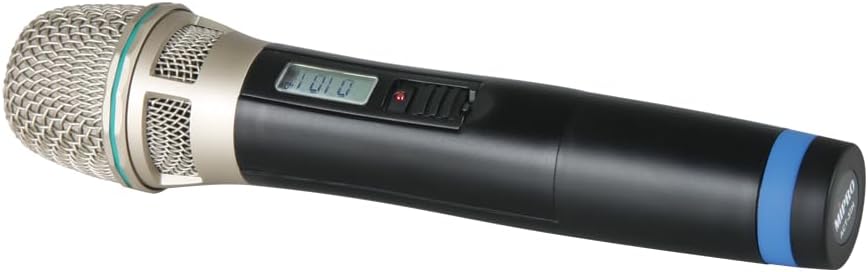
Figure 1: MIPRO ACT-32H UHF Handheld Transmitter. This image shows the black handheld microphone with a silver mesh grille at the top, a small display screen, and a power switch on the body. A blue band is visible near the bottom of the handle.
പ്രധാന ഘടകങ്ങൾ:
- മൈക്രോഫോൺ ഗ്രിൽ: Protects the microphone capsule and helps shape the sound.
- കാപ്സ്യൂൾ: High-quality condenser capsule for clear audio capture.
- LCD ഡിസ്പ്ലേ: Shows frequency, battery status, and other operational information.
- Power/Mute Switch: Controls power on/off and mutes the microphone output.
- ബാറ്ററി കമ്പാർട്ട്മെൻ്റ്: പ്രവർത്തനത്തിന് ആവശ്യമായ ബാറ്ററികൾ ഉണ്ട്.
- ആൻ്റിന: Integrated antenna for wireless signal transmission.
ബോക്സിൽ എന്താണുള്ളത്
Upon opening the package, please verify that all listed items are present and in good condition:
- MIPRO ACT-32H UHF Handheld Transmitter (Microphone)
- ഉപയോക്തൃ മാനുവൽ (ഈ പ്രമാണം)
- (Note: Batteries may or may not be included depending on the specific package. Please check packaging for details.)
സജ്ജമാക്കുക
1. ബാറ്ററി ഇൻസ്റ്റാളേഷൻ:
- Unscrew the bottom cap of the handheld transmitter to access the battery compartment.
- Insert two fresh AA alkaline batteries, observing the correct polarity (+/-) as indicated inside the compartment.
- Securely screw the bottom cap back onto the transmitter.
2. റിസീവറുമായി ജോടിയാക്കൽ:
The ACT-32H transmitter must be paired with a compatible MIPRO wireless receiver (sold separately) to function. Refer to your receiver's user manual for specific pairing instructions. Generally, the process involves:
- Powering on both the transmitter and the receiver.
- Initiating the ACT (Automatic Channel Targeting) sync function on the receiver.
- Aligning the IR (Infrared) ports of the transmitter and receiver for data transfer.
- Confirming successful pairing on both devices' displays.
പ്രധാനപ്പെട്ടത്: Ensure the transmitter and receiver are set to the same frequency band (e.g., 904-925 MHz for this model) to avoid compatibility issues.
ഓപ്പറേഷൻ
പവർ ഓൺ/ഓഫ്:
- To power on, slide the power switch to the "ON" position. The LCD display will illuminate.
- പവർ ഓഫ് ചെയ്യാൻ, പവർ സ്വിച്ച് "ഓഫ്" സ്ഥാനത്തേക്ക് സ്ലൈഡ് ചെയ്യുക.
നിശബ്ദ പ്രവർത്തനം:
- While powered on, briefly slide the power switch to the "MUTE" position and release to mute the microphone. The LCD display may indicate "MUTE".
- Repeat the action to unmute the microphone.
മോണിറ്ററിംഗ് ബാറ്ററി നില:
The LCD display on the transmitter will show the current battery level. Replace batteries promptly when the low battery indicator appears to avoid interruption during use.
ഒപ്റ്റിമൽ ഉപയോഗം:
- Hold the microphone approximately 2-6 inches from your mouth for best vocal pickup.
- Avoid covering the antenna area (typically at the bottom of the microphone) with your hand, as this can reduce wireless range and signal quality.
- Maintain a clear line of sight between the transmitter and the receiver whenever possible.
മെയിൻ്റനൻസ്
- വൃത്തിയാക്കൽ: Use a soft, dry cloth to clean the exterior of the transmitter. Do not use liquid cleaners or solvents.
- ബാറ്ററി കെയർ: ട്രാൻസ്മിറ്റർ ദീർഘനേരം ഉപയോഗിക്കുന്നില്ലെങ്കിൽ, ചോർച്ചയും കേടുപാടുകളും തടയാൻ ബാറ്ററികൾ നീക്കം ചെയ്യുക.
- സംഭരണം: ട്രാൻസ്മിറ്റർ തണുത്തതും വരണ്ടതുമായ സ്ഥലത്ത് സൂക്ഷിക്കുക, നേരിട്ടുള്ള സൂര്യപ്രകാശത്തിൽ നിന്നും കടുത്ത താപനിലയിൽ നിന്നും അകറ്റി നിർത്തുക.
- കൈകാര്യം ചെയ്യൽ: While robust, avoid dropping or subjecting the transmitter to severe impacts.
ട്രബിൾഷൂട്ടിംഗ്
| പ്രശ്നം | സാധ്യമായ കാരണം | പരിഹാരം |
|---|---|---|
| മൈക്രോഫോണിൽ നിന്ന് ശബ്ദമില്ല |
|
|
| ഇടവിട്ടുള്ള സിഗ്നൽ അല്ലെങ്കിൽ സ്റ്റാറ്റിക് |
|
|
| മോശം ശബ്ദ നിലവാരം |
|
|
സ്പെസിഫിക്കേഷനുകൾ
| ഫീച്ചർ | വിശദാംശങ്ങൾ |
|---|---|
| മോഡൽ | ACT-32H |
| ബ്രാൻഡ് | മിപ്രോ |
| ഫ്രീക്വൻസി പ്രതികരണം | 904-925 MHz (UHF) |
| മൈക്രോഫോൺ ഫോം ഫാക്ടർ | ഹാൻഡ്ഹെൽഡ് |
| പോളാർ പാറ്റേൺ | ഏകദിശ |
| പവർ ഉറവിടം | ബാറ്ററി പവർഡ് (AA) |
| ഇനത്തിൻ്റെ ഭാരം | 4 പൗണ്ട് |
| പ്രത്യേക സവിശേഷതകൾ | വയർലെസ്, ഭാരം കുറഞ്ഞ |
| അനുയോജ്യമായ ഉപകരണങ്ങൾ | പിഎ സിസ്റ്റം |
വാറൻ്റിയും പിന്തുണയും
MIPRO products are designed for durability and performance. For specific warranty information, please refer to the warranty card included with your product or visit the official MIPRO webവാറന്റി ക്ലെയിമുകൾക്കുള്ള വാങ്ങലിന്റെ തെളിവായി നിങ്ങളുടെ വാങ്ങൽ രസീത് സൂക്ഷിക്കുക.
For technical support, troubleshooting assistance beyond this manual, or service inquiries, please contact MIPRO customer support or your authorized dealer. Contact information can typically be found on the manufacturer's webസൈറ്റ്.
Note: Protection plans may be available for purchase separately from third-party providers. These plans are distinct from the manufacturer's warranty.