
1. ആമുഖം
The DOOGEE S200 Plus 5G Rugged Phone is engineered for durability and high performance, designed to withstand challenging environments while providing advanced smartphone functionalities. This manual provides essential information for setting up, operating, maintaining, and troubleshooting your device.

Figure 1.1: DOOGEE S200 Plus 5G Rugged Phone with included accessories.
2. സജ്ജീകരണ ഗൈഡ്
2.1 പാക്കേജ് ഉള്ളടക്കം
സജ്ജീകരണവുമായി മുന്നോട്ടുപോകുന്നതിനുമുമ്പ് എല്ലാ ഇനങ്ങളും പാക്കേജിൽ ഉണ്ടെന്ന് ഉറപ്പാക്കുക.
- 1 x DOOGEE S200 Plus Cellphone
- 1 x ടൈപ്പ്-സി യുഎസ്ബി കേബിൾ
- 1 x Charger (33W)
- 1 x Silk screen printing Protective Film
- 1 x Anti-explosion film
- 1 x പാക്കിംഗ് ബോക്സ്
- 1 x ഉപയോക്തൃ മാനുവൽ
- 1 x വാറൻ്റി കാർഡ്

Figure 2.1: Contents of the DOOGEE S200 Plus retail package.
2.2 പ്രാരംഭ ചാർജിംഗ്
Before first use, fully charge the device using the provided 33W fast charger and Type-C USB cable. The phone features a 10100mAh battery.

Figure 2.2: The DOOGEE S200 Plus supports 33W fast charging for its 10100mAh battery.
2.3 സിം കാർഡ് ഇൻസ്റ്റാളേഷൻ
Locate the SIM card tray on the side of the device. Use the SIM ejector tool (not explicitly listed but standard) to open the tray. Insert your Nano-SIM card(s) and/or microSD card into the designated slots. Ensure the tray is fully reinserted to maintain water and dust resistance.
കുറിപ്പ്: This device supports 5G networks. However, it is not compatible with Verizon and AT&T networks. Please verify compatibility with your local frequency bands before attempting to use cellular services.
3. പ്രവർത്തന നിർദ്ദേശങ്ങൾ
3.1 പവർ ഓൺ/ഓഫ്, പ്രാരംഭ സജ്ജീകരണം
Press and hold the power button located on the side of the phone to turn it on. Follow the on-screen prompts to complete the initial setup, including language selection, Wi-Fi connection, and Google account setup.
3.2 Main Display Features
The DOOGEE S200 Plus features a 6.72-inch FHD+ IPS display with a 120Hz refresh rate, providing a smooth visual experience. The resolution is 2400x1080.

Figure 3.1: The 6.72-inch FHD+ display with 120Hz refresh rate.
3.3 Rear AMOLED Multifunctional Display
A unique feature of the S200 Plus is its 1.32-inch AMOLED rear display. This secondary screen can be used for quick access to information and controls without activating the main display.
- അറിയിപ്പുകൾ: View incoming messages and alerts.
- സംഗീത നിയന്ത്രണം: Manage media playback.
- കോമ്പസ്: Utilize the built-in compass for navigation.
- SOS സിഗ്നൽ: Activate a flashing SOS signal for emergencies.
- Custom Signature: Personalize the display with custom text or dynamic wallpapers.
- സമയ പ്രദർശനം: Shows time and date.
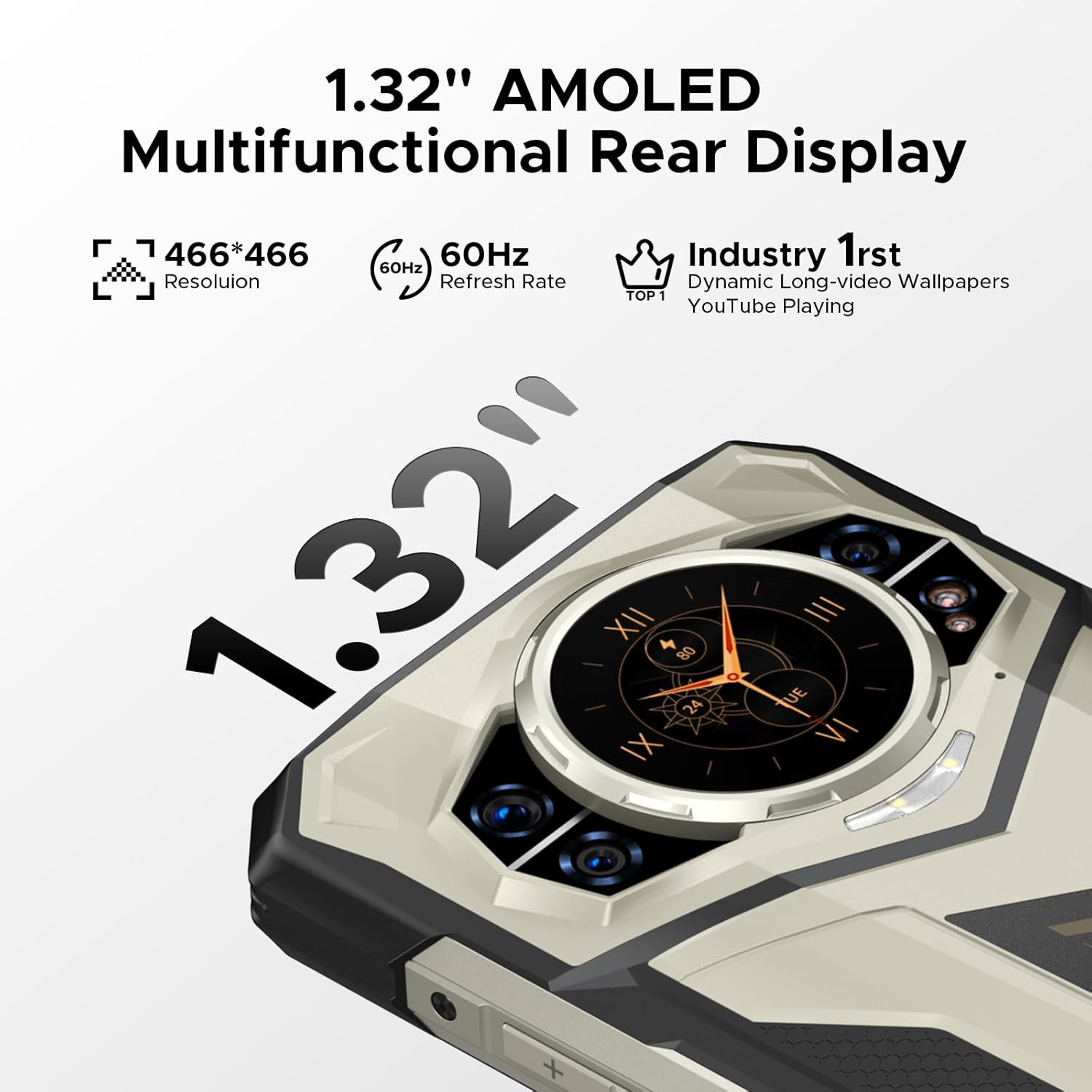
Figure 3.2: The 1.32-inch AMOLED multifunctional rear display.

Figure 3.3: Multi-functional capabilities of the rear display.
3.4 ക്യാമറ സിസ്റ്റം
The phone is equipped with a versatile camera setup for various photography needs.
- പ്രധാന ക്യാമറ: 100MP AI camera for high-resolution photos.
- രാത്രി കാഴ്ച ക്യാമറ: 20MP with infrared for clear images in low-light conditions.
- മുൻ ക്യാമറ: സെൽഫികൾക്കും വീഡിയോ കോളുകൾക്കും 32MP.
- മാക്രോ ക്യാമറ: 2MP for close-up shots.
- വീഡിയോ റെക്കോർഡിംഗ്: 4K വീഡിയോ റെക്കോർഡിംഗിനെ പിന്തുണയ്ക്കുന്നു.
- ഫീച്ചറുകൾ: Includes underwater mode, HDR, 360° panorama, and various AI-enhanced modes.

ചിത്രം 3.4: ഓവർview of the DOOGEE S200 Plus camera system.
3.5 പ്രകടനവും സംഭരണവും
Powered by a 4nm D7300 octa-core processor, the S200 Plus offers efficient performance. It comes with 32GB of RAM (expandable) and 512GB of internal storage, which can be further expanded up to 2TB via a microSD card.

Figure 3.5: The Dimensity D7300 4nm 5G Octa-core Processor.

Figure 3.6: Memory and storage configuration (32GB RAM + 512GB ROM).
3.6 ഈട് സവിശേഷതകൾ
The DOOGEE S200 Plus is built to be rugged, with IP68, IP69K, and MIL-STD-810H certifications, ensuring resistance to water, dust, and drops.

Figure 3.7: Durability features: IP68, IP69K, and MIL-STD-810H compliance.
3.7 അധിക സവിശേഷതകൾ
- സുരക്ഷ: Side fingerprint sensor and Face Unlock for secure access.
- കണക്റ്റിവിറ്റി: NFC for contactless payments and data transfer, Wi-Fi 6E for faster wireless speeds.
- OTG പ്രവർത്തനം: Allows the phone to charge other devices.
- സ്മാർട്ട് സെൻസിംഗ്: Gesture sensing, flip to mute, smart answering, and screen sensing.
- പ്രത്യേക മോഡുകൾ: Game Mode for optimized gaming, Kids Mode for restricted access, and Glove Mode for touch sensitivity with gloves.

Figure 3.8: Security and connectivity features.

Figure 3.9: Specialized operating modes.
3.8 ഉൽപ്പന്നം കഴിഞ്ഞുview വീഡിയോ
ഒരു വിഷ്വൽ ഓവറിനായിview of the DOOGEE S200 Plus 5G Rugged Phone's features and capabilities, please watch the official product video below.
വീഡിയോ 3.1: ഔദ്യോഗിക ഉൽപ്പന്നം അവസാനിച്ചുview of the DOOGEE S200 Plus 5G Rugged Phone, showcasing its design, durability, and key features.
4. പരിപാലനം
4.1 നിങ്ങളുടെ ഉപകരണം വൃത്തിയാക്കൽ
Due to its rugged design, the S200 Plus can be cleaned with water and mild soap if it gets dirty. Ensure all ports are securely closed before washing. Dry thoroughly with a soft cloth. Avoid using harsh chemicals or abrasive materials.
4.2 ബാറ്ററി കെയർ
To maximize battery lifespan, avoid exposing the device to extreme temperatures (hot or cold). Do not fully discharge the battery regularly. Use only the provided charger or a certified compatible charger.
4.3 സോഫ്റ്റ്വെയർ അപ്ഡേറ്റുകൾ
Regularly check for and install software updates to ensure optimal performance, security, and access to new features. Updates can typically be found in the phone's settings under "System" or "About phone".
5. പ്രശ്നപരിഹാരം
This section addresses common issues you might encounter with your DOOGEE S200 Plus.
5.1 നെറ്റ്വർക്ക് കണക്റ്റിവിറ്റി പ്രശ്നങ്ങൾ
- സിഗ്നൽ ഇല്ല/പരിമിത സേവനം: Ensure your SIM card is correctly inserted. Verify that your carrier's frequency bands are supported by the device (Verizon and AT&T are not supported). Try restarting the phone.
- Slow Data Speeds: Check your data plan and signal strength. Move to an area with better network coverage.
5.2 ചാർജിംഗ് പ്രശ്നങ്ങൾ
- ഫോൺ ചാർജ് ചെയ്യുന്നില്ല: Ensure the Type-C USB cable is securely connected to both the phone and the charger. Try a different power outlet. Inspect the charging port for debris. Use only the original charger and cable.
- സ്ലോ ചാർജിംഗ്: Verify you are using the 33W fast charger. Close background applications that consume significant power during charging.
5.3 Camera Malfunctions
- Camera App Freezes/Crashes: Clear the cache and data of the camera application in Settings > Apps. Restart the phone.
- മോശം ചിത്രത്തിന്റെ ഗുണനിലവാരം: Ensure the camera lens is clean and free of smudges. Check lighting conditions.
5.4 Rear Display Battery Drain
- Excessive Battery Consumption: While the rear display is convenient, continuous use or certain dynamic display modes can increase battery drain. Adjust settings to reduce refresh rate or use simpler display modes if battery life is a concern.
5.5 പൊതുവായ പ്രകടന പ്രശ്നങ്ങൾ
- Device Lag/Unresponsiveness: Close unnecessary background applications. Clear cached data. Restart the device. Ensure sufficient free storage space.
- ആപ്പുകൾ ക്രാഷാകുന്നു: Update the problematic app to its latest version. Reinstall the app if the issue persists.
6 സ്പെസിഫിക്കേഷനുകൾ
| ഫീച്ചർ | വിശദാംശങ്ങൾ |
|---|---|
| മോഡലിൻ്റെ പേര് | എസ് 200 പ്ലസ് |
| ഓപ്പറേറ്റിംഗ് സിസ്റ്റം | ആൻഡ്രോയിഡ് 14 |
| പ്രോസസ്സർ | 4nm D7300 Octa-core CPU (2.5GHz) |
| റാം | 32GB (12GB + 20GB Extended) |
| ആന്തരിക സംഭരണം | 512 ജിബി |
| വികസിപ്പിക്കാവുന്ന സംഭരണം | മൈക്രോ എസ്ഡി വഴി 2TB വരെ |
| പ്രധാന ഡിസ്പ്ലേ | 6.72-inch FHD+ IPS (2400x1080), 120Hz Refresh Rate |
| പിൻ ഡിസ്പ്ലേ | 1.32-inch AMOLED (466x466), 60Hz Refresh Rate |
| പിൻ ക്യാമറ | 100MP AI Main Camera, 20MP Night Vision Camera, 2MP Macro Camera |
| മുൻ ക്യാമറ | 32എംപി |
| ബാറ്ററി ശേഷി | 10100mAh |
| ചാർജിംഗ് | 33W ഫാസ്റ്റ് ചാർജിംഗ്, 18W OTG റിവേഴ്സ് ചാർജിംഗ് |
| ഈട് റേറ്റിംഗുകൾ | IP68, IP69K, MIL-STD-810H (Waterproof, Dust-proof, Drop-proof) |
| കണക്റ്റിവിറ്റി | 5G, Wi-Fi 6E, Bluetooth 5.4, NFC, GPS |
| ഓഡിയോ ജാക്ക് | 3.5 മി.മീ |
| അളവുകൾ | 7.6 x 4.1 x 2.3 ഇഞ്ച് (പാക്കേജ്) |
| ഇനത്തിൻ്റെ ഭാരം | 1 പൗണ്ട് |
7. വാറൻ്റിയും പിന്തുണയും
7.1 ഉൽപ്പന്ന വാറന്റി
The DOOGEE S200 Plus comes with a 2-വർഷ പരിമിത വാറൻ്റി from the manufacturer. Please refer to the included Warranty Card for detailed terms and conditions. This warranty covers manufacturing defects and malfunctions under normal use.
7.2 റിട്ടേൺ പോളിസി
A 30-ദിവസത്തെ പണം തിരികെ നൽകാനുള്ള ഗ്യാരണ്ടി is offered for eligible returns. Please consult your point of purchase for specific return procedures and conditions.
7.3 ഉപഭോക്തൃ പിന്തുണ
For technical assistance, troubleshooting, or any inquiries regarding your DOOGEE S200 Plus, 24/7 one-on-one online support is available. You can visit the official DOOGEE store on Amazon for more information and support resources: DOOGEE Amazon Store.