
DOOGEE S200-Silver Rugged Smartphone 5G
DOOGEE S200 Rugged Smartphone 5G User Manual
Model: S200-Silver Rugged Smartphone 5G | Brand: DOOGEE
ആമുഖം
Welcome to the user manual for your new DOOGEE S200 Rugged Smartphone. This guide provides essential information on setting up, operating, maintaining, and troubleshooting your device. The DOOGEE S200 is engineered for durability and high performance, featuring advanced capabilities suitable for various environments.

മുന്നിലും പിന്നിലും view of the DOOGEE S200 Rugged Smartphone, showcasing its robust design and rear display.
സജ്ജമാക്കുക
പാക്കേജ് ഉള്ളടക്കം
ആരംഭിക്കുന്നതിന് മുമ്പ്, നിങ്ങളുടെ പാക്കേജിൽ എല്ലാ ഇനങ്ങളും ഉണ്ടെന്ന് ദയവായി പരിശോധിക്കുക:
- 1 x DOOGEE S200 5G Cellphone
- 1 x ടൈപ്പ്-സി യുഎസ്ബി കേബിൾ
- 1 x Charger (33W)
- 1 x Anti-explosion film (Screen Protector)
- 1 x ഉപയോക്തൃ മാനുവൽ
പ്രാരംഭ ഉപകരണ സജ്ജീകരണം
- Insert SIM Card(s) and TF Card: Locate the SIM card tray on the side of the phone. Use the provided SIM ejector tool to open the tray. Insert your Nano-SIM card(s) and/or a TF (microSD) card into the designated slots. Ensure the tray is securely closed to maintain water and dust resistance.
- ഉപകരണം ചാർജ് ചെയ്യുക: Connect the Type-C USB cable to the phone's charging port and the other end to the 33W charger. Plug the charger into a power outlet. The phone's battery indicator will show charging progress. For optimal battery life, fully charge the device before first use.
- പവർ ഓൺ: Press and hold the Power button (usually on the side) until the DOOGEE logo appears. Follow the on-screen prompts to complete the initial setup, including language selection, Wi-Fi connection, and Google account sign-in.
Video demonstrating the unboxing and initial setup process for the DOOGEE S200 Rugged Smartphone.
നിങ്ങളുടെ ഉപകരണം പ്രവർത്തിപ്പിക്കുന്നു
പ്രദർശനവും ഇടപെടലും
The DOOGEE S200 features a 6.72-inch FHD+ display with a 120Hz refresh rate for smooth visuals and responsive touch. It also includes a unique 1.32-inch AMOLED rear display.
- പ്രധാന ഡിസ്പ്ലേ: Navigate through apps, browse the web, and enjoy multimedia content with vibrant colors and sharp details. The 120Hz refresh rate enhances gaming and scrolling experiences.
- Rear Display: This customizable AMOLED screen allows you to check time, date, notifications, battery status, control music, and answer calls without activating the main screen. It helps conserve power and provides quick access to essential information.

The 1.32-inch AMOLED rear display offers customizable options for quick information access.
പ്രകടനവും സംഭരണവും
Equipped with a Dimensity 7050 octa-core processor and 32GB RAM (12GB physical + 20GB virtual), the S200 delivers robust performance for multitasking and demanding applications. The 256GB internal storage can be expanded up to 2TB using a TF card.

Internal memory and storage architecture of the DOOGEE S200.
ക്യാമറ സവിശേഷതകൾ
The S200 features a versatile quad-camera setup:
- 100MP AI പ്രധാന ക്യാമറ: Captures high-resolution photos with enhanced clarity and AI-driven stabilization.
- 20MP നൈറ്റ് വിഷൻ ക്യാമറ: Allows for clear photography in low-light or complete darkness.
- 20MP മുൻ ക്യാമറ: ഉയർന്ന നിലവാരമുള്ള സെൽഫികൾക്കും വീഡിയോ കോളുകൾക്കും.
- 2MP മാക്രോ ക്യാമറ: വിശദമായ ക്ലോസ്-അപ്പ് ഷോട്ടുകൾക്കായി.

കഴിഞ്ഞുview of the DOOGEE S200's camera system.
ബാറ്ററിയും ചാർജിംഗും
The device is equipped with a 10100mAh battery, providing extended usage times. It supports 33W fast charging and OTG reverse charging.
- ചാർജിംഗ്: Use the provided 33W charger for rapid charging.
- OTG റിവേഴ്സ് ചാർജിംഗ്: Connect other compatible devices to your S200 using an OTG cable to charge them, effectively turning your phone into a power bank.
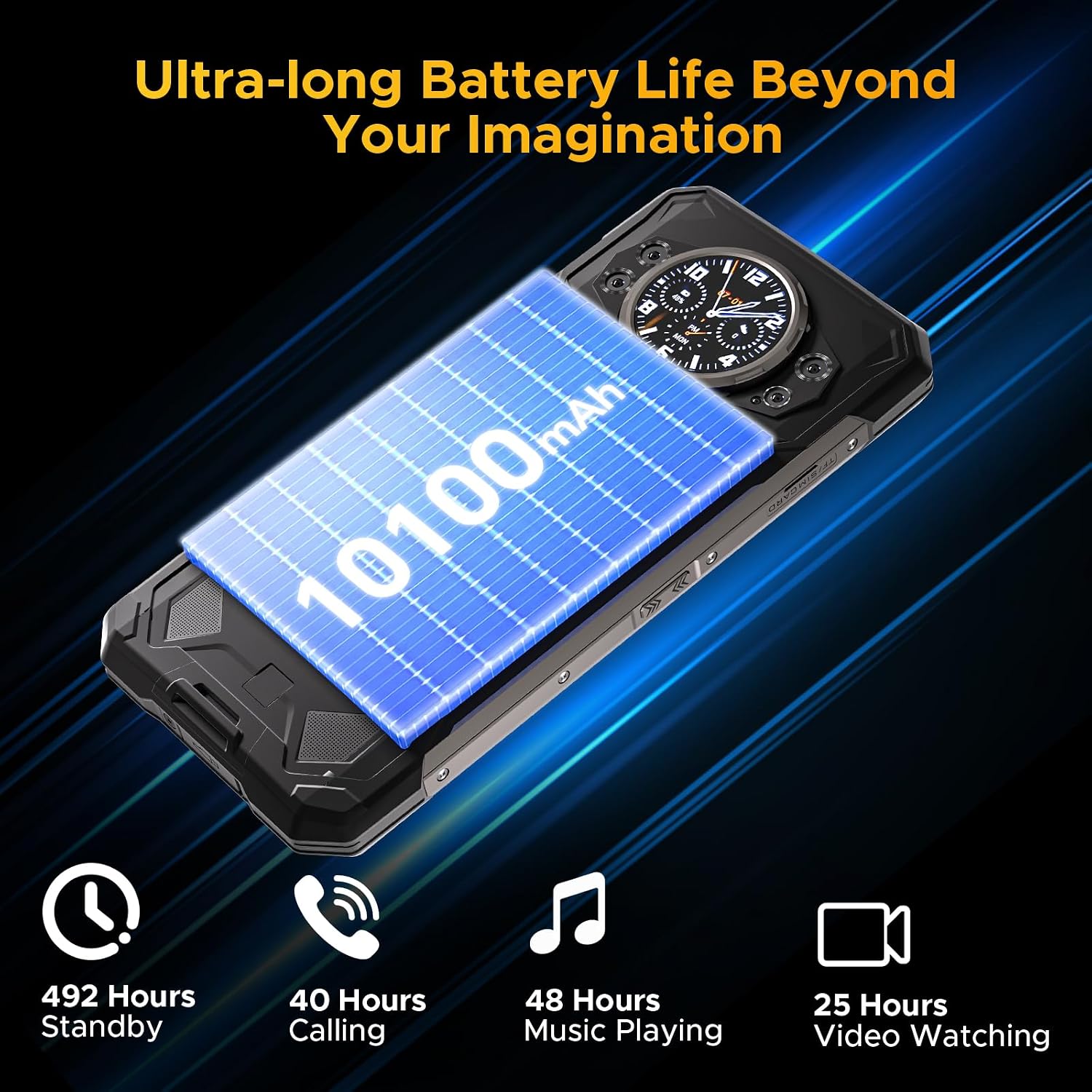
The S200 offers ultra-long battery life for extended use.
സുരക്ഷയും കണക്റ്റിവിറ്റിയും
The S200 offers multiple security and connectivity options:
- Fingerprint ID & Face Unlock: Securely unlock your device using the side-mounted fingerprint sensor or facial recognition.
- NFC: കോൺടാക്റ്റ്ലെസ് പേയ്മെന്റുകൾക്കും ഡാറ്റാ കൈമാറ്റത്തിനും.
- Wi-Fi 6: Provides faster and more stable wireless internet connections.
- ജിപിഎസ്: Supports GPS, Glonass, Galileo, and Beidou for accurate navigation.
മെയിൻ്റനൻസ്
The DOOGEE S200 is built to be rugged, but proper care will ensure its longevity and optimal performance.
- വൃത്തിയാക്കൽ: ഫോൺ പതിവായി മൃദുവായ, ഡി-ടൈപ്പർ ഉപയോഗിച്ച് തുടയ്ക്കുക.amp cloth to remove dirt and dust. For stubborn grime, use a mild soap solution. Ensure all ports are closed before cleaning with liquids.
- വെള്ളവും പൊടിയും പ്രതിരോധം: The phone is IP68/IP69K/MIL-STD-810H certified. This means it can withstand immersion in water up to 1.5 meters for 30 minutes and is protected against dust ingress. Always ensure the SIM tray and USB port cover are fully sealed before exposing the phone to water or dusty environments.
- താപനില: ഫോൺ ഉയർന്ന താപനിലയിൽ (വളരെ ചൂട് അല്ലെങ്കിൽ വളരെ തണുപ്പ്) തുറന്നുവെക്കുന്നത് ഒഴിവാക്കുക, കാരണം ഇത് ബാറ്ററി ലൈഫിനെയും ആന്തരിക ഘടകങ്ങളെയും ബാധിച്ചേക്കാം.
- ആഘാത സംരക്ഷണം: While drop-proof up to 1.8 meters, excessive force or repeated drops can still cause damage. Handle with care, especially on hard surfaces.
- സോഫ്റ്റ്വെയർ അപ്ഡേറ്റുകൾ: Keep your phone's software updated to the latest version to ensure security, performance improvements, and access to new features.

The DOOGEE S200 is built to withstand challenging conditions.
ട്രബിൾഷൂട്ടിംഗ്
If you encounter issues with your DOOGEE S200, try the following common solutions:
| പ്രശ്നം | സാധ്യമായ പരിഹാരം |
|---|---|
| ഉപകരണം ഓണാകില്ല | Ensure the battery is charged. Connect to the charger and wait a few minutes before attempting to power on again. If unresponsive, try a forced restart by holding the Power button for 10-15 seconds. |
| ബാറ്ററി പെട്ടെന്ന് തീരുന്നു | Close unused apps running in the background. Reduce screen brightness. Disable Wi-Fi, Bluetooth, or GPS when not in use. Check for power-intensive apps in battery settings. |
| Network connectivity issues (no signal/slow data) | Check if airplane mode is off. Restart the phone. Re-insert the SIM card. Verify your carrier's network coverage in your area. Go to Settings > Network & internet > Mobile network to ensure correct settings. |
| ആപ്പുകൾ ക്രാഷാകുന്നു അല്ലെങ്കിൽ മരവിക്കുന്നു | Clear the cache and data for the problematic app (Settings > Apps > [App Name] > Storage). Update the app from the Google Play Store. If the issue persists, uninstall and reinstall the app. |
| Rear display not responding | Ensure the main screen is off. Check settings related to the rear display in the phone's display settings. Restart the device. |
സ്പെസിഫിക്കേഷനുകൾ
Key technical specifications for the DOOGEE S200 Rugged Smartphone:
| ഫീച്ചർ | വിശദാംശങ്ങൾ |
|---|---|
| മോഡലിൻ്റെ പേര് | S200-Silver Rugged Smartphone 5G |
| ഓപ്പറേറ്റിംഗ് സിസ്റ്റം | ആൻഡ്രോയിഡ് 14 |
| പ്രോസസ്സർ | Dimensity 7050 Octa-core (2.6 GHz) |
| റാം | 32GB (12GB Physical + 20GB Virtual) |
| ആന്തരിക സംഭരണം | 256GB റോം (TF കാർഡ് വഴി 2TB വരെ വികസിപ്പിക്കാം) |
| പ്രധാന ഡിസ്പ്ലേ | 6.72 Inches FHD+ (2400 x 1080) IPS, 120Hz Refresh Rate |
| പിൻ ഡിസ്പ്ലേ | 1.32 Inches AMOLED (466x466) |
| ബാറ്ററി ശേഷി | 10100mAh |
| ചാർജിംഗ് | 33W ഫാസ്റ്റ് ചാർജിംഗ്, OTG റിവേഴ്സ് ചാർജിംഗ് |
| പ്രധാന ക്യാമറ | 100MP AI Ultra-clear |
| നൈറ്റ് വിഷൻ ക്യാമറ | 20എംപി |
| മുൻ ക്യാമറ | 20എംപി |
| മാക്രോ ക്യാമറ | 2എംപി |
| ഈട് | IP68, IP69K, MIL-STD-810H (Waterproof, Dustproof, Drop-proof) |
| കണക്റ്റിവിറ്റി | 5G Dual SIM, Wi-Fi 6, Bluetooth, NFC, USB Type-C |
| നാവിഗേഷൻ | ജിപിഎസ്, ഗ്ലോനാസ്, ഗലീലിയോ, ബീഡോ |
| അളവുകൾ | 7.07 x 3.25 x 0.63 ഇഞ്ച് |
| ഭാരം | 12.8 ഔൺസ് (364 ഗ്രാം) |
വാറൻ്റിയും പിന്തുണയും
For warranty information and technical support, please refer to the official DOOGEE webസൈറ്റിൽ ബന്ധപ്പെടുകയോ അവരുടെ ഉപഭോക്തൃ സേവനവുമായി നേരിട്ട് ബന്ധപ്പെടുകയോ ചെയ്യുക. വാറന്റി കാലയളവുകളെയും സേവന നടപടിക്രമങ്ങളെയും കുറിച്ചുള്ള വിശദാംശങ്ങൾ സാധാരണയായി നിങ്ങളുടെ വാങ്ങൽ ഡോക്യുമെന്റേഷനിലോ നിർമ്മാതാവിന്റെ പിന്തുണാ പേജുകളിലോ നൽകിയിട്ടുണ്ട്.
നിങ്ങൾക്ക് സന്ദർശിക്കാനും കഴിയും DOOGEE Store on Amazon കൂടുതൽ ഉൽപ്പന്ന വിവരങ്ങൾക്കും ഉറവിടങ്ങൾക്കും.
Ask a question about this manual
Ask about setup, troubleshooting, compatibility, parts, safety, or missing instructions. Manuals+ will review the question and use this page’s manual context to help answer it.