
1. ആമുഖം
Thank you for choosing the ieGeek 5MP Indoor WiFi Camera SC1. This camera is designed to provide comprehensive indoor surveillance with advanced features such as 5MP resolution, dual-band WiFi connectivity (2.4GHz and 5GHz), 360° pan and 55° tilt (PTZ) rotation, enhanced night vision, two-way audio, automatic motion tracking, and compatibility with Alexa. Please read this manual carefully before use to ensure proper installation and operation.
2. ഉൽപ്പന്നം കഴിഞ്ഞുview കൂടാതെ പാക്കേജ് ഉള്ളടക്കം
Before proceeding with installation, please verify that all components are present in your package.
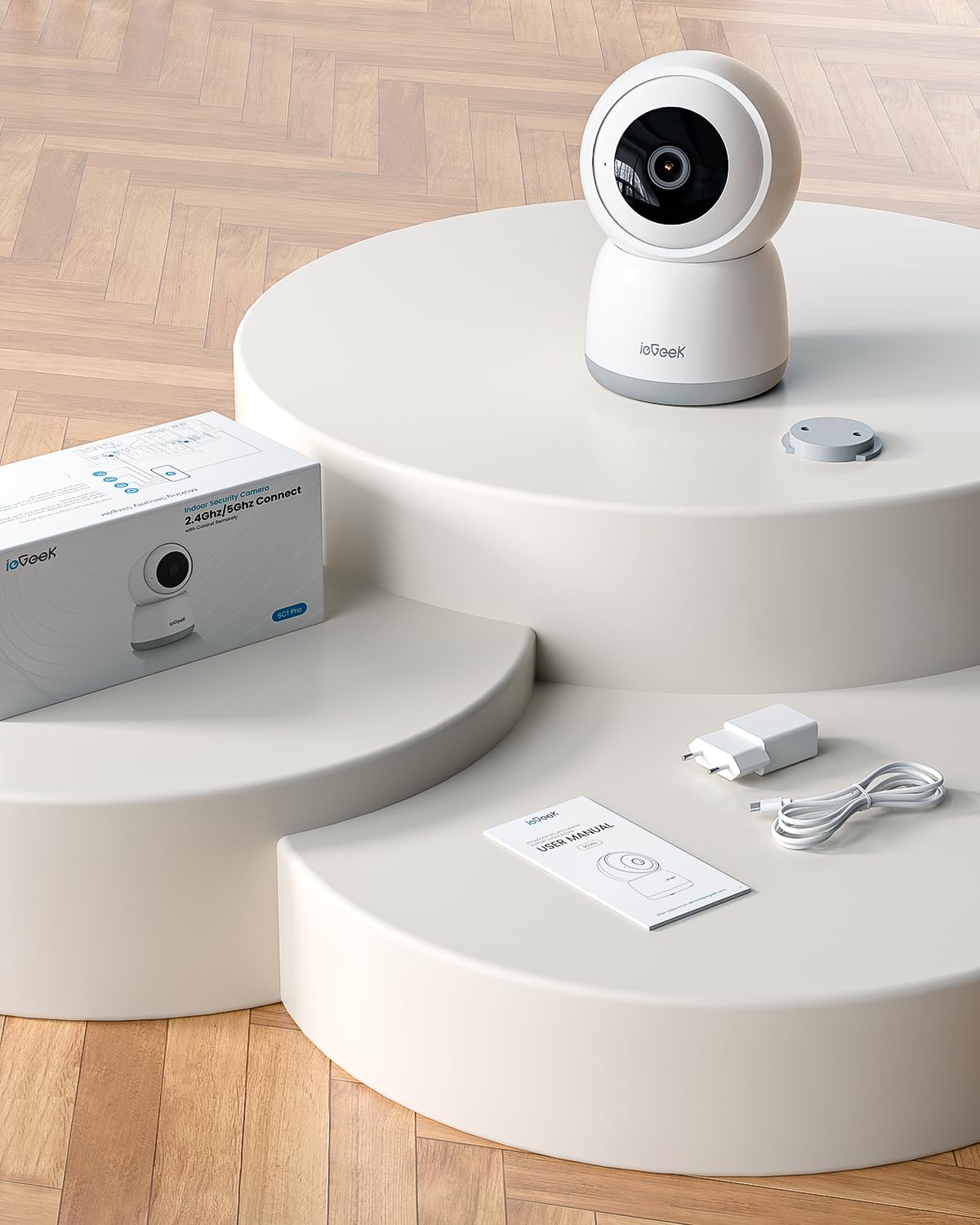
Image: The ieGeek SC1 camera, power adapter, USB cable, user manual, and mounting base are included in the package.
പാക്കേജ് ഉള്ളടക്കം:
- ieGeek 5MP Indoor WiFi Camera SC1
- പവർ അഡാപ്റ്റർ
- യുഎസ്ബി പവർ കേബിൾ
- മൗണ്ടിംഗ് ബേസ്
- മൗണ്ടിംഗ് സ്ക്രൂകൾ
- ഉപയോക്തൃ മാനുവൽ
3. സജ്ജീകരണ ഗൈഡ്
3.1 അപ്ലിക്കേഷൻ ഇൻസ്റ്റാളേഷൻ
ഡൗൺലോഡ് ചെയ്യുക ieGeek കാം app from your smartphone's app store (Google Play Store for Android or Apple App Store for iOS). Register an account and log in.
3.2 പവർ ഓണാണ്
Connect the camera to a power source using the provided USB cable and power adapter. The camera will power on and initiate its startup sequence.
3.3 വൈഫൈ കണക്ഷൻ
The ieGeek SC1 supports both 2.4GHz and 5GHz WiFi networks. Follow the in-app instructions to connect your camera to your home WiFi network. This typically involves selecting your WiFi network and scanning a QR code generated by the app with the camera lens.

Image: Visual guide showing the two main steps for WiFi connection: 1. Connecting to WiFi via the app, and 2. Scanning the QR code on the camera's back.
3.4 മൗണ്ടിംഗ് ഓപ്ഷനുകൾ
The camera can be placed on a flat surface, mounted on a wall, or inverted for ceiling mounting. Use the provided mounting base and screws for secure installation.

Image: Demonstrates various mounting options for the ieGeek SC1 camera, including tabletop, wall, and ceiling installations.
4. ഓപ്പറേഷൻ
4.1 5MP Resolution and Night Vision
The camera features a 5MP sensor, providing clear and detailed video footage. Its advanced night vision capabilities ensure visibility up to 15 meters in low-light conditions.

Image: Illustrates the high detail provided by the 5MP resolution, highlighting the new CMOS sensor for ultra-clear images.
4.2 Dual-Band WiFi Connectivity
Benefit from stable and reliable connectivity with support for both 2.4GHz and 5GHz WiFi bands, allowing you to choose the best option for your network environment.

Image: Shows the camera with visual representations of 5GHz and 2.4GHz, indicating stronger network signal and greater transmission distance.
4.3 PTZ നിയന്ത്രണം
Control the camera's pan (360°) and tilt (55°) remotely via the ieGeek Cam app to monitor every corner of your room. This feature allows for a comprehensive view അന്ധമായ പാടുകൾ ഇല്ലാതെ.
Video: Demonstrates the PTZ (Pan-Tilt-Zoom) control functionality of the camera, showing its ability to rotate horizontally 360 degrees and vertically 55 degrees, controlled via the mobile app.
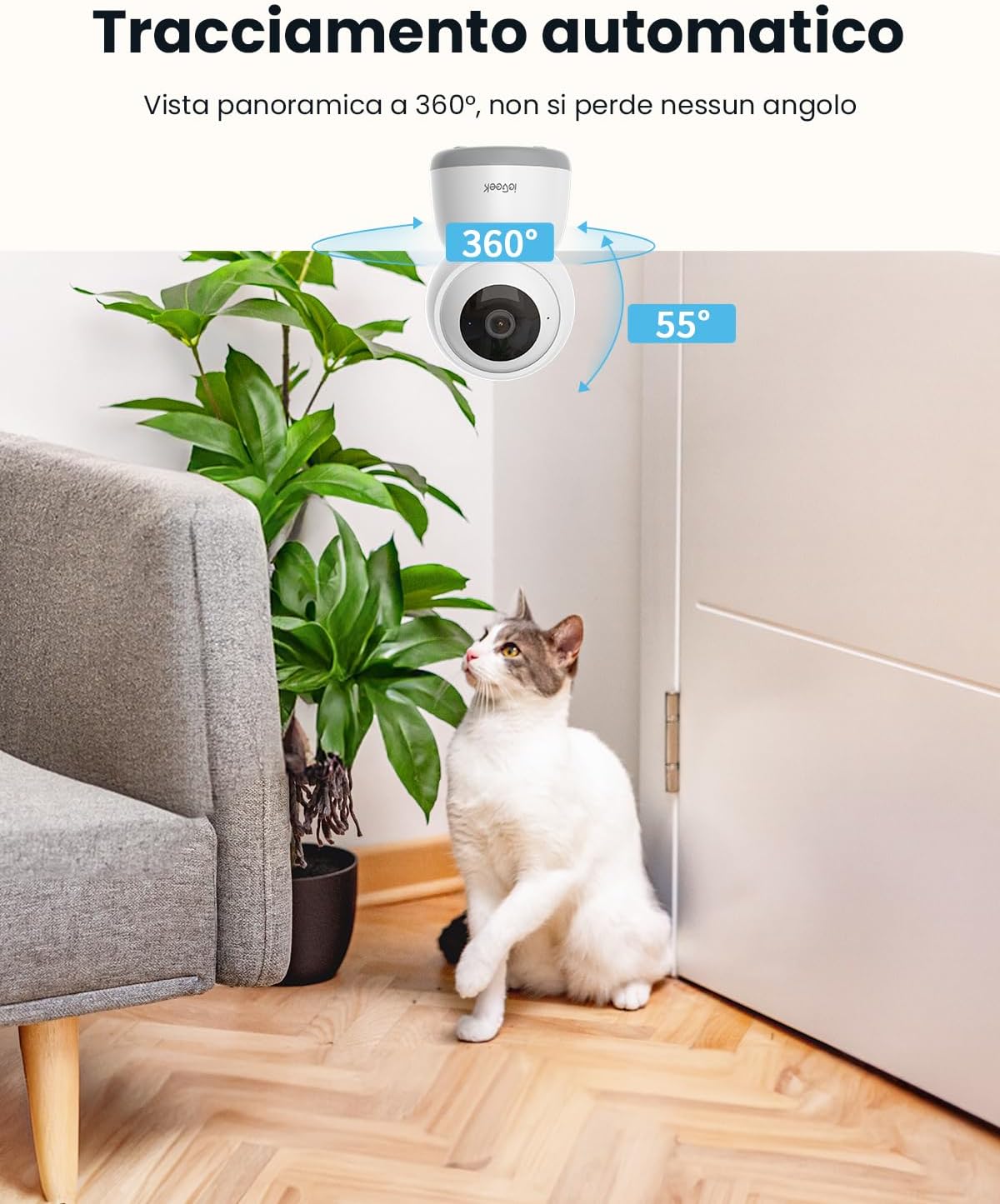
Image: Shows the camera automatically tracking a cat, illustrating its 360° panoramic view and ability to follow movement without missing any angle.
4.4 ടു-വേ ഓഡിയോ
Communicate directly through the camera using the built-in microphone and speaker. This feature is ideal for comforting pets, speaking to family members, or deterring intruders.
Video: Illustrates the two-way audio feature, showing a person interacting with their dog remotely via the camera, providing comfort and communication.
4.5 Motion Tracking and Alerts
The camera automatically tracks detected movement and sends real-time notifications to your smartphone. It can also detect abnormal sounds like a baby crying, providing immediate alerts.

Image: Shows the camera's accurate detection of a child in a kitchen, with an on-screen notification indicating movement in the area.

Image: Displays a smartphone screen showing live footage of a baby, with icons for two-way conversation, infrared night vision, and noise detection, emphasizing baby monitoring capabilities.
4.6 അലക്സാ ഇന്റഗ്രേഷൻ
Integrate your ieGeek SC1 camera with Amazon Alexa for convenient voice control. Use simple voice commands to view live streams on compatible Alexa-enabled devices with screens.

Image: Shows an Alexa-enabled smart display showing a live feed from the camera, with the text "Alexa, show me the garden" and "Works with Alexa" logo, indicating voice control integration.
4.7 സ്വകാര്യത മോഡ്
Activate the privacy mode via the app to disable the camera lens and protect your privacy when needed. This feature ensures that no video or audio is recorded or streamed.

Image: Depicts a person sleeping peacefully while the camera's app shows a "lens is disabled" message, highlighting the Sleep Privacy Mode feature with manual camera shutdown, authentication steps, and 128-bit AES encryption.
5. സ്റ്റോറേജ് ഓപ്ഷനുകൾ
The ieGeek SC1 offers flexible storage solutions for your recordings.
5.1 ലോക്കൽ സ്റ്റോറേജ്
Insert a Micro SD card (up to 256GB, not included) into the camera for continuous 24/7 local recording without monthly fees.
5.2 ക്ലൗഡ് സംഭരണം
Utilize the cloud storage option, which includes a free 6-second loop recording feature. Cloud storage provides secure backup and remote access to your video history.

Image: Illustrates the multiple storage options available, including 6s free cloud storage and Micro SD card support up to 256GB (not included), alongside 24/7 recording capabilities.
6. പരിപാലനം
6.1 വൃത്തിയാക്കൽ
Regularly clean the camera lens with a soft, dry cloth to ensure optimal image clarity. Avoid using harsh chemicals or abrasive materials.
6.2 ഫേംവെയർ അപ്ഡേറ്റുകൾ
Check the ieGeek Cam app periodically for available firmware updates. Keeping your camera's firmware up-to-date ensures access to the latest features and security enhancements.
7. പ്രശ്നപരിഹാരം
If you encounter any issues with your ieGeek SC1 camera, please refer to the following common solutions:
- കണക്ഷൻ പ്രശ്നങ്ങൾ: Ensure your WiFi network is stable and the camera is within range. Verify that you have selected the correct 2.4GHz or 5GHz network during setup.
- മോശം ചിത്രത്തിന്റെ ഗുണനിലവാരം: Check the lens for dirt or smudges. Ensure adequate lighting, especially for night vision performance.
- അറിയിപ്പുകളൊന്നുമില്ല: Confirm that app notifications are enabled on your smartphone and within the ieGeek Cam app settings.
- PTZ Control Unresponsive: Check your internet connection. Restart the camera and the app.
For more detailed troubleshooting or technical support, please contact ieGeek customer service.
8 സ്പെസിഫിക്കേഷനുകൾ
| മോഡലിൻ്റെ പേര് | SC1 |
| റെസലൂഷൻ | 5MP (2880*1600) |
| വൈഫൈ കണക്റ്റിവിറ്റി | 2.4GHz & 5GHz ഡ്യുവൽ-ബാൻഡ് |
| PTZ റൊട്ടേഷൻ | 360° പാൻ, 55° ചരിവ് |
| നൈറ്റ് വിഷൻ റേഞ്ച് | 15 മീറ്റർ വരെ |
| ഓഡിയോ | ടു-വേ ഓഡിയോ (ബിൽറ്റ്-ഇൻ മൈക്കും സ്പീക്കറും) |
| സ്റ്റോറേജ് ഓപ്ഷനുകൾ | മൈക്രോ എസ്ഡി കാർഡ് (256GB വരെ, ഉൾപ്പെടുത്തിയിട്ടില്ല), ക്ലൗഡ് സ്റ്റോറേജ് |
| അനുയോജ്യത | Amazon Alexa, ieGeek Cam App (iOS/Android) |
| പവർ ഉറവിടം | വയർഡ് ഇലക്ട്രിക് |
| മൗണ്ടിംഗ് തരം | Wall, Ceiling, Tabletop |
| അളവുകൾ (LxWxH) | 11 x 7 x 7 സെ.മീ |
| ഭാരം | 370 ഗ്രാം |
9. വാറൻ്റിയും പിന്തുണയും
ieGeek provides a 2-year warranty for this product. If you have any questions, require technical assistance, or need to claim warranty service, please contact ieGeek customer support through the official webസൈറ്റ് അല്ലെങ്കിൽ ഉൽപ്പന്ന പാക്കേജിംഗിൽ നൽകിയിരിക്കുന്ന ബന്ധപ്പെടാനുള്ള വിവരങ്ങൾ.