
1. ആമുഖം
Thank you for choosing the MECHEN H1-Pro Bluetooth MP3 Player with WiFi. This device is designed to provide a versatile and enjoyable audio and video experience. Featuring a 4-inch touchscreen and running on Android 9.0, it supports various applications and connectivity options. This manual provides essential information for setting up, operating, and maintaining your device.
2. പാക്കേജ് ഉള്ളടക്കം
താഴെ ലിസ്റ്റ് ചെയ്തിരിക്കുന്ന എല്ലാ ഇനങ്ങളും നിങ്ങളുടെ പാക്കേജിൽ ഉൾപ്പെടുത്തിയിട്ടുണ്ടെന്ന് ഉറപ്പാക്കുക. ഏതെങ്കിലും ഇനങ്ങൾ നഷ്ടപ്പെട്ടിട്ടുണ്ടെങ്കിലോ കേടായിട്ടുണ്ടെങ്കിലോ, ദയവായി ഉപഭോക്തൃ പിന്തുണയുമായി ബന്ധപ്പെടുക.
- MECHEN H1-Pro MP3 Player
- USB കേബിൾ
- ഹെഡ്ഫോണുകൾ
- സംരക്ഷണ ഫിലിം
- സംരക്ഷണ കേസ്
- ഉപയോക്തൃ മാനുവൽ

Image: The MECHEN H1-Pro MP3 Player displayed with its accessories, including a USB cable, headphones, protective film, and a clear protective case.
3. ഡിവൈസ് ഓവർview
Familiarize yourself with the physical components and controls of your MECHEN H1-Pro MP3 Player.
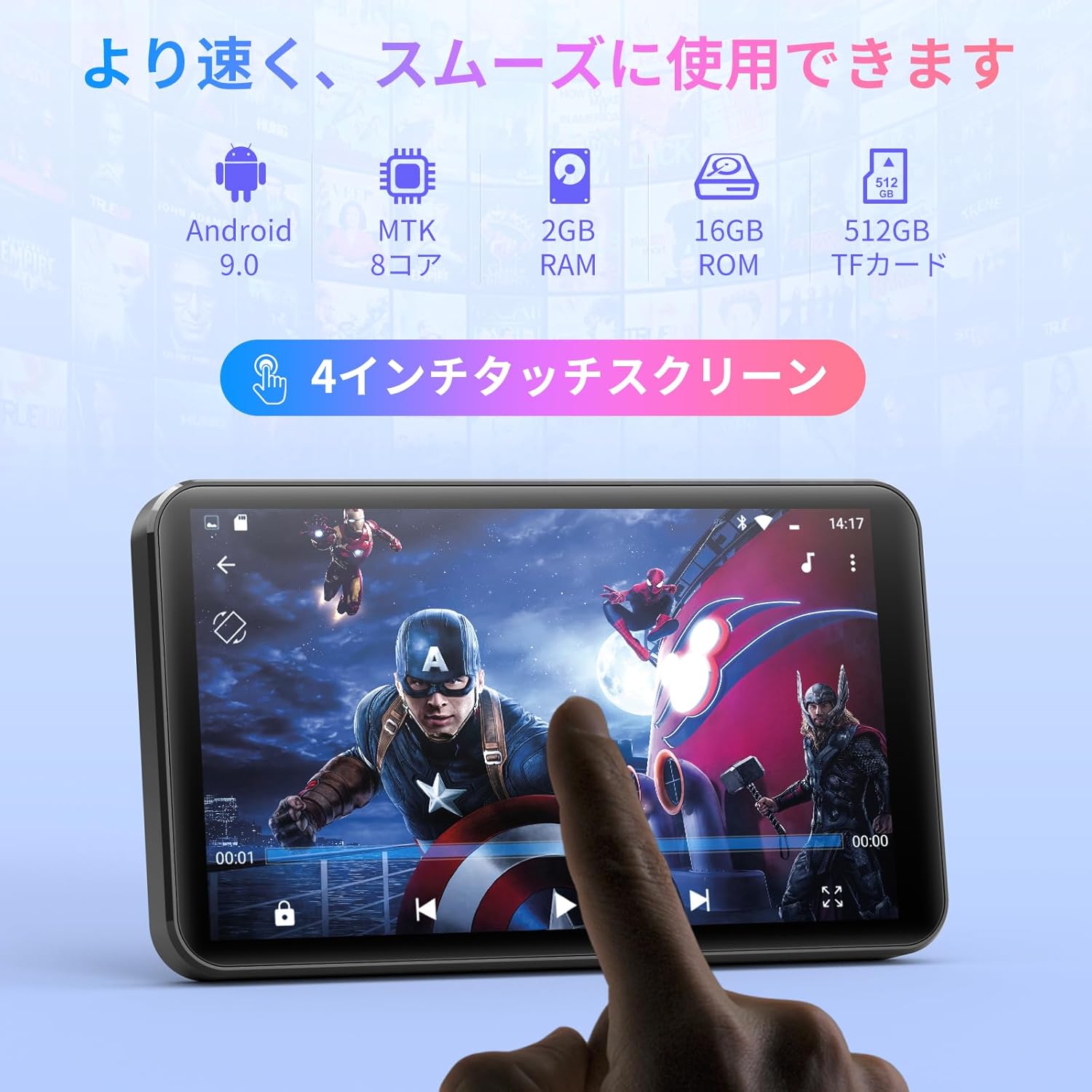
ചിത്രം: മുൻഭാഗം view of the MECHEN H1-Pro MP3 Player, showcasing its 4-inch touchscreen display.

ചിത്രം: വശം view of the MECHEN H1-Pro MP3 Player, highlighting the power button and volume controls.

ചിത്രം: മുകളിലും താഴെയും views of the MECHEN H1-Pro MP3 Player, illustrating the USB-C charging port, headphone jack, and Micro SD card slot.
4. സജ്ജീകരണം
4.1 പ്രാരംഭ ചാർജിംഗ്
Before first use, fully charge the device. Connect the provided USB cable to the player's USB-C port and the other end to a USB power adapter (not included) or a computer's USB port. The charging indicator will show the charging status.
4.2 പവർ ഓൺ/ഓഫ്
- പവർ ഓണാക്കാൻ: Press and hold the Power button on the side of the device until the screen lights up.
- പവർ ഓഫ് ചെയ്യാൻ: Press and hold the Power button until a power-off menu appears on the screen. Select 'Power Off' to shut down the device.
4.3 Wi-Fi-ലേക്ക് ബന്ധിപ്പിക്കുന്നു
To access online features and download apps, connect your device to a Wi-Fi network.
- പോകുക ക്രമീകരണങ്ങൾ > നെറ്റ്വർക്കും ഇൻ്റർനെറ്റും > വൈഫൈ.
- വൈഫൈ ടോഗിൾ ചെയ്യുക On.
- ലിസ്റ്റിൽ നിന്ന് നിങ്ങൾക്ക് ആവശ്യമുള്ള വൈഫൈ നെറ്റ്വർക്ക് തിരഞ്ഞെടുക്കുക.
- ആവശ്യപ്പെടുകയാണെങ്കിൽ പാസ്വേഡ് നൽകി ടാപ്പ് ചെയ്യുക ബന്ധിപ്പിക്കുക.

Image: The MECHEN H1-Pro MP3 Player screen showing Wi-Fi settings and available networks.
4.4 ഒരു മൈക്രോ എസ്ഡി കാർഡ് ചേർക്കുന്നു
The device supports Micro SD cards for expanded storage. Locate the Micro SD card slot on the side of the device. Gently insert the card with the gold contacts facing down until it clicks into place.
5. പ്രവർത്തന നിർദ്ദേശങ്ങൾ
5.1 Basic Navigation (Touchscreen)
The MECHEN H1-Pro features a responsive 4-inch touchscreen. Use standard touch gestures:
- ടാപ്പ് ചെയ്യുക: ഒരു ഇനം തിരഞ്ഞെടുക്കാനോ ഒരു ആപ്പ് തുറക്കാനോ.
- സ്വൈപ്പ്: ലിസ്റ്റുകളിലൂടെ സ്ക്രോൾ ചെയ്യാനോ സ്ക്രീനുകൾക്കിടയിൽ മാറാനോ.
- പിഞ്ച്: To zoom in or out (in supported applications).
5.2 മ്യൂസിക് പ്ലേബാക്ക്
The device supports various audio formats including MP3, WAV, WMA, APE, OGG, and FLAC for high-fidelity music playback.
- തുറക്കുക സംഗീതം അപേക്ഷ.
- ആർട്ടിസ്റ്റ്, ആൽബം, ഗാനം അല്ലെങ്കിൽ പ്ലേലിസ്റ്റ് അനുസരിച്ച് നിങ്ങളുടെ സംഗീത ലൈബ്രറി ബ്രൗസ് ചെയ്യുക.
- Tap on a song to begin playback.
- Use the on-screen controls for play/pause, skip tracks, and volume adjustment.

Image: The MECHEN H1-Pro MP3 Player screen showing a music playback interface with album art and controls.
5.3 വീഡിയോ പ്ലേബാക്ക്
Enjoy 720P/1080P full-format HD video playback without conversion. Supported formats include RM, RMVB, FLV, MP4, DAT, MKV, MPG, MOV, TS, etc.
- തുറക്കുക വീഡിയോ പ്ലെയർ അപേക്ഷ.
- ഒരു വീഡിയോ തിരഞ്ഞെടുക്കുക file from your storage.
- Tap to play. Use on-screen controls for playback options.

Image: The MECHEN H1-Pro MP3 Player screen showing a video playing in full-screen mode.
5.4 ബ്ലൂടൂത്ത് കണക്റ്റിവിറ്റി
Connect to Bluetooth headphones, speakers, or other compatible devices.
- പോകുക ക്രമീകരണങ്ങൾ > ബന്ധിപ്പിച്ച ഉപകരണങ്ങൾ > ബ്ലൂടൂത്ത്.
- ബ്ലൂടൂത്ത് ടോഗിൾ ചെയ്യുക On.
- Ensure your Bluetooth accessory is in pairing mode.
- Select the accessory from the list of available devices to pair.

Image: The MECHEN H1-Pro MP3 Player shown alongside a pair of wireless headphones, indicating Bluetooth connectivity.
5.5 Wi-Fi Connectivity & App Downloads
With Android 9.0 and Wi-Fi, you can download and install various applications from the Google Play Store.
- Ensure the device is connected to Wi-Fi (see Section 4.3).
- തുറക്കുക പ്ലേ സ്റ്റോർ അപേക്ഷ.
- നിങ്ങളുടെ Google അക്കൗണ്ട് ഉപയോഗിച്ച് സൈൻ ഇൻ ചെയ്യുക.
- ഇതിനായി തിരയുക and download desired applications (e.g., Spotify, Amazon Music, Audible).

Image: The MECHEN H1-Pro MP3 Player screen showing a variety of installed applications, including music streaming services and web ബ്ര rowsers സറുകൾ.
5.6 എഫ്എം റേഡിയോ
നിങ്ങളുടെ പ്രിയപ്പെട്ട എഫ്എം റേഡിയോ സ്റ്റേഷനുകൾ ശ്രദ്ധിക്കുക.
- Connect wired headphones to the 3.5mm audio jack; they act as the antenna.
- തുറക്കുക എഫ്എം റേഡിയോ അപേക്ഷ.
- Use the on-screen controls to scan for stations or tune manually.
5.7 File മാനേജ്മെൻ്റ്
ബിൽറ്റ്-ഇൻ ഉപയോഗിക്കുക file നിങ്ങളുടെ കാര്യങ്ങൾ സംഘടിപ്പിക്കാൻ മാനേജർ files on internal storage and the Micro SD card.
- തുറക്കുക File മാനേജർ അപേക്ഷ.
- Navigate through folders to view, copy, move, or delete files.
6. പരിപാലനം
6.1 വൃത്തിയാക്കൽ
Wipe the device with a soft, dry, lint-free cloth. Do not use liquid cleaners or abrasive materials.
6.2 സംഭരണം
Store the device in a cool, dry place away from direct sunlight and extreme temperatures. If storing for an extended period, ensure the battery is partially charged (around 50%) to prolong its lifespan.
6.3 ബാറ്ററി കെയർ
To maximize battery life, avoid fully discharging the battery frequently. Use the original charging cable for optimal performance.
7. പ്രശ്നപരിഹാരം
| പ്രശ്നം | സാധ്യമായ പരിഹാരം |
|---|---|
| ഉപകരണം പവർ ഓണാക്കുന്നില്ല. | Ensure the battery is charged. Connect to a charger for at least 30 minutes. If unresponsive, perform a hard reset by holding the power button for 10-15 seconds. |
| Wi-Fi-ലേക്ക് കണക്റ്റ് ചെയ്യാൻ കഴിയില്ല. | Check if Wi-Fi is enabled. Verify the Wi-Fi password. Restart your router and the MP3 player. |
| ബ്ലൂടൂത്ത് ഉപകരണം ജോടിയാക്കുന്നില്ല. | Ensure Bluetooth is enabled on both devices and the accessory is in pairing mode. Move devices closer together. |
| ആപ്പുകൾ മന്ദഗതിയിലാണ് അല്ലെങ്കിൽ ക്രാഷാകുന്നു. | Close unnecessary background apps. Clear app cache (Settings > Apps > [App Name] > Storage > Clear Cache). Restart the device. Too many apps can lead to slowdowns. |
| ഹെഡ്ഫോണുകളിൽ നിന്ന് ശബ്ദമില്ല. | Check headphone connection. Ensure volume is not muted or too low. Test with different headphones. |
8 സ്പെസിഫിക്കേഷനുകൾ
| ഫീച്ചർ | വിശദാംശങ്ങൾ |
|---|---|
| ബ്രാൻഡ് | മെച്ചൻ |
| മോഡലിൻ്റെ പേര് | H1-Pro (EU-H11) |
| ഓപ്പറേറ്റിംഗ് സിസ്റ്റം | ആൻഡ്രോയിഡ് 9.0 |
| പ്രോസസ്സർ | MTK 8-core |
| റാം | 2 ജിബി |
| ആന്തരിക സംഭരണം | 16 ജിബി |
| വികസിപ്പിക്കാവുന്ന സംഭരണം | മൈക്രോ എസ്ഡി (512 ജിബി വരെ) |
| സ്ക്രീൻ വലിപ്പം | 4 ഇഞ്ച് |
| സ്ക്രീൻ സാങ്കേതികവിദ്യ | എൽസിഡി |
| കണക്റ്റിവിറ്റി | ബ്ലൂടൂത്ത്, യുഎസ്ബി, വൈ-ഫൈ |
| പ്രത്യേക സവിശേഷതകൾ | FM Radio, Equalizer, Video Playback |
| പിന്തുണയ്ക്കുന്ന ഓഡിയോ ഫോർമാറ്റുകൾ | MP3, WAV, WMA, APE, OGG, FLAC |
| പിന്തുണയ്ക്കുന്ന വീഡിയോ ഫോർമാറ്റുകൾ | RM, RMVB, FLV, MP4, DAT, MKV, MPG, MOV, TS, etc. |
| ബാറ്ററി ശേഷി | 2000 mAh |
| ബാറ്ററി ലൈഫ് (സംഗീതം) | 50 മണിക്കൂർ വരെ |
| ബാറ്ററി ലൈഫ് (വീഡിയോ) | 8 മണിക്കൂർ വരെ |
| അളവുകൾ (D x W x H) | 10.5 x 6.2 x 1.2 സെ.മീ (4.14 x 2.44 x 0.46 ഇഞ്ച്) |
| ഇനത്തിൻ്റെ ഭാരം | 97.5 ഗ്രാം (3.45 ഔൺസ്) |

Image: The MECHEN H1-Pro MP3 Player shown with its physical dimensions and weight specifications.
9. വാറൻ്റിയും പിന്തുണയും
For warranty information and technical support, please refer to the warranty card included in your package or visit the official MECHEN webവാറന്റി ക്ലെയിമുകൾക്കുള്ള വാങ്ങലിന്റെ തെളിവായി നിങ്ങളുടെ വാങ്ങൽ രസീത് സൂക്ഷിക്കുക.