ആമുഖം
This manual provides essential instructions for the installation, maintenance, and use of CHUBORY X10 PRO drone replacement parts. These parts are specifically designed for the CHUBORY X10 PRO drone model. Please read this manual carefully before proceeding with any installation or maintenance to ensure proper function and safety.
1. സജ്ജീകരണവും ഇൻസ്റ്റാളേഷനും
1.1 പാക്കേജ് ഉള്ളടക്കം
നിങ്ങളുടെ പാക്കേജിൽ എല്ലാ ഘടകങ്ങളും ഉണ്ടെന്ന് ഉറപ്പാക്കുക:
- 8 x പ്രൊപ്പല്ലറുകൾ
- 1 x USB ചാർജിംഗ് കേബിൾ
- 1 x സ്ക്രൂഡ്രൈവർ
- 8 x സ്ക്രൂകൾ
1.2 പ്രൊപ്പല്ലർ ഇൻസ്റ്റലേഷൻ
Follow these steps to replace the propellers on your CHUBORY X10 PRO drone:
- പവർ ഓഫ്: Ensure the drone is powered off and the battery is disconnected before beginning.
- Identify Propellers: Note the orientation of the existing propellers. Propellers are typically marked (e.g., A or B) and must be installed in the correct positions.
- പഴയ പ്രൊപ്പല്ലർ നീക്കം ചെയ്യുക: Use the provided screwdriver to carefully remove the screw securing the old propeller to the motor shaft. Gently lift and remove the propeller.
- Install New Propeller: Place a new propeller onto the motor shaft, ensuring it matches the orientation of the propeller being replaced. Align the screw hole.
- സുരക്ഷിത പ്രൊപ്പല്ലർ: Insert a new screw and tighten it with the screwdriver. Do not overtighten, as this can damage the propeller or motor.
- ആവർത്തിക്കുക: Repeat the process for all propellers that need replacement.
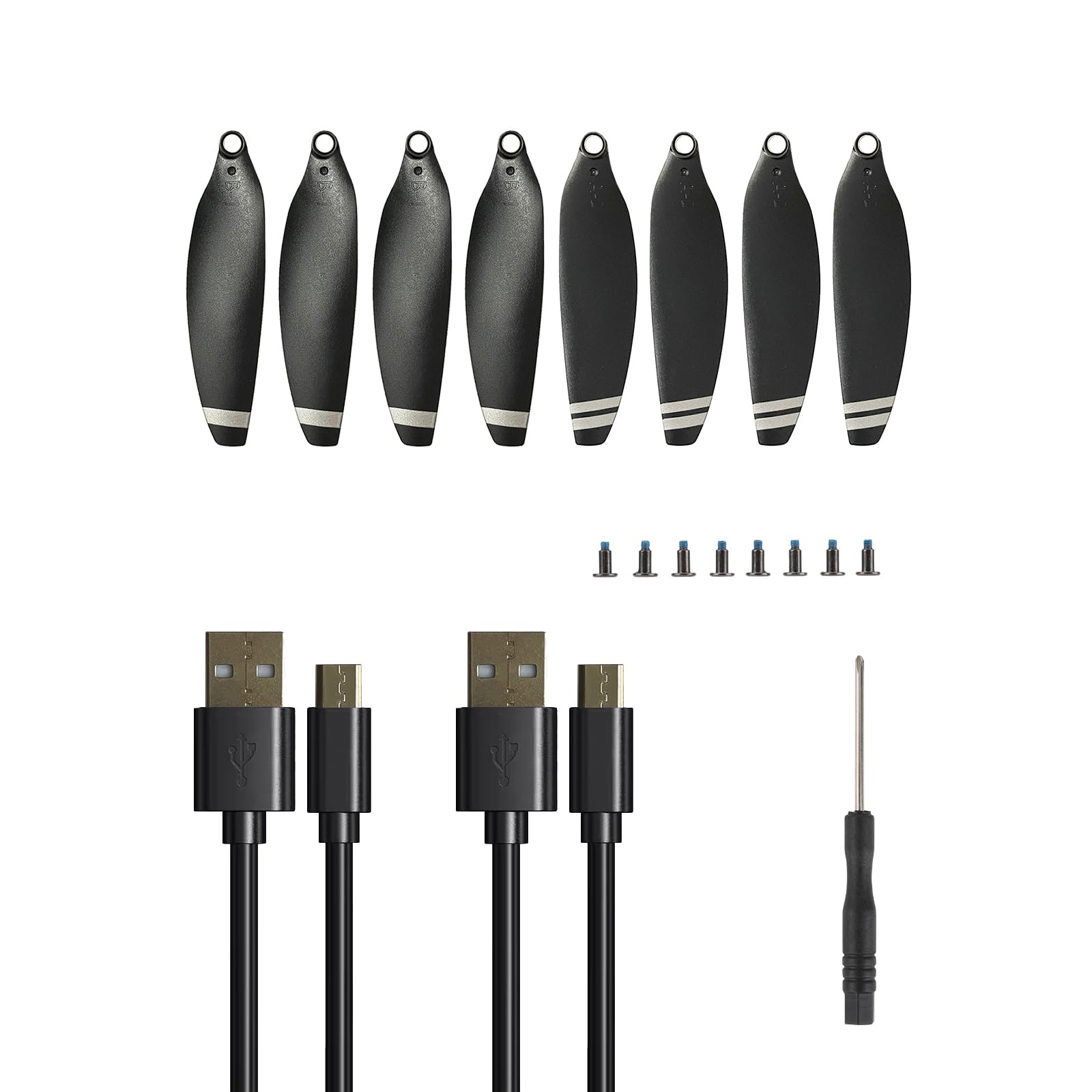
Image: CHUBORY X10 PRO drone replacement parts, including propellers, screwdriver, and screws. This image illustrates the components involved in propeller replacement.
1.3 Charging Cable Usage
The USB charging cable is used to recharge the drone's battery. Always use the provided cable or an approved replacement to prevent damage to the battery or drone.
- ബാറ്ററി ബന്ധിപ്പിക്കുക: ഡ്രോൺ ബാറ്ററി ചാർജിംഗ് കേബിളുമായി ബന്ധിപ്പിക്കുക.
- പവറിലേക്ക് ബന്ധിപ്പിക്കുക: Plug the USB end of the charging cable into a compatible USB power source (e.g., computer USB port, USB wall adapter).
- ചാർജിംഗ് സൂചകം: Observe the charging indicator light (if present on the battery or cable) to monitor the charging status. Refer to your drone's main manual for specific charging light behavior.
- വിച്ഛേദിക്കുക: Once fully charged, disconnect the cable from the power source and then from the battery.
2. പരിപാലനം
2.1 പ്രൊപ്പല്ലർ പരിശോധന
Regularly inspect propellers for signs of damage, such as cracks, bends, or chips. Damaged propellers can affect flight stability and efficiency. Replace any damaged propellers immediately using the instructions in Section 1.2.
2.2 Screw Tightness
Periodically check the tightness of all screws, especially those securing the propellers. Loose screws can lead to parts detaching during flight. Use the provided screwdriver to gently tighten any loose screws.
2.3 വൃത്തിയാക്കൽ
Keep all parts clean and free from dust or debris. Use a soft, dry cloth to wipe down components. Avoid using harsh chemicals or abrasive materials.
5. വാറൻ്റിയും പിന്തുണയും
5.1 വാറൻ്റി വിവരങ്ങൾ
Specific warranty details for these replacement parts may vary. Please refer to the original purchase documentation or contact CHUBORY customer support for precise warranty terms and conditions. Typically, replacement parts are covered against manufacturing defects for a limited period.
5.2 ഉപഭോക്തൃ പിന്തുണ
For technical assistance, troubleshooting, or inquiries regarding your CHUBORY X10 PRO drone replacement parts, please contact CHUBORY customer support. Contact information can usually be found on the manufacturer's official website or in the original drone manual.
- ഓൺലൈൻ പിന്തുണ: Visit the official CHUBORY webപതിവുചോദ്യങ്ങൾക്കും പിന്തുണാ ഉറവിടങ്ങൾക്കുമുള്ള സൈറ്റ്.
- ഇമെയിൽ പിന്തുണ: Refer to your product packaging or the main drone manual for a support email address.
