
1. ഉൽപ്പന്നം കഴിഞ്ഞുview
The ESSGOO Wireless CarPlay Android Auto Motorcycle GPS Screen provides advanced navigation and entertainment features for motorcycles. It offers seamless integration with Apple CarPlay and Android Auto, real-time navigation, voice control, and multimedia playback capabilities, all within a durable, weather-resistant design.
പാക്കേജ് ഉള്ളടക്കം
ഇൻസ്റ്റാൾ ചെയ്യുന്നതിനുമുമ്പ്, പാക്കേജിൽ എല്ലാ ഘടകങ്ങളും ഉണ്ടെന്ന് ദയവായി ഉറപ്പാക്കുക:
- ESSGOO Motorcycle GPS Screen (Display)
- പവർ കേബിൾ
- ഹാൻഡിൽബാർ മൗണ്ട്
- Mounting Bracket Adjuster
- പിൻഭാഗംview Mirror Link Support
- ഉപയോക്തൃ മാനുവൽ

Figure 1: Included components in the ESSGOO Motorcycle GPS Screen package.
2. സജ്ജീകരണവും ഇൻസ്റ്റാളേഷനും
2.1 ഉപകരണം മൌണ്ട് ചെയ്യുന്നു
The ESSGOO GPS screen can be mounted on your motorcycle's handlebar or using the rearview mirror link support. Choose the most suitable mounting option for your motorcycle and ensure the device is securely fastened and does not obstruct your view അല്ലെങ്കിൽ നിയന്ത്രണങ്ങൾ.
- ഹാൻഡിൽബാർ മൗണ്ടിംഗ്: Attach the handlebar mount to a suitable section of your handlebar. Use the mounting bracket adjuster to secure the GPS screen to the handlebar mount.
- പിൻഭാഗംview Mirror Mounting: If preferred, use the rearview mirror link support to attach the device. Ensure the mount is tightened to prevent vibration during riding.
കുറിപ്പ്: Some users have reported that the U-bracket for mounting might be too short for handlebars with a large diameter. If this occurs, custom solutions or alternative mounting hardware may be required. Ensure any custom solution is robust and safe for motorcycle use.
2.2 പവർ കണക്ഷൻ
Connect the provided power cable to your motorcycle's battery. Ensure the connection is secure and waterproof. It is recommended to have this done by a qualified technician if you are unsure about electrical wiring on your motorcycle.
- ബാറ്ററിയുടെ പോസിറ്റീവ് (+) ടെർമിനലിലേക്ക് ചുവന്ന വയർ ബന്ധിപ്പിക്കുക.
- ബാറ്ററിയുടെ നെഗറ്റീവ് (-) ടെർമിനലിലേക്ക് ബ്ലാക്ക് വയർ ബന്ധിപ്പിക്കുക.
- Route the cable safely, away from moving parts and heat sources.
പ്രധാനപ്പെട്ടത്: The device does not include an anti-theft system. It is advisable to remove the CarPlay unit when leaving your motorcycle unattended to prevent theft.
2.3 പ്രാരംഭ പവർ-ഓണും സജ്ജീകരണവും
Once powered, the device will boot up. On the first use, the device may prompt for a password. If you have not set one, try common default passwords like "0000" or "1234". If these do not work, refer to the included physical manual or contact customer support for assistance.
3. പ്രവർത്തന നിർദ്ദേശങ്ങൾ
3.1 വയർലെസ് കാർപ്ലേയും ആൻഡ്രോയിഡ് ഓട്ടോയും
The device supports wireless Apple CarPlay and Android Auto, allowing you to access your smartphone's navigation, music, and communication apps directly on the screen.
- നിങ്ങളുടെ സ്മാർട്ട്ഫോണിലെ വൈ-ഫൈയും ബ്ലൂടൂത്തും പ്രവർത്തനക്ഷമമാക്കിയിട്ടുണ്ടെന്ന് ഉറപ്പാക്കുക.
- On the ESSGOO screen, select either "Apple CarPlay" or "Android Auto".
- Follow the on-screen prompts to pair your smartphone via Bluetooth. Once paired, the device will establish a Wi-Fi connection for wireless CarPlay/Android Auto functionality.

Figure 2: Wireless Apple CarPlay and Android Auto interfaces.
3.2 Audio Output via Bluetooth
To enjoy audio from the device (navigation prompts, music) through your Bluetooth helmet headset or earphones, follow these steps:
- Ensure your phone is NOT directly connected to your Bluetooth helmet headset or earphones.
- Connect your phone to the ESSGOO CarPlay unit via Apple CarPlay or Android Auto as described above.
- On the ESSGOO screen, navigate to the "BT Ear" icon to connect your Bluetooth helmet headset or earphones to the CarPlay unit.
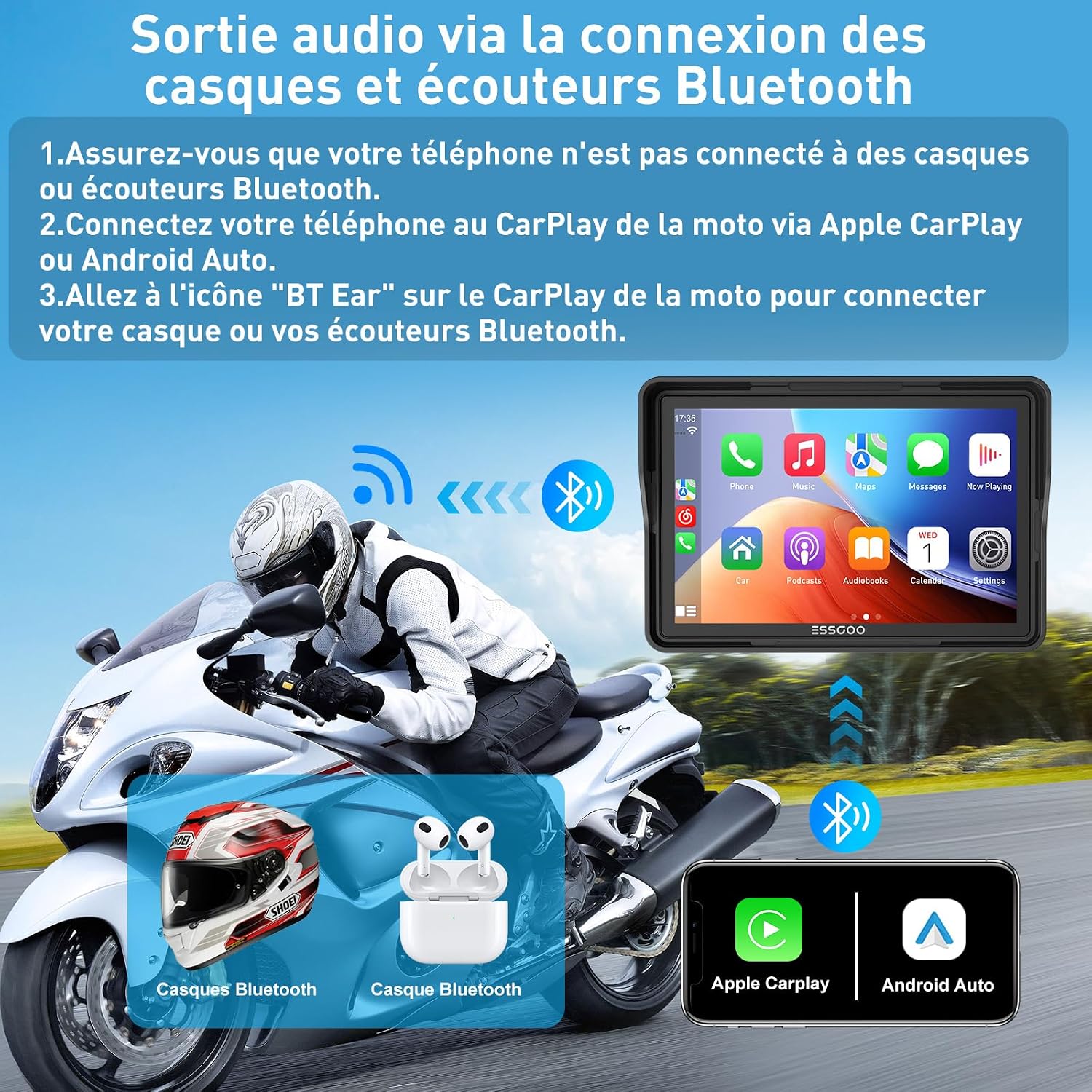
Figure 3: Connecting Bluetooth audio devices for sound output.
3.3 Real-time Navigation
Utilize your smartphone's navigation applications (e.g., Google Maps, Apple Maps) directly on the ESSGOO screen for real-time directions.
- Once connected to CarPlay or Android Auto, open your preferred navigation app on the screen.
- Enter your destination, and the directions will be displayed on the 5-inch LCD screen.

Figure 4: Real-time navigation display.
3.4 വോയ്സ് കൺട്രോൾ (സിരി/ഗൂഗിൾ അസിസ്റ്റന്റ്)
Access your smartphone's voice assistant (Siri for CarPlay, Google Assistant for Android Auto) for hands-free operation.
- Activate the voice assistant by pressing the dedicated button on the screen or using the voice command "Hey Siri" or "Hey Google".
- You can then issue commands for navigation, making calls, sending messages, or playing music.

Figure 5: Voice control via Siri or Google Assistant.
3.5 TF Card Media Playback
The device supports multimedia playback directly from a TF (microSD) card, allowing you to enjoy audio and video content without an internet connection.
- Insert a TF card with your desired media files into the designated slot on the device.
- Navigate to the media player application on the screen to browse and play your content.

Figure 6: TF card media playback.
4. പരിപാലനവും പരിചരണവും
The ESSGOO GPS screen is designed for durability and performance in various riding conditions.
4.1 കാലാവസ്ഥാ പ്രതിരോധം
The device features an IP67 waterproof design and is equipped with a sunshade, making it suitable for use in diverse weather conditions, including rainy days, high temperatures, and cold temperatures. It operates effectively between -20°C (-4°F) and 70°C (158°F).

Figure 7: Device performance in various weather conditions.
4.2 വൃത്തിയാക്കൽ
To clean the screen, use a soft, lint-free cloth. For stubborn marks, slightly dampen the cloth with water or a screen-safe cleaning solution. Avoid abrasive materials or harsh chemicals that could damage the screen or casing.
4.3 സംഭരണം
When not in use for extended periods, store the device in a cool, dry place, away from direct sunlight and extreme temperatures. As there is no anti-theft system, it is recommended to detach the unit from the motorcycle when parked in public areas.
5. പ്രശ്നപരിഹാരം
This section addresses common issues you might encounter with your ESSGOO GPS screen.
5.1 No Sound with Bluetooth/Wi-Fi Coupling
- ഇഷ്യൂ: No sound from the helmet headset when connected to CarPlay/Android Auto via Bluetooth and Wi-Fi simultaneously.
- പരിഹാരം: Ensure your phone is connected ONLY to the ESSGOO unit for CarPlay/Android Auto. Then, connect your helmet headset to the ESSGOO unit via the "BT Ear" function. Direct connection of the phone to the headset can interfere with the unit's audio routing.
5.2 Screen Malfunction or Freezing
- ഇഷ്യൂ: Screen freezes or stops working after a period of use.
- പരിഹാരം:
- Try restarting the device by disconnecting and reconnecting the power.
- If the issue persists, check for any available firmware updates (information on software updates is not available, contact support if needed).
- If the screen remains unresponsive, contact customer support for further assistance.
5.3 Password Prompt on First Use
- ഇഷ്യൂ: Device asks for a password on initial power-on, but no password was set.
- പരിഹാരം: Try common default passwords such as "0000" or "1234". If these do not work, consult the physical user manual for a default password or contact ESSGOO customer support.
5.4 Insufficient Touchscreen Sensitivity
- ഇഷ്യൂ: The capacitive touchscreen is not responsive enough.
- പരിഹാരം: Ensure the screen is clean and dry. If wearing gloves, try gloves designed for touchscreen use. If sensitivity remains an issue, contact customer support.
5.5 Mounting Bracket Issues
- ഇഷ്യൂ: The U-bracket for handlebar mounting is too short for larger diameter handlebars, or the plastic ball joint breaks during tightening.
- പരിഹാരം: For larger handlebars, consider purchasing a compatible aftermarket mounting solution. When tightening, apply firm but not excessive force to avoid damaging plastic components. If a part breaks, contact customer support for replacement options or consider a more robust third-party mount.
6 സ്പെസിഫിക്കേഷനുകൾ
| ഫീച്ചർ | വിശദാംശങ്ങൾ |
|---|---|
| ബ്രാൻഡ് | എസ്.എസ്.ഗു |
| മോഡൽ | B0D813LHMJ |
| സ്ക്രീൻ തരം | 5-ഇഞ്ച് എൽസിഡി |
| റെസലൂഷൻ | 800 x 480 |
| ടച്ച്സ്ക്രീൻ തരം | കപ്പാസിറ്റീവ് |
| കണക്റ്റിവിറ്റി ടെക്നോളജി | ബ്ലൂടൂത്ത് |
| പ്രത്യേക സവിശേഷതകൾ | Bluetooth, Touchscreen, Wireless CarPlay, Wireless Android Auto |
| Mapping Type | Satellite (via connected smartphone) |
| വാഹന സേവന തരം | മോട്ടോർസൈക്കിൾ |
| മൗണ്ടിംഗ് തരം | ഹാൻഡിൽബാർ മൗണ്ട് |
| ഉൽപ്പന്ന അളവുകൾ (L x W x H) | 12.7 x 12.7 x 12.7 സെ.മീ |
| ഭാരം | 810 ഗ്രാം |
| പ്രവർത്തന താപനില | -20°C മുതൽ 70°C വരെ (-4°F മുതൽ 158°F വരെ) |
| വാട്ടർപ്രൂഫ് റേറ്റിംഗ് | IP67 |
7. വാറൻ്റിയും പിന്തുണയും
Information regarding specific warranty terms and software update guarantees is not explicitly available. For warranty claims, technical support, or inquiries about spare parts and software updates, please contact ESSGOO customer service directly through their official channels or the retailer from whom the product was purchased.
Please note that availability of spare parts and software updates is currently listed as "Information unavailable."