
1. ആമുഖം
This manual provides detailed instructions for the installation, operation, and maintenance of your Radioddity CB-900 PRO CB Radio. Please read this manual thoroughly before using the device to ensure proper function and safety. The Radioddity CB-900 PRO is a versatile mobile CB radio designed for clear communication with features such as AM/FM dual mode, advanced noise reduction, ASQ, VOX, PA system support, and SWR high alert.
2. ബോക്സിൽ എന്താണുള്ളത്?
Carefully unpack your Radioddity CB-900 PRO and verify that all items listed below are present:
- 1 x CB-900 PRO CB Radio Unit
- 1 x വേർപെടുത്താവുന്ന മൈക്രോഫോൺ
- 1 x മൗണ്ടിംഗ് ബ്രാക്കറ്റ്
- 1 x മൈക്രോഫോൺ ഹാംഗർ
- 1 x ഡിസി പവർ കേബിൾ
- 2 x Adhesive Case Protectors
- 4 x Adjusting Screws
- സ്വയം-ടാപ്പിംഗ് സ്ക്രൂകൾ
- Screws for Bracket
- പാഡുകൾ

Figure 2.1: Included components of the Radioddity CB-900 PRO CB Radio.
3. ഉൽപ്പന്നം കഴിഞ്ഞുview
The Radioddity CB-900 PRO features an intuitive control panel and a clear display for easy operation.

Figure 3.1: Front panel of the Radioddity CB-900 PRO CB Radio.
3.1. നിയന്ത്രണങ്ങളും കണക്റ്ററുകളും
- Volume/Squelch (VOL-SQ) Knob: Controls power ON/OFF, volume level, and squelch adjustment.
- NBI/ANL/NR Switch: Toggles Noise Blanker, Automatic Noise Limiter, and Noise Reduction features.
- VOX/SET Button: Activates Voice Operated Exchange (VOX) and accesses menu settings.
- MIC ഗെയിൻ നോബ്: Adjusts microphone sensitivity.
- RF GAIN Knob: Adjusts receiver sensitivity.
- CB/PA/WX Switch: Selects between CB radio mode, Public Address (PA) mode, and Weather (WX) channel mode.
- AM/FM സ്വിച്ച്: ഇടയിൽ തിരഞ്ഞെടുക്കുന്നു Amplitude Modulation (AM) and Frequency Modulation (FM) modes.
- CH9/NOR Switch: Toggles between Instant Emergency Channel 9 and normal channel operation.
- Talk Back Knob: Adjusts the volume of the talk-back feature.
- Channel Selector Knob (PUSH MENU): Rotates to change channels and pushes to access the menu.
- RX/TX Indicator: Illuminates green for reception (RX) and red for transmission (TX).

Figure 3.2: Detachable microphone with UP/DOWN/PF buttons.
3.2. ഡിജിറ്റൽ ഡിസ്പ്ലേ
The digital display provides information on the current channel, frequency, signal strength (S-meter), transmit power (TX PWR), and SWR levels. It can be configured to show different display types (Classic, S-Meter, Bar Graph) and SWR/RF modes via the menu.
3.3. ഉൽപ്പന്ന അളവുകൾ

Figure 3.3: Radioddity CB-900 PRO dimensions.
4. സജ്ജീകരണവും ഇൻസ്റ്റാളേഷനും
4.1. റേഡിയോ മൌണ്ട് ചെയ്യുന്നു
Use the provided mounting bracket and screws to securely install the CB-900 PRO in your vehicle. Ensure the location allows for easy access to controls and clear visibility of the display, while not obstructing your view or vehicle operation.
4.2. പവർ കണക്ഷൻ
The CB-900 PRO supports both 12V and 24V DC power systems, making it compatible with a wide range of vehicles, from cars to trucks. Connect the DC power cable to your vehicle's power source, ensuring correct polarity (red to positive, black to negative). Improper connection can damage the radio.
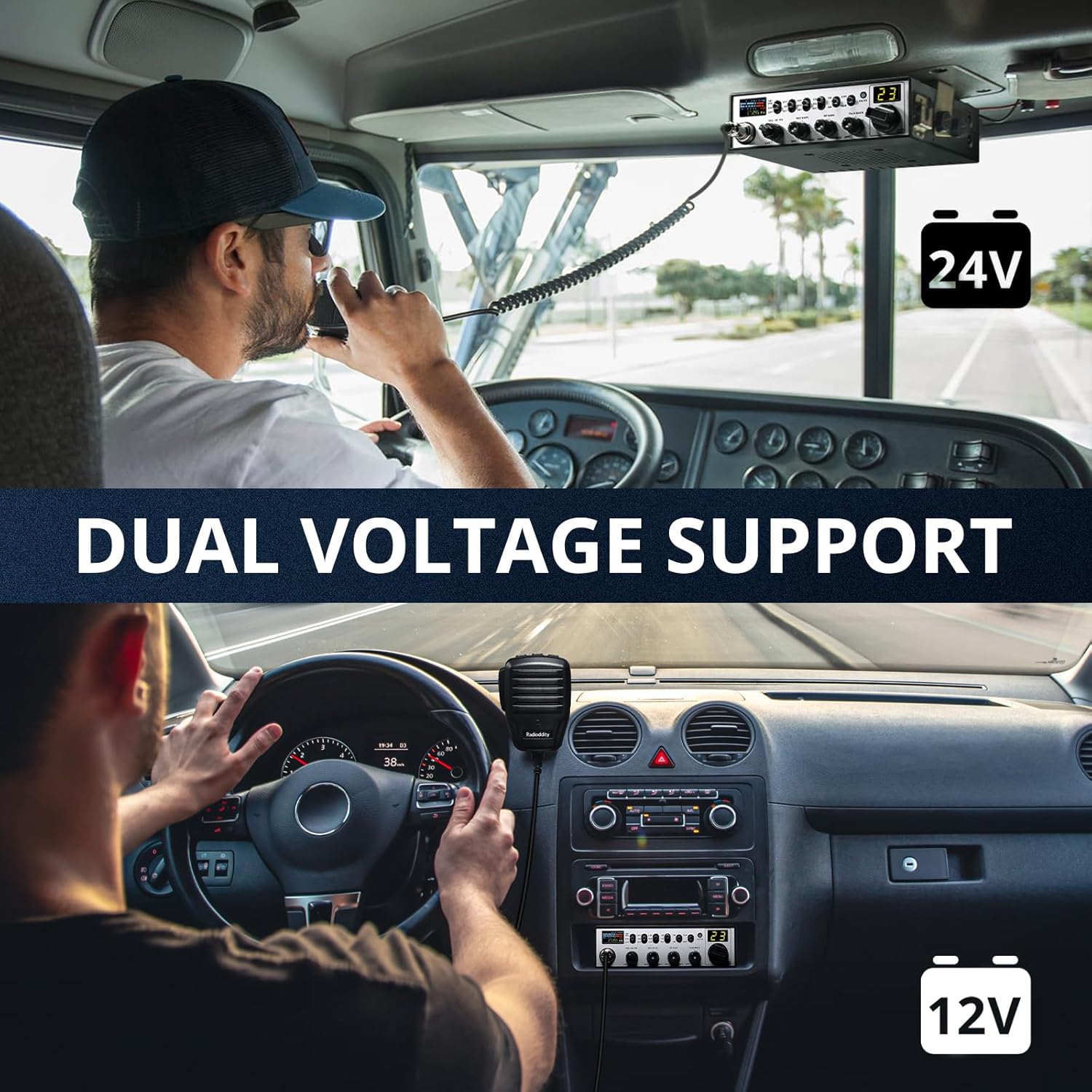
Figure 4.1: Dual voltage support for 12V and 24V systems.
4.3. ആന്റിന കണക്ഷൻ
Connect a suitable CB antenna to the antenna connector on the rear of the radio. For optimal performance and to prevent damage to the radio, it is crucial to tune your antenna for the lowest possible SWR (Standing Wave Ratio). Refer to the antenna manufacturer's instructions for tuning procedures.
4.4. മൈക്രോഫോൺ കണക്ഷൻ
Plug the detachable microphone into the front microphone jack. Ensure it clicks securely into place.
5. പ്രവർത്തന നിർദ്ദേശങ്ങൾ
5.1. പവർ ഓൺ/ഓഫ്, വോളിയം
തിരിക്കുക VOL-SQ knob clockwise to power on the radio. Continue rotating to adjust the listening volume. Rotate counter-clockwise until it clicks to power off.
5.2. Squelch Adjustment (SQ)
The squelch control eliminates background noise when no signal is being received. Rotate the VOL-SQ knob counter-clockwise until you hear static, then slowly rotate clockwise until the static disappears. This sets the squelch to an optimal level.
5.3 ചാനൽ തിരഞ്ഞെടുക്കൽ
തിരിക്കുക ചാനൽ സെലക്ടർ നോബ് to change between the 40 available CB channels. The current channel number will be displayed on the screen.
5.4. AM/FM Mode Selection
അമർത്തുക AM/FM switch to toggle between Amplitude Modulation (AM) and Frequency Modulation (FM) modes. AM is generally used for longer distances and noisy environments, while FM provides clearer communication over shorter distances.
5.5. Noise Reduction Features (NBI/ANL/NR)
ഉപയോഗിക്കുക NBI/ANL/NR switch to activate various noise reduction functions:
- NBI (Noise Blanker): Reduces pulse-type noise.
- ANL (Automatic Noise Limiter): Reduces ignition interference and other electrical noises.
- NR (ശബ്ദം കുറയ്ക്കൽ): Advanced digital noise reduction for clearer audio.
5.6. VOX (വോയ്സ് ഓപ്പറേറ്റഡ് എക്സ്ചേഞ്ച്) ഫംഗ്ഷൻ
The VOX function allows for hands-free transmission. Press the VOX/SET button to activate VOX. You can adjust the VOX level in the menu settings to suit your speaking volume and environment.

Figure 5.1: Using the VOX hands-free function.
5.7. PA (Public Address) System
The CB-900 PRO supports a Public Address (PA) system. Connect an external PA speaker to the radio's PA output jack. Switch to PA mode using the CB/PA/WX switch to use the radio as a PA system.

Figure 5.2: Radioddity CB-900 PRO supporting PA mode for clear communication.
5.8. NOAA Weather Channels (WX)
ഇതിലേക്ക് മാറുക WX mode using the CB/PA/WX switch to access NOAA weather channels. The radio can also provide weather alerts, which can be configured in the menu.
5.9. Instant Emergency Channel 9
അമർത്തുക CH9/NOR switch to instantly switch to Channel 9, the universal emergency channel for CB radio. Press it again to return to normal channel operation.
5.10. Menu Settings and Advanced Features
അമർത്തിപ്പിടിക്കുക Channel Selector Knob (PUSH MENU) to enter the menu. Rotate the knob to navigate through options and press to select. Options include:
- കീ ബീപ്പ്: Turn button press sounds ON or OFF.
- റോജർ ബീപ്: Turn the end-of-transmission tone ON or OFF, and select from various tones.
- ഡിമ്മർ: Adjust display brightness (Bright or Dim).
- ഡിസ്പ്ലേ തരം: Choose between Classic, S-Meter, or Bar Graph for the main display.
- ഡിസ്പ്ലേ മോഡ്: Select between SWR or RF power display.
- മൈക്ക് തരം: Select microphone type (e.g., Electret).
- സ്കാൻ തരം: Choose between Squelch-based or Time-based scanning.
- പ്രതിധ്വനി: Turn echo effect ON or OFF, and adjust Echo Volume and Echo Delay.
- WX Alert: Turn NOAA Weather Alerts ON or OFF.
- ടൈം ഔട്ട് ടൈമർ (TOT): Set the maximum transmission time (e.g., 3 minutes) to prevent accidental long transmissions.
- SWR Warning: Set the SWR threshold for warnings (e.g., 2:1 or 3:1).
- PA-RX Path: Configure the PA receive path.
- ASQ (Automatic Squelch): Turn automatic squelch ON or OFF.
- WX Squelch: Turn squelch for weather channels ON or OFF.
5.11. സ്കാൻ ഫംഗ്ഷൻ
To activate the scan function, hold the UP or DOWN button on the microphone. The radio will automatically scan through channels until a signal is detected. This feature is particularly useful for monitoring multiple channels without manual adjustment.
5.12. ഉൽപ്പന്നം കഴിഞ്ഞുview വീഡിയോ
വീഡിയോ 5.1: വിശദമായ ഒരു വിവരണംview of the Radioddity CB-900 PRO CB Radio's features and controls, demonstrating various settings and functions.
6. പരിപാലനം
To ensure the longevity and optimal performance of your Radioddity CB-900 PRO, follow these maintenance guidelines:
- വൃത്തിയാക്കൽ: റേഡിയോയുടെ പുറംഭാഗം വൃത്തിയാക്കാൻ മൃദുവായതും ഉണങ്ങിയതുമായ തുണി ഉപയോഗിക്കുക. അബ്രസിവ് ക്ലീനറുകളോ ലായകങ്ങളോ ഉപയോഗിക്കുന്നത് ഒഴിവാക്കുക.
- കണക്ഷനുകൾ: എല്ലാ കേബിൾ കണക്ഷനുകളും (പവർ, ആന്റിന, മൈക്രോഫോൺ) സുരക്ഷിതമാണെന്നും തുരുമ്പെടുക്കാത്തതാണെന്നും ഉറപ്പാക്കാൻ ഇടയ്ക്കിടെ പരിശോധിക്കുക.
- ആൻ്റിന ട്യൂണിംഗ്: Regularly check and re-tune your antenna's SWR, especially after moving the radio or antenna, to prevent damage to the radio's final ampജീവൻ.
- സംഭരണം: ദീർഘനേരം ഉപയോഗിക്കാത്തപ്പോൾ, നേരിട്ടുള്ള സൂര്യപ്രകാശത്തിൽ നിന്നും കടുത്ത താപനിലയിൽ നിന്നും മാറി തണുത്തതും വരണ്ടതുമായ സ്ഥലത്ത് റേഡിയോ സൂക്ഷിക്കുക.
7. പ്രശ്നപരിഹാരം
If you encounter issues with your CB-900 PRO, refer to the following common problems and solutions:
| പ്രശ്നം | സാധ്യമായ കാരണം | പരിഹാരം |
|---|---|---|
| പവർ ഇല്ല | അയഞ്ഞ വൈദ്യുതി കണക്ഷൻ, ഫ്യൂസ് പൊട്ടി, വാഹന വൈദ്യുതി പ്രശ്നം. | Check power cable connections, inspect and replace fuse if necessary, verify vehicle's power source. |
| No Reception/Transmission | Antenna not connected, high SWR, incorrect mode selected, squelch set too high. | Ensure antenna is connected, check SWR, verify AM/FM mode, lower squelch level. |
| മോശം ഓഡിയോ നിലവാരം | Microphone gain incorrect, noise reduction settings, antenna issues. | Adjust MIC GAIN and RF GAIN, experiment with NBI/ANL/NR settings, check antenna connection and SWR. |
| SWR High Alert | Poorly tuned antenna, damaged antenna or cable. | Tune antenna for lower SWR, inspect antenna and cable for damage. |
8 സ്പെസിഫിക്കേഷനുകൾ
| ഫീച്ചർ | സ്പെസിഫിക്കേഷൻ |
|---|---|
| ബ്രാൻഡ് | റേഡിയോഡിഡിറ്റി |
| മോഡൽ നമ്പർ | CB-900 PRO |
| ചാനലുകളുടെ എണ്ണം | 40 |
| ഫ്രീക്വൻസി റേഞ്ച് | CB |
| പരമാവധി സംസാര ശ്രേണി | 10 മൈൽ |
| വാല്യംtage | 13.8 Volts (Compatible with 12V & 24V systems) |
| ജല പ്രതിരോധ നില | വെള്ളത്തെ പ്രതിരോധിക്കുന്ന |
| ശബ്ദ നില | 30 ഡെസിബെൽ |
| താപനില പരിധി | -20℃ to +50℃ Degrees Celsius |
| കണക്റ്റിവിറ്റി പ്രോട്ടോക്കോൾ | CB |
| പ്രത്യേക സവിശേഷതകൾ | 12V & 24V Voltage Compatibility, AM & FM Mode, RX & TX Noise Reduction, Voice Operated Transmission (VOX), NOAA Weather, ASQ, Instant Emergency Channel 9, PA System Support, SWR High Alert |
9. വാറൻ്റിയും പിന്തുണയും
9.1. വാറൻ്റി വിവരങ്ങൾ
The Radioddity CB-900 PRO comes with an 18 മാസ വാറൻ്റി from the date of purchase. This warranty covers manufacturing defects and malfunctions under normal use. Please retain your proof of purchase for warranty claims. The warranty does not cover damage caused by misuse, accidents, unauthorized modifications, or improper installation.
9.2. ഉപഭോക്തൃ പിന്തുണ
സാങ്കേതിക സഹായം, ട്രബിൾഷൂട്ടിംഗ് അല്ലെങ്കിൽ വാറന്റി അന്വേഷണങ്ങൾക്കായി, ദയവായി അവരുടെ ഔദ്യോഗിക വഴി റേഡിയോഡിറ്റി ഉപഭോക്തൃ പിന്തുണയുമായി ബന്ധപ്പെടുക. webനിങ്ങൾ ഉൽപ്പന്നം വാങ്ങിയ സൈറ്റ് അല്ലെങ്കിൽ റീട്ടെയിലർ. കൂടുതൽ വിവരങ്ങളും ബന്ധപ്പെടാനുള്ള വിശദാംശങ്ങളും ഇവിടെ കണ്ടെത്താനാകും ആമസോണിലെ റേഡിയോഡിറ്റി സ്റ്റോർ.