
s116 max
S116 MAX Brushless Optical Flow Remote Control Drone User Manual
Model: S116 MAX
ബ്രാൻഡ്: ജനറിക്
ആമുഖം
This manual provides comprehensive instructions for the safe operation, setup, and maintenance of your S116 MAX Brushless Optical Flow Remote Control Drone. The S116 MAX is equipped with dual cameras, advanced optical flow technology, 360° intelligent infrared obstacle avoidance, and various intelligent flight modes, offering an immersive aerial experience. Please read this manual thoroughly before operating the drone to ensure proper use and to prevent damage or injury.
സുരക്ഷാ മാർഗ്ഗനിർദ്ദേശങ്ങൾ
Adhering to these safety guidelines is crucial for safe and responsible drone operation:
- വിമാന യാത്രയ്ക്ക് മുമ്പുള്ള പരിശോധന: Always inspect the drone, remote control, and battery for any damage before each flight. Ensure propellers are securely attached.
- ഫ്ലൈറ്റ് പരിസ്ഥിതി: Fly in open areas, away from people, animals, buildings, and obstacles. Avoid flying near airports or restricted airspace.
- കാലാവസ്ഥാ സാഹചര്യങ്ങൾ: Do not fly in strong winds, rain, snow, or fog. Optimal conditions are calm and clear.
- ബാറ്ററി സുരക്ഷ: Use only the original battery and charging cable. Do not overcharge or puncture the battery. Discontinue use if the battery is swollen or damaged.
- വീക്ഷണരേഖ: Maintain visual line of sight with the drone at all times during flight.
- സ്വകാര്യതയെ ബഹുമാനിക്കുക: Be mindful of privacy when using the camera. Do not record individuals without their consent.
- പ്രായം ശുപാർശ: This product is recommended for adult users.
ബോക്സിൽ എന്താണുള്ളത്
അൺബോക്സിംഗ് ചെയ്യുമ്പോൾ എല്ലാ ഘടകങ്ങളും ഉണ്ടെന്ന് ഉറപ്പാക്കുക:
- S116 MAX Drone (White)
- റിമോട്ട് കൺട്രോൾ
- റീചാർജ് ചെയ്യാവുന്ന ലിഥിയം-അയൺ ബാറ്ററി (1 ഉൾപ്പെടുത്തിയിരിക്കുന്നു)
- ESC Camera (Integrated)
- Spare Blades (4 pieces)
- ചാർജിംഗ് കേബിൾ (USB)
- സ്ക്രൂഡ്രൈവർ
- സ്റ്റോറേജ് ബാഗ്
- ഉപയോക്തൃ മാനുവൽ (ഈ പ്രമാണം)

Image: All components included in the S116 MAX drone package, laid out for clear identification.
ഉൽപ്പന്നം കഴിഞ്ഞുview
The S116 MAX drone features a robust design with advanced functionalities. Key components include:
- ബ്രഷ്ലെസ് മോട്ടോറുകൾ: Provide efficient and quiet operation with enhanced durability.
- ഡ്യുവൽ ക്യാമറ സിസ്റ്റം: Features a main HD camera for aerial photography and video, and a bottom optical flow camera for stable hovering. The main camera is electrically adjustable up to 90 degrees.
- 360° Intelligent Infrared Obstacle Avoidance: Sensors detect obstacles from all directions to prevent collisions.
- ഒപ്റ്റിക്കൽ ഫ്ലോ പൊസിഷനിംഗ്: Assists in maintaining stable flight and precise hovering, especially indoors or at low altitudes.
- മടക്കാവുന്ന കൈകൾ: ഒതുക്കമുള്ള സംഭരണത്തിനും പോർട്ടബിലിറ്റിക്കും.
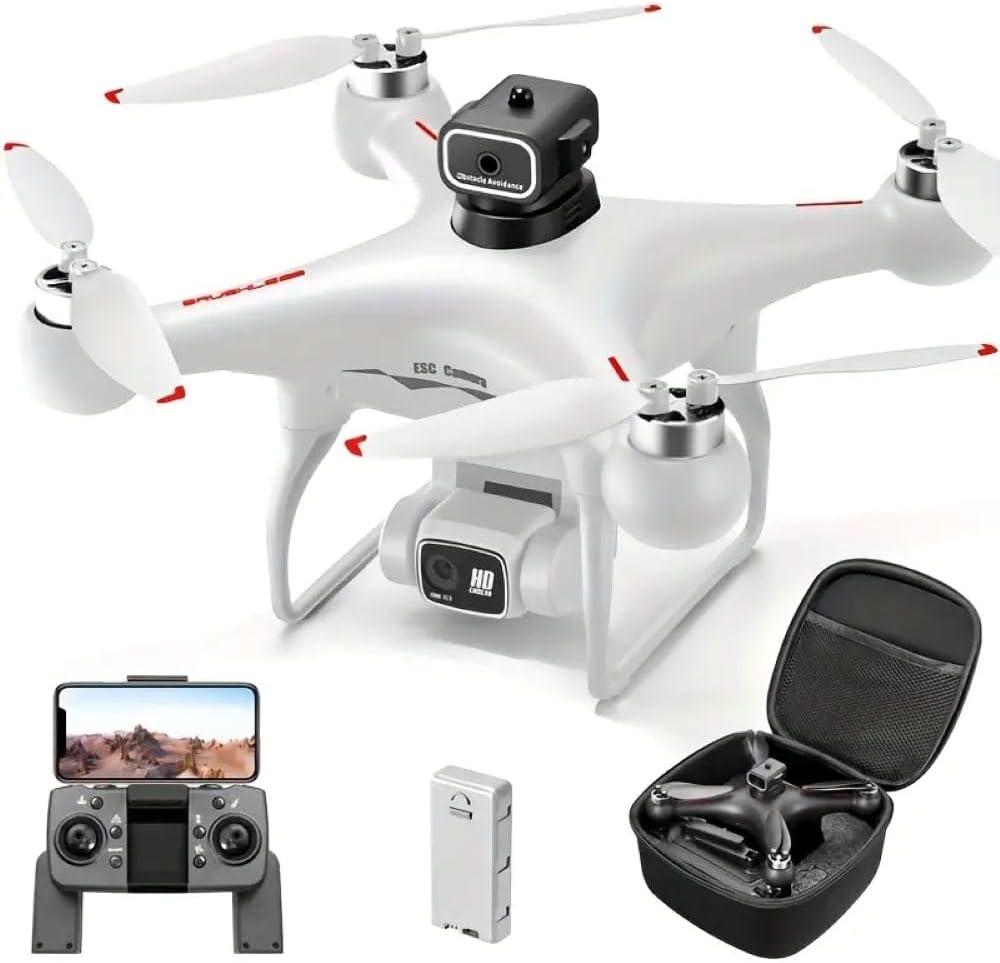
Image: The S116 MAX drone in white, alongside its remote control, battery, and a compact carrying case.

ചിത്രം: വിശദമായത് view of the S116 MAX's dual camera, highlighting its electrical adjustability for varied shooting angles.

Image: Diagram illustrating the physical dimensions of the S116 MAX drone, showing its length, width, and height.
സജ്ജമാക്കുക
1. ബാറ്ററി ഇൻസ്റ്റാളേഷനും ചാർജിംഗും
- Insert the fully charged Lithium-Ion battery into the drone's battery compartment until it clicks into place.
- To charge the battery, connect the provided USB charging cable to the battery and a suitable USB power source (e.g., computer USB port, USB wall adapter). The charging indicator light will show charging status.
- Ensure the battery is fully charged before each flight for optimal performance and safety.
2. പ്രൊപ്പല്ലർ ഇൻസ്റ്റലേഷൻ
If propellers are not pre-installed, attach them according to the markings (A and B) on the propellers and motor arms. Use the provided screwdriver to secure them firmly.
3. റിമോട്ട് കൺട്രോൾ സജ്ജീകരണം
- Install 3x AA batteries (not included) into the remote control's battery compartment.
- റിമോട്ട് കൺട്രോൾ ഓൺ ചെയ്യുക.
- Place your smartphone into the phone holder on the remote control.
4. App Installation and Connection (WIFI FPV)
- Scan the QR code in the quick start guide (or search your app store) to download the official S116 MAX drone application.
- ഡ്രോണും റിമോട്ട് കൺട്രോളും ഓണാക്കുക.
- On your smartphone, go to Wi-Fi settings and connect to the drone's Wi-Fi network (usually named "S116 MAX_XXXXXX").
- Open the drone application. The live video feed from the drone's camera should appear, indicating a successful connection.
പ്രവർത്തന നിർദ്ദേശങ്ങൾ
1. വിമാന യാത്രയ്ക്ക് മുമ്പുള്ള പരിശോധനകൾ
- Ensure drone battery is fully charged.
- Ensure remote control batteries are sufficient.
- Check propellers for damage and ensure they are securely fastened.
- Confirm Wi-Fi connection between drone and smartphone app.
- Choose a safe, open flying area.
2. ടേക്ക് ഓഫും ലാൻഡിങ്ങും
- കാലിബ്രേഷൻ: Before first flight, perform gyroscope calibration as per app instructions.
- One-Key Take-off/Landing: Press the designated button on the remote or in the app for automatic take-off or landing.
- മാനുവൽ ടേക്ക് ഓഫ്: Push both joysticks down and outwards simultaneously to start motors, then slowly push the left joystick up to ascend.
3. ഫ്ലൈറ്റ് നിയന്ത്രണങ്ങൾ
- ഇടത് ജോയിസ്റ്റിക്: ഉയരം (മുകളിലേക്ക്/താഴേക്ക്) ഭ്രമണം (ഇടത്/വലത്) എന്നിവ നിയന്ത്രിക്കുന്നു.
- വലത് ജോയിസ്റ്റിക്: മുന്നോട്ടും പിന്നോട്ടും ഇടത്തോട്ടോ വലത്തോട്ടോ ഉള്ള ചലനങ്ങൾ നിയന്ത്രിക്കുന്നു.
- തലയില്ലാത്ത മോഡ്: Activates a mode where the drone's orientation is relative to the pilot, simplifying control regardless of the drone's front direction.
- ട്രാക്ക് ഫ്ലൈറ്റ്: Draw a path on your smartphone screen, and the drone will automatically follow it.
- 360° Intelligent Infrared Obstacle Avoidance: This feature automatically detects and avoids obstacles within its sensor range, enhancing flight safety.

Image: Visual representation of the S116 MAX drone's key features, including its obstacle avoidance system and various flight modes.
4. Camera Operation (Photo & Video)
- Live FPV: View തത്സമയ footage on your smartphone via the app.
- ഫോട്ടോ/വീഡിയോ ക്യാപ്ചർ: Use the dedicated buttons on the remote control or within the app to take photos or start/stop video recording.
- Adjustable Camera: The main camera's angle can be adjusted remotely via the app or remote control for different perspectives.
- സംഭരണം: Captured media is typically saved to your smartphone or an inserted SD card (if supported by the drone).
മെയിൻ്റനൻസ്
- വൃത്തിയാക്കൽ: Use a soft, dry cloth to clean the drone body and camera lenses. Avoid using harsh chemicals.
- പ്രൊപ്പല്ലർ പരിശോധന: Regularly check propellers for cracks, bends, or debris. Replace damaged propellers immediately using the provided spare blades.
- ബാറ്ററി കെയർ: Store batteries in a cool, dry place. Do not fully discharge batteries for extended periods. Charge them to about 50-60% for long-term storage.
- മോട്ടോർ മെയിന്റനൻസ്: Keep motors free of dust and debris. Do not attempt to lubricate motors unless specified by the manufacturer.
- സംഭരണം: When not in use, store the drone and its components in the provided storage bag or a protective case to prevent damage.
ട്രബിൾഷൂട്ടിംഗ്
| പ്രശ്നം | സാധ്യമായ കാരണം | പരിഹാരം |
|---|---|---|
| ഡ്രോൺ റിമോട്ട് കൺട്രോളിനോട് പ്രതികരിക്കുന്നില്ല. | Not paired; low battery on drone or remote. | Ensure drone and remote are powered on and paired correctly. Charge batteries. |
| പറക്കലിനിടെ ഡ്രോൺ തെന്നിമാറി. | Not calibrated; strong wind. | Perform gyroscope calibration. Fly in calm conditions. |
| No FPV video feed. | Wi-Fi not connected; app issue. | Reconnect to drone's Wi-Fi network. Restart app and drone. |
| തടസ്സം ഒഴിവാക്കൽ പ്രവർത്തിക്കുന്നില്ല. | Sensors blocked; feature disabled. | Clean sensors. Ensure feature is enabled in the app. |
സ്പെസിഫിക്കേഷനുകൾ
| ഫീച്ചർ | വിശദാംശങ്ങൾ |
|---|---|
| ബ്രാൻഡ് | ജനറിക് |
| മോഡലിൻ്റെ പേര് | S116 MAX |
| നിറം | വെള്ള |
| ഇനത്തിൻ്റെ ഭാരം | 153 ഗ്രാം (5.4 ഔൺസ്) |
| ഉൽപ്പന്ന അളവുകൾ | 9.06"L x 9.06"W x 4.7"H (23cm x 23cm x 12cm) |
| വീഡിയോ ക്യാപ്ചർ റെസല്യൂഷൻ | 480p (Main camera output: 1920x1080 Pixels) |
| കണക്റ്റിവിറ്റി ടെക്നോളജി | USB, Wi-Fi |
| നിയന്ത്രണ തരം | റിമോട്ട് കൺട്രോൾ, ആപ്പ് കൺട്രോൾ |
| ബാറ്ററി തരം | ലിഥിയം അയോൺ (1 ഉൾപ്പെടുത്തിയിരിക്കുന്നു) |
| പ്രത്യേക സവിശേഷതകൾ | Anti-Corrosion, Brushless Motor, Dual Camera, Optical Flow, Infrared Obstacle Avoidance, Headless Mode, Trajectory Flight |
| നൈപുണ്യ നില | ഇൻ്റർമീഡിയറ്റ് |
വാറൻ്റിയും പിന്തുണയും
For warranty information, technical support, or service inquiries, please refer to the manufacturer's official webഉൽപ്പന്നം വാങ്ങിയ സ്ഥലത്ത് നിന്ന് വാങ്ങുകയോ റീട്ടെയിലറെ ബന്ധപ്പെടുകയോ ചെയ്യുക. വാറന്റി ക്ലെയിമുകൾക്കായി നിങ്ങളുടെ വാങ്ങിയതിന്റെ തെളിവ് സൂക്ഷിക്കുക.
Ask a question about this manual
Ask about setup, troubleshooting, compatibility, parts, safety, or missing instructions. Manuals+ will review the question and use this page’s manual context to help answer it.