
1. ആമുഖവും അവസാനവുംview
The Maxpro Fagor Connect+ FG2804 is a versatile multifunction food processor designed to simplify your cooking experience. It features a 5-liter stainless steel bowl, an intuitive 10-inch LED touchscreen, and integrated Wi-Fi connectivity for guided recipes and automatic updates. With its powerful 1500W motor, it can perform various tasks including cooking, simmering, steaming, browning, mixing, kneading, and chopping.
പ്രധാന സവിശേഷതകളിൽ ഇവ ഉൾപ്പെടുന്നു:
- 5-liter stainless steel bowl with handle for easy handling.
- Integrated Wi-Fi for step-by-step guided recipes and automatic updates.
- Intuitive 10-inch (25.4cm) LED touchscreen display.
- Reverse function for delicate tasks like kneading dough for bread and pastries, or preparing risottos, soups, and stews.
- Integrated scale for precise ingredient measurements.
- Pre-loaded with 400 recipes, with monthly updates.
- "Do It Yourself" page for manual program settings and saving custom recipes.
- Google Assistant Voice Control activation.
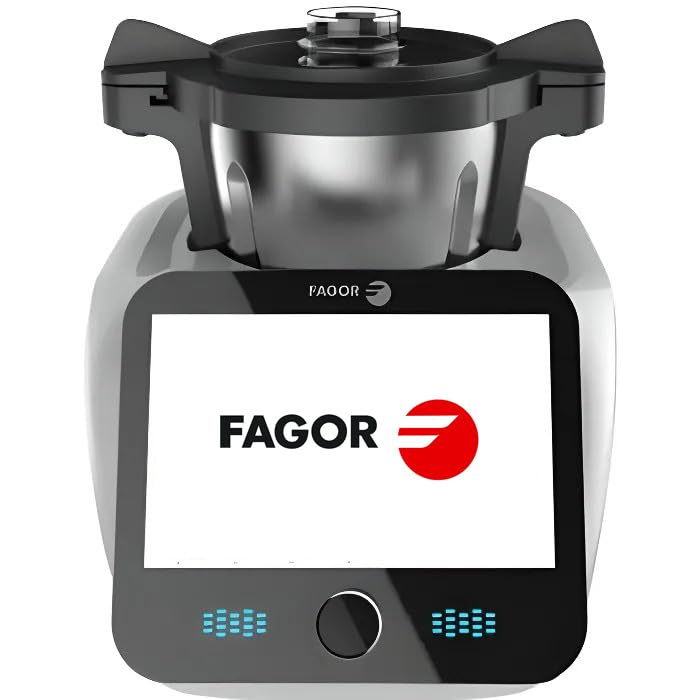
Image 1: The Maxpro Fagor Connect+ FG2804 food processor, showcasing its large touchscreen display with a recipe.
2. സജ്ജീകരണം
Before first use, ensure all packaging materials are removed. Place the food processor on a stable, flat, and dry surface. Ensure adequate ventilation around the appliance.
- ഘടകങ്ങൾ അൺപാക്ക് ചെയ്യുക: Carefully remove the main unit, stainless steel bowl, lid, and all accessories from the packaging.
- ശുദ്ധമായ ഘടകങ്ങൾ: Wash the stainless steel bowl, lid, and all accessories (spatula, chopping blade, blade protection, measuring cap, steam bowl, butterfly whisk, steam basket) with warm soapy water. Rinse thoroughly and dry completely before assembly. The main unit should be wiped with a damp തുണി.
- Assemble the Bowl: Place the clean stainless steel bowl onto the main unit. Ensure it is securely seated.
- ആക്സസറികൾ ചേർക്കുക: Depending on your recipe, insert the appropriate accessory (e.g., chopping blade, butterfly whisk) into the bowl. The system allows for easy accessory changes without removing the bowl.
- ലിഡ് സുരക്ഷിതമാക്കുക: Place the lid onto the bowl and turn it clockwise until it locks securely into place. The appliance will not operate if the lid is not properly secured.
- പവറിലേക്ക് ബന്ധിപ്പിക്കുക: അനുയോജ്യമായ ഒരു ഇലക്ട്രിക്കൽ ഔട്ട്ലെറ്റിലേക്ക് പവർ കോർഡ് പ്ലഗ് ചെയ്യുക.
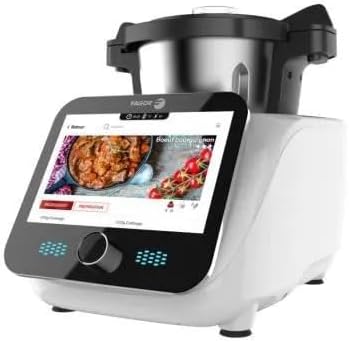
Image 2: The Fagor Connect+ food processor with its various accessories, including the stainless steel bowl, lid, and different blades/attachments.
3. പ്രവർത്തന നിർദ്ദേശങ്ങൾ
The Fagor Connect+ offers both automated guided recipes and manual control for maximum flexibility.
3.1. Using Guided Recipes (Wi-Fi Connected)
- പവർ ഓൺ: Turn on the appliance. The 10-inch LED touchscreen will display the main menu.
- വൈഫൈയിലേക്ക് കണക്റ്റുചെയ്യുക: Ensure your appliance is connected to your home Wi-Fi network to access the full recipe library and receive automatic updates. Follow the on-screen prompts for initial Wi-Fi setup.
- Browse Recipes: Use the touchscreen to browse recipes by theme (e.g., Cocktails, Baby Food, Italian, Exotic) or use the search bar to find recipes by ingredients.
- Select a Recipe: Tap on your desired recipe. The screen will display step-by-step instructions, including ingredient lists and preparation steps.
- നിർദ്ദേശങ്ങൾ പാലിക്കുക: The appliance will guide you through each step, indicating when to add ingredients, which accessory to use, and automatically setting the correct time, temperature, and speed.
- Intelligent Suggestions: The new interface may offer intelligent suggestions for complementary recipes (e.g., an appetizer, sauce, or dessert) based on your preferences or previously prepared dishes.
- ശബ്ദ നിയന്ത്രണം: Activate Google Assistant Voice Control in the settings to operate the appliance hands-free.
3.2. Manual Operation ("Do It Yourself" Page)
- Access Manual Mode: Navigate to the "Do It Yourself" page on the touchscreen.
- പാരാമീറ്ററുകൾ സജ്ജമാക്കുക: Manually adjust the speed (11 speeds available), temperature, and time according to your recipe.
- Use Integrated Scale: The integrated scale allows for precise weighing of ingredients directly in the bowl.
- പ്രവർത്തനം തിരഞ്ഞെടുക്കുക: Choose from various functions such as chopping, mixing, kneading (using the reverse function for delicate doughs), cooking, simmering, steaming, browning, liquefying, or emulsifying.
- Save Custom Recipes: You can save your customized manual settings as new recipes for future use.
4. പരിപാലനം
Proper maintenance ensures the longevity and optimal performance of your Fagor Connect+ food processor.
- പ്രധാന യൂണിറ്റ് വൃത്തിയാക്കൽ: Always unplug the appliance before cleaning. Wipe the main unit with a soft, damp തുണി. പ്രധാന യൂണിറ്റ് വെള്ളത്തിലോ മറ്റേതെങ്കിലും ദ്രാവകത്തിലോ മുക്കരുത്.
- പാത്രവും അനുബന്ധ ഉപകരണങ്ങളും വൃത്തിയാക്കൽ: The stainless steel bowl and most accessories (spatula, chopping blade, blade protection, measuring cap, steam bowl, butterfly whisk, steam basket) are dishwasher safe. For best results, rinse immediately after use to prevent food from drying on.
- കെെ കഴുകൽ: If hand washing, use warm soapy water and a non-abrasive sponge. Rinse thoroughly and dry completely.
- സംഭരണം: ഉപകരണവും അതിന്റെ അനുബന്ധ ഉപകരണങ്ങളും വൃത്തിയുള്ളതും വരണ്ടതുമായ സ്ഥലത്ത് സൂക്ഷിക്കുക.
Important: The main appliance unit is NOT dishwasher safe and should only be cleaned by hand wiping.
5. പ്രശ്നപരിഹാരം
If you encounter issues with your Fagor Connect+ food processor, refer to the following common troubleshooting steps:
- ഉപകരണം ഓണാക്കുന്നില്ല:
- പ്രവർത്തിക്കുന്ന ഒരു ഇലക്ട്രിക്കൽ ഔട്ട്ലെറ്റിൽ പവർ കോർഡ് സുരക്ഷിതമായി പ്ലഗ് ചെയ്തിട്ടുണ്ടെന്ന് ഉറപ്പാക്കുക.
- Check if the lid is properly closed and locked. The appliance has a safety mechanism that prevents operation if the lid is not secured.
- മോട്ടോർ പ്രവർത്തിക്കുന്നില്ല:
- Verify that the bowl and accessories are correctly assembled.
- Check for any error messages on the touchscreen display and consult the digital manual for specific codes.
- വൈഫൈ കണക്റ്റിവിറ്റി പ്രശ്നങ്ങൾ:
- നിങ്ങളുടെ വൈഫൈ റൂട്ടർ ഓണാണെന്നും ശരിയായി പ്രവർത്തിക്കുന്നുണ്ടെന്നും ഉറപ്പാക്കുക.
- Check the Wi-Fi settings on the appliance's touchscreen and re-enter network credentials if necessary.
- Move the appliance closer to your Wi-Fi router if signal strength is weak.
- Inaccurate Scale Readings:
- Ensure the appliance is on a flat, stable surface and not vibrating during weighing.
- Remove any items from the main unit's base before using the scale.
- Tare the scale before adding ingredients.
ഈ ഘട്ടങ്ങൾ പരീക്ഷിച്ചതിനുശേഷവും പ്രശ്നം നിലനിൽക്കുകയാണെങ്കിൽ, കൂടുതൽ സഹായത്തിനായി ഉപഭോക്തൃ പിന്തുണയുമായി ബന്ധപ്പെടുക.
6 സ്പെസിഫിക്കേഷനുകൾ
| ഫീച്ചർ | വിശദാംശങ്ങൾ |
|---|---|
| ബ്രാൻഡ് | Maxpro |
| മോഡലിൻ്റെ പേര് | Fagor Connect+ |
| മോഡൽ നമ്പർ | FG2804 |
| ശക്തി | 1500 Watts (800W motor + 1000W heating) |
| ബൗൾ കപ്പാസിറ്റി | 5 Litres (3.5L usable) |
| മെറ്റീരിയൽ | Stainless Steel (bowl and blade) |
| വേഗതകളുടെ എണ്ണം | 11 |
| പ്രത്യേക സവിശേഷതകൾ | Adjustable Speed Control, Programmable, Integrated Scale, Wi-Fi Connectivity, 10-inch LED Touchscreen, Voice Control (Google Assistant) |
| അളവുകൾ (L x W x H) | 40 സെ.മീ x 30 സെ.മീ x 30 സെ.മീ |
| ഭാരം | 10 കിലോഗ്രാം |
| ശുപാർശ ചെയ്യുന്ന ഉപയോഗങ്ങൾ | Grinding, Chopping, Liquefying, Emulsifying, Cooking, Simmering, Steaming, Browning, Mixing, Kneading |
| ഉൾപ്പെടുത്തിയ ഘടകങ്ങൾ | 5L Stainless Steel Bowl, Spatula, Chopping Blade, Blade Protection for Mixing, Lid with 90ml Measuring Cap, Steam Bowl, Butterfly Whisk, Steam Basket |
| പരിചരണ നിർദ്ദേശങ്ങൾ | Main unit: Hand wash only. Bowl and accessories: Dishwasher safe. |
7. വാറൻ്റിയും പിന്തുണയും
Your Maxpro Fagor Connect+ FG2804 food processor comes with a standard manufacturer's warranty. Please refer to the warranty card included in your product packaging for specific terms and conditions, including warranty period and coverage details.
For technical support, service, or warranty claims, please contact Maxpro customer service. Contact information can typically be found on the product packaging, the official Maxpro webസൈറ്റ്, അല്ലെങ്കിൽ വാറന്റി കാർഡ്.
When contacting support, please have your model number (FG2804) and proof of purchase readily available.