
റേഡിയോഷാക്ക് 4001771
RadioShack IPX5 Waterproof Bluetooth Speaker User Manual
മോഡൽ: 4001771
ആമുഖം
This manual provides essential information for the safe and efficient operation of your RadioShack IPX5 Waterproof Bluetooth Speaker. Please read this manual thoroughly before using the product and retain it for future reference.
The RadioShack IPX5 Waterproof Bluetooth Speaker delivers powerful 40W sound with dynamic RGB lighting, designed for both indoor and outdoor use. Its rugged, water-resistant design and long-lasting battery make it ideal for various environments.

Figure 1: RadioShack IPX5 Waterproof Bluetooth Speaker.
പാക്കേജ് ഉള്ളടക്കം
അൺബോക്സിംഗ് ചെയ്യുമ്പോൾ എല്ലാ ഇനങ്ങളും ഉണ്ടെന്ന് ഉറപ്പാക്കുക:
- 1x Portable Bluetooth Speaker with Lights
- 1x ഉപയോക്തൃ മാനുവൽ
- 1x Charging Cable (Type-C)
Figure 2: Included accessories and speaker.
ഉൽപ്പന്ന സവിശേഷതകൾ
- ശക്തമായ ശബ്ദം: 40W output for immersive audio with deep bass and clear highs.
- ഡൈനാമിക് RGB ലൈറ്റിംഗ്: Customizable lighting to enhance the listening experience.
- പരുക്കൻ ഈട്: IPX5 water-resistant rating for protection against splashes.
- ദീർഘകാല ബാറ്ററി: 3600mAh battery for extended playback.
- പോർട്ടബിൾ ഡിസൈൻ: എളുപ്പമുള്ള ഗതാഗതത്തിനായി ഒതുക്കമുള്ളതും ഭാരം കുറഞ്ഞതും.
- ബ്ലൂടൂത്ത് കണക്റ്റിവിറ്റി: Seamless wireless connection to compatible devices.
- Hands-free Microphone: For easy voice control and calls.
- ട്രൂ വയർലെസ് സ്റ്റീരിയോ (TWS): Allows pairing two speakers for synchronized stereo playback.

ചിത്രം 3: ഓവർview പ്രധാന ഉൽപ്പന്ന സവിശേഷതകൾ.
സുരക്ഷാ വിവരങ്ങൾ
- ഉയർന്ന താപനിലയിലോ നേരിട്ടുള്ള സൂര്യപ്രകാശത്തിലോ ദീർഘനേരം സ്പീക്കറിനെ തുറന്നുകാട്ടരുത്.
- സ്പീക്കറെ ശക്തമായ ആഘാതങ്ങൾക്ക് വിധേയമാക്കുകയോ താഴെയിടുകയോ ചെയ്യുന്നത് ഒഴിവാക്കുക.
- Do not disassemble, repair, or modify the speaker yourself. Contact qualified service personnel for repairs.
- സ്പീക്കറിന്റെ കാന്തിക ഘടകങ്ങൾ അവയുടെ പ്രവർത്തനത്തെ തടസ്സപ്പെടുത്തിയേക്കാം എന്നതിനാൽ, അത് മെഡിക്കൽ ഉപകരണങ്ങളിൽ നിന്ന് അകറ്റി നിർത്തുക.
- The IPX5 rating means the speaker is resistant to water splashes from any direction. Do not submerge the speaker in water.
- ചാർജ് ചെയ്യുന്നതിന് നൽകിയിരിക്കുന്ന ചാർജിംഗ് കേബിളോ സാക്ഷ്യപ്പെടുത്തിയ ടൈപ്പ്-സി കേബിളോ മാത്രം ഉപയോഗിക്കുക.
- പ്രാദേശിക നിയന്ത്രണങ്ങൾ അനുസരിച്ച് ബാറ്ററിയും സ്പീക്കറും നശിപ്പിക്കുക. ബാറ്ററികൾ തീയിൽ നിക്ഷേപിക്കരുത്.
സജ്ജമാക്കുക
സ്പീക്കറെ കുറ്റപ്പെടുത്തുന്നു
- നൽകിയിരിക്കുന്ന ടൈപ്പ്-സി ചാർജിംഗ് കേബിൾ സ്പീക്കറിലെ ചാർജിംഗ് പോർട്ടുമായി ബന്ധിപ്പിക്കുക.
- കേബിളിന്റെ മറ്റേ അറ്റം ഒരു USB പവർ അഡാപ്റ്ററുമായി (ഉൾപ്പെടുത്തിയിട്ടില്ല) അല്ലെങ്കിൽ ഒരു കമ്പ്യൂട്ടർ USB പോർട്ടുമായി ബന്ധിപ്പിക്കുക.
- The charging indicator lights will illuminate to show charging status. The lights will turn off or change color when fully charged.
- ഒരു പൂർണ്ണ ചാർജ് സാധാരണയായി ഏകദേശം 4 മണിക്കൂർ എടുക്കും.
പവർ ചെയ്യുന്നത് ഓൺ/ഓഫ്
- പവർ ഓൺ ചെയ്യാൻ, പവർ ബട്ടൺ അമർത്തിപ്പിടിക്കുക (●) for a few seconds until the indicator lights illuminate.
- പവർ ഓഫ് ചെയ്യാൻ, പവർ ബട്ടൺ അമർത്തിപ്പിടിക്കുക (●) again for a few seconds until the indicator lights turn off.
പ്രവർത്തന നിർദ്ദേശങ്ങൾ
ബ്ലൂടൂത്ത് ജോടിയാക്കൽ
- സ്പീക്കർ ഓണാണെന്നും ബ്ലൂടൂത്ത് ജോടിയാക്കൽ മോഡിലാണെന്നും ഉറപ്പാക്കുക (മിന്നുന്ന നീല വെളിച്ചം സൂചിപ്പിക്കുന്നത്).
- നിങ്ങളുടെ സ്മാർട്ട്ഫോണിലോ ടാബ്ലെറ്റിലോ, ബ്ലൂടൂത്ത് പ്രവർത്തനക്ഷമമാക്കി ലഭ്യമായ ഉപകരണങ്ങൾക്കായി തിരയുക.
- Select "RadioShack Speaker" from the list of devices.
- Once paired, the indicator light will become solid blue, and you will hear a confirmation tone.
സംഗീത പ്ലേബാക്ക്
- പ്ലേ/താൽക്കാലികമായി നിർത്തുക: പ്ലേ/പോസ് ബട്ടൺ അമർത്തുക (►▮▮) സംഗീതം പ്ലേ ചെയ്യാനോ താൽക്കാലികമായി നിർത്താനോ.
- വോളിയം കൂട്ടുക: വോളിയം അപ്പ് ബട്ടൺ അമർത്തുക (+).
- വോളിയം താഴേക്ക്: വോളിയം ഡൗൺ ബട്ടൺ അമർത്തുക (-).
- അടുത്ത ട്രാക്ക്: വോളിയം അപ്പ് ബട്ടൺ അമർത്തിപ്പിടിക്കുക (+).
- മുമ്പത്തെ ട്രാക്ക്: വോളിയം ഡൗൺ ബട്ടൺ അമർത്തിപ്പിടിക്കുക (-).
RGB ലൈറ്റിംഗ് നിയന്ത്രണം
- ലൈറ്റ് ബട്ടൺ അമർത്തുക (☀) to cycle through different RGB lighting modes.
- Press and hold the Light button to turn the RGB lighting off.
ഹാൻഡ്സ് ഫ്രീ കോളിംഗ്
- When a call comes in, press the Play/Pause button (►▮▮) ഉത്തരം നൽകാൻ.
- പ്ലേ/പോസ് ബട്ടൺ അമർത്തുക (►▮▮) again to end the call.
- പ്ലേ/പോസ് ബട്ടൺ അമർത്തിപ്പിടിക്കുക (►▮▮) ഒരു ഇൻകമിംഗ് കോൾ നിരസിക്കാൻ.

Figure 4: Hands-free microphone for easy voice control.
ട്രൂ വയർലെസ് സ്റ്റീരിയോ (ടിഡബ്ല്യുഎസ്) ജോടിയാക്കൽ
To achieve a true stereo sound experience, you can pair two RadioShack IPX5 Waterproof Bluetooth Speakers together:
- രണ്ട് സ്പീക്കറുകളും ഓണാക്കിയിട്ടുണ്ടെന്നും ഏതെങ്കിലും ബ്ലൂടൂത്ത് ഉപകരണവുമായി ബന്ധിപ്പിച്ചിട്ടില്ലെന്നും ഉറപ്പാക്കുക.
- On one speaker, press and hold the TWS button (often indicated by an infinity symbol ∞ ∞ ന്റെ വ്യാപ്തി or a dedicated TWS icon) for a few seconds. It will enter TWS pairing mode.
- The second speaker will automatically connect to the first. You will hear a confirmation tone when TWS pairing is successful.
- Once paired, connect your device to the primary speaker via Bluetooth as described above. Both speakers will now play audio in synchronized stereo.

Figure 5: True Wireless Stereo (TWS) functionality.
മെയിൻ്റനൻസ്
- മൃദുവായതും ഉണങ്ങിയതുമായ തുണി ഉപയോഗിച്ച് സ്പീക്കർ വൃത്തിയാക്കുക. അബ്രസീവ് ക്ലീനറുകളോ ലായകങ്ങളോ ഉപയോഗിക്കരുത്.
- If the speaker gets wet, wipe it dry thoroughly before charging or storing.
- ഉപയോഗിക്കാത്തപ്പോൾ തണുത്തതും വരണ്ടതുമായ സ്ഥലത്ത് സ്പീക്കർ സൂക്ഷിക്കുക.
- ബാറ്ററി ലൈഫ് സംരക്ഷിക്കാൻ, പതിവായി ഉപയോഗിക്കുന്നില്ലെങ്കിൽ, കുറഞ്ഞത് മൂന്ന് മാസത്തിലൊരിക്കലെങ്കിലും സ്പീക്കർ ചാർജ് ചെയ്യുക.
ട്രബിൾഷൂട്ടിംഗ്
| പ്രശ്നം | സാധ്യമായ കാരണം | പരിഹാരം |
|---|---|---|
| സ്പീക്കർ പവർ ഓൺ ചെയ്യുന്നില്ല. | ബാറ്ററി കുറവാണ് അല്ലെങ്കിൽ തീർന്നു. | സ്പീക്കർ പൂർണ്ണമായും ചാർജ് ചെയ്യുക. |
| സ്പീക്കറിൽ നിന്ന് ശബ്ദമില്ല. | Volume is too low; device not paired; incorrect audio source. | Increase volume on speaker and connected device. Ensure proper Bluetooth pairing. Check audio output settings on your device. |
| ബ്ലൂടൂത്ത് ഉപകരണവുമായി ജോടിയാക്കാൻ കഴിയില്ല. | സ്പീക്കർ ജോടിയാക്കൽ മോഡിലല്ല; ഉപകരണം വളരെ അകലെയാണ്; ഇടപെടൽ. | Ensure speaker is in pairing mode (flashing blue light). Move device closer to speaker (within 32ft). Turn off other Bluetooth devices nearby. |
| TWS ജോടിയാക്കൽ പരാജയപ്പെടുന്നു. | Speakers are already connected to a device; too far apart. | ഏതെങ്കിലും ബ്ലൂടൂത്ത് ഉപകരണങ്ങളിൽ നിന്ന് രണ്ട് സ്പീക്കറുകളും വിച്ഛേദിക്കുക. TWS ജോടിയാക്കുമ്പോൾ സ്പീക്കറുകൾ പരസ്പരം അടുത്താണെന്ന് ഉറപ്പാക്കുക. |
സ്പെസിഫിക്കേഷനുകൾ
| ഫീച്ചർ | വിശദാംശങ്ങൾ |
|---|---|
| മോഡലിൻ്റെ പേര് | RadioShack Bluetooth Speaker Pump RGB Light 40W IPX5 3600MAH Black |
| സ്പീക്കർ തരം | പോർട്ടബിൾ |
| പവർ ഔട്ട്പുട്ട് | 40 വാട്ട്സ് |
| വാട്ടർപ്രൂഫ് റേറ്റിംഗ് | IPX5 |
| ബാറ്ററി ശേഷി | 3600 mAh ലിഥിയം അയോൺ |
| കണക്റ്റിവിറ്റി ടെക്നോളജി | ബ്ലൂടൂത്ത് |
| ബ്ലൂടൂത്ത് ശ്രേണി | 10 മീറ്റർ (ഏകദേശം 32 അടി) |
| ഉൽപ്പന്ന അളവുകൾ (D x W x H) | 5.35"D x 12.52"W x 5.75"H |
| ഇനത്തിൻ്റെ ഭാരം | 4.54 പൗണ്ട് |
| നിറം | കറുപ്പ് |
| ഉൾപ്പെടുത്തിയ ഘടകങ്ങൾ | ഉപയോക്തൃ മാനുവൽ |
| നിയന്ത്രണ രീതി | സ്പർശിക്കുക |
| ശുപാർശ ചെയ്യുന്ന ഉപയോഗങ്ങൾ | ഇൻഡോർ/ഔട്ട്ഡോർ |
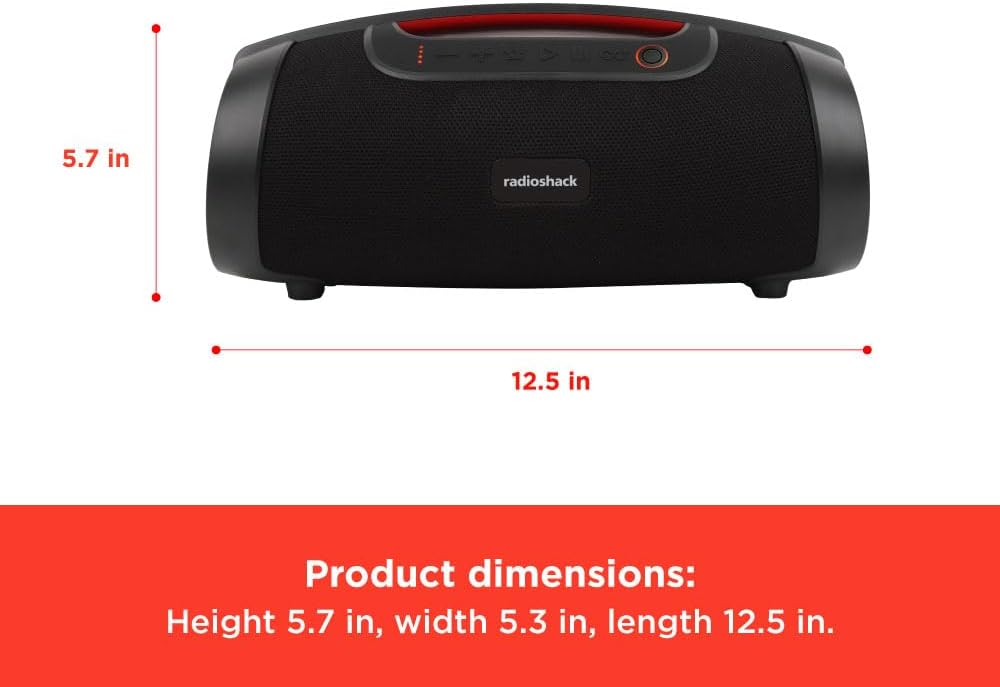
ചിത്രം 6: ഉൽപ്പന്ന അളവുകൾ.
വാറൻ്റിയും പിന്തുണയും
This RadioShack product comes with a Limited Warranty. For detailed warranty information, please refer to the warranty card included in your package or visit the official RadioShack webസൈറ്റ്.
For technical support, troubleshooting assistance, or warranty claims, please contact RadioShack customer service:
- നിർമ്മാതാവ്: റേഡിയോഷാക്ക്
- Webസൈറ്റ്: www.റേഡിയോഷാക്ക്.കോം (Please note: This is a general placeholder. Refer to your product packaging for the most accurate support contact information.)
- മോഡൽ നമ്പർ: 4001771
കൂടുതൽ സംരക്ഷണ പ്ലാനുകൾ വാങ്ങാൻ ലഭ്യമായേക്കാം. വിശദാംശങ്ങൾക്ക് നിങ്ങളുടെ റീട്ടെയിലറെ ബന്ധപ്പെടുക.
Ask a question about this manual
Ask about setup, troubleshooting, compatibility, parts, safety, or missing instructions. Manuals+ will review the question and use this page’s manual context to help answer it.