
ആമുഖം
This manual provides essential instructions for the Generic Replacement Remote Control designed for the Vimgo P10 Portable Mini Projector. As a replacement unit, its primary function is to provide core control over your projector. While it aims to replicate the functionality of the original remote, some advanced or specific features may vary. Please refer to your projector's original manual for detailed information on its full capabilities.
This remote operates using infrared (IR) technology, requiring a direct line of sight to the projector's IR receiver for proper function.
ഉൽപ്പന്നം കഴിഞ്ഞുview
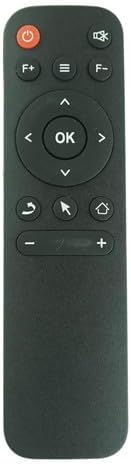
ചിത്രം 1: മുൻഭാഗം view വിദൂര നിയന്ത്രണത്തിന്റെ.
The remote control features a sleek black design with clearly labeled buttons for easy navigation and control of your Vimgo P10 Portable Mini Projector. Key buttons include Power, Volume Up/Down, Navigation Pad with OK button, Menu, Home, Back, and a cursor/mouse function button.
സജ്ജമാക്കുക
ബാറ്ററി ഇൻസ്റ്റാളേഷൻ
The remote control requires two (2) AAA batteries (not included) for operation.
- റിമോട്ട് കൺട്രോളിൻ്റെ പിൻഭാഗത്ത് ബാറ്ററി കമ്പാർട്ട്മെൻ്റ് കവർ കണ്ടെത്തുക.
- Gently slide the cover downwards or press the latch (if present) and lift to remove it.
- കമ്പാർട്ടുമെന്റിനുള്ളിലെ അടയാളപ്പെടുത്തലുകളുമായി പോസിറ്റീവ് (+), നെഗറ്റീവ് (-) ടെർമിനലുകൾ ശരിയായി വിന്യസിക്കുന്നുണ്ടെന്ന് ഉറപ്പാക്കാൻ രണ്ട് AAA ബാറ്ററികൾ ഇടുക.
- സുരക്ഷിതമായി ക്ലിക്ക് ചെയ്യുന്നതുവരെ ബാറ്ററി കമ്പാർട്ട്മെന്റ് കവർ തിരികെ സ്ഥലത്തേക്ക് സ്ലൈഡുചെയ്ത് മാറ്റിസ്ഥാപിക്കുക.

Figure 2: Battery compartment.
Ensure correct battery polarity for proper function.
പ്രവർത്തന നിർദ്ദേശങ്ങൾ
Point the remote control directly at the IR receiver on your Vimgo P10 Portable Mini Projector. Obstructions between the remote and the projector will prevent proper operation.
- പവർ ബട്ടൺ (⏻): Press to turn the projector On or Off.
- Volume Buttons (F+, F-): Adjust the audio volume of the projector.
- Navigation Pad (▲ ▼ ◀ ▶): Use these arrow buttons to navigate through menus and options on the projector screen.
- ശരി ബട്ടൺ: Confirms selections or enters a menu item.
- Menu Button (≡): Accesses the projector's main menu or settings.
- ഹോം ബട്ടണ് (⌂): Returns to the projector's home screen or main interface.
- ബാക്ക് ബട്ടൺ (↩): മുമ്പത്തെ സ്ക്രീനിലേക്കോ മെനുവിലേക്കോ മടങ്ങുന്നു.
- Mouse/Cursor Button (⇱): Activates or deactivates the on-screen mouse cursor for easier navigation in certain applications.
- Volume Control (+ -): Adjusts the volume. (Note: Some remotes may have dual volume controls, use the one that works for your projector).
മെയിൻ്റനൻസ്
- വൃത്തിയാക്കൽ: മൃദുവായതും ഉണങ്ങിയതുമായ തുണി ഉപയോഗിച്ച് റിമോട്ട് കൺട്രോൾ തുടയ്ക്കുക. അബ്രാസീവ് ക്ലീനറുകളോ ലായകങ്ങളോ ഉപയോഗിക്കരുത്.
- ബാറ്ററി മാറ്റിസ്ഥാപിക്കൽ: റിമോട്ടിന്റെ പ്രതികരണം മന്ദഗതിയിലാകുകയോ പ്രവർത്തിക്കുന്നത് നിർത്തുകയോ ചെയ്യുമ്പോൾ ബാറ്ററികൾ മാറ്റിസ്ഥാപിക്കുക. എല്ലായ്പ്പോഴും രണ്ട് ബാറ്ററികളും ഒരേ സമയം പുതിയവ ഉപയോഗിച്ച് മാറ്റിസ്ഥാപിക്കുക.
- സംഭരണം: റിമോട്ട് ദീർഘനേരം ഉപയോഗിക്കുന്നില്ലെങ്കിൽ, ചോർച്ചയും സാധ്യതയുള്ള കേടുപാടുകളും തടയാൻ ബാറ്ററികൾ നീക്കം ചെയ്യുക. തണുത്തതും വരണ്ടതുമായ സ്ഥലത്ത് സൂക്ഷിക്കുക.
ട്രബിൾഷൂട്ടിംഗ്
| പ്രശ്നം | സാധ്യമായ കാരണം | പരിഹാരം |
|---|---|---|
| റിമോട്ട് പ്രതികരിക്കുന്നില്ല | Dead or incorrectly installed batteries; Obstruction between remote and projector; Remote out of range; Projector's IR receiver blocked or faulty. | Replace batteries, ensuring correct polarity. Remove any obstructions. Ensure you are within effective range (typically 15-20 feet) and have a clear line of sight. Check projector's IR receiver. |
| ചില പ്രവർത്തനങ്ങൾ പ്രവർത്തിക്കുന്നില്ല | This is a replacement remote; Specific functions may not be fully compatible with all projector models. | Verify the remote's compatibility with your specific projector model. Refer to your projector's original manual for its remote control specifications. This replacement remote is designed for core functions. |
| ബട്ടണുകൾ സ്റ്റിക്കി അല്ലെങ്കിൽ പ്രതികരിക്കുന്നില്ല | Dirt or debris under buttons; Wear and tear. | Clean the remote surface. If the issue persists, the remote may need replacement. |
സ്പെസിഫിക്കേഷനുകൾ
- മോഡൽ: P10 റിമോട്ട് കൺട്രോൾ
- അനുയോജ്യത: Specifically designed for Vimgo P10 Portable Mini Projector (IR Replacement)
- ഊർജ്ജ സ്രോതസ്സ്: 2 x AAA ബാറ്ററികൾ (ഉൾപ്പെടുത്തിയിട്ടില്ല)
- നിറം: കറുപ്പ്
- നിർമ്മാതാവ്: ഈസിട്രി
വാറൻ്റിയും പിന്തുണയും
As a replacement product, warranty terms may vary. Please refer to the purchase documentation or contact the seller (Easytry123) directly for information regarding warranty coverage and support for this specific remote control.
For any operational questions or issues not covered in this manual, it is recommended to first consult the original user manual of your Vimgo P10 Portable Mini Projector, as this replacement remote is designed to work with its existing functionalities.