
1. ആമുഖം
Thank you for choosing the Hama DR2002BT Digital Radio. This device offers a comprehensive audio experience with FM, DAB/DAB+ digital radio reception, and Bluetooth connectivity. Its user-friendly design, featuring large buttons and a clear 4.3-inch TFT color display, makes it suitable for all users. This manual will guide you through the setup, operation, and maintenance of your new digital radio.
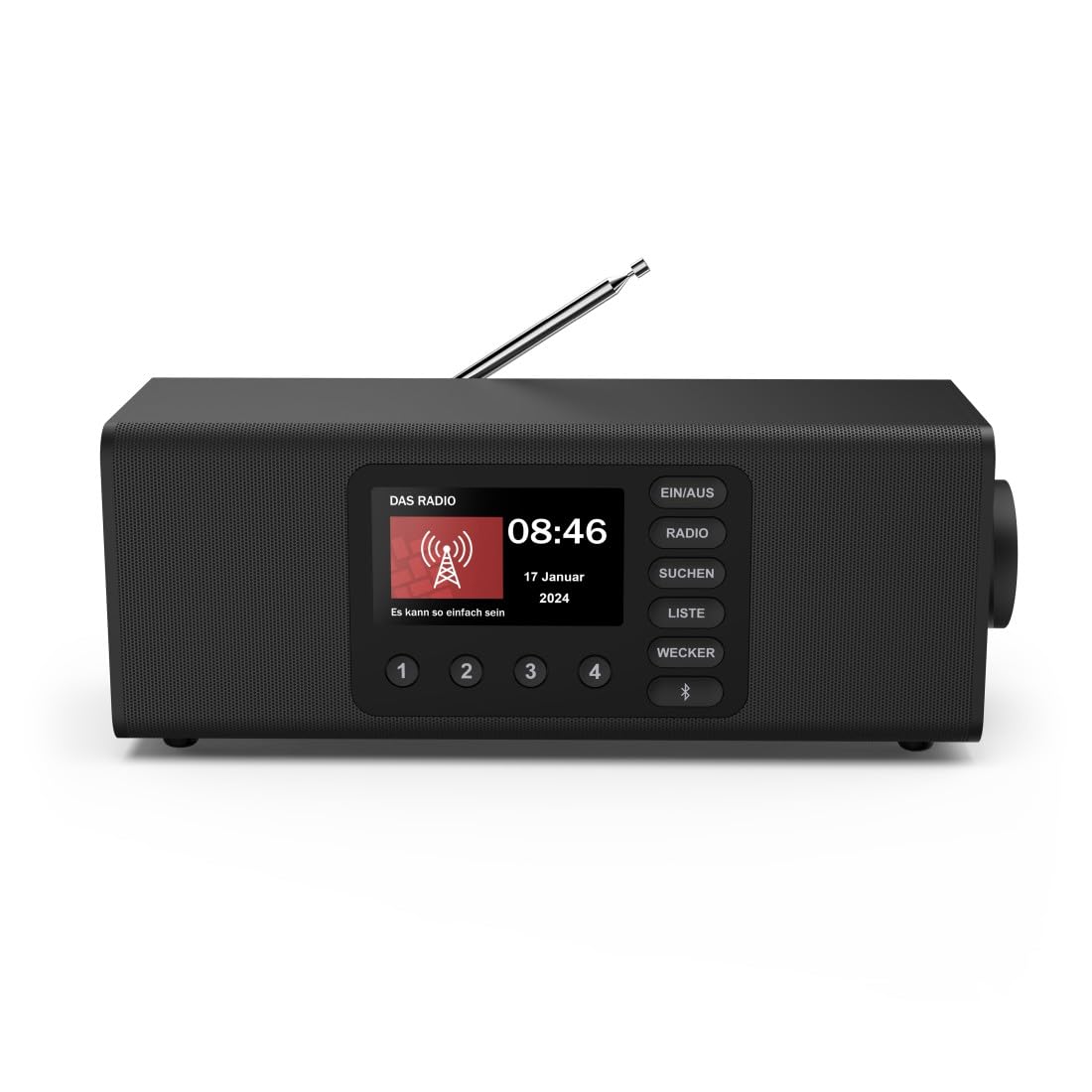
ചിത്രം: മുൻഭാഗം view of the Hama DR2002BT Digital Radio, showcasing അതിന്റെ ഡിസ്പ്ലേ, നിയന്ത്രണ ബട്ടണുകൾ.
2 സുരക്ഷാ വിവരങ്ങൾ
ഉപകരണം ഉപയോഗിക്കുന്നതിന് മുമ്പ് ദയവായി ഈ സുരക്ഷാ നിർദ്ദേശങ്ങൾ ശ്രദ്ധാപൂർവ്വം വായിക്കുക. ഭാവിയിലെ റഫറൻസിനായി ഈ മാനുവൽ സൂക്ഷിക്കുക.
- ഉപകരണത്തെ ഈർപ്പം, മഴ, അല്ലെങ്കിൽ തീവ്രമായ താപനില എന്നിവയ്ക്ക് വിധേയമാക്കരുത്.
- താപ സ്രോതസ്സുകൾക്ക് സമീപം അല്ലെങ്കിൽ നേരിട്ട് സൂര്യപ്രകാശത്തിൽ ഉപകരണം സ്ഥാപിക്കുന്നത് ഒഴിവാക്കുക.
- ഉപകരണം തുറക്കരുത് casing. യോഗ്യതയുള്ള ഉദ്യോഗസ്ഥർ മാത്രമേ അറ്റകുറ്റപ്പണികൾ നടത്താവൂ.
- നൽകിയിരിക്കുന്ന പവർ അഡാപ്റ്റർ മാത്രം ഉപയോഗിക്കുക.
- ഉപകരണത്തിന് ചുറ്റും ശരിയായ വായുസഞ്ചാരം ഉറപ്പാക്കുക.
3. പാക്കേജ് ഉള്ളടക്കം
പായ്ക്ക് അൺപാക്ക് ചെയ്യുമ്പോൾ എല്ലാ ഇനങ്ങളും ഉണ്ടെന്ന് ഉറപ്പാക്കുക:
- Hama DR2002BT Digital Radio
- പവർ അഡാപ്റ്റർ
- ഉപയോക്തൃ മാനുവൽ
4. ഉൽപ്പന്നം കഴിഞ്ഞുview
4.1 ഫ്രണ്ട് പാനൽ നിയന്ത്രണങ്ങളും ഡിസ്പ്ലേയും

Image: Front panel of the radio highlighting the display and control buttons, with icons for Bluetooth, DAB+, and Alarm functions.
The front panel features a 4.3-inch TFT color display, large control buttons, and a rotary knob for easy navigation and selection. Key buttons include:
- EIN/AUS (ON/OFF): ഉപകരണം ഓൺ അല്ലെങ്കിൽ ഓഫ് ചെയ്യുന്നു.
- റേഡിയോ: Switches between FM and DAB/DAB+ modes.
- SUCHEN (SEARCH): Initiates station scanning.
- LISTE (LIST): Accesses the list of available stations.
- WECKER (ALARM): അലാറം ക്രമീകരണങ്ങൾ കോൺഫിഗർ ചെയ്യുന്നു.
- ബ്ലൂടൂത്ത് ബട്ടൺ: ബ്ലൂടൂത്ത് ജോടിയാക്കൽ മോഡ് സജീവമാക്കുന്നു.
- പ്രീസെറ്റ് ബട്ടണുകൾ (1-4): Quick access to stored favorite stations.
- Rotary Knob (LAUTSTÄRKE/NAVIGIEREN): Controls volume and navigates menus.
4.2 പിൻ പാനൽ കണക്ഷനുകൾ
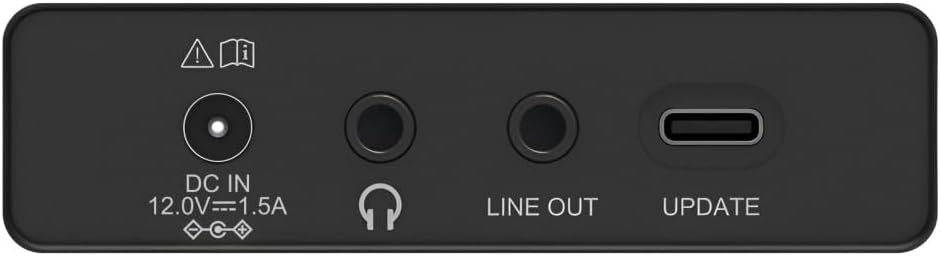
Image: Close-up of the rear panel showing the DC IN, Headphone, Line Out, and UPDATE (USB-C) ports.
പിൻ പാനൽ അത്യാവശ്യ കണക്റ്റിവിറ്റി ഓപ്ഷനുകൾ നൽകുന്നു:
- DC IN 12.0V --- 1.5A: Power input for the external adapter.
- ഹെഡ്ഫോൺ ജാക്ക് (3.5 മിമി): സ്വകാര്യ ശ്രവണത്തിനായി.
- ലൈൻ Uട്ട്: ബാഹ്യ ഉപകരണങ്ങളുമായി ബന്ധിപ്പിക്കുന്നതിനുള്ള ഓഡിയോ ഔട്ട്പുട്ട് ampലൈഫയർമാർ അല്ലെങ്കിൽ സ്പീക്കറുകൾ.
- UPDATE (USB-C): ഫേംവെയർ അപ്ഡേറ്റുകൾക്കായി.
- ടെലിസ്കോപ്പിക് ആന്റിന: For FM and DAB/DAB+ reception.

ചിത്രം: പിൻഭാഗം view of the Hama DR2002BT Digital Radio with its telescopic antenna extended for optimal signal reception.
5. സജ്ജീകരണം
5.1 പവർ കണക്ഷൻ
- നൽകിയിരിക്കുന്ന പവർ അഡാപ്റ്റർ ഇതിലേക്ക് ബന്ധിപ്പിക്കുക ഡിസി ഐഎൻ റേഡിയോയുടെ പിൻഭാഗത്തുള്ള പോർട്ട്.
- അനുയോജ്യമായ പവർ ഔട്ട്ലെറ്റിലേക്ക് പവർ അഡാപ്റ്റർ പ്ലഗ് ചെയ്യുക.
- The radio will power on automatically or enter standby mode.
5.2 Antenna Positioning
For optimal FM and DAB/DAB+ reception, fully extend the telescopic antenna. Position the radio near a window if reception is poor.
5.3 Initial Setup (First Use)
Upon first power-on, the radio may guide you through an initial setup process, including language selection and an automatic DAB station scan. Follow the on-screen prompts.
6. പ്രവർത്തന നിർദ്ദേശങ്ങൾ
6.1 പവർ ഓൺ/ഓഫ്
അമർത്തുക EIN/AUS റേഡിയോ ഓണാക്കാനോ ഓഫാക്കാനോ ഉള്ള ബട്ടൺ.
6.2 DAB/DAB+ റേഡിയോ മോഡ്
- അമർത്തുക റേഡിയോ DAB മോഡ് തിരഞ്ഞെടുക്കുന്നതിനുള്ള ബട്ടൺ.
- If this is the first time in DAB mode or if you want to rescan, press SUCHEN to perform a full scan for available stations.
- Use the rotary knob to navigate through the station list. Press the knob to select a station.
- ലേക്ക് view the station list, press the പട്ടിക ബട്ടൺ.
6.3 എഫ്എം റേഡിയോ മോഡ്
- അമർത്തുക റേഡിയോ FM മോഡ് തിരഞ്ഞെടുക്കാനുള്ള ബട്ടൺ.
- അമർത്തുക SUCHEN to automatically scan for the next available FM station.
- Alternatively, use the rotary knob to manually tune to a frequency.
6.4 പ്രീസെറ്റുകൾ സംഭരിക്കുകയും തിരിച്ചുവിളിക്കുകയും ചെയ്യുന്നു
The radio allows you to store up to 4 favorite stations using the dedicated preset buttons (1-4).
- Tune to the desired station (DAB or FM).
- Press and hold one of the preset buttons (1-4) until the display confirms the station has been saved.
- To recall a preset station, simply press the corresponding preset button (1-4).
6.5 ബ്ലൂടൂത്ത് പ്രവർത്തനം

ചിത്രം: മുൻഭാഗം view of the radio with Bluetooth and stereo speaker icons, indicating its wireless audio streaming capability.
The Hama DR2002BT can stream audio from your smartphone, tablet, or laptop via Bluetooth 5.0.
- Press the Bluetooth button on the front panel to enter Bluetooth pairing mode. The display will show a pairing indicator.
- On your external device (smartphone, tablet), enable Bluetooth and search for available devices.
- Select "Hama DR2002BT" from the list of devices to pair.
- Once paired, you can play audio from your device, and it will be output through the radio's speakers.
6.6 അലാറം ക്ലോക്ക് പ്രവർത്തനം

Image: A person waking up with the Hama DR2002BT Digital Radio placed on a bedside table, illustrating its alarm clock functionality.
The radio features two independent alarm settings.
- അമർത്തുക വെക്കർ അലാറം ക്രമീകരണങ്ങൾ ആക്സസ് ചെയ്യുന്നതിനുള്ള ബട്ടൺ.
- Use the rotary knob to select Alarm 1 or Alarm 2.
- Configure the alarm time, source (buzzer or radio station), and repetition (once, daily, weekdays, weekends, or specific days).
- Press the rotary knob to confirm each setting.
- To quickly activate/deactivate an alarm, press the വെക്കർ button and use the rotary knob to toggle the alarm status.

Image: A person interacting with the Hama DR2002BT Digital Radio, demonstrating its ease of use for setting functions like alarms or tuning stations.
7. പരിപാലനം
To ensure the longevity and optimal performance of your Hama DR2002BT Digital Radio, follow these maintenance guidelines:
- വൃത്തിയാക്കൽ: Use a soft, dry, lint-free cloth to clean the exterior of the radio. Do not use abrasive cleaners, waxes, or solvents.
- പൊടി: Regularly dust the device to prevent accumulation in vents and ports.
- സംഭരണം: റേഡിയോ ദീർഘനേരം സൂക്ഷിക്കുകയാണെങ്കിൽ, വൈദ്യുതി വിതരണത്തിൽ നിന്ന് അത് വിച്ഛേദിച്ച് തണുത്തതും വരണ്ടതുമായ സ്ഥലത്ത് സൂക്ഷിക്കുക.
- ആൻ്റിന: Handle the telescopic antenna carefully to avoid bending or breaking.
8. പ്രശ്നപരിഹാരം
നിങ്ങളുടെ റേഡിയോയിൽ പ്രശ്നങ്ങൾ നേരിടുകയാണെങ്കിൽ, ഇനിപ്പറയുന്ന പൊതുവായ പ്രശ്നങ്ങളും പരിഹാരങ്ങളും പരിശോധിക്കുക:
| പ്രശ്നം | സാധ്യമായ കാരണം | പരിഹാരം |
|---|---|---|
| ശക്തിയില്ല | പവർ അഡാപ്റ്റർ ബന്ധിപ്പിച്ചിട്ടില്ല; പവർ ഔട്ട്ലെറ്റ് തകരാറിലാണ് | Check power adapter connection; Try a different power outlet. |
| മോശം റേഡിയോ റിസപ്ഷൻ (DAB/FM) | Antenna not extended; Weak signal area; Interference | Fully extend the telescopic antenna; Reposition the radio (e.g., near a window); Perform a new station scan. |
| ബ്ലൂടൂത്ത് ജോടിയാക്കൽ പരാജയപ്പെടുന്നു | Bluetooth not enabled on external device; Radio not in pairing mode; Device too far | Ensure Bluetooth is on and visible on your device; Press the Bluetooth button on the radio; Move devices closer (within 10m). |
| ശബ്ദമില്ല | ശബ്ദം വളരെ കുറവാണ്; മ്യൂട്ട് സജീവമാക്കി; തെറ്റായ ഉറവിടം തിരഞ്ഞെടുത്തു. | Increase volume using the rotary knob; Check if mute is active; Ensure the correct mode (DAB, FM, Bluetooth) is selected. |
| അലാറം മുഴങ്ങുന്നില്ല | Alarm not activated; Incorrect alarm time/day set | Verify alarm is enabled in settings; Check alarm time and repetition settings. |
9 സ്പെസിഫിക്കേഷനുകൾ

Image: Diagram showing the dimensions of the Hama DR2002BT Digital Radio: 35 cm (width), 12.5 cm (depth), and 13 cm (height).
| ഫീച്ചർ | വിശദാംശങ്ങൾ |
|---|---|
| മോഡൽ നമ്പർ | DR2002BT (00054298) |
| സ്വീകരണം | ഡിഎബി, ഡിഎബി+, എഫ്എം |
| ബ്ലൂടൂത്ത് പതിപ്പ് | 5.0 |
| ഔട്ട്പുട്ട് പവർ (RMS) | 10 W (Stereo) |
| പ്രദർശിപ്പിക്കുക | 4.3" TFT Color Display |
| കണക്ഷനുകൾ | 3.5mm Jack (Headphone), USB-C (Update), Line Out, DC IN |
| വൈദ്യുതി വിതരണം | ബാഹ്യ പവർ അഡാപ്റ്റർ |
| അളവുകൾ (W x D x H) | 35 x 12.5 x 13 സെ.മീ |
| ഭാരം | 1788 ഗ്രാം |
| മെറ്റീരിയൽ | പ്ലാസ്റ്റിക് |
| നിറം | കറുപ്പ് |
| അധിക സവിശേഷതകൾ | Alarm Function (2 alarms), Direct Selection Keys |
10. വാറൻ്റിയും പിന്തുണയും
Hama GmbH & Co KG provides a warranty for this product. Please refer to the warranty card included in your package or visit the official Hama webവിശദമായ വാറന്റി നിബന്ധനകൾക്കും വ്യവസ്ഥകൾക്കും സൈറ്റ്.
For technical support, troubleshooting assistance, or spare parts, please contact Hama customer service or visit their webസൈറ്റ്. EU-വിൽ സ്പെയർ പാർട്സുകളുടെ ലഭ്യത 7 വർഷത്തേക്ക് ഉറപ്പുനൽകുന്നു.
- നിർമ്മാതാവ്: Hama GmbH & Co KG
- മാതൃരാജ്യം: ജർമ്മനി
- EU Spare Parts Availability: 7 വർഷം
