
1. ഉൽപ്പന്നം കഴിഞ്ഞുview
This manual provides essential information for the setup, operation, and maintenance of your new 155 cm (59 inches) 4K Ultra HD LED TV, Model 55D4K. Please read this manual thoroughly before using the product to ensure proper functionality and safety.

ചിത്രം 1.1: മുൻഭാഗം view of the 59-inch 4K Ultra HD LED TV. This image displays the television screen with a vibrant background, highlighting its 4K HDR capabilities, Dynamic Color Enhancement, Dolby Audio, and T-Screen technology.

Figure 1.2: Key features and energy efficiency rating. This image shows the TV's 4-star energy rating and highlights features such as Dynamic Color Enhancement, AI PQ Processor, T-Screen, Multiple Eye Care, Dolby Audio, HDMI connectivity, 16GB memory, and a metallic bezel-less design.
2. ബോക്സിൽ എന്താണുള്ളത്?
Carefully unpack the box and ensure all items are present and undamaged. If any items are missing or damaged, please contact customer support.
- 1N LED TV (Main Unit)
- 1N ഓഡിയോ കേബിൾ
- 1N സ്റ്റാൻഡ് (ടേബിൾ ടോപ്പ് മൗണ്ടിംഗിനായി)
- 1N ഉപയോക്തൃ മാനുവൽ (ഈ പ്രമാണം)
- 1N വാറന്റി കാർഡ്
- 1N റിമോട്ട് കൺട്രോൾ
- 2N ബാറ്ററികൾ (റിമോട്ട് കൺട്രോളിനായി)
3. സജ്ജീകരണം
3.1 ഫിസിക്കൽ ഇൻസ്റ്റലേഷൻ
Your TV can be installed on a tabletop using the provided stand or mounted on a wall (wall mount kit sold separately).

Figure 3.1: Product dimensions for installation planning. This diagram illustrates the TV's dimensions in centimeters and inches, including height with and without the stand, width, and depth, along with its weight specifications.
3.1.1 Table-Top Installation
- കേടുപാടുകൾ സംഭവിക്കാതിരിക്കാൻ ടിവി സ്ക്രീൻ-ഡൗൺ മൃദുവായതും പരന്നതുമായ ഒരു പ്രതലത്തിൽ ശ്രദ്ധാപൂർവ്വം വയ്ക്കുക.
- Attach the provided stand to the designated slots on the bottom of the TV using the screws included with the stand.
- Ensure the stand is securely fastened before carefully lifting the TV to its upright position on a stable, level surface.
3.1.2 വാൾ മൗണ്ടിംഗ്
For wall mounting, a compatible VESA wall mount kit (not included) is required. Refer to the wall mount kit's instructions for proper installation. Ensure the wall can support the TV's weight (9.2 kg with stand, 9 kg without stand).

ചിത്രം 3.2: പിൻഭാഗം view of the television. This image displays the back panel of the TV, indicating the VESA mounting points and the general location of input/output ports.
3.2 പെരിഫറലുകൾ ബന്ധിപ്പിക്കുന്നു
Connect your external devices to the TV's ports. The TV features multiple connectivity options:
- HDMI പോർട്ടുകൾ (x3): For set-top boxes, Blu-ray players, gaming consoles.
- യുഎസ്ബി പോർട്ട് (x1): ഹാർഡ് ഡ്രൈവുകളോ മറ്റ് യുഎസ്ബി ഉപകരണങ്ങളോ ബന്ധിപ്പിക്കുന്നതിന്.
- ഇഥർനെറ്റ് പോർട്ട്: വയർഡ് ഇന്റർനെറ്റ് കണക്ഷന്.
- ഹെഡ്ഫോൺ ഔട്ട്പുട്ട്: ഹെഡ്ഫോണുകളോ ബാഹ്യ ഓഡിയോ സിസ്റ്റങ്ങളോ ബന്ധിപ്പിക്കുന്നതിന്.
The TV also supports Wi-Fi and Bluetooth for wireless connectivity.
3.3 പ്രാരംഭ പവർ ഓണും സജ്ജീകരണവും
- ആവശ്യമുള്ള എല്ലാ ഉപകരണങ്ങളും ബന്ധിപ്പിച്ച ശേഷം, ടിവിയുടെ പവർ കോർഡ് ഒരു വാൾ ഔട്ട്ലെറ്റിൽ പ്ലഗ് ചെയ്യുക.
- ടിവി ഓണാക്കാൻ ടിവിയിലെ പവർ ബട്ടൺ അല്ലെങ്കിൽ റിമോട്ട് കൺട്രോൾ അമർത്തുക.
- ഭാഷാ തിരഞ്ഞെടുപ്പ്, നെറ്റ്വർക്ക് കണക്ഷൻ (വൈ-ഫൈ അല്ലെങ്കിൽ ഇതർനെറ്റ്), ചാനൽ സ്കാനിംഗ് എന്നിവയുൾപ്പെടെയുള്ള പ്രാരംഭ സജ്ജീകരണം പൂർത്തിയാക്കാൻ ഓൺ-സ്ക്രീൻ നിർദ്ദേശങ്ങൾ പാലിക്കുക.
- Google TV ഫീച്ചറുകൾ ആക്സസ് ചെയ്യാനും ആപ്പുകൾ ഡൗൺലോഡ് ചെയ്യാനും നിങ്ങളുടെ Google അക്കൗണ്ട് ഉപയോഗിച്ച് സൈൻ ഇൻ ചെയ്യുക.
4. പ്രവർത്തന നിർദ്ദേശങ്ങൾ
4.1 റിമോട്ട് കൺട്രോൾ ഉപയോഗം
The universal remote control allows you to navigate the TV's interface and control various functions. Insert the two provided batteries into the remote control, observing polarity.

Figure 4.1: The universal remote control. This image highlights the remote's layout, including the Google Assistant button and dedicated quick access buttons for popular streaming services like Netflix, Prime Video, Sony LIV, and YouTube.
- പവർ ബട്ടൺ: ടിവി ഓൺ/ഓഫ് ചെയ്യുന്നു.
- നാവിഗേഷൻ പാഡ് (മുകളിലേക്ക്/താഴേക്ക്/ഇടത്/വലത്/ശരി): മെനുകളിലൂടെ നാവിഗേറ്റ് ചെയ്ത് തിരഞ്ഞെടുപ്പുകൾ സ്ഥിരീകരിക്കുന്നു.
- വോളിയം കൂട്ടുക/താഴ്ത്തുക: ഓഡിയോ വോളിയം ക്രമീകരിക്കുന്നു.
- ചാനൽ മുകളിലേക്കും താഴേക്കും: ടിവി ചാനലുകൾ മാറ്റുന്നു.
- ഗൂഗിൾ അസിസ്റ്റന്റ് ബട്ടൺ: Activates voice commands for search, smart device control, and more.
- ദ്രുത ആക്സസ് ബട്ടണുകൾ: Dedicated buttons for Netflix, Prime Video, Sony LIV, and YouTube for instant access.
4.2 സ്മാർട്ട് ടിവി സവിശേഷതകൾ (ഗൂഗിൾ ടിവി)
Your TV comes with Google TV, providing a personalized entertainment experience.
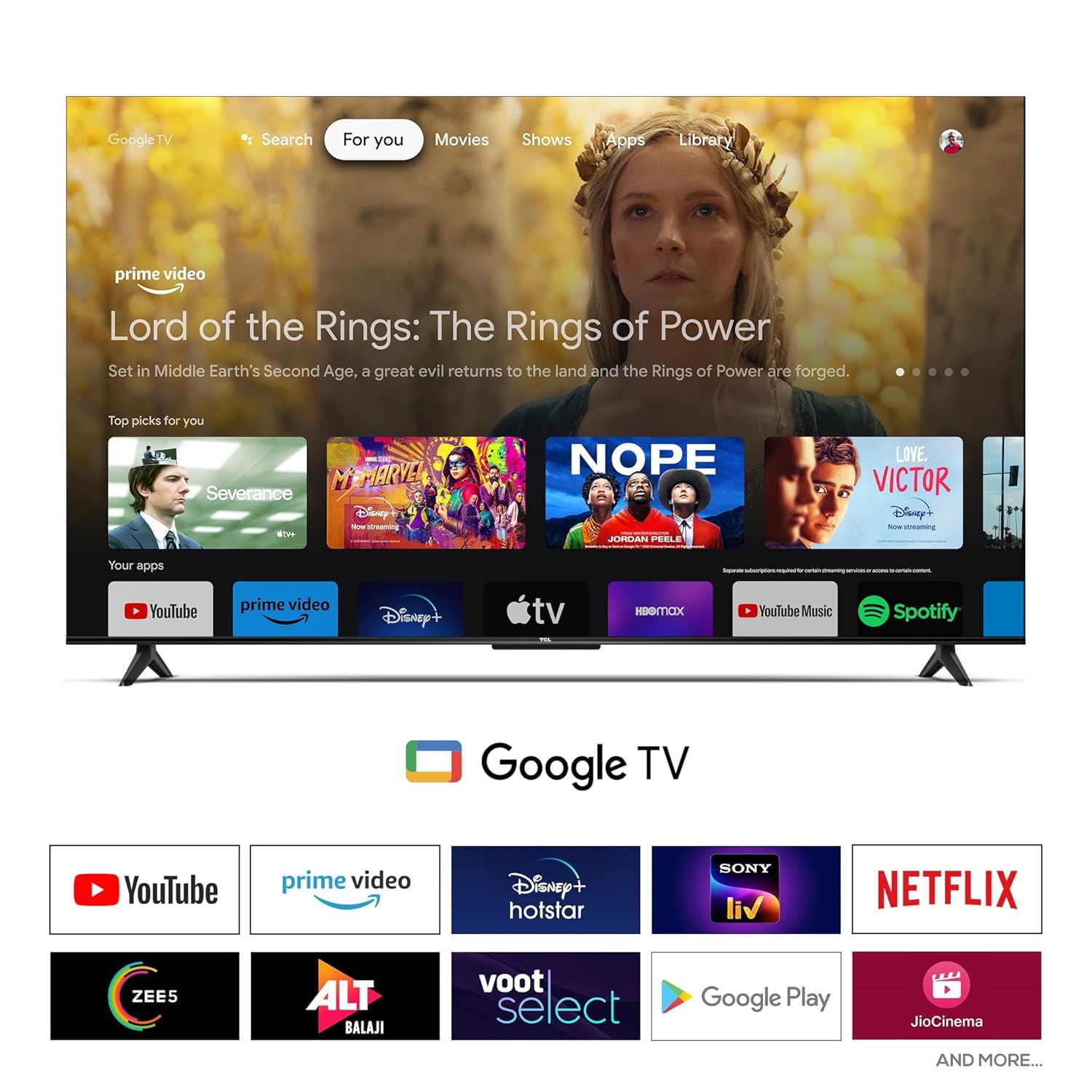
Figure 4.2: Google TV user interface. This screenshot displays the home screen of Google TV, featuring recommended content and a selection of pre-installed and downloadable applications such as YouTube, Prime Video, Disney+ Hotstar, Netflix, and more.
- വ്യക്തിഗതമാക്കിയ ശുപാർശകൾ: Content suggestions based on your viewing history across various streaming services.
- ആപ്പ് ആക്സസ്: Download and stream from a wide range of applications available on Google Play Store (e.g., YouTube, Prime Video, Netflix, Disney+ Hotstar, Sony LIV, Zee5, JioCinema).
- Google അസിസ്റ്റൻ്റ്: Use voice commands to search for movies, control smart home devices, get answers, and manage your day.
- Chromecast ബിൽറ്റ്-ഇൻ: നിങ്ങളുടെ അനുയോജ്യമായ സ്മാർട്ട്ഫോണിൽ നിന്നോ ടാബ്ലെറ്റിൽ നിന്നോ ടിവിയിലേക്ക് നേരിട്ട് ഉള്ളടക്കം കാസ്റ്റുചെയ്യുക.
4.3 Audio and Video Settings
Access the TV's settings menu to customize picture and sound quality.
- ചിത്ര മോഡുകൾ: വിവിധ പ്രീസെറ്റ് മോഡുകളിൽ നിന്ന് (ഉദാ: സ്റ്റാൻഡേർഡ്, വിവിഡ്, മൂവി, ഗെയിം) തിരഞ്ഞെടുക്കുക അല്ലെങ്കിൽ ബ്രൈറ്റ്നെസ്, കോൺട്രാസ്റ്റ്, നിറം, ഷാർപ്നെസ് പോലുള്ള ക്രമീകരണങ്ങൾ ഇഷ്ടാനുസൃതമാക്കുക.
- ശബ്ദ മോഡുകൾ: Choose audio presets (e.g., Standard, Music, Movie, Speech) or adjust equalizer settings. The TV supports Dolby Audio for enhanced sound.
- ഡിസ്പ്ലേ തരം: HDR 10 is supported for enhanced dynamic range with compatible content.
5. പരിപാലനം
5.1 ടിവി വൃത്തിയാക്കൽ
- വൃത്തിയാക്കുന്നതിന് മുമ്പ് എല്ലായ്പ്പോഴും പവർ ഔട്ട്ലെറ്റിൽ നിന്ന് ടിവി അഴിക്കുക.
- സ്ക്രീനും കാബിനറ്റും മൃദുവായതും ഉണങ്ങിയതും ലിന്റ് രഹിതവുമായ ഒരു തുണി ഉപയോഗിച്ച് സൌമ്യമായി തുടയ്ക്കുക.
- കഠിനമായ അടയാളങ്ങൾക്ക്, നേരിയ dampവെള്ളം അല്ലെങ്കിൽ നേരിയതും ഉരച്ചിലുകൾ ഇല്ലാത്തതുമായ സ്ക്രീൻ ക്ലീനർ ഉപയോഗിച്ച് തുണി വൃത്തിയാക്കുക. ഒരിക്കലും സ്ക്രീനിൽ നേരിട്ട് ക്ലീനർ സ്പ്രേ ചെയ്യരുത്.
- ടിവിയുടെ ഫിനിഷിന് കേടുവരുത്തുന്നതിനാൽ അബ്രാസീവ് ക്ലീനറുകൾ, വാക്സുകൾ അല്ലെങ്കിൽ ലായകങ്ങൾ ഉപയോഗിക്കുന്നത് ഒഴിവാക്കുക.
5.2 സോഫ്റ്റ്വെയർ അപ്ഡേറ്റുകൾ
പ്രകടനം മെച്ചപ്പെടുത്തുന്നതിനും പുതിയ സവിശേഷതകൾ ചേർക്കുന്നതിനുമായി നിങ്ങളുടെ ടിവിയിൽ സോഫ്റ്റ്വെയർ അപ്ഡേറ്റുകൾ ലഭിച്ചേക്കാം. ഈ അപ്ഡേറ്റുകൾ സ്വയമേവ ലഭിക്കുന്നതിന് നിങ്ങളുടെ ടിവി ഇന്റർനെറ്റുമായി കണക്റ്റ് ചെയ്തിട്ടുണ്ടെന്ന് ഉറപ്പാക്കുക അല്ലെങ്കിൽ ടിവിയുടെ ക്രമീകരണ മെനുവിലൂടെ അവ നേരിട്ട് പരിശോധിക്കുക.
6. പ്രശ്നപരിഹാരം
If you encounter issues with your TV, refer to the following common problems and solutions. If the problem persists, contact customer support.
| പ്രശ്നം | സാധ്യമായ പരിഹാരം |
|---|---|
| പവർ ഇല്ല | ടിവിയിലേക്കും പ്രവർത്തിക്കുന്ന ഒരു ഇലക്ട്രിക്കൽ ഔട്ട്ലെറ്റിലേക്കും പവർ കോർഡ് സുരക്ഷിതമായി പ്ലഗ് ചെയ്തിട്ടുണ്ടെന്ന് ഉറപ്പാക്കുക. മറ്റൊരു ഔട്ട്ലെറ്റ് പരീക്ഷിക്കുക. |
| ചിത്രം/ശബ്ദം ഇല്ല | Check input source (HDMI, USB). Ensure cables are securely connected. Try a different HDMI port. |
| റിമോട്ട് കൺട്രോൾ പ്രവർത്തിക്കുന്നില്ല | Check batteries and replace if necessary. Ensure no obstructions between remote and TV. Re-pair Bluetooth remote if applicable. |
| മോശം ചിത്ര നിലവാരം | Adjust picture settings (brightness, contrast, sharpness). Check source resolution. Ensure 4K content is being played for optimal 4K display. |
| ഇൻ്റർനെറ്റ് കണക്ഷനില്ല | Check Wi-Fi password. Restart your router. Try connecting via Ethernet cable. |
7 സ്പെസിഫിക്കേഷനുകൾ
| ഫീച്ചർ | വിശദാംശങ്ങൾ |
|---|---|
| മോഡലിൻ്റെ പേര് | 55 ഡി 4 കെ |
| സ്ക്രീൻ വലിപ്പം | 155 cm (59 inches) / 55 Inches (diagonal) |
| റെസലൂഷൻ | 4K അൾട്രാ HD (3840 x 2160 പിക്സലുകൾ) |
| പുതുക്കിയ നിരക്ക് | 60 ഹെർട്സ് |
| ഡിസ്പ്ലേ ടെക്നോളജി | എൽഇഡി, എച്ച്ഡിആർ 10 |
| Viewing ആംഗിൾ | 178 ഡിഗ്രി |
| ഓഡിയോ ഔട്ട്പുട്ട് | 24 Watts, Dolby Audio, Surround Sound |
| കണക്റ്റിവിറ്റി | 3 HDMI Ports, 1 USB Port, Ethernet, Wi-Fi, Bluetooth, Headphone Output |
| ഓപ്പറേറ്റിംഗ് സിസ്റ്റം | Google TV |
| മെമ്മറി (റാം/സ്റ്റോറേജ്) | 2 ജിബി റാം / 16 ജിബി സ്റ്റോറേജ് |
| ഉൽപ്പന്ന അളവുകൾ (LxWxH) | 25.5 x 122.6 x 75 സെ.മീ (സ്റ്റാൻഡോടുകൂടി) |
| ഇനത്തിൻ്റെ ഭാരം | 9.2 കിലോ (സ്റ്റാൻഡിനൊപ്പം) |
| വൈദ്യുതി ഉപഭോഗം | 125 വാട്ട്സ് (ഓൺ-മോഡ്) |
| പവർ ഉറവിടം | എസി 240 വോൾട്ട് |
| റിമോട്ട് കൺട്രോൾ | Universal (IR, Bluetooth) |
| മൗണ്ടിംഗ് തരം | Table Top & Wall Mount |
8. വാറൻ്റിയും പിന്തുണയും
8.1 വാറൻ്റി വിവരങ്ങൾ
ഈ ഉൽപ്പന്നം എ 2 വർഷത്തെ വാറൻ്റി from the date of purchase. Please retain your purchase receipt and the warranty card for any warranty claims. The warranty covers manufacturing defects and malfunctions under normal use conditions. It does not cover damage caused by misuse, accidents, unauthorized repairs, or natural disasters.
8.2 ഉപഭോക്തൃ പിന്തുണ
For technical assistance, troubleshooting beyond this manual, or warranty claims, please contact the manufacturer's customer support. Refer to the warranty card or the manufacturer's official webബന്ധപ്പെടാനുള്ള വിശദാംശങ്ങൾക്കുള്ള സൈറ്റ്.
നിർമ്മാതാവ്: ഇന്ത്യ
മോഡൽ: 55 ഡി 4 കെ
ആദ്യം ലഭ്യമായ തീയതി: 27 മാർച്ച് 2024