
1. ആമുഖം
The Drexma WiStat is a programmable WiFi touchscreen thermostat designed for radiant floor heating systems. It offers advanced control and monitoring capabilities through its intuitive interface and mobile application for iOS and Android devices. This thermostat is compatible with both 2.4G and 5G Wi-Fi networks and integrates with popular smart home ecosystems such as Amazon Alexa and Google Assistant. It supports dual-voltage (120V and 240V) floor heating cables and includes built-in Class A GFCI protection for enhanced safety. This manual provides detailed instructions for the proper installation, operation, and maintenance of your WiStat thermostat.
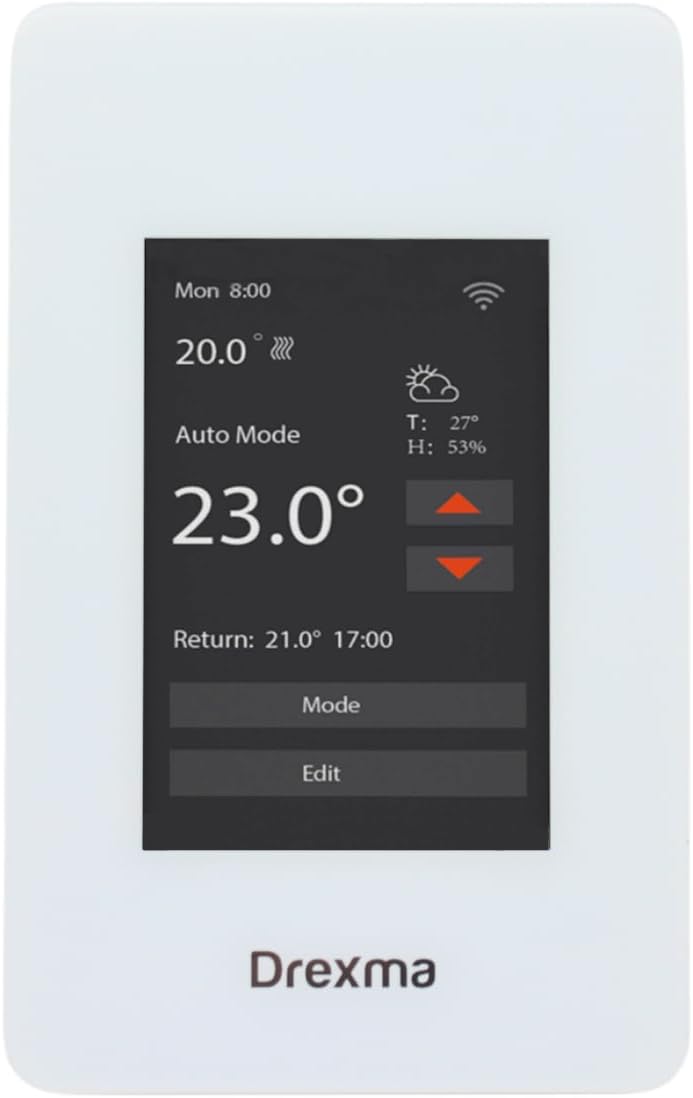
Figure 1: Drexma WiStat Thermostat and Packaging
2 സുരക്ഷാ വിവരങ്ങൾ
മുന്നറിയിപ്പ്: വൈദ്യുതാഘാതത്തിനുള്ള സാധ്യത. Installation must be performed by a qualified electrician in accordance with local electrical codes. Disconnect power at the circuit breaker before installing or servicing the thermostat.
- Ensure the power supply is disconnected before any wiring.
- The thermostat is designed for 120V or 240V radiant floor heating systems. Verify your system's voltagഇൻസ്റ്റാളേഷന് മുമ്പ് ഇ.
- The built-in Class A GFCI (Ground Fault Circuit Interrupter) provides protection against electrical shock. Test the GFCI regularly as per local regulations.
- തെർമോസ്റ്റാറ്റ് വെള്ളത്തിലോ അമിതമായ ഈർപ്പത്തിലോ പുരട്ടരുത്.
- Do not attempt to repair or modify the thermostat. Refer all servicing to qualified personnel.

ചിത്രം 2: പിൻഭാഗം view with wiring caution
3. പാക്കേജ് ഉള്ളടക്കം
പാക്കേജിൽ എല്ലാ ഇനങ്ങളും ഉണ്ടെന്ന് ഉറപ്പാക്കുക:
- Drexma WiStat Thermostat Unit
- ഫ്ലോർ ടെമ്പറേച്ചർ സെൻസർ
- മൗണ്ടിംഗ് സ്ക്രൂകൾ (സാധാരണയായി ഉൾപ്പെടുത്തിയിട്ടുണ്ട്)
- ഉപയോക്തൃ മാനുവൽ (ഈ പ്രമാണം)
4. സജ്ജീകരണം
4.1. ഇൻസ്റ്റലേഷൻ
- പവർ വിച്ഛേദിക്കുക: Turn off power to the heating circuit at the main electrical panel.
- മൗണ്ടിംഗ്: Install the thermostat into a standard electrical box. Ensure proper clearance for wiring.
- വയറിംഗ്: Connect the thermostat according to the wiring diagram provided in the installation guide (refer to Figure 2 for terminal layout). Ensure correct connections for LINE (power supply), LOAD (heating cables), and the floor sensor. The thermostat supports both 120V and 240V systems.
- സെൻസർ ഇൻസ്റ്റാളേഷൻ: Route the floor temperature sensor cable to the desired location in the floor, ensuring it is properly embedded in the heating area.
- Secure Thermostat: Fasten the thermostat to the electrical box using the provided screws.
- പവർ പുന ore സ്ഥാപിക്കുക: Turn on power at the circuit breaker. The thermostat display should illuminate.

ചിത്രം 3: വശം view തെർമോസ്റ്റാറ്റിൻ്റെ
4.2. പ്രാരംഭ കോൺഫിഗറേഷൻ
- Upon first power-on, the thermostat will guide you through initial settings such as language (English/French) and temperature units (Celsius/Fahrenheit).
- തീയതിയും സമയവും സജ്ജമാക്കാൻ ഓൺ-സ്ക്രീൻ നിർദ്ദേശങ്ങൾ പാലിക്കുക.
4.3. വൈഫൈ കണക്ഷൻ
- അപ്ലിക്കേഷൻ ഡൗൺലോഡുചെയ്യുക: Download the Drexma WiStat mobile application from the iOS App Store or Google Play Store.
- അക്കൗണ്ട് സൃഷ്ടിക്കുക: ആപ്പ് തുറന്ന് ഒരു ഉപയോക്തൃ അക്കൗണ്ട് സൃഷ്ടിക്കുക.
- ഉപകരണം ചേർക്കുക: Follow the in-app instructions to add your WiStat thermostat. This typically involves putting the thermostat into pairing mode and connecting it to your home's 2.4G or 5G Wi-Fi network.
- സ്മാർട്ട് ഹോം ഇൻ്റഗ്രേഷൻ: Once connected to Wi-Fi, you can link your thermostat to smart home platforms like Amazon Alexa or Google Assistant through their respective apps.

ചിത്രം 4: മുൻഭാഗം view of the thermostat display
5. പ്രവർത്തന നിർദ്ദേശങ്ങൾ
5.1. ടച്ച്സ്ക്രീൻ ഇന്റർഫേസ്
The WiStat thermostat features a color touchscreen for easy navigation. Tap icons and menus to access various settings and functions.
5.2. ചൂടാക്കൽ മോഡുകൾ
Select from available heating modes (e.g., Auto, Manual, Away) to suit your comfort and energy-saving preferences. Refer to the on-screen menu for specific mode descriptions.
5.3 ഷെഡ്യൂളിംഗ്
Utilize the 7-day programmability feature to create custom heating schedules. This allows you to set different temperatures for various times of the day and days of the week, optimizing comfort and energy consumption.
5.4 താപനില ക്രമീകരണം
Adjust the desired temperature directly on the touchscreen or through the mobile app. The thermostat can display temperatures in either Fahrenheit or Celsius.
5.5. Child Lock Functionality
Activate the child lock feature through the settings menu to prevent unauthorized changes to the thermostat settings.
5.6. Real-time Weather Reports
The thermostat can display real-time local weather reports, allowing you to anticipate heating needs and adjust settings proactively.

ചിത്രം 5: മുകളിൽ view തെർമോസ്റ്റാറ്റിൻ്റെ
6. പരിപാലനം
- വൃത്തിയാക്കൽ: Gently wipe the touchscreen and thermostat body with a soft, damp തുണി. ഉരച്ചിലുകളുള്ള ക്ലീനറുകളോ ലായകങ്ങളോ ഉപയോഗിക്കരുത്.
- GFCI ടെസ്റ്റ്: Regularly test the GFCI function as recommended by local electrical codes, typically monthly. Press the TEST button on the thermostat; the heating should turn off. Press the RESET button to restore normal operation.
- ഫേംവെയർ അപ്ഡേറ്റുകൾ: Ensure your thermostat's firmware is up to date through the mobile application for optimal performance and new features.
7. പ്രശ്നപരിഹാരം
| പ്രശ്നം | സാധ്യമായ കാരണം | പരിഹാരം |
|---|---|---|
| തെർമോസ്റ്റാറ്റ് ഡിസ്പ്ലേ ശൂന്യമാണ് | No power supply; tripped circuit breaker; incorrect wiring. | Check circuit breaker. Verify wiring connections. Consult a qualified electrician if necessary. |
| തറയിൽ നിന്ന് ചൂട് ഇല്ല | Thermostat in OFF mode; GFCI tripped; heating cables faulty; temperature set too low. | Ensure thermostat is in an active heating mode. Reset GFCI. Increase set temperature. Consult a professional for heating cable inspection. |
| Wi-Fi കണക്ഷൻ പ്രശ്നങ്ങൾ | Incorrect Wi-Fi password; router too far; network interference; 2.4G/5G band conflict. | Re-enter Wi-Fi password. Move router closer or use a Wi-Fi extender. Ensure your router supports 2.4G or 5G and the thermostat is connecting to the correct band. Restart router and thermostat. |
| കൃത്യമല്ലാത്ത താപനില റീഡിംഗുകൾ | Floor sensor not properly installed or damaged. | Verify floor sensor placement. If damaged, replace the sensor. |
| Thermostat unresponsive | താൽക്കാലിക സോഫ്റ്റ്വെയർ തകരാർ. | Perform a soft reset by turning off power at the circuit breaker for 30 seconds, then restoring power. |
8 സ്പെസിഫിക്കേഷനുകൾ
| ഫീച്ചർ | വിശദാംശങ്ങൾ |
|---|---|
| ബ്രാൻഡ് | ഡ്രെക്സ്മ |
| മോഡലിൻ്റെ പേര് | DREXMA-WiStat |
| കൺട്രോളർ തരം | വൈഫൈ പ്രോഗ്രാം ചെയ്യാവുന്നത് |
| പ്രത്യേക ഫീച്ചർ | ടച്ച് സ്ക്രീൻ |
| നിറം | വെള്ള |
| ഉൽപ്പന്നത്തിൻ്റെ പ്രത്യേക ഉപയോഗങ്ങൾ | നില ചൂടാക്കൽ |
| വാല്യംtage | 120 വോൾട്ട്, 240 വോൾട്ട് |
| ആകൃതി | ദീർഘചതുരം |
| നിയന്ത്രണ തരം | സ്പർശിക്കുക |
| നിയന്ത്രണ രീതി | ആപ്പ് |
| ഉൽപ്പന്ന സവിശേഷതകൾ | ടച്ച് സ്ക്രീൻ |
| കണക്റ്റിവിറ്റി പ്രോട്ടോക്കോൾ | വൈഫൈ (2.4G, 5G എന്നിവ അനുയോജ്യമാണ്) |
| ബാക്ക്ലൈറ്റ് | അതെ |
| ഉൽപ്പന്ന ശൈലി | ആധുനികം |
| മോഡൽ നമ്പർ | DREXMA-WiStat |
| യു.പി.സി | 659460138640 |
| നിർമ്മാതാവ് | ഡ്രെക്സ്മ |
| മാതൃരാജ്യം | യുഎസ്എ |
| ASIN | B0D9KPCW36 |
| GTIN | 659460138640 |
9. വാറൻ്റി
As per the product information, this Drexma WiStat Thermostat is sold without a manufacturer's warranty. Please refer to your retailer's return policy for any issues.
10. പിന്തുണ
For technical assistance or further inquiries regarding your Drexma WiStat Thermostat, please refer to the support section within the Drexma WiStat mobile application or visit the manufacturer's official webബന്ധപ്പെടാനുള്ള വിവരങ്ങൾക്കുള്ള സൈറ്റ്.