
ആമുഖം
This manual provides detailed instructions for the safe and efficient operation of the DC DC 2-24V to 3-30V 4A 80W Step Up Boost Converter CC CV Power Module. This module is designed to convert a lower DC input voltagഉയർന്ന DC ഔട്ട്പുട്ട് വോള്യത്തിലേക്ക് etage, offering constant current (CC) and constant voltage (CV) regulation. It is suitable for various applications requiring adjustable regulated power supply, including charging batteries, driving LEDs, and powering electronic devices.
ഉൽപ്പന്നം കഴിഞ്ഞുview
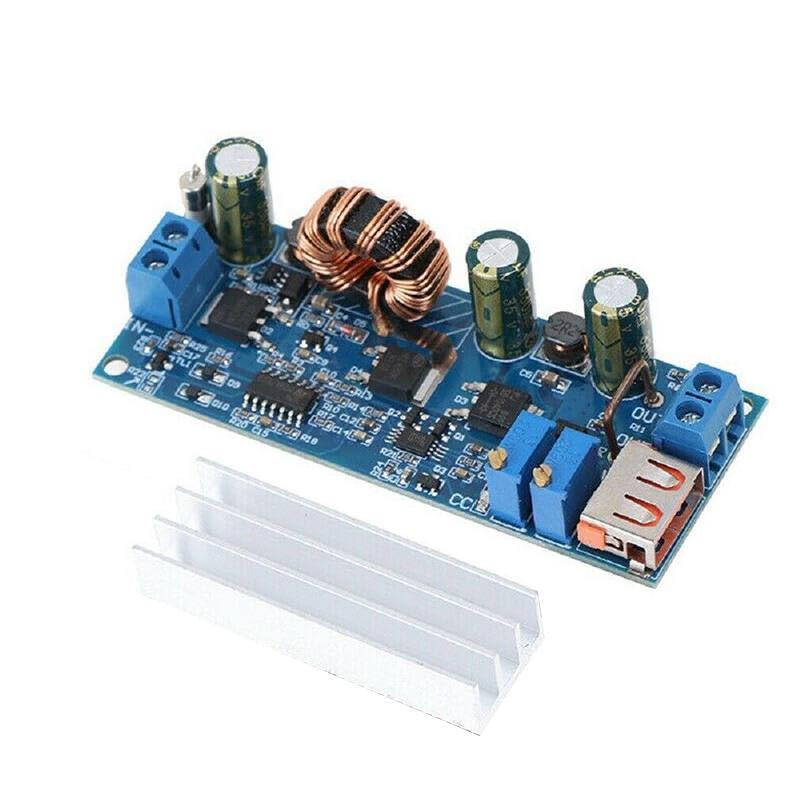
The module features input and output terminals, a USB output port, and potentiometers for adjusting output voltage and current. A heatsink is included for thermal management.

ചിത്രം 1: മുകളിൽ നിന്ന് താഴേക്ക് view of the DC DC Boost Converter module, showing the main components including the inductor, capacitors, input/output terminals, and USB port. A separate heatsink is shown below the module.

ചിത്രം 2: കോണാകൃതിയിലുള്ളത് view of the boost converter module, highlighting the input (IN-) and output (OUT+) screw terminals, the two adjustment potentiometers, and the USB output port.
ചിത്രം 3: ക്ലോസപ്പ് view of the central part of the module, showing the large inductor coil and various integrated circuits and capacitors, which are key to its boosting and regulation functions.

Figure 4: Close-up of the output section of the module, showing the USB Type-A output port and the screw terminals for the regulated DC output.

ചിത്രം 5: താഴെ view of the boost converter module, displaying the model number "ZK-S4" and input/output voltage ranges "2V-24V" and "3V-30V".
സ്പെസിഫിക്കേഷനുകൾ
| പരാമീറ്റർ | മൂല്യം |
|---|---|
| ഇൻപുട്ട് വോളിയംtagഇ റേഞ്ച് | ഡിസി 2V - 24V |
| Putട്ട്പുട്ട് വോളിയംtagഇ റേഞ്ച് | DC 3V - 30V (Adjustable) |
| പരമാവധി ഔട്ട്പുട്ട് കറൻ്റ് | 4 Amps |
| പരമാവധി ഔട്ട്പുട്ട് പവർ | 80 വാട്ട്സ് |
| പരിവർത്തന കാര്യക്ഷമത | 94% വരെ |
| പ്രവർത്തന താപനില | -40°C മുതൽ +85°C വരെ |
| അളവുകൾ | (Approximate, based on typical modules) 68mm x 36mm x 15mm |
| നിർമ്മാതാവ് | ജനറിക് |
| ASIN | B0D9KVPDGG |
Note: Efficiency and maximum power/current may vary based on input/output voltage difference and operating conditions. Adequate cooling (heatsink) is required for high power operation.
സജ്ജീകരണ നിർദ്ദേശങ്ങൾ
- ഘടകങ്ങൾ തയ്യാറാക്കുക: Ensure you have the boost converter module, a suitable DC power source (within 2V-24V), a multimeter for measuring voltage and current, and a load for testing.
- ഇൻപുട്ട് പവർ ബന്ധിപ്പിക്കുക:
- Connect the positive (+) terminal of your DC power source to the IN+ terminal on the module.
- Connect the negative (-) terminal of your DC power source to the ഇൻ- terminal on the module.
- Ensure correct polarity to prevent damage to the module.
- Connect Output Load:
- Connect the positive (+) terminal of your load to the പുറത്ത്+ terminal on the module.
- Connect the negative (-) terminal of your load to the പുറത്ത്- terminal on the module.
- Alternatively, for USB-powered devices, use the integrated USB Type-A port.
- Install Heatsink: For continuous operation at higher currents or power levels, attach the provided heatsink to the main power components (e.g., the large inductor and power ICs) using thermal adhesive or paste (not included). This helps dissipate heat and maintain performance.
ജാഗ്രത: Always ensure power is disconnected before making or changing any connections. Incorrect wiring can damage the module or connected devices.
പ്രവർത്തന നിർദ്ദേശങ്ങൾ
- പ്രാരംഭ പവർ ഓൺ: After all connections are secure, apply power to the input terminals.
- ഔട്ട്പുട്ട് വോളിയം ക്രമീകരിക്കുന്നുtage (CV Mode):
- Locate the potentiometer labeled "V-ADJ" or similar (usually the one closer to the output terminals).
- Using a small screwdriver, slowly turn this potentiometer clockwise to increase the output voltage, or counter-clockwise to decrease it.
- ഔട്ട്പുട്ട് വോളിയം നിരീക്ഷിക്കുകtage with a multimeter connected to the OUT+ and OUT- terminals until the desired voltagഇ എത്തിയിരിക്കുന്നു.
- It is recommended to adjust voltage with no load or a light load initially.
- Adjusting Output Current (CC Mode):
- Locate the potentiometer labeled "I-ADJ" or similar (usually the one closer to the input terminals or the other adjustment).
- To set the current limit, first set the output voltage slightly higher than the target load voltage.
- Connect an ammeter in series with your load, or short the output terminals (briefly and carefully, with a suitable current-limiting resistor if possible) and adjust the "I-ADJ" potentiometer.
- Turn the potentiometer clockwise to increase the current limit, or counter-clockwise to decrease it.
- The CC mode is primarily used for charging batteries or driving LEDs, where a constant current is desired.
- USB ഔട്ട്പുട്ട്: The USB port provides a regulated 5V output, suitable for charging standard USB devices, provided the module's main output voltage is set appropriately or it has an internal 5V regulator for the USB port (common for these modules). Verify the voltage with a multimeter before connecting sensitive devices.
മെയിൻ്റനൻസ്
- വൃത്തിയാക്കൽ: Keep the module clean and free from dust and debris. Use a soft, dry brush or compressed air to remove dust. Do not use liquid cleaners.
- പരിശോധന: Periodically inspect the module for any signs of damage, loose connections, or overheating (discoloration on components).
- തെർമൽ മാനേജ്മെൻ്റ്: Ensure the heatsink is properly attached and that there is adequate airflow around the module, especially during high-power operation, to prevent overheating.
- സംഭരണം: Store the module in a dry, cool environment, away from direct sunlight and corrosive substances.
ട്രബിൾഷൂട്ടിംഗ്
| പ്രശ്നം | സാധ്യമായ കാരണം | പരിഹാരം |
|---|---|---|
| ട്ട്പുട്ട് വോളിയം ഇല്ലtage |
|
|
| Putട്ട്പുട്ട് വോളിയംtage unstable or fluctuating |
|
|
| മൊഡ്യൂൾ അമിത ചൂടാക്കൽ |
|
|
| Cannot adjust voltagഇ/കറൻ്റ് |
|
|
വാറൻ്റിയും പിന്തുണയും
This product is manufactured by Generic. For specific warranty information or technical support, please refer to the retailer or manufacturer's official webഉൽപ്പന്നം വാങ്ങിയ സ്ഥലം. വാങ്ങിയതിന്റെ തെളിവായി നിങ്ങളുടെ വാങ്ങൽ രസീത് സൂക്ഷിക്കുക.
For general inquiries regarding the operation of DC-DC converters, online resources and electronics forums can provide valuable assistance.