
ErGear B0D9MFMBBQ
ErGear Electric Height Adjustable Desk User Manual
Model: B0D9MFMBBQ
1 പ്രധാനപ്പെട്ട സുരക്ഷാ വിവരങ്ങൾ
അസംബ്ലി ചെയ്യുന്നതിനും ഉപയോഗിക്കുന്നതിനും മുമ്പ് എല്ലാ സുരക്ഷാ നിർദ്ദേശങ്ങളും ശ്രദ്ധാപൂർവ്വം വായിക്കുക. ഈ നിർദ്ദേശങ്ങൾ പാലിക്കുന്നതിൽ പരാജയപ്പെടുന്നത് ഉൽപ്പന്നത്തിന് പരിക്കോ കേടുപാടുകളോ ഉണ്ടാക്കാൻ കാരണമായേക്കാം.
- അസംബ്ലി നിർദ്ദേശങ്ങൾ എപ്പോഴും കൃത്യമായി പാലിക്കുക.
- പരമാവധി ലോഡ് കപ്പാസിറ്റി കവിയരുത് 100 കി.ഗ്രാം.
- Keep the desk away from heat sources and liquids.
- Ensure the desk is properly anchored or placed on a stable surface to prevent tipping.
- Exercise caution when adjusting the desk height to avoid pinching or trapping objects.
This section provides critical guidelines for safe operation and handling of your ErGear Electric Height Adjustable Desk.
2. ഉൽപ്പന്നം കഴിഞ്ഞുview
The ErGear Electric Height Adjustable Desk is designed for ergonomic comfort and versatility in your workspace. It features a robust metal frame, a powerful brushless motor, and programmable memory presets for height adjustment.

Figure 2.1: The ErGear Electric Height Adjustable Desk in a typical office setup, showcasing its spacious white desktop and sturdy frame supporting multiple devices.
പ്രധാന സവിശേഷതകൾ:
- 100 kg Load Capacity: Supports multiple monitors, laptops, and heavy equipment.
- വിപുലമായ ബ്രഷ്ലെസ് മോട്ടോർ: Certified for reliable performance and smooth height transitions, tested for 100,000 lift cycles.
- ഉറപ്പിച്ച ഫ്രെയിം: Features thicker 2.36" legs, wider feet, and larger top plates for 30% more stability.
- ഉയരം ക്രമീകരിക്കൽ: Range from 72 cm to 118 cm with four programmable memory presets.
- ശാന്തമായ പ്രവർത്തനം: Maximum noise level of 50 dB during height adjustment.
- കേബിൾ മാനേജുമെന്റ്: Two cable grommets and an under-desk power strip holder for an organized workspace.
- ആക്സസറി കൊളുത്തുകൾ: Two hooks for headphones or bags.
3. അസംബ്ലി നിർദ്ദേശങ്ങൾ
Assembly of the ErGear Electric Height Adjustable Desk is straightforward. It is recommended to have a second person assist with certain steps due to the weight of the components.
3.1. അൺപാക്ക് ചെയ്യലും ഘടക പരിശോധനയും
Carefully unpack all components and lay them out on a clean, soft surface to prevent scratches. Verify that all parts listed in the packing list are present. If any parts are missing or damaged, contact customer support.
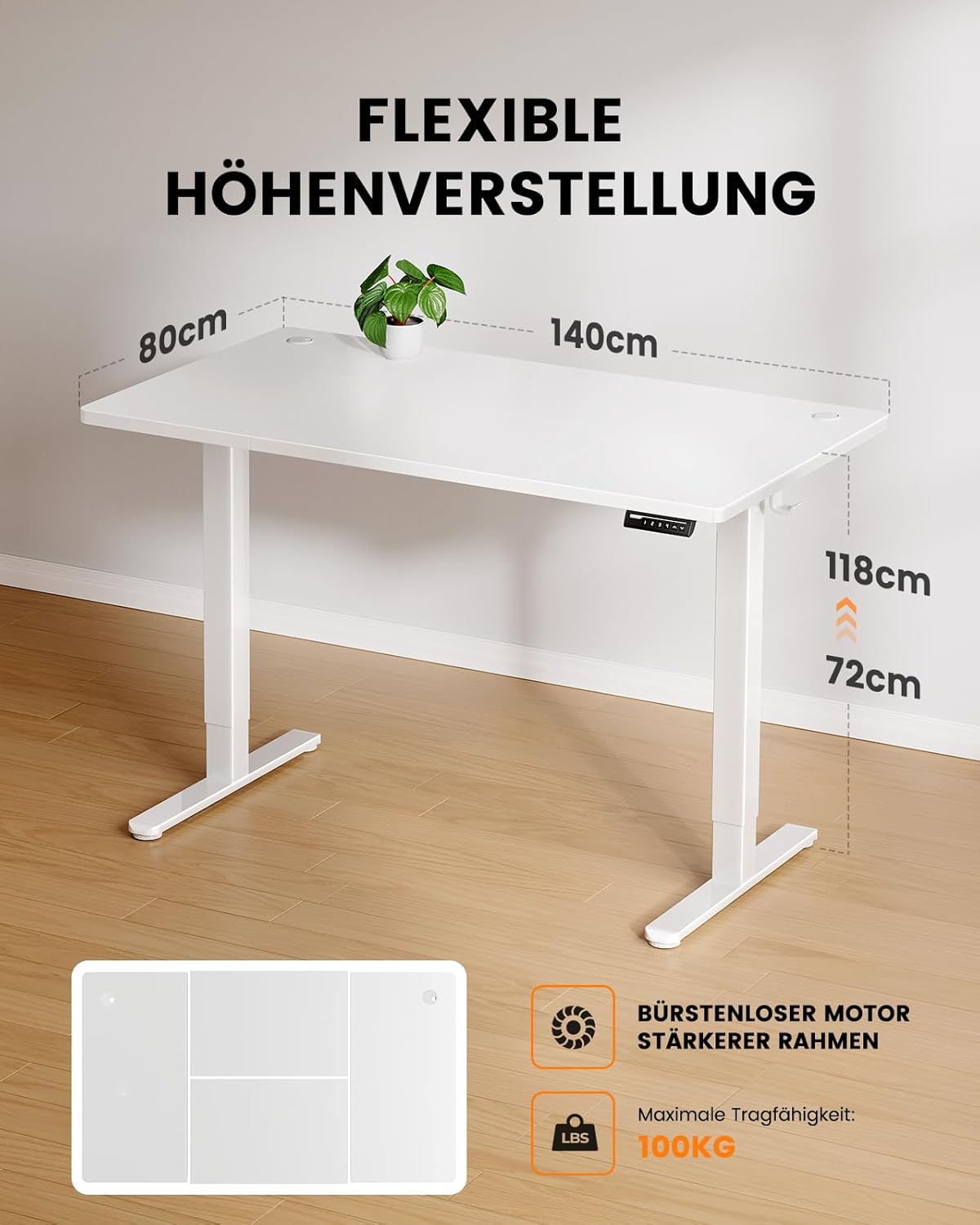
Figure 3.1: Illustration of the desk's flexible height adjustment range (72cm to 118cm) and its maximum load capacity of 100kg, highlighting the brushless motor and strong frame.
3.2. ഫ്രെയിം അസംബ്ലി
- Attach the lifting columns to the foot supports using the provided screws. Ensure they are securely fastened.
- Connect the crossbar to the lifting columns. This provides structural integrity.
- Install the control box onto the designated area of the frame.

Figure 3.2: A visual comparison demonstrating the thicker leg design of the ErGear desk (6cm) versus standard thinner legs (4.5cm), illustrating the enhanced stability provided by the robust frame.
3.3. ഡെസ്ക്ടോപ്പ് ഇൻസ്റ്റാളേഷൻ
- Carefully place the desktop onto the assembled frame, aligning the pre-drilled holes.
- Secure the desktop to the frame using the appropriate screws. Use a screwdriver or electric drill (low torque setting) for best results.
3.4. Cable Management and Accessories
- Install the power strip holder under the desk.
- Attach the accessory hooks to the sides of the desk as desired.
- Route all cables through the cable grommets and into the power strip holder for a tidy setup.

ചിത്രം 3.3: വിശദമായി view of the desk's integrated cable management features, including dual cable grommets, an under-desk power strip holder, and convenient accessory hooks for headphones or bags.
4. പ്രവർത്തന നിർദ്ദേശങ്ങൾ
Your ErGear Electric Height Adjustable Desk is designed for easy and intuitive operation.
4.1. പ്രാരംഭ സജ്ജീകരണവും ആദ്യ ഉപയോഗവും
- Plug the desk into a standard power outlet.
- The control panel display will light up.
- അമർത്തുക Up or താഴേക്ക് arrows to move the desk to your desired height.

Figure 4.1: The desk's control panel, featuring four programmable memory buttons (1-4) for quick height recall, along with standard up and down adjustment arrows.
4.2. Programming Memory Presets
The desk allows you to save up to four preferred height settings.
- Adjust the desk to your desired height using the Up or താഴേക്ക് അമ്പുകൾ.
- അമർത്തുക "എം" button (or similar memory button, if present, otherwise assume direct number press). The display might flash.
- ഉടൻ തന്നെ നമ്പർ ബട്ടണുകളിൽ ഒന്ന് അമർത്തുക (1, 2, 3, അല്ലെങ്കിൽ 4) to save the current height to that preset. The display will confirm the save.
- To recall a saved height, simply press the corresponding number button.

Figure 4.2: A user demonstrating the ergonomic benefits of the ErGear desk, easily transitioning between sitting and standing positions within the 72cm to 118cm height range.
5. പരിപാലനവും പരിചരണവും
Proper maintenance ensures the longevity and optimal performance of your ErGear desk.
- വൃത്തിയാക്കൽ: ഡെസ്ക്ടോപ്പും ഫ്രെയിമും ഒരു സോഫ്റ്റ്, ഡി ക്ലീനർ ഉപയോഗിച്ച് തുടയ്ക്കുക.amp തുണി. ഉരച്ചിലുകൾ ഉണ്ടാക്കുന്ന ക്ലീനറുകളോ കഠിനമായ രാസവസ്തുക്കളോ ഒഴിവാക്കുക.
- പരിശോധന: എല്ലാ സ്ക്രൂകളും കണക്ഷനുകളും ഇറുകിയതാണെന്ന് ഉറപ്പാക്കാൻ ഇടയ്ക്കിടെ പരിശോധിക്കുക. ആവശ്യമെങ്കിൽ വീണ്ടും മുറുക്കുക.
- മോട്ടോർ കെയർ: The brushless motor is designed for durability and requires no special maintenance. Avoid obstructing the motor's movement.
- കേബിൾ മാനേജുമെന്റ്: Regularly check cables for wear or damage and ensure they are neatly routed to prevent tripping hazards or damage.
6. പ്രശ്നപരിഹാരം
If you encounter any issues with your ErGear Electric Height Adjustable Desk, refer to the following common troubleshooting steps:
| പ്രശ്നം | സാധ്യമായ കാരണം | പരിഹാരം |
|---|---|---|
| ഡെസ്ക് അനങ്ങുന്നില്ല. | പ്ലഗ് ഇൻ ചെയ്തിട്ടില്ല; പവർ അല്ലെങ്കിൽtage; motor overload. | Check power connection; verify power supply; reduce load on desk. |
| മേശ അസമമായി നീങ്ങുന്നു അല്ലെങ്കിൽ അസാധാരണമായ ശബ്ദങ്ങൾ ഉണ്ടാക്കുന്നു. | Loose connections; obstruction; uneven weight distribution. | Check and tighten all screws; remove any obstructions; redistribute weight evenly. |
| മെമ്മറി പ്രീസെറ്റുകൾ പ്രവർത്തിക്കുന്നില്ല. | Incorrect programming; power cycle needed. | Re-program the memory presets (refer to Section 4.2); unplug the desk for 30 seconds and plug back in. |
| ഡിസ്പ്ലേയിൽ പിശക് കോഡ്. | നിർദ്ദിഷ്ട സിസ്റ്റം പിശക്. | പൂർണ്ണ മാനുവലിൽ (ലഭ്യമെങ്കിൽ) നൽകിയിരിക്കുന്ന നിർദ്ദിഷ്ട പിശക് കോഡ് കാണുക അല്ലെങ്കിൽ ഉപഭോക്തൃ പിന്തുണയുമായി ബന്ധപ്പെടുക. |
If the problem persists after attempting these solutions, please contact ErGear customer support for further assistance.
7 സ്പെസിഫിക്കേഷനുകൾ
- മോഡൽ: B0D9MFMBBQ
- ബ്രാൻഡ്: എർഗിയർ
- Desktop Dimensions: 140 സെ.മീ (നീളം) x 80 സെ.മീ (വീതി)
- ഉയരം ക്രമീകരിക്കൽ ശ്രേണി: 72 സെ.മീ - 118 സെ.മീ
- ലോഡ് കപ്പാസിറ്റി: 100 കി.ഗ്രാം
- മോട്ടോർ തരം: Advanced Brushless Motor
- ശബ്ദ നില: ≤ 50 ഡിബി
- മെറ്റീരിയൽ: Metal (Frame), Wood (Desktop)
- ഉൽപ്പന്ന ഭാരം: ഏകദേശം 29.6 കി.ഗ്രാം
- നിറം: വെള്ള
8. വാറൻ്റിയും പിന്തുണയും
ErGear products are built with quality and durability in mind. For specific warranty details, please refer to the warranty card included with your product or visit the official ErGear webസൈറ്റ്.
ഉപഭോക്തൃ പിന്തുണ:
If you have any questions, require technical assistance, or need to report an issue, please contact ErGear customer support through the following channels:
- ഓൺലൈൻ പിന്തുണ: Visit the ErGear official webസൈറ്റ് (ErGear Store on Amazon) for FAQs and contact information.
- ഇമെയിൽ: Refer to your product packaging or warranty card for the customer service email address.
Please have your product model number (B0D9MFMBBQ) and purchase date ready when contacting support.
Ask a question about this manual
Ask about setup, troubleshooting, compatibility, parts, safety, or missing instructions. Manuals+ will review the question and use this page’s manual context to help answer it.