
1. ആമുഖം
The SecuX Neo Gold is a hardware cryptocurrency wallet designed to provide secure and convenient management of your digital assets. It features a 2.8-inch intuitive touchscreen, Bluetooth, and USB-C connectivity. This device is engineered with military-grade security to protect Bitcoin, Ethereum, NFTs, tokens, and other cryptocurrencies.
പ്രധാന സവിശേഷതകളിൽ ഇവ ഉൾപ്പെടുന്നു:
- Top-Tier Security: Infineon CC EAL5+ Certified Secure Element Chip for 100% offline, self-custodial protection.
- Effortless Transactions: Simple tap, verify, and send functionality.
- Largest Color Touchscreen: A 2.8-inch display for clear asset viewing.
- Extensive Coin Support: Manages over 5000+ coins, tokens, and NFTs.
- Encrypted Bluetooth: Secure connection to the mobile app for on-the-go management.
- DeFi & NFT Access: Compatibility with Metamask & WalletConnect for popular NFT marketplaces and DeFi apps.
- XSEED Backup Set: Exclusive feature for secure crypto seed storage.

2. സജ്ജീകരണം
To begin using your SecuX Neo Gold wallet, follow these initial setup steps:
- അൺബോക്സിംഗും പ്രാരംഭ ചാർജും: Carefully unbox your SecuX Neo Gold. The device arrives with a USB-C cable. Connect the device to a power source using the provided cable to ensure it is sufficiently charged before proceeding.
- പവർ ഓൺ: ഉപകരണം ഓണാക്കാൻ പവർ ബട്ടൺ അമർത്തിപ്പിടിക്കുക.
- ഭാഷ തിരഞ്ഞെടുക്കൽ: On the touchscreen, select your preferred language.
- Download the SecuX Mobile App: The SecuX Neo Gold requires a companion mobile application for full functionality. Scan the QR code displayed on the device screen or visit the official SecuX website to download the app for your iOS or Android smartphone.
- ബ്ലൂടൂത്ത് വഴി ജോടിയാക്കുന്നു: Open the SecuX mobile app and follow the on-screen instructions to pair your device via encrypted Bluetooth. Ensure Bluetooth is enabled on your smartphone.
- ഫേംവെയർ അപ്ഡേറ്റ്: During the initial setup, you may be prompted to perform a firmware update. It is crucial to update the device to the latest firmware version to ensure optimal security and access to new features. Follow the instructions on the device and in the app to complete the update. This can typically be done via USB or a Micro SD card.
- Create or Restore Wallet:
- New Wallet: If you are setting up a new wallet, the device will guide you through generating a new seed phrase (recovery phrase). Write this phrase down accurately on the provided recovery sheet and store it in a secure, offline location. Never share your seed phrase.
- Restore Wallet: If you are restoring an existing wallet, you will be prompted to enter your existing seed phrase.
- പിൻ കോഡ് സജ്ജമാക്കുക: Establish a strong PIN code on your device. The dynamic keypad feature enhances security by randomizing number positions.

3. പ്രവർത്തന നിർദ്ദേശങ്ങൾ
The SecuX Neo Gold is designed for user-friendly operation. Here’s how to manage your digital assets:
3.1 ടച്ച്സ്ക്രീൻ നാവിഗേറ്റ് ചെയ്യൽ
The 2.8-inch color touchscreen allows for direct interaction with your wallet. Swipe and tap to navigate menus, select cryptocurrencies, and confirm transactions. The interface provides a clear view of your assets and transaction details.
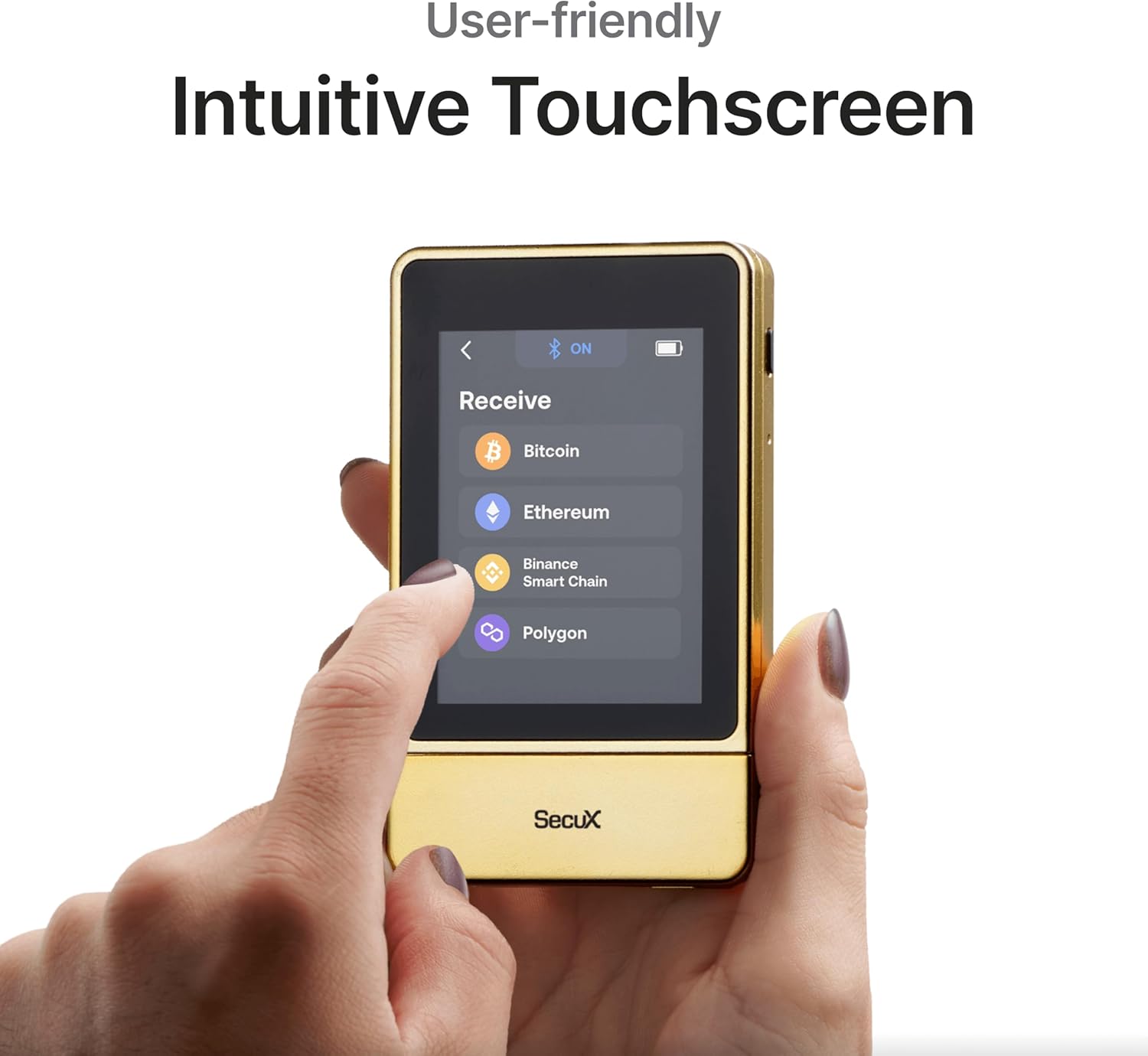
3.2 Sending and Receiving Cryptocurrencies
- Receiving Assets:
- On the device or in the mobile app, select the cryptocurrency you wish to receive.
- Your wallet address and a QR code will be displayed. Share this address with the sender.
- Always verify the address on your SecuX Neo Gold screen before confirming.
- Sending Assets:
- Initiate a send transaction from the SecuX mobile app.
- Enter the recipient's address and the amount.
- The transaction details will be displayed on your SecuX Neo Gold screen. Carefully review എല്ലാ വിശദാംശങ്ങളും.
- Confirm the transaction on your device by tapping "Approve" or "Confirm" on the touchscreen. This physical confirmation step ensures that your private keys never leave the device.

3.3 Managing Multiple Cryptocurrencies and NFTs
The SecuX Neo Gold supports over 5000+ coins, tokens, and NFTs. Use the mobile app to add or remove different asset accounts. You can access popular NFT marketplaces and DeFi applications through Metamask and WalletConnect integration.

4. പരിപാലനം
Proper maintenance ensures the longevity and optimal performance of your SecuX Neo Gold wallet.
- വൃത്തിയാക്കൽ: Use a soft, dry cloth to clean the device and touchscreen. Avoid abrasive materials or harsh chemicals.
- ബാറ്ററി കെയർ: Charge the device using the provided USB-C cable. Avoid overcharging or completely draining the battery frequently to prolong its lifespan.
- ഫേംവെയർ അപ്ഡേറ്റുകൾ: Regularly check for and install firmware updates. These updates often include security enhancements and new features.
- സംഭരണം: Store your SecuX Neo Gold in a safe, dry place away from extreme temperatures and direct sunlight.
- Seed Phrase Security: Your seed phrase is the ultimate backup. Ensure it is stored securely offline and never digitized or shared.
5. പ്രശ്നപരിഹാരം
If you encounter issues with your SecuX Neo Gold, refer to the following common solutions:
| പ്രശ്നം | പരിഹാരം |
|---|---|
| ഉപകരണം ഓണാക്കുന്നില്ല. | Ensure the device is fully charged using the USB-C cable. If the issue persists, contact support. |
| Unable to pair with mobile app via Bluetooth. |
|
| Transaction not confirming. |
|
| Specific cryptocurrency not supported. | While the SecuX Neo Gold supports over 5000+ assets, some newer or less common coins may not be directly supported. Check the official SecuX website for the most up-to-date list of supported cryptocurrencies. |
| Screen resolution appears low or text is hard to read. | The device features a 2.8-inch color touchscreen. While designed for clarity, individual perception of resolution may vary. Ensure the screen is clean and free from smudges. |
6 സ്പെസിഫിക്കേഷനുകൾ
| ഫീച്ചർ | വിശദാംശങ്ങൾ |
|---|---|
| ബ്രാൻഡ് | SecuX |
| മോഡലിൻ്റെ പേര് | SecuX Neo |
| മോഡൽ നമ്പർ | Neo Gold |
| നിറം | Neo Gold |
| മെമ്മറി സ്റ്റോറേജ് കപ്പാസിറ്റി | 1 ജിബി |
| ഹാർഡ്വെയർ ഇന്റർഫേസ് | USB 2.0 |
| പ്രത്യേക ഫീച്ചർ | എൻക്രിപ്റ്റ് ചെയ്തത് |
| വായന വേഗത | സെക്കൻഡിൽ 126 ജിഗാബൈറ്റ് |
| കണക്റ്റിവിറ്റി ടെക്നോളജി | ബ്ലൂടൂത്ത്, യുഎസ്ബി |
| ഫ്ലാഷ് മെമ്മറി തരം | മൈക്രോ എസ്.ഡി |
| ഹാർഡ്വെയർ കണക്റ്റിവിറ്റി സാങ്കേതികവിദ്യ | യുഎസ്ബി ടൈപ്പ് സി |
| അനുയോജ്യമായ ഉപകരണങ്ങൾ | Smartphones (iOS, Android), Computers (Windows, MacOS, Linux) with USB-C port |
| നിർമ്മാതാവ് | SecuX |
| ASIN | B0D9NJ2J2N |
7. വാറൻ്റിയും പിന്തുണയും
വാറൻ്റി: The SecuX Neo Gold comes with a 1-year limited warranty from the date of purchase. This warranty covers manufacturing defects under normal use. Please retain your proof of purchase for warranty claims.
ഉപഭോക്തൃ പിന്തുണ: For technical assistance, troubleshooting, or warranty inquiries, please visit the official SecuX website or contact their customer support team. You can find more information and resources on the SecuX Brand Store.