
1. ആമുഖം
വാങ്ങിയതിന് നന്ദി.asing the Xiaomi Cordless Vacuum Cleaner G20 Lite. This manual provides essential information for the safe and efficient use, maintenance, and troubleshooting of your new vacuum cleaner. Please read this manual thoroughly before first use and keep it for future reference.
2. സുരക്ഷാ നിർദ്ദേശങ്ങൾ
To reduce the risk of fire, electric shock, or injury, always follow basic safety precautions when using your vacuum cleaner:
- ഉപകരണം ഉപയോഗിക്കുന്നതിന് മുമ്പ് എല്ലാ നിർദ്ദേശങ്ങളും വായിക്കുക.
- പുറത്തോ നനഞ്ഞ പ്രതലങ്ങളിലോ ഉപയോഗിക്കരുത്.
- കളിപ്പാട്ടമായി ഉപയോഗിക്കാൻ അനുവദിക്കരുത്. കുട്ടികൾ അല്ലെങ്കിൽ അടുത്ത് ഉപയോഗിക്കുമ്പോൾ വളരെ ശ്രദ്ധ ആവശ്യമാണ്.
- ഈ മാനുവലിൽ വിവരിച്ചിരിക്കുന്നതുപോലെ മാത്രം ഉപയോഗിക്കുക. നിർമ്മാതാവ് ശുപാർശ ചെയ്യുന്ന അറ്റാച്ച്മെൻ്റുകൾ മാത്രം ഉപയോഗിക്കുക.
- കേടായ ചരട് അല്ലെങ്കിൽ പ്ലഗ് ഉപയോഗിച്ച് ഉപയോഗിക്കരുത്. ഉപകരണം പ്രവർത്തിക്കുന്നില്ലെങ്കിൽ, വീഴുകയോ കേടുപാടുകൾ സംഭവിക്കുകയോ വെളിയിൽ ഉപേക്ഷിക്കുകയോ വെള്ളത്തിൽ വീഴുകയോ ചെയ്താൽ, അത് ഒരു സേവന കേന്ദ്രത്തിലേക്ക് തിരികെ കൊണ്ടുവരിക.
- ചരട് ഉപയോഗിച്ച് വലിക്കുകയോ കൊണ്ടുപോകുകയോ ചെയ്യരുത്, ചരട് ഒരു ഹാൻഡിലായി ഉപയോഗിക്കുക, ചരടിൽ ഒരു വാതിൽ അടയ്ക്കുക, അല്ലെങ്കിൽ മൂർച്ചയുള്ള അരികുകളിലോ മൂലകളിലോ ചരട് വലിക്കുക. ചരടിന് മുകളിലൂടെ ഉപകരണം പ്രവർത്തിപ്പിക്കരുത്. ചൂടായ പ്രതലങ്ങളിൽ നിന്ന് ചരട് സൂക്ഷിക്കുക.
- ചരട് വലിച്ചുകൊണ്ട് അൺപ്ലഗ് ചെയ്യരുത്. അൺപ്ലഗ് ചെയ്യാൻ, പ്ലഗ് പിടിക്കുക, ചരടല്ല.
- നനഞ്ഞ കൈകളാൽ പ്ലഗ്ഗോ ഉപകരണമോ കൈകാര്യം ചെയ്യരുത്.
- ഒരു വസ്തുവും തുറസ്സുകളിൽ ഇടരുത്. ഒരു ഓപ്പണിംഗും തടഞ്ഞിരിക്കുമ്പോൾ ഉപയോഗിക്കരുത്; പൊടി, ലിൻ്റ്, മുടി, വായുപ്രവാഹം കുറയ്ക്കുന്ന എന്തും എന്നിവ ഒഴിവാക്കുക.
- മുടി, അയഞ്ഞ വസ്ത്രങ്ങൾ, വിരലുകൾ, ശരീരത്തിൻ്റെ എല്ലാ ഭാഗങ്ങളും തുറസ്സുകളിൽ നിന്നും ചലിക്കുന്ന ഭാഗങ്ങളിൽ നിന്നും അകറ്റി നിർത്തുക.
- കത്തുന്നതോ പുകവലിക്കുന്നതോ ആയ സിഗരറ്റ്, തീപ്പെട്ടി, ചൂടുള്ള ചാരം എന്നിവയൊന്നും എടുക്കരുത്.
- ഗ്യാസോലിൻ പോലുള്ള കത്തുന്നതോ കത്തുന്നതോ ആയ ദ്രാവകങ്ങൾ എടുക്കാനോ അവ ഉള്ള സ്ഥലങ്ങളിൽ ഉപയോഗിക്കാനോ ഉപയോഗിക്കരുത്.
- ക്ലോറിൻ ബ്ലീച്ച്, അമോണിയ, ഡ്രെയിൻ ക്ലീനർ തുടങ്ങിയ വിഷാംശമുള്ള വസ്തുക്കൾ എടുക്കരുത്.
- ഡസ്റ്റ് കപ്പ് കൂടാതെ/അല്ലെങ്കിൽ ഫിൽട്ടറുകൾ ഇല്ലാതെ ഉപയോഗിക്കരുത്.
- അൺപ്ലഗ് ചെയ്യുന്നതിനുമുമ്പ് എല്ലാ നിയന്ത്രണങ്ങളും ഓഫാക്കുക.
- കോണിപ്പടികളിൽ വൃത്തിയാക്കുമ്പോൾ കൂടുതൽ ശ്രദ്ധിക്കണം.
- വീട്ടുപകരണങ്ങൾ വീടിനുള്ളിൽ സംഭരിക്കുക.
- ഔട്ട്ഡോർ യൂണിറ്റ് ചാർജ് ചെയ്യരുത്.
- നിർമ്മാതാവ് വ്യക്തമാക്കിയ ചാർജർ മാത്രം ഉപയോഗിക്കുക.
3. ഉൽപ്പന്നം കഴിഞ്ഞുview
The Xiaomi Cordless Vacuum Cleaner G20 Lite is designed for efficient cleaning with its powerful suction and versatile attachments. Key features include:
- Maximum 18,000Pa suction power for thorough cleaning.
- Integrated white LED light on the brush head to illuminate dark areas.
- വിപുലമായ 5-സെtage powerful filter system to prevent secondary pollution.
- Large capacity 2200mAh battery providing up to 45 minutes of runtime.
- One-touch dust disposal for easy and hygienic emptying.
- 2-way brush nozzle and extension rod for versatile cleaning.
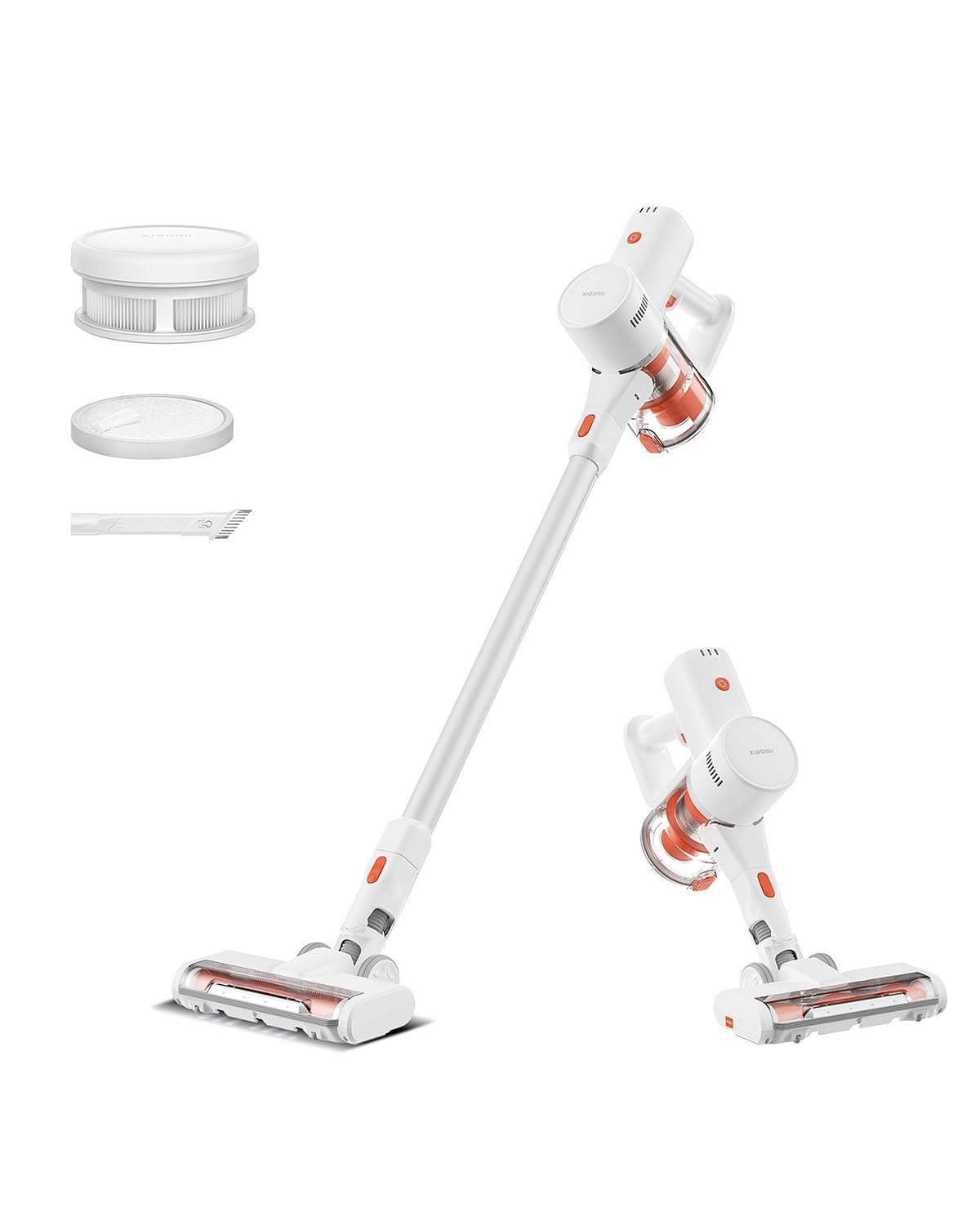
Image: Xiaomi Cordless Vacuum Cleaner G20 Lite, showing the full product assembly.

Image: Illustration of the vacuum cleaner's internal motor, highlighting its 18,000Pa suction power.
ചിത്രം: സുതാര്യം view of the vacuum cleaner's handle, showing the internal large-capacity battery cells.
4. സജ്ജീകരണം
നിങ്ങളുടെ വാക്വം ക്ലീനർ കൂട്ടിച്ചേർക്കാൻ ഈ ഘട്ടങ്ങൾ പാലിക്കുക:
- ഘടകങ്ങൾ അൺപാക്ക് ചെയ്യുക: Carefully remove all parts from the packaging. Ensure all accessories (main unit, extension rod, motorized brush head, 2-way brush nozzle, crevice nozzle, adapter) are present.
- Attach Extension Rod: Connect the extension rod to the main unit until it clicks into place.
- ബ്രഷ് ഹെഡ് അറ്റാച്ചുചെയ്യുക: Connect the desired brush head (motorized brush or 2-way brush nozzle) to the other end of the extension rod. For handheld use, attach the 2-way brush nozzle or crevice nozzle directly to the main unit.
- ബാറ്ററി ചാർജ് ചെയ്യുക: Before first use, fully charge the vacuum cleaner. Connect the adapter to the charging port on the main unit and plug it into a power outlet. The power indicator lights will show the charging status.

Image: The vacuum cleaner being stored on a wall-mounted charging dock, illustrating convenient storage and charging.
5. പ്രവർത്തന നിർദ്ദേശങ്ങൾ
Your Xiaomi Cordless Vacuum Cleaner G20 Lite offers versatile cleaning options:
പവർ ഓൺ/ഓഫ്, സക്ഷൻ മോഡുകൾ
Press the power button to turn the vacuum on. Press the mode button to cycle through different suction power levels (Standard, Turbo). The power indicator lights will show the current mode and battery level.
Video: A short demonstration of turning the vacuum cleaner on and cycling through its suction modes using the power and mode buttons.
അറ്റാച്ചുമെൻ്റുകൾ ഉപയോഗിക്കുന്നു
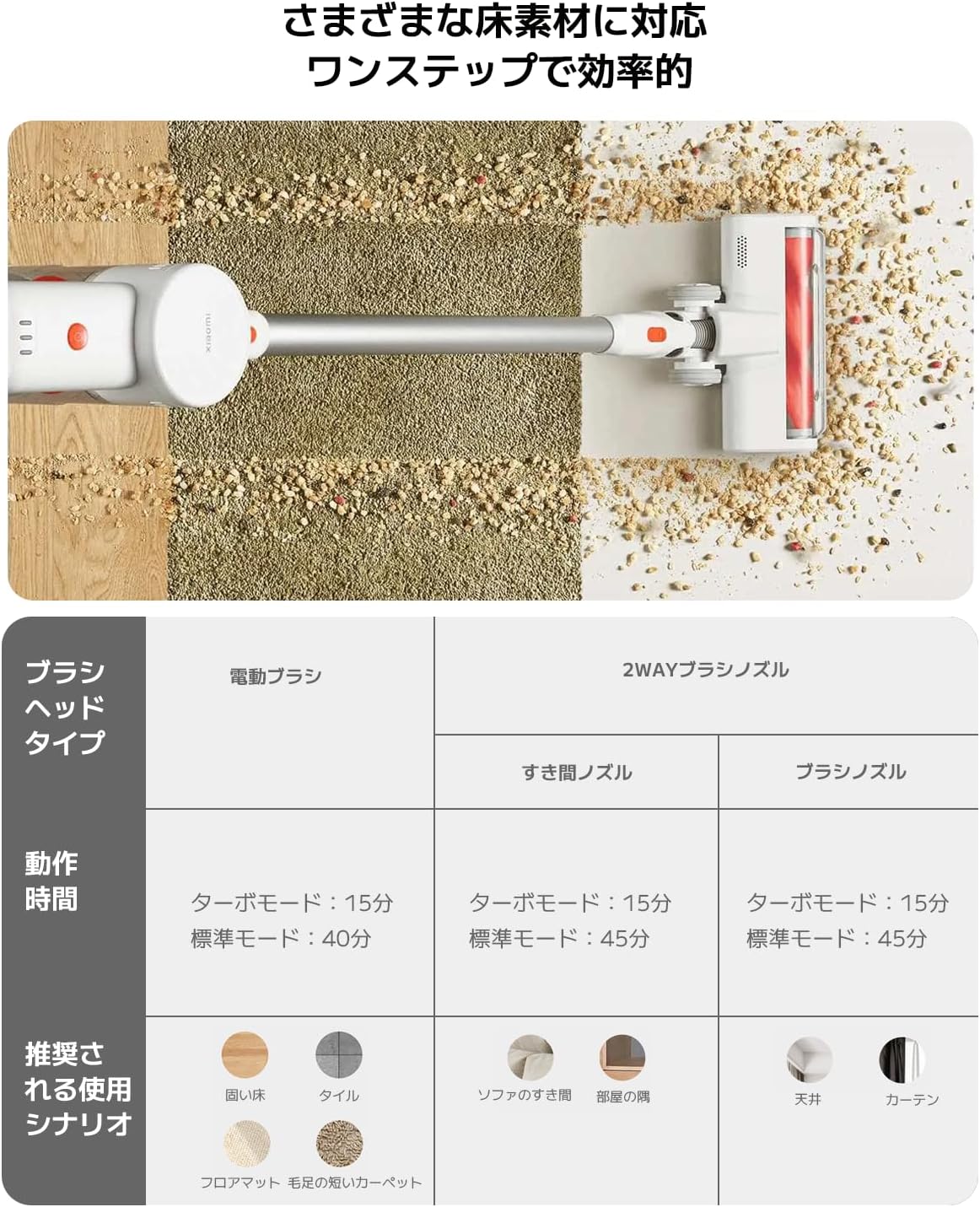
Select the appropriate brush head for your cleaning task:
| ബ്രഷ് ഹെഡ് തരം | Operating Time (Standard/Turbo) | Recommended Use Scenario |
|---|---|---|
| മോട്ടറൈസ്ഡ് ബ്രഷ് | 40 മിനിറ്റ് / 15 മിനിറ്റ് | Hard Floor, Tile, Floor Mat, Short Pile Carpet |
| 2-Way Brush Nozzle (Crevice) | 45 മിനിറ്റ് / 15 മിനിറ്റ് | Sofa Crevices, Room Corners |
| 2-Way Brush Nozzle (Brush) | 45 മിനിറ്റ് / 15 മിനിറ്റ് | Ceiling, Curtains |

Image: Close-up of the vacuum cleaner's motorized brush head, showing the integrated white LED lights illuminating the floor.

Image: A person using the vacuum cleaner with the extension rod to clean high areas, and with a specialized nozzle for narrow gaps and desk surfaces.
6. പരിപാലനം
പതിവ് അറ്റകുറ്റപ്പണികൾ മികച്ച പ്രകടനം ഉറപ്പാക്കുകയും നിങ്ങളുടെ വാക്വം ക്ലീനറിന്റെ ആയുസ്സ് വർദ്ധിപ്പിക്കുകയും ചെയ്യുന്നു.
ഡസ്റ്റ്ബിൻ ശൂന്യമാക്കുന്നു
The vacuum cleaner features a one-touch dust disposal system. Simply press the release button on the dustbin to open the bottom flap and empty collected debris directly into a trash can. Empty the dustbin regularly to maintain suction power.

Image: A hand demonstrating the one-touch dust disposal mechanism, showing debris falling from the dustbin. Also visible is the power indicator light on the handle.
ഫിൽട്ടറുകൾ വൃത്തിയാക്കുന്നു
5-സെtage powerful filter system requires periodic cleaning. Refer to the diagram below for filter components. Remove the dustbin and separate the filter components. Tap off loose dirt and rinse washable parts under running water. Ensure all filter components are completely dry before reassembling them into the vacuum cleaner.

ചിത്രം: പൊട്ടിത്തെറിച്ചു view of the vacuum cleaner's main unit, illustrating the components of the 5-stagഇ ഫിൽട്ടർ സിസ്റ്റം.
Cleaning Brush Heads
Periodically check brush heads for tangled hair or debris. Use scissors to cut away any tangled hair and remove any obstructions to ensure smooth operation.
7. പ്രശ്നപരിഹാരം
നിങ്ങളുടെ വാക്വം ക്ലീനറിൽ പ്രശ്നങ്ങൾ നേരിടുകയാണെങ്കിൽ, ഇനിപ്പറയുന്ന പൊതുവായ പ്രശ്നങ്ങളും പരിഹാരങ്ങളും പരിശോധിക്കുക:
- ശക്തിയില്ല:
- ബാറ്ററി ചാർജ്ജ് ആണോ എന്ന് പരിശോധിക്കുക. ആവശ്യമെങ്കിൽ റീചാർജ് ചെയ്യുക.
- പവർ ബട്ടൺ ദൃഡമായി അമർത്തിയെന്ന് ഉറപ്പാക്കുക.
- കുറഞ്ഞ സക്ഷൻ പവർ:
- ഡസ്റ്റ്ബിൻ ശൂന്യമാക്കുക.
- Clean the filters. Ensure they are dry before reinstallation.
- Check for blockages in the brush head, extension rod, or main unit.
- ബ്രഷ് ഹെഡ് കറങ്ങുന്നില്ല:
- Check for tangled hair or debris obstructing the brush roll.
- Ensure the brush head is correctly attached.
- അസാധാരണമായ ശബ്ദം:
- Check for any foreign objects caught in the brush head or suction path.
- എല്ലാ ഭാഗങ്ങളും സുരക്ഷിതമായി കൂട്ടിച്ചേർക്കപ്പെട്ടിട്ടുണ്ടെന്ന് ഉറപ്പാക്കുക.
പ്രശ്നം നിലനിൽക്കുകയാണെങ്കിൽ, ദയവായി ഉപഭോക്തൃ പിന്തുണയുമായി ബന്ധപ്പെടുക.
8 സ്പെസിഫിക്കേഷനുകൾ
| സ്പെസിഫിക്കേഷൻ | വിശദാംശങ്ങൾ |
|---|---|
| ബ്രാൻഡ് | Xiaomi |
| മോഡൽ നമ്പർ | BHR8232US |
| ഉൽപ്പന്ന തരം | സ്റ്റിക്ക് ക്ലീനർ |
| ഫീച്ചറുകൾ | കോർഡ്ലെസ്സ് |
| ഫിൽട്ടർ തരം | HEPA ഫിൽട്ടർ |
| ശുപാർശ ചെയ്യുന്ന ഉപയോഗം | Carpet, Hard Floors, Sofa, Curtains, Beds, Tiles, Blankets |
| പവർ ഉറവിടം | Battery Powered (Charges via power cord) |
| ശേഷി | 0.55 ലിറ്റർ |
| നിറം | വെള്ള |
| പോർട്ടബിൾ | അതെ |
| ഇൻഡോർ/ഔട്ട്ഡോർ ഉപയോഗം | ഇൻഡോർ |
| ഓപ്പറേറ്റിംഗ് വോളിയംtage | 21.6 വോൾട്ട് |
| ബാറ്ററി ശേഷി | 215 വാട്ട്-അവർസ് (2200mAh) |
| കൺട്രോളർ തരം | കൈ നിയന്ത്രണം |
| കണക്റ്റിവിറ്റി | Bluetooth (for potential smart features) |
| ഉൾപ്പെടുത്തിയ ഘടകങ്ങൾ | Accessory kit, Adapter |
| മാതൃരാജ്യം | ചൈന |
| ഉൽപ്പന്ന ഭാരം | 2.4 കിലോഗ്രാം |
| ഇനത്തിന്റെ അളവുകൾ (L x W x H) | 66.2 സെ.മീ x 32 സെ.മീ x 13.2 സെ.മീ |
9. വാറൻ്റിയും പിന്തുണയും
Xiaomi products are designed with quality and reliability in mind. For warranty information and customer support, please refer to the details below:
വാറൻ്റി വിവരങ്ങൾ
This product comes with a standard manufacturer's warranty. Please retain your proof of purchase for warranty claims. For specific warranty terms and conditions, refer to the documentation included with your product or visit the official Xiaomi webസൈറ്റ്.
ഉപഭോക്തൃ പിന്തുണ
For technical assistance, troubleshooting, or service inquiries, please contact the Xiaomi Customer Service Center:
- ഫോൺ: 0120-767-378 (Reception hours: 9:00 - 18:00, excluding year-end and New Year holidays)
- ഇമെയിൽ: service.jp@support.mi.com
Xiaomi Service Center (Akihabara Store)
For in-person support or repairs, you may visit our service center:
- വിലാസം: 4-6-7 Kanda Sakumacho, Chiyoda-ku, Tokyo
- ബിസിനസ്സ് സമയം: 10:00 - 19:00
- അടച്ചു: ബുധനാഴ്ച
- Last Reception: 18:00