
FINGEREVO 057T03899KZF27
RG40XXH Handheld Game Console User Manual
Model: 057T03899KZF27
Brand: FINGEREVO
ആമുഖം
വാങ്ങിയതിന് നന്ദി.asing the FINGEREVO RG40XXH Handheld Game Console. This device is designed to provide a versatile gaming experience with its 4.0-inch IPS screen, powerful H700 chipset, and extensive connectivity options. This manual will guide you through the setup, operation, and maintenance of your new console to ensure optimal performance and enjoyment.
ബോക്സിൽ എന്താണുള്ളത്
- RG40XXH Console (Retro Gray)
- USB-C ചാർജ് കേബിൾ
- ഇൻസ്ട്രക്ഷൻ മാനുവൽ
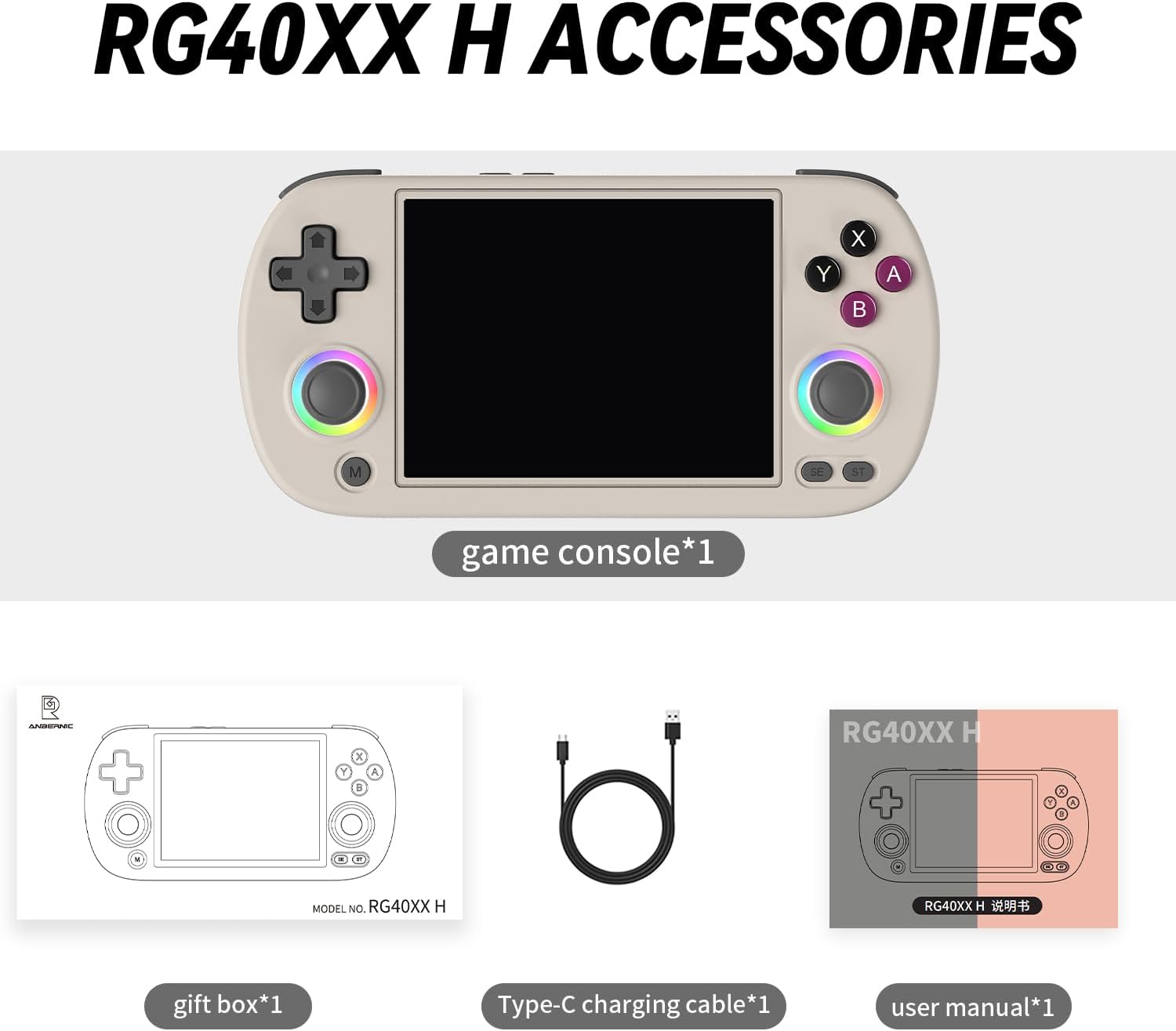
Image: Included accessories for the RG40XXH Handheld Game Console.
ഉൽപ്പന്നം കഴിഞ്ഞുview
The RG40XXH features an ergonomic design for comfortable handheld gaming. It is equipped with a vibrant 4.0-inch IPS screen, dual analog joysticks, a D-pad, and standard gaming buttons.

ചിത്രം: മുൻഭാഗം view of the RG40XXH Handheld Game Console.
നിയന്ത്രണങ്ങളും തുറമുഖങ്ങളും
- ഡി-പാഡ്: ദിശാ ഇൻപുട്ട്.
- അനലോഗ് ജോയ്സ്റ്റിക്കുകൾ: Dual joysticks for precise control, featuring customizable RGB light rings.
- ആക്ഷൻ ബട്ടണുകൾ (A, B, X, Y): സ്റ്റാൻഡേർഡ് ഗെയിമിംഗ് ഇൻപുട്ട്.
- എം ബട്ടൺ: മെനു ബട്ടൺ.
- SE Button: ബട്ടൺ തിരഞ്ഞെടുക്കുക.
- ST Button: ആരംഭ ബട്ടൺ.
- ഷോൾഡർ ബട്ടണുകൾ (L1, L2, R1, R2): മുകളിലെ അറ്റത്ത് സ്ഥിതിചെയ്യുന്നു.
- യുഎസ്ബി-സി പോർട്ട്: ചാർജിംഗിനും ഡാറ്റ കൈമാറ്റത്തിനും.
- TF1/TF2 Card Slots: ബാഹ്യ സംഭരണത്തിനായി.
- HDMI ഔട്ട്പുട്ട്: ബാഹ്യ ഡിസ്പ്ലേകളിലേക്ക് ബന്ധിപ്പിക്കുന്നതിന്.
The joysticks feature 16 million colors RGB colorful light rings with 6 adjustable light effects (Light, Marquee, Breath, Chasing, Rainbow, Gaming) that can be freely turned on or off and controlled.

Image: RGB Colorful Light Ring feature on the joysticks.

Image: The 4-inch custom screen of the RG40XXH console.
സജ്ജമാക്കുക
ഉപകരണം ചാർജ് ചെയ്യുന്നു
Before first use, fully charge the console using the provided USB-C cable and a compatible power adapter (not included). The device supports C2C charging. A full charge typically takes approximately 2-3 hours.
Inserting Storage Cards
The console has two TF card slots: TF1 (internal) and TF2 (external). The operating system and preloaded games are typically on the TF1 card. The TF2 slot can be used to expand storage for additional games. Gently insert the TF cards into the designated slots until they click into place.
പ്രവർത്തന നിർദ്ദേശങ്ങൾ
പവർ ചെയ്യുന്നത് ഓൺ/ഓഫ്
To power on, press and hold the Power button located on the top edge of the console until the screen illuminates. To power off, press and hold the Power button again and select the shutdown option from the menu, or briefly press the power button to save and exit when playing games.
ഇൻ്റർഫേസ് നാവിഗേറ്റ് ചെയ്യുന്നു
Use the D-pad or analog joysticks to navigate through the console's menus. The A button typically confirms selections, while the B button cancels or goes back.
ഗെയിമുകൾ കളിക്കുന്നു
Navigate to the game selection menu. Select a game using the D-pad or joystick and press the A button to launch it. Please note: The console does not include Nin10do-games. Users are expected to prepare their own games if needed.
വൈഫൈയിലേക്ക് കണക്റ്റ് ചെയ്യുന്നു
The RG40XXH supports 5G Wi-Fi for online multiplayer and other network features. Go to the system settings, select Wi-Fi, and connect to your desired network.

Image: The RG40XXH supports 5G Wi-Fi for online multiplayer.
TV-Out Functionality
Connect the console to a TV or external monitor using an HDMI cable (not included) to enjoy games on a larger screen. The console supports TV-out functionality.
Multiplayer Function
The console supports multiplayer functionality. Connect external controllers via Bluetooth for local multiplayer gaming.
Moonlight Streaming
The RG40XXH supports Moonlight Streaming, allowing you to play PC games freely on your handheld console. Ensure your PC is set up for Moonlight streaming and connect the console to the same network.

Image: Moonlight Streaming feature for playing PC games.
മെയിൻ്റനൻസ്
ബാറ്ററി കെയർ
The RG40XXH is equipped with a 3200mAh built-in LiPo battery, providing 4-6 hours of playing time. To prolong battery life, avoid fully discharging the battery frequently and store the device in a cool, dry place when not in use for extended periods.

Image: Illustration of the 3200mAh battery and its durability.
വൃത്തിയാക്കൽ
Use a soft, dry cloth to clean the console's exterior. For the screen, use a microfiber cloth specifically designed for electronics. Avoid using harsh chemicals or abrasive materials.
ട്രബിൾഷൂട്ടിംഗ്
| ഇഷ്യൂ | സാധ്യമായ പരിഹാരം |
|---|---|
| കൺസോൾ ഓണാക്കുന്നില്ല. | Ensure the battery is charged. Connect the USB-C cable and try again. |
| Games are not loading. | Check if the TF card is properly inserted. Ensure game files are in compatible formats. |
| വൈഫൈ കണക്ഷൻ പ്രശ്നങ്ങൾ. | Verify Wi-Fi password. Ensure the console is within range of the router. Restart the console and router. |
| സ്ക്രീൻ പ്രതികരിക്കുന്നില്ല അല്ലെങ്കിൽ നിശ്ചലമാണ്. | Perform a hard reset by holding the Power button for 10-15 seconds until the device shuts down, then restart. |
സാങ്കേതിക സവിശേഷതകൾ
| ഫീച്ചർ | സ്പെസിഫിക്കേഷൻ |
|---|---|
| മോഡൽ നമ്പർ | 057T03899KZF27 |
| സ്ക്രീൻ വലിപ്പം | 4.0 ഇഞ്ച് |
| ഡിസ്പ്ലേ തരം | IPS LCD, 640*480 resolution, OCA 4:3 full view ആംഗിൾ |
| ചിപ്സെറ്റ് | H700 quad-core ARM Cortex-A53 1.5GHz |
| ബാറ്ററി | 3200mAh ലിഥിയം പോളിമർ (ഉൾപ്പെടുത്തിയിരിക്കുന്നു) |
| ബാറ്ററി ലൈഫ് | 4-6 hours (approx. 5 hours stated) |
| മെമ്മറി സ്റ്റോറേജ് കപ്പാസിറ്റി | 64 ജിബി (ആന്തരികം) |
| ഹാർഡ്വെയർ ഇന്റർഫേസ് | USB-C |
| കണക്റ്റിവിറ്റി | 5G Wi-Fi, Bluetooth (for external controllers), HDMI TV-out |
| മെറ്റീരിയൽ | പ്ലാസ്റ്റിക് |
| ഉൽപ്പന്ന അളവുകൾ | 6.42 x 3.11 x 0.63 ഇഞ്ച് |
| ഇനത്തിൻ്റെ ഭാരം | 7.2 ഔൺസ് (205 ഗ്രാം) |
| ശുപാർശ ചെയ്യുന്ന പ്രായം | 15 വർഷവും അതിൽ കൂടുതലും |
വാറൻ്റിയും പിന്തുണയും
For warranty information and technical support, please refer to the documentation provided with your purchase or contact FINGEREVO customer service through their official channels. Keep your proof of purchase for any warranty claims.
Ask a question about this manual
Ask about setup, troubleshooting, compatibility, parts, safety, or missing instructions. Manuals+ will review the question and use this page’s manual context to help answer it.