
Vrabocry sp548e
Vrabocry SP548E SPI RGB LED Controller User Manual
Comprehensive instructions for setup, operation, and maintenance of your SP548E LED controller.
1. ആമുഖം
The Vrabocry SP548E is an advanced SPI RGB LED controller designed for digital addressable LED strip lights. It offers versatile control options including WiFi, Bluetooth, 2.4G RF remote, and onboard buttons. This controller supports a wide range of LED ICs such as WS2811, WS2812B, WS2815, and SK series, operating on DC 5-24V. It enables users to manage up to 1200 controllable pixels, providing dynamic lighting effects, music synchronization, and smart home integration via Alexa.
2. പാക്കേജ് ഉള്ളടക്കം
താഴെ ലിസ്റ്റ് ചെയ്തിരിക്കുന്ന എല്ലാ ഇനങ്ങളും നിങ്ങളുടെ പാക്കേജിൽ ഉൾപ്പെടുത്തിയിട്ടുണ്ടെന്ന് ദയവായി പരിശോധിക്കുക:
- 1x Vrabocry SP548E WiFi BT Pixel LED Controller
- 1x 2.4G RF Remote Control (Battery not included)
- 1x ഉപയോക്തൃ മാനുവൽ (ഈ പ്രമാണം)
- 1x Mounting Clip (may vary by package)
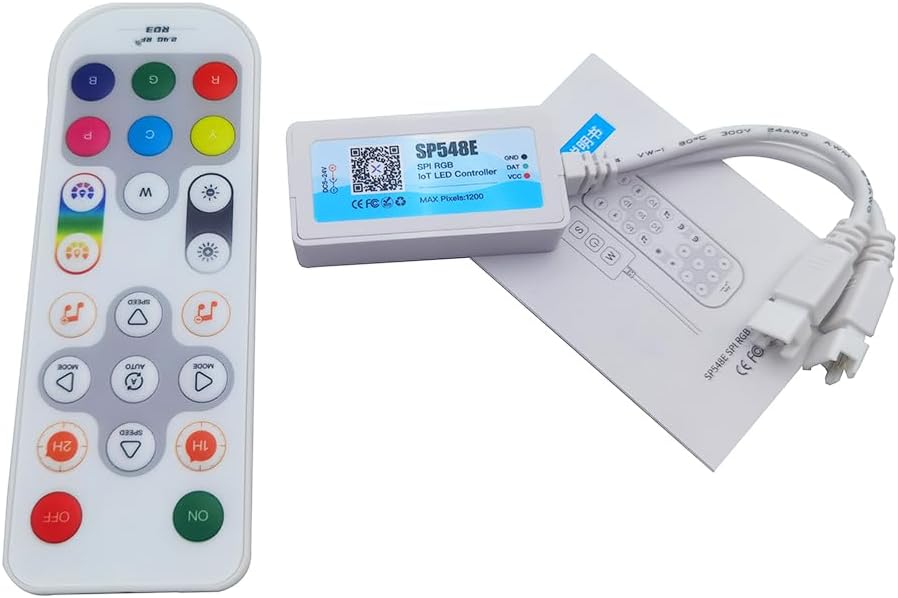
Image: The SP548E controller, its 2.4G RF remote, and the included instruction manual, laid out on a white surface.
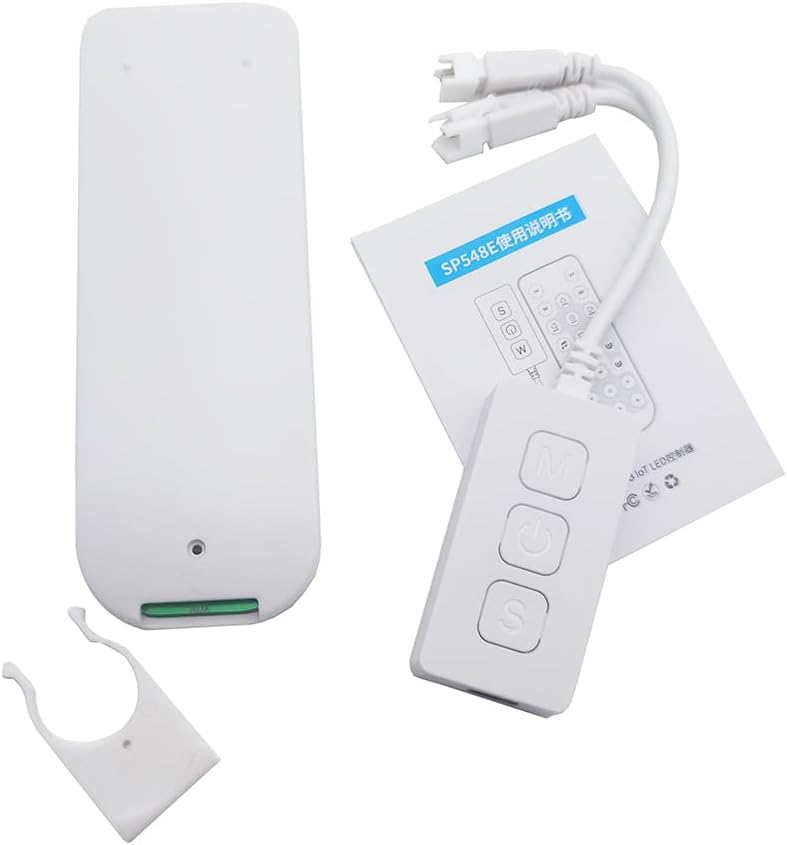
ചിത്രം: ഒരു സമ്പൂർണ്ണ view of the package contents, including the SP548E controller, the remote, the manual, and a white mounting clip.
3 സ്പെസിഫിക്കേഷനുകൾ
| ഇൻപുട്ട് വോളിയംtage | ഡിസി ക്സനുമ്ക്സ-ക്സനുമ്ക്സവ് |
| കണക്ഷൻ തരം | വൈഫൈ, ബ്ലൂടൂത്ത് |
| Controllable Pixels | Up to 1200 ICs |
| അപേക്ഷ | Digital Addressable LED Light Strips |
| ഔട്ട്പുട്ട് സിഗ്നൽ | SPI (TTL) Digital Signal |
| Compatible LED Strips | WS2811, WS2812, WS2815, SK series IC SPI RGB LED strips |
| ആപ്പിൻ്റെ പേര് | Banlanx |
| പ്രവർത്തന താപനില | -20℃ മുതൽ 60℃ വരെ |
| പരമാവധി കറന്റ് | 6A |
| നിയന്ത്രണ രീതികൾ | APP, IR Remote, Buttons, Alexa Voice Control |
4. സജ്ജീകരണ നിർദ്ദേശങ്ങൾ
4.1 കൺട്രോളർ ഓവർview
Familiarize yourself with the controller's ports and buttons before proceeding with installation.

Image: The SP548E controller showing its 5.5x2.5mm DC input, 3-pin output for LED strips, and onboard buttons labeled for Music mode, ON/OFF, and Speed adjustment.
4.2 വയറിംഗ് ഡയഗ്രം
Follow the diagram below to correctly connect the LED controller to your power supply and LED strip.

Image: A simplified wiring diagram illustrating the connection. The DC 5-24V power input connects to the controller, and the controller's 3-pin output connects to a compatible LED strip (e.g., Cob Strip).
- Ensure all power is disconnected before making any connections.
- Connect a DC 5-24V power supply to the controller's DC input port.
- Connect your compatible digital addressable LED strip (e.g., WS2811, WS2812B) to the controller's 3-pin output connector. Ensure correct polarity (Data, Ground, VCC).
- Once all connections are secure, connect the power supply to an electrical outlet.
4.3 App Installation (Banlanx)
To utilize the full features of your controller, download the "Banlanx" app from your device's app store (available for iOS and Android). Follow the in-app instructions to pair your controller via WiFi or Bluetooth.
5. പ്രവർത്തന നിർദ്ദേശങ്ങൾ
5.1 വിദൂര നിയന്ത്രണ പ്രവർത്തനങ്ങൾ
The included 2.4G RF remote control provides convenient access to various lighting modes and settings. Ensure the remote has batteries installed (not included).
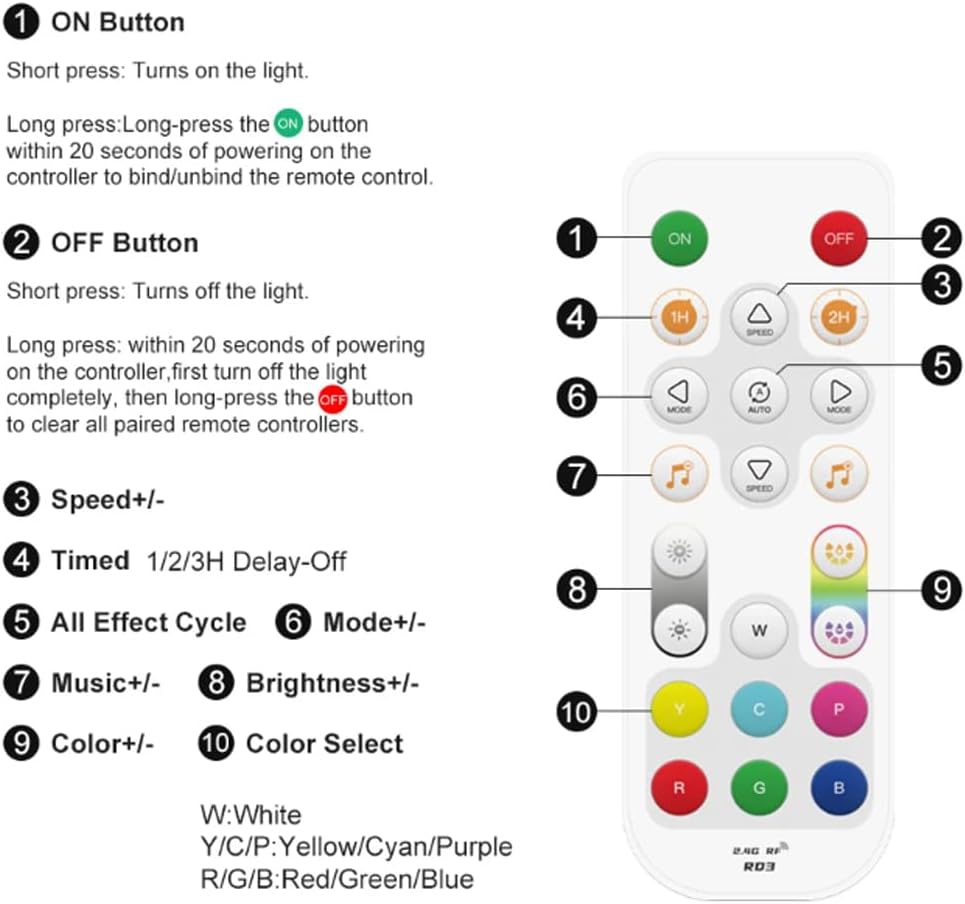
Image: A detailed layout of the 2.4G RF remote control, indicating the function of each button. Key functions include ON/OFF, Speed adjustment, Timed Delay-Off, Effect Cycle, Mode selection, Music effects, Brightness control, and Color selection.
- ഓൺ ബട്ടണിൽ: ലൈറ്റ് ഓണാക്കാൻ ഹ്രസ്വമായി അമർത്തുക. റിമോട്ട് കൺട്രോൾ ബൈൻഡ്/അൺബൈൻഡ് ചെയ്യാൻ കൺട്രോളറിൽ പവർ ചെയ്ത് 20 സെക്കൻഡിനുള്ളിൽ ദീർഘനേരം അമർത്തുക.
- ഓഫ് ബട്ടൺ: Short press to turn off the light. Long press within 20 seconds of powering on the controller (after turning off the light completely) to clear all paired remote controllers.
- വേഗത +/-: Adjusts the speed of dynamic effects.
- Timed 1H/2H Delay-Off: Sets a timer for the lights to turn off after 1 or 2 hours.
- All Effect Cycle (AUTO): Cycles through all available dynamic effects.
- മോഡ് +/-: Selects different dynamic lighting modes.
- Music +/-: Selects different music synchronization effects.
- തെളിച്ചം +/-: Adjusts the brightness level of the lights.
- നിറം +/-: Fine-tunes color selection within certain modes.
- Color Select Buttons (W, Y, C, P, R, G, B): Directly selects White, Yellow, Cyan, Purple, Red, Green, or Blue colors.
The 2.4G RF remote offers a long control distance and stable signal transmission.

Image: The 2.4G RF remote control overlaid on an image of a room illuminated by colorful LED strip lights, demonstrating its wireless control capability.
5.2 ഓൺബോർഡ് ബട്ടൺ നിയന്ത്രണം
The controller itself features three buttons for basic control:

Image: The SP548E controller with its three buttons labeled: 'M' for Mode adjust, power symbol for ON/OFF, and 'S' for Speed adjust. The controller is shown in a room with LED strip lighting.
- Power Button (Middle): LED ലൈറ്റുകൾ ഓൺ അല്ലെങ്കിൽ ഓഫ് ചെയ്യുന്നു.
- 'M' Button (Top): Adjusts the lighting mode.
- 'S' Button (Bottom): Adjusts the speed of dynamic lighting effects.
5.3 Smart APP Control (Banlanx)
The "Banlanx" app provides comprehensive control over your LED lights. After pairing your controller via WiFi or Bluetooth, you can:
- Select from 180 non-music dynamic effects with adjustable brightness and speed.
- Choose from 8 built-in music effects for synchronization with audio.
- Access 8 dynamic LED effects and 8 solid color scenes.
- Customize colors and create personalized lighting scenes.
- Set timers and schedules for automatic operation.
5.4 Alexa Smart Voice Control
The SP548E controller supports integration with Alexa for voice commands. Once configured through the Banlanx app and linked to your Alexa account, you can use voice commands to:
- Turn lights ON/OFF.
- Change colors.
- തെളിച്ചം ക്രമീകരിക്കുക.
- Activate specific dynamic LED effects, solid color scenes, or music effects.
Refer to the Banlanx app's help section for detailed instructions on Alexa integration.
6. പരിപാലനം
- Keep the controller in a dry environment, away from moisture and extreme temperatures.
- Clean the controller's exterior with a soft, dry cloth. Do not use liquid cleaners or solvents.
- അമിതമായി ചൂടാകുന്നത് തടയാൻ കൺട്രോളറിന് ചുറ്റും ശരിയായ വായുസഞ്ചാരം ഉറപ്പാക്കുക.
- If the remote control is unresponsive, check and replace its batteries.
7. പ്രശ്നപരിഹാരം
| പ്രശ്നം | സാധ്യമായ കാരണം | പരിഹാരം |
|---|---|---|
| LED സ്ട്രിപ്പ് പ്രകാശിക്കുന്നില്ല. |
|
|
| റിമോട്ട് കൺട്രോൾ പ്രതികരിക്കുന്നില്ല. |
|
|
| ആപ്പിന് കൺട്രോളറുമായി കണക്റ്റ് ചെയ്യാൻ കഴിയുന്നില്ല. |
|
|
| ലൈറ്റുകൾ മിന്നിമറയുന്നു അല്ലെങ്കിൽ തെറ്റായ നിറങ്ങൾ പ്രദർശിപ്പിക്കുന്നു. |
|
|
8. വാറൻ്റിയും പിന്തുണയും
Specific warranty information for the Vrabocry SP548E SPI RGB LED Controller is not provided in this manual. For warranty details, technical support, or further assistance, please contact your retailer or the manufacturer directly. Please retain your proof of purchase for any warranty claims.
Ask a question about this manual
Ask about setup, troubleshooting, compatibility, parts, safety, or missing instructions. Manuals+ will review the question and use this page’s manual context to help answer it.