
ALLIMITY RC45162
ALLIMITY RC45162 Voice Remote Control User Manual
Model: MME-RC45162-NP
Compatible with Panasonic TV models: TX-65MX700E, TX-65MX710E, TX-43MX700E, TX-55MX710E, TX-50MX710E, TX-55MX700E
1. ആമുഖം
This manual provides instructions for the ALLIMITY RC45162 Voice Remote Control. This remote is designed to be fully compatible with various Panasonic TV models, offering a direct replacement experience without complex setup procedures. Its ergonomic design ensures comfortable handling and reliable performance for controlling your television.
2. സജ്ജീകരണം
2.1 ബാറ്ററി ഇൻസ്റ്റാളേഷൻ
The ALLIMITY RC45162 remote control requires batteries for operation. Please follow these steps to install them:
- റിമോട്ട് കൺട്രോളിൻ്റെ പിൻഭാഗത്ത് ബാറ്ററി കമ്പാർട്ട്മെൻ്റ് കവർ കണ്ടെത്തുക.
- Slide or press the latch to open the battery compartment.
- Insert the required Lithium batteries, ensuring the positive (+) and negative (-) terminals align correctly with the markings inside the compartment.
- ബാറ്ററി കമ്പാർട്ട്മെൻ്റ് കവർ സുരക്ഷിതമായി അടയ്ക്കുക.
Note: This remote control requires no programming or complex installation. Once batteries are correctly inserted, it is ready for use with compatible Panasonic TV models.

ചിത്രം: പിന്നിലേക്ക് view of the remote control, highlighting the battery compartment for easy access and installation.
3. പ്രവർത്തന നിർദ്ദേശങ്ങൾ
The ALLIMITY RC45162 remote control is designed for intuitive use. Below are the primary functions:
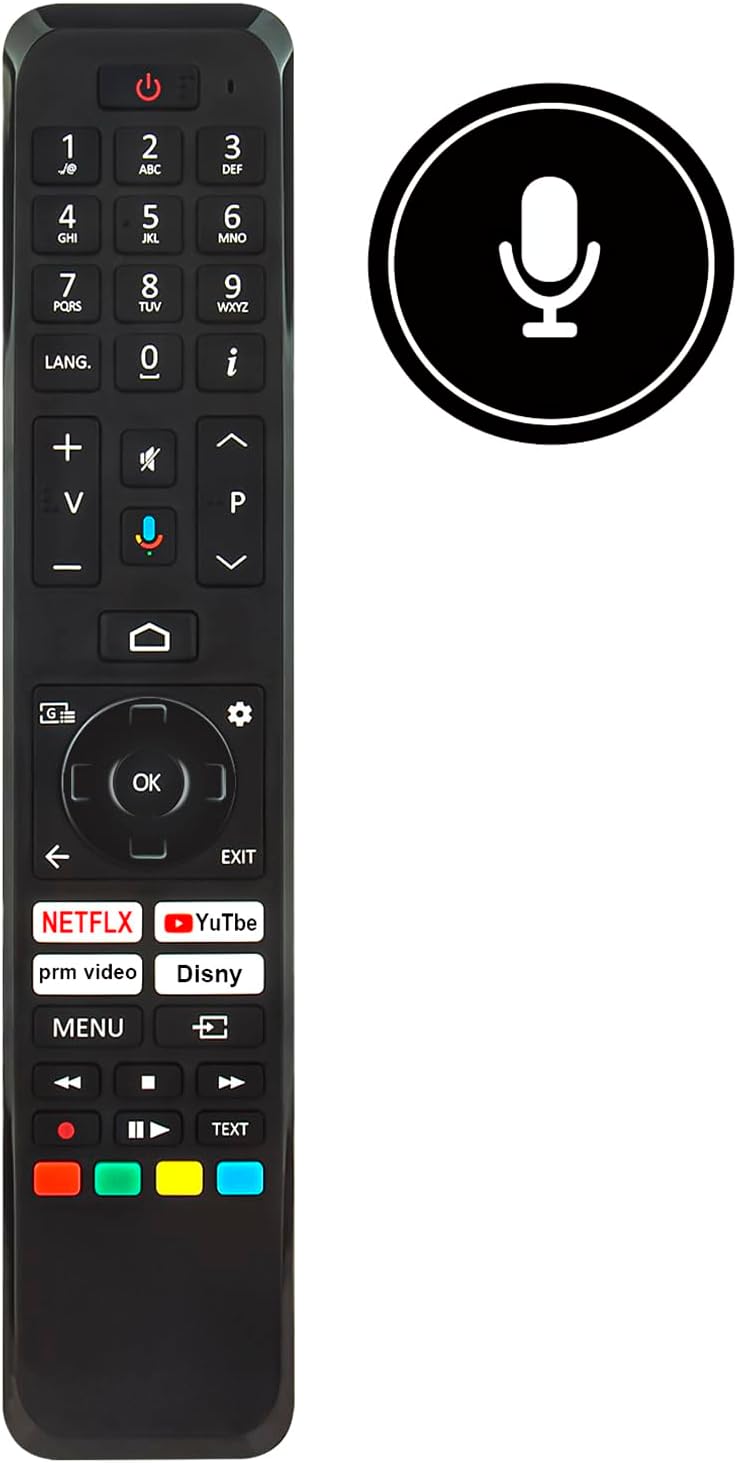
ചിത്രം: മുൻഭാഗം view of the ALLIMITY RC45162 remote control, displaying the full button layout.
3.1 അടിസ്ഥാന പ്രവർത്തനങ്ങൾ
- പവർ ബട്ടൺ (U): ടിവി ഓണാക്കുകയോ ഓഫാക്കുകയോ ചെയ്യുന്നു.
- നമ്പർ ബട്ടണുകൾ (0-9): ചാനലുകൾ നേരിട്ട് തിരഞ്ഞെടുക്കുക.
- വോളിയം കൂട്ടുക/താഴ്ത്തുക (+/-): ടിവി വോളിയം ക്രമീകരിക്കുന്നു.
- Channel Up/Down (P^/P<): ടിവി ചാനലുകൾ മാറ്റുന്നു.
- നിശബ്ദ ബട്ടൺ: ടിവി ശബ്ദം മ്യൂട്ട് ചെയ്യുകയോ അൺമ്യൂട്ട് ചെയ്യുകയോ ചെയ്യുന്നു.
- നാവിഗേഷൻ പാഡ് (മുകളിലേക്ക്, താഴേക്ക്, ഇടത്തേക്ക്, വലത്തേക്ക്, ശരി): മെനുകൾ നാവിഗേറ്റ് ചെയ്യുന്നതിനും തിരഞ്ഞെടുപ്പുകൾ സ്ഥിരീകരിക്കുന്നതിനും ഉപയോഗിക്കുന്നു.
- Back Button (<): മുമ്പത്തെ മെനുവിലേക്കോ സ്ക്രീനിലേക്കോ മടങ്ങുന്നു.
- പുറത്തുകടക്കുക ബട്ടൺ: നിലവിലുള്ള മെനുവിൽ നിന്നോ ആപ്ലിക്കേഷനിൽ നിന്നോ പുറത്തുകടക്കുന്നു.
- ഹോം ബട്ടണ്: ടിവിയുടെ പ്രധാന ഹോം സ്ക്രീൻ അല്ലെങ്കിൽ സ്മാർട്ട് ടിവി ഇന്റർഫേസ് ആക്സസ് ചെയ്യുന്നു.
3.2 പ്രത്യേക സവിശേഷതകൾ
- Voice Control Button (Microphone icon): Activates the voice control feature. Press and hold this button, then speak your command clearly into the remote. Release the button when finished.
- ദ്രുത ആക്സസ് ബട്ടണുകൾ: Dedicated buttons for popular streaming services such as Netflix, YouTube, Prime Video, and Disney+ for direct access.
- LANG. Button: For language selection or audio track changes.
- വിവര ബട്ടൺ (i): നിലവിലെ പ്രോഗ്രാമിനെക്കുറിച്ചോ ഇൻപുട്ടിനെക്കുറിച്ചോ ഉള്ള വിവരങ്ങൾ പ്രദർശിപ്പിക്കുന്നു.
- മെനു ബട്ടൺ: Accesses the TV's main settings menu.
- നിറമുള്ള ബട്ടണുകൾ (ചുവപ്പ്, പച്ച, മഞ്ഞ, നീല): These buttons often correspond to specific functions within TV menus or applications, as indicated on the screen.
4. പരിപാലനം
4.1 വൃത്തിയാക്കൽ
റിമോട്ട് കൺട്രോളിന്റെ രൂപഭാവവും പ്രവർത്തനക്ഷമതയും നിലനിർത്താൻ:
- മൃദുവായതും ഉണങ്ങിയതുമായ തുണി ഉപയോഗിച്ച് റിമോട്ട് തുടയ്ക്കുക.
- കഠിനമായ അഴുക്കിന്, ചെറുതായി dampവെള്ളം അല്ലെങ്കിൽ മൃദുവായ, ഉരച്ചിലുകളില്ലാത്ത ക്ലീനർ ഉപയോഗിച്ച് തുണിയിൽ വയ്ക്കുക.
- Avoid using harsh chemicals, solvents, or abrasive materials, as these can damage the remote's surface or internal components.
4.2 ബാറ്ററി മാറ്റിസ്ഥാപിക്കൽ
Replace batteries when the remote control's response becomes sluggish or stops working. Always replace all batteries at the same time with new ones of the same type. Do not mix old and new batteries or different types of batteries.
4.3 സംഭരണം
റിമോട്ട് കൺട്രോൾ ദീർഘനേരം ഉപയോഗിക്കുന്നില്ലെങ്കിൽ, ചോർച്ചയും ഉപകരണത്തിന് കേടുപാടുകൾ സംഭവിക്കാനുള്ള സാധ്യതയും തടയാൻ ബാറ്ററികൾ നീക്കം ചെയ്യുക.
5. പ്രശ്നപരിഹാരം
If you encounter issues with your ALLIMITY RC45162 remote control, please refer to the following common solutions:
- റിമോട്ട് പ്രതികരിക്കുന്നില്ല:
- ബാറ്ററികൾ ശരിയായി ചേർത്തിട്ടുണ്ടോ എന്നും ആവശ്യത്തിന് ചാർജ് ഉണ്ടോ എന്നും പരിശോധിക്കുക. ആവശ്യമെങ്കിൽ അവ മാറ്റിസ്ഥാപിക്കുക.
- റിമോട്ട് കൺട്രോളിനും ടിവിയുടെ ഇൻഫ്രാറെഡ് സെൻസറിനും ഇടയിൽ തടസ്സങ്ങളൊന്നുമില്ലെന്ന് ഉറപ്പാക്കുക.
- റിമോട്ട് ടിവിയിലേക്ക് നേരിട്ട് ചൂണ്ടുക.
- ശബ്ദ നിയന്ത്രണം പ്രവർത്തിക്കുന്നില്ല:
- Ensure you are pressing and holding the voice control button while speaking.
- വ്യക്തമായും സാധാരണ ശബ്ദത്തിലും സംസാരിക്കുക.
- Check your TV's settings to ensure voice control is enabled and configured correctly.
- പരിമിതമായ ശ്രേണി അല്ലെങ്കിൽ ഇടവിട്ടുള്ള പ്രതികരണം:
- Replace the batteries. Low battery power can affect signal strength.
- Ensure the remote is within the maximum operating range (up to 10 meters).
- Minimize sources of infrared interference, such as direct sunlight or strong artificial light.
6 സ്പെസിഫിക്കേഷനുകൾ

ചിത്രം: മുൻവശവും വശവും view of the remote control, illustrating its dimensions for reference.
| ബ്രാൻഡ് | അലിമിറ്റി |
| മോഡലിന്റെ പേര് / നമ്പർ | MME-RC45162-NP |
| പ്രത്യേക സവിശേഷതകൾ | എർഗണോമിക് |
| നിറം | കറുപ്പ്/വെളുപ്പ് |
| പിന്തുണയ്ക്കുന്ന ഉപകരണങ്ങളുടെ പരമാവധി എണ്ണം | 10 |
| അനുയോജ്യമായ ഉപകരണങ്ങൾ | TX-65MX700E, TX-65MX710E, TX-43MX700E, TX-55MX710E, TX-50MX710E, TX-55MX700E |
| കണക്റ്റിവിറ്റി ടെക്നോളജി | ഇൻഫ്രാറെഡ് |
| കൺട്രോളർ തരം | ഇൻഫ്രാറെഡ് നിയന്ത്രണം |
| പരമാവധി പരിധി | 10 മീറ്റർ |
| ബാറ്ററി തരം | ലിഥിയം |
| ഇനത്തിൻ്റെ ഭാരം | 59 ഗ്രാം |
7. വാറൻ്റി വിവരങ്ങൾ
This product is typically covered by a standard manufacturer's warranty. For specific details regarding warranty duration, coverage, and claims, please refer to the documentation provided at the time of purchase or contact your retailer. Extended warranty options may be available from third-party providers.
8. പിന്തുണ
For further assistance or if you have questions not covered in this manual, please contact the seller or the manufacturer directly. You may find contact information on the product packaging or the retailer's webസൈറ്റ്.
Ask a question about this manual
Ask about setup, troubleshooting, compatibility, parts, safety, or missing instructions. Manuals+ will review the question and use this page’s manual context to help answer it.