
1. ആമുഖം
Thank you for choosing the Cyboris KKM-001 Portable Karaoke Machine. This device combines a 15W Bluetooth speaker with two wireless microphones, offering a versatile audio experience for various occasions. Please read this manual thoroughly before use to ensure proper operation and to maximize your enjoyment of the product.
2. പാക്കേജ് ഉള്ളടക്കം
താഴെ പറയുന്ന ഇനങ്ങൾക്കായി ബോക്സ് ചെക്ക് ചെയ്യുക:
- 1 x Cyboris KKM-001 Portable Karaoke Speaker
- 2 x വയർലെസ് മൈക്രോഫോണുകൾ
- 1 x ടൈപ്പ്-സി ചാർജിംഗ് കേബിൾ
- 1 x ഉപയോക്തൃ മാനുവൽ (ഈ പ്രമാണം)
3. ഉൽപ്പന്നം കഴിഞ്ഞുview
Familiarize yourself with the components and controls of your Cyboris KKM-001 Karaoke Machine.

Image: The Cyboris KKM-001 Portable Karaoke Machine in green, accompanied by two matching wireless microphones.
3.1 സ്പീക്കർ നിയന്ത്രണങ്ങളും പോർട്ടുകളും

Image: A detailed diagram illustrating the control buttons and ports on the Cyboris KKM-001 speaker and its wireless microphone.
- ശബ്ദം കുറയ്ക്കുക / മുമ്പത്തെ ട്രാക്ക് ബട്ടൺ: Short press to decrease volume, long press for previous track.
- വോളിയം കൂട്ടുക / അടുത്ത ട്രാക്ക് ബട്ടൺ: Short press to increase volume, long press for next track.
- Power On/Off Knob: Rotate to turn the speaker on or off.
- Play/Pause / Mode Switching / Lights Button: Short press to play/pause, long press to switch modes (Bluetooth, AUX, TF Card), double press to turn lights on/off.
- AUX Audio Cable Jack: For connecting external audio devices via a 3.5mm AUX cable.
- ടിഎഫ് കാർഡ് സ്ലോട്ട്: ഒരു TF (മൈക്രോ എസ്ഡി) കാർഡിൽ നിന്ന് നേരിട്ട് സംഗീതം പ്ലേ ചെയ്യുന്നതിന്.
- ടൈപ്പ്-സി ചാർജിംഗ് പോർട്ട്: സ്പീക്കറിന്റെ ആന്തരിക ബാറ്ററി ചാർജ് ചെയ്യുന്നതിന്.
3.2 മൈക്രോഫോൺ നിയന്ത്രണങ്ങൾ
- Microphone/Reverb Volume + / Next Song Button: Short press to increase microphone volume or reverb, long press for next song (in music playback mode).
- Microphone/Reverb Volume - / Previous Song Button: Short press to decrease microphone volume or reverb, long press for previous song (in music playback mode).
- Power On/Off / Microphone Mute / Play/Pause Button: Long press to power on/off the microphone, short press to mute/unmute, double press to play/pause music.
- Original Sound Cancellation / Magic Sound Loop Switching Button: Short press to cancel original vocals from a song (karaoke mode), long press to cycle through voice change effects.
4. സജ്ജീകരണം
4.1 ഉപകരണം ചാർജ് ചെയ്യുന്നു
Before first use, fully charge the speaker and both microphones.
- Connect the provided Type-C charging cable to the speaker's Type-C charging port and a standard USB power adapter (not included).
- Connect the Type-C charging cable to each microphone's charging port.
- The charging indicator light will show charging status (refer to product for specific light behavior).
- A full charge takes approximately 3 hours for the speaker and microphones.
4.2 പവർ ഓണാക്കലും ജോടിയാക്കലും
- സ്പീക്കർ: Rotate the Power On/Off knob clockwise to turn on the speaker. A power-on prompt will sound.
- മൈക്രോഫോണുകൾ: Long press the Power On/Off button on each microphone to turn them on. They will automatically pair with the speaker. A successful connection will be indicated by a sound prompt.
4.3 ബ്ലൂടൂത്ത് കണക്ഷൻ
To connect the karaoke machine to your smartphone or other Bluetooth-enabled device:
- Ensure the speaker is powered on and in Bluetooth mode (indicated by a voice prompt or light). If not, long press the Play/Pause / Mode Switching / Lights Button to cycle modes until Bluetooth mode is active.
- നിങ്ങളുടെ ഉപകരണത്തിൽ, ബ്ലൂടൂത്ത് ക്രമീകരണത്തിലേക്ക് പോയി ലഭ്യമായ ഉപകരണങ്ങൾക്കായി തിരയുക.
- Select "KKM-001" from the list.
- Once connected, a confirmation sound will play from the speaker. You can now stream audio from your device.
5. പ്രവർത്തന നിർദ്ദേശങ്ങൾ
5.1 സ്പീക്കർ പ്രവർത്തനം
- വോളിയം ക്രമീകരണം: Use the Volume Up/Down buttons on the speaker.
- ട്രാക്ക് നിയന്ത്രണം: Long press the Volume Up/Down buttons for next/previous track.
- പ്ലേ/താൽക്കാലികമായി നിർത്തുക: പ്ലേ/പോസ് ബട്ടൺ ഹ്രസ്വമായി അമർത്തുക.
- മോഡ് സ്വിച്ചിംഗ്: Long press the Play/Pause button to switch between Bluetooth, AUX, and TF Card modes.
- ലൈറ്റ് ഇഫക്റ്റുകൾ: Double press the Play/Pause button to turn the LED lights on or off.
5.2 മൈക്രോഫോൺ പ്രവർത്തനം
- Microphone Volume/Reverb: Use the +/- buttons on the microphone.
- നിശബ്ദമാക്കുക/അൺമ്യൂട്ടുചെയ്യുക: Short press the Power On/Off button on the microphone.
- Voice Change Effects: Long press the Original Sound Cancellation / Magic Sound Loop Switching button to cycle through 6 sound modes: Original Sound, Male to Female, Female to Male, Magic Sound, Kid Sound, and Karaoke Mode.
- Original Sound Cancellation: Short press the Original Sound Cancellation button to reduce or remove vocals from a playing song, allowing you to sing along.

Image: Two children happily singing into the wireless microphones, demonstrating the dual microphone functionality of the Cyboris KKM-001.
5.3 പ്ലേബാക്ക് മോഡുകൾ
- ബ്ലൂടൂത്ത് മോഡ്: Connect your device as described in Section 4.3.
- ഓക്സ് മോഡ്: Insert a 3.5mm audio cable into the AUX jack on the speaker and connect the other end to your audio source. The speaker will automatically switch to AUX mode or can be manually selected using the mode button.
- ടിഎഫ് കാർഡ് മോഡ്: Insert a TF (MicroSD) card with MP3, WAV, FLAC, or APE audio files into the TF card slot. The speaker will automatically switch to TF Card mode and begin playback.
5.4 LED ലൈറ്റിംഗ് ഇഫക്റ്റുകൾ
The speaker features vibrant LED lights that can sync with the rhythm of your music. Double press the Play/Pause button on the speaker to toggle the lights on or off.

Image: The Cyboris KKM-001 speaker showcasing its dynamic, colorful LED lighting effects.
6. പരിപാലനം
- മൃദുവായതും ഉണങ്ങിയതുമായ തുണി ഉപയോഗിച്ച് ഉപകരണം വൃത്തിയാക്കുക. അബ്രസീവ് ക്ലീനറുകളോ ലായകങ്ങളോ ഉപയോഗിക്കരുത്.
- തീവ്രമായ ഊഷ്മാവ്, നേരിട്ടുള്ള സൂര്യപ്രകാശം അല്ലെങ്കിൽ ഉയർന്ന ആർദ്രത എന്നിവയിലേക്ക് ഉപകരണം എക്സ്പോഷർ ചെയ്യുന്നത് ഒഴിവാക്കുക.
- ഉപയോഗത്തിലില്ലാത്തപ്പോൾ തണുത്തതും ഉണങ്ങിയതുമായ സ്ഥലത്ത് ഉപകരണം സൂക്ഷിക്കുക.
- ഉപകരണം സ്വയം ഡിസ്അസംബ്ലിംഗ് ചെയ്യാനോ നന്നാക്കാനോ ശ്രമിക്കരുത്, കാരണം ഇത് വാറന്റി അസാധുവാക്കും.
7. പ്രശ്നപരിഹാരം
| പ്രശ്നം | സാധ്യമായ കാരണം | പരിഹാരം |
|---|---|---|
| ശക്തിയില്ല | ബാറ്ററി തീർന്നു. | സ്പീക്കറും മൈക്രോഫോണുകളും പൂർണ്ണമായും ചാർജ് ചെയ്യുക. |
| സ്പീക്കറിൽ നിന്ന് ശബ്ദമില്ല | വോളിയം വളരെ കുറവാണ് അല്ലെങ്കിൽ മ്യൂട്ട് ചെയ്തിരിക്കുന്നു. തെറ്റായ ഇൻപുട്ട് മോഡ്. | Increase volume. Ensure correct mode (Bluetooth, AUX, TF Card) is selected. |
| മൈക്രോഫോൺ പ്രവർത്തിക്കുന്നില്ല | Microphone is off or not paired. Battery is low. | Turn on microphone. Ensure it's paired. Charge microphone. |
| Echo or feedback (squealing) | Microphone too close to speaker. Microphone volume too high. | Increase distance between microphone and speaker. Reduce microphone volume or reverb. |
| ബ്ലൂടൂത്ത് കണക്ഷൻ അസ്ഥിരമാണ് | Device too far from speaker. Interference. | Move device closer to speaker (within 18m). Avoid obstacles. Re-pair Bluetooth. |
8 സ്പെസിഫിക്കേഷനുകൾ
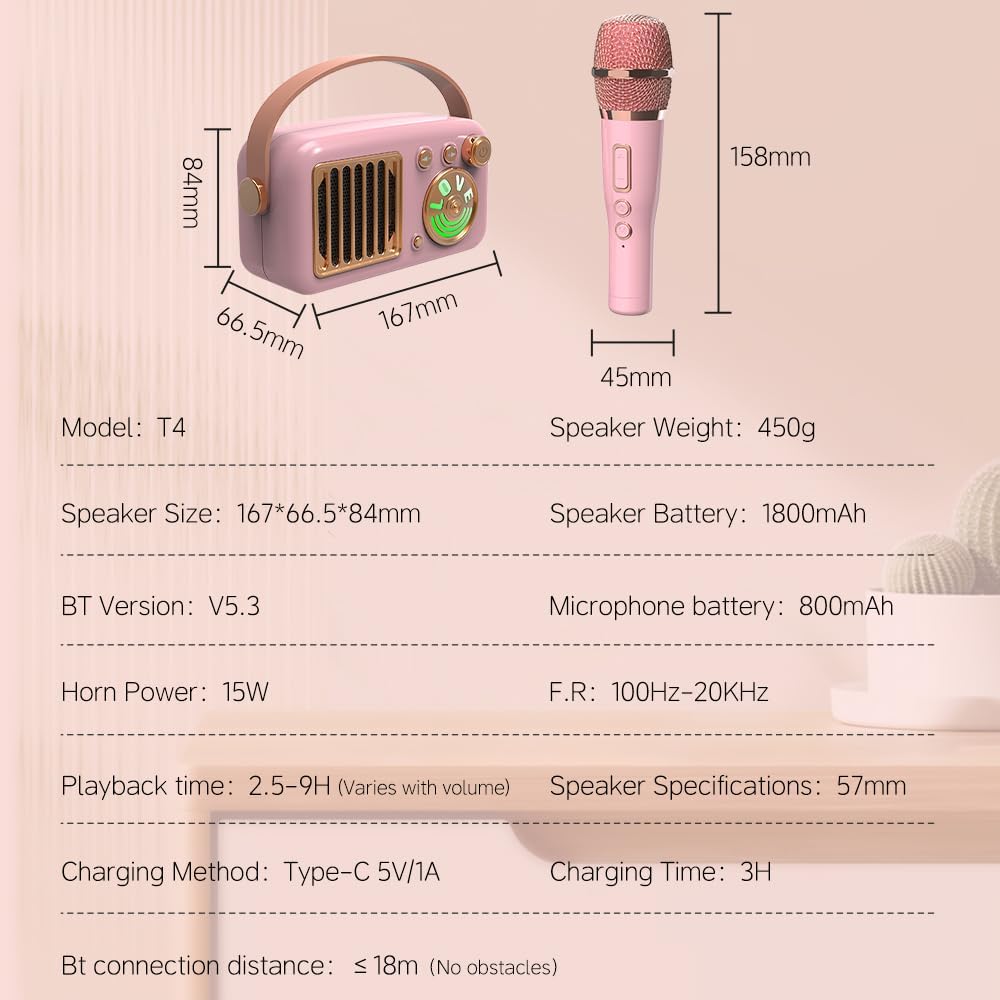
Image: A visual representation of the Cyboris KKM-001 speaker and microphone dimensions, along with key technical specifications.
| മോഡൽ നമ്പർ | KKM-001 |
| Speaker Dimensions (L x W x H) | 5.9 x 3.14 x 2.16 ഇഞ്ച് (167 x 66.5 x 84 മിമി) |
| സ്പീക്കർ ഭാരം | 2.27 പൗണ്ട് (ഏകദേശം 450 ഗ്രാം) |
| ഹോൺ പവർ | 15W |
| സ്പീക്കർ ബാറ്ററി | 1800mAh ലിഥിയം അയൺ (ഉൾപ്പെടുത്തിയത്) |
| മൈക്രോഫോൺ ബാറ്ററി | 800mAh |
| പ്ലേബാക്ക് സമയം | 2.5 - 9 hours (varies with volume) |
| ചാർജിംഗ് സമയം | ഏകദേശം 3 മണിക്കൂർ |
| ചാർജിംഗ് രീതി | ടൈപ്പ്-സി 5V/1A |
| ബ്ലൂടൂത്ത് പതിപ്പ് | 5.3 |
| ബ്ലൂടൂത്ത് കണക്ഷൻ ദൂരം | 18 മീറ്റർ വരെ (തടസ്സങ്ങളില്ലാതെ) |
| ഫ്രീക്വൻസി പ്രതികരണം | 100Hz - 20KHz |
| ഓഡിയോ ഇൻപുട്ട് | AUX, TF Card |
| മെറ്റീരിയൽ | മെറ്റൽ, പ്ലാസ്റ്റിക് |
9 സുരക്ഷാ വിവരങ്ങൾ
- ഉപകരണം വെള്ളത്തിൽ നിന്നും മറ്റ് ദ്രാവകങ്ങളിൽ നിന്നും അകറ്റി നിർത്തുക.
- ഉപകരണത്തെ ശക്തമായ ആഘാതങ്ങൾക്ക് വിധേയമാക്കുകയോ ഉപേക്ഷിക്കുകയോ ചെയ്യരുത്.
- നിർദ്ദിഷ്ട ചാർജിംഗ് കേബിൾ മാത്രം ഉപയോഗിക്കുക.
- ചെറിയ ഭാഗങ്ങളിൽ നിന്നുള്ള ശ്വാസംമുട്ടൽ അപകടങ്ങൾ തടയാൻ ചെറിയ കുട്ടികൾക്ക് ലഭ്യമാകാതെ സൂക്ഷിക്കുക.
- കേൾവിക്ക് കേടുപാടുകൾ സംഭവിക്കാതിരിക്കാൻ ഉയർന്ന ശബ്ദത്തിൽ ദീർഘനേരം കേൾക്കുന്നത് ഒഴിവാക്കുക.
10. വാറൻ്റിയും പിന്തുണയും
The Cyboris KKM-001 Portable Karaoke Machine comes with a standard manufacturer's warranty. For specific warranty details, please refer to the warranty card included in your package or contact Cyboris customer support.
For technical support, troubleshooting assistance, or warranty claims, please contact the seller or visit the official Cyboris webസൈറ്റ്.