
1. ആമുഖം
Thank you for choosing the VolkanoX VXH300 Hybrid Active Noise Cancelling Bluetooth Headphones. These headphones are designed to provide a high-quality audio experience with the convenience of wireless connectivity and effective noise cancellation. This manual will guide you through the setup, operation, and maintenance of your new headphones.
2 സുരക്ഷാ വിവരങ്ങൾ
- Do not use the headphones at high volume for extended periods to prevent hearing damage.
- Do not use the headphones in situations where inability to hear ambient sounds could be dangerous, such as while driving or cycling.
- Keep the headphones away from water, moisture, and extreme temperatures.
- ഹെഡ്ഫോണുകൾ വേർപെടുത്താനോ പരിഷ്ക്കരിക്കാനോ ശ്രമിക്കരുത്. ഇത് വാറന്റി അസാധുവാക്കും.
- Charge the headphones using a compatible USB power source.
3. പാക്കേജ് ഉള്ളടക്കം
നിങ്ങളുടെ പാക്കേജിൽ എല്ലാ ഇനങ്ങളും ഉണ്ടെന്ന് ഉറപ്പാക്കുക:
- 1 x VolkanoX VXH300 Hybrid Active Noise Cancelling Bluetooth Headphones
- 1 x യുഎസ്ബി ടൈപ്പ്-സി ചാർജിംഗ് കേബിൾ
- 1 x 3.5mm ഓഡിയോ കേബിൾ
- 1 x ചുമക്കുന്ന കേസ്
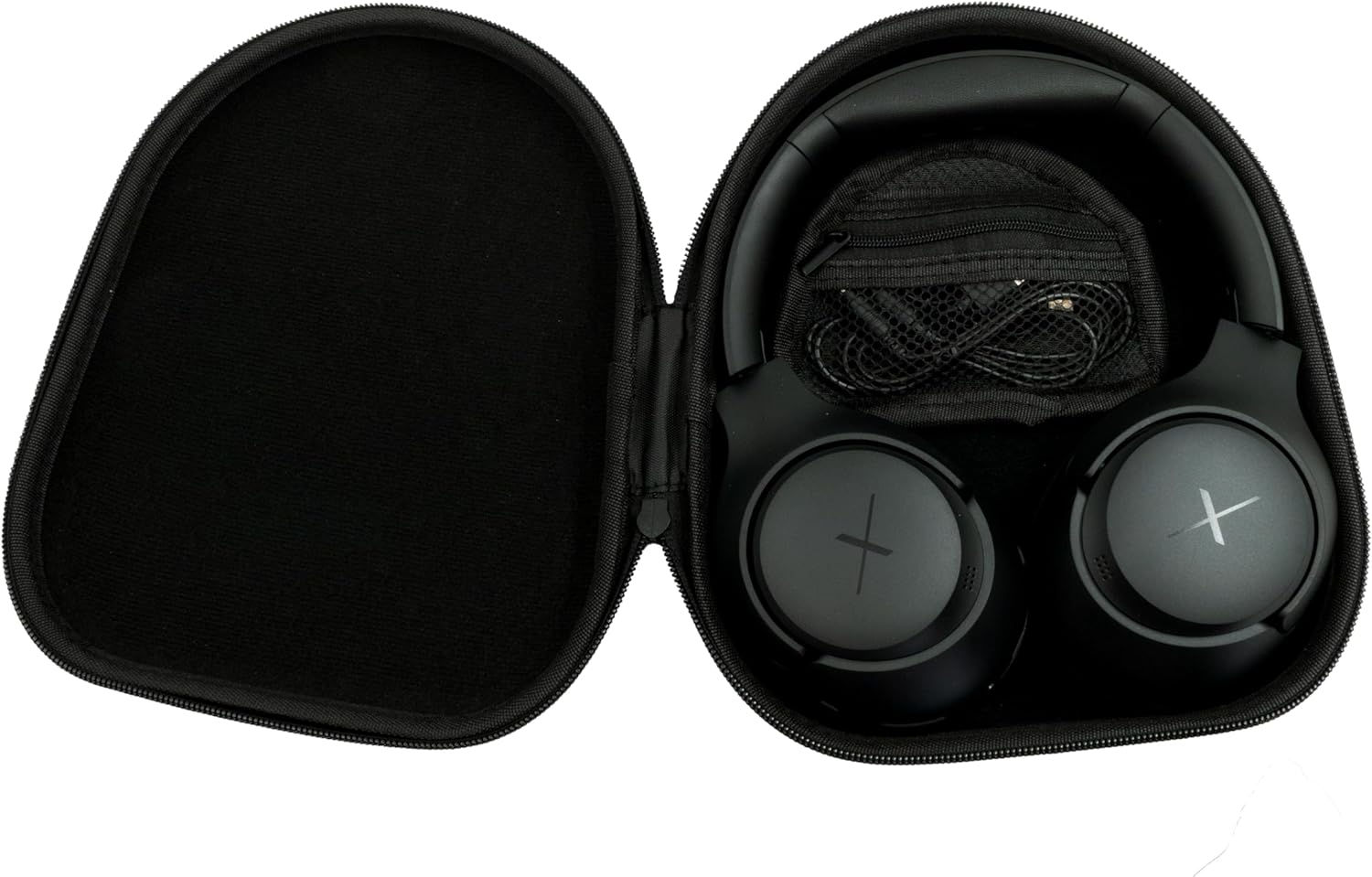
Image: VolkanoX VXH300 Headphones neatly stored in their carrying case, alongside the included charging and audio cables.
4. ഉൽപ്പന്നം കഴിഞ്ഞുview
Familiarize yourself with the various parts and controls of your VolkanoX VXH300 headphones:

ചിത്രം: വിശദമായ ഒരു ചിത്രം view of the right earcup, highlighting the control buttons, the 3.5mm Aux Input, and the USB Type-C Charging Port.
- നിയന്ത്രണ ബട്ടണുകൾ: Power On/Off, Volume Up/Down, Play/Pause, Track Skip, Call Answer/End.
- ഓക്സ് ഇൻപുട്ട്: For wired audio connection using the 3.5mm audio cable.
- ടൈപ്പ്-സി ചാർജിംഗ് പോർട്ട്: ആന്തരിക ബാറ്ററി ചാർജ് ചെയ്യുന്നതിന്.
- ANC സ്വിച്ച്: Dedicated button or switch for Active Noise Cancelling function.
- മൈക്രോഫോൺ: ഹാൻഡ്സ്-ഫ്രീ കോളുകൾക്കായി ബിൽറ്റ്-ഇൻ.
5. സജ്ജീകരണം
5.1 ഹെഡ്ഫോണുകൾ ചാർജ് ചെയ്യുന്നു
- Connect the supplied USB Type-C charging cable to the charging port on the headphones.
- കേബിളിന്റെ മറ്റേ അറ്റം ഒരു USB പവർ അഡാപ്റ്ററുമായി (ഉൾപ്പെടുത്തിയിട്ടില്ല) അല്ലെങ്കിൽ ഒരു കമ്പ്യൂട്ടറിന്റെ USB പോർട്ടുമായി ബന്ധിപ്പിക്കുക.
- LED ഇൻഡിക്കേറ്റർ ചാർജിംഗ് സ്റ്റാറ്റസ് കാണിക്കും (ഉദാ: ചാർജ് ചെയ്യുന്നതിന് ചുവപ്പ്, പൂർണ്ണമായി ചാർജ് ചെയ്തതിന് നീല/ഓഫ്).
- ഒരു പൂർണ്ണ ചാർജ് ഏകദേശം 1 മണിക്കൂർ എടുക്കും.
5.2 പവർ ഓൺ/ഓഫ്
- പവർ ഓണാക്കാൻ: LED ഇൻഡിക്കേറ്റർ മിന്നുന്നത് വരെ ഏകദേശം 3 സെക്കൻഡ് നേരത്തേക്ക് പവർ ബട്ടൺ അമർത്തിപ്പിടിക്കുക.
- പവർ ഓഫ് ചെയ്യാൻ: LED ഇൻഡിക്കേറ്റർ ഓഫാകുന്നതുവരെ ഏകദേശം 3 സെക്കൻഡ് നേരത്തേക്ക് പവർ ബട്ടൺ അമർത്തിപ്പിടിക്കുക.
5.3 ബ്ലൂടൂത്ത് ജോടിയാക്കൽ
- ഹെഡ്ഫോണുകൾ ഓഫാണെന്ന് ഉറപ്പാക്കുക.
- എൽഇഡി ഇൻഡിക്കേറ്റർ ചുവപ്പും നീലയും മാറിമാറി മിന്നുന്നതുവരെ ഏകദേശം 5-7 സെക്കൻഡ് നേരത്തേക്ക് പവർ ബട്ടൺ അമർത്തിപ്പിടിക്കുക, ഇത് ജോടിയാക്കൽ മോഡിനെ സൂചിപ്പിക്കുന്നു.
- നിങ്ങളുടെ ഉപകരണത്തിൽ (സ്മാർട്ട്ഫോൺ, ടാബ്ലെറ്റ്, കമ്പ്യൂട്ടർ), ബ്ലൂടൂത്ത് പ്രവർത്തനക്ഷമമാക്കി പുതിയ ഉപകരണങ്ങൾക്കായി തിരയുക.
- Select "VolkanoX VXH300" from the list of available devices.
- Once paired, the LED indicator will flash blue slowly, and you will hear an audible confirmation.
- ഹെഡ്ഫോണുകൾ, അവയുടെ പരിധിക്കുള്ളിൽ (10 മീറ്റർ വരെ) ഉണ്ടെങ്കിൽ, പവർ ഓൺ ചെയ്യുമ്പോൾ, അവസാനം ജോടിയാക്കിയ ഉപകരണവുമായി യാന്ത്രികമായി വീണ്ടും കണക്റ്റുചെയ്യും.
5.4 Wired Connection (Duo Mode)
For ultimate flexibility, you can use the headphones in wired mode:
- Connect one end of the 3.5mm audio cable to the Aux Input port on the headphones.
- Connect the other end of the cable to the 3.5mm audio jack on your audio device.
- The headphones will automatically switch to wired mode. Bluetooth functionality will be disabled.
6. പ്രവർത്തന നിർദ്ദേശങ്ങൾ
6.1 മ്യൂസിക് പ്ലേബാക്ക്
- പ്ലേ/താൽക്കാലികമായി നിർത്തുക: Press the Power/Multi-function button once.
- വോളിയം കൂട്ടുക: വോളിയം അപ്പ് (+) ബട്ടൺ അമർത്തുക.
- വോളിയം താഴേക്ക്: വോളിയം ഡൗൺ (-) ബട്ടൺ അമർത്തുക.
- അടുത്ത ട്രാക്ക്: വോളിയം അപ്പ് (+) ബട്ടൺ അമർത്തിപ്പിടിക്കുക.
- മുമ്പത്തെ ട്രാക്ക്: വോളിയം ഡൗൺ (-) ബട്ടൺ അമർത്തിപ്പിടിക്കുക.
6.2 കോൾ മാനേജ്മെന്റ്
- ഉത്തരം/അവസാന കോൾ: Press the Power/Multi-function button once.
- കോൾ നിരസിക്കുക: പവർ/മൾട്ടി-ഫംഗ്ഷൻ ബട്ടൺ 2 സെക്കൻഡ് അമർത്തിപ്പിടിക്കുക.
- അവസാന നമ്പർ വീണ്ടും ഡയൽ ചെയ്യുക: Double-press the Power/Multi-function button.
6.3 ആക്ടീവ് നോയ്സ് ക്യാൻസലിംഗ് (ANC) ഫംഗ്ഷൻ
The VolkanoX VXH300 features Hybrid Active Noise Cancelling technology to reduce ambient noise.

Image: A visual representation of Hybrid Active Noise Cancelling, showing how external noise is filtered to enhance the listening experience.
- ANC സജീവമാക്കുക: Locate the dedicated ANC switch or button (refer to Product Overview) and slide/press it to the ON position. The ANC indicator light will illuminate.
- ANC നിർജ്ജീവമാക്കുക: Slide/press the ANC switch or button to the OFF position. The ANC indicator light will turn off.
- ANC can be used independently or simultaneously with Bluetooth audio.
7. പരിപാലനം
7.1 വൃത്തിയാക്കൽ
- മൃദുവായതും ഉണങ്ങിയതുമായ തുണി ഉപയോഗിച്ച് ഹെഡ്ഫോണുകൾ തുടയ്ക്കുക.
- അബ്രാസീവ് ക്ലീനറുകൾ, ലായകങ്ങൾ, കഠിനമായ രാസവസ്തുക്കൾ എന്നിവ ഉപയോഗിക്കരുത്.
- ഏതെങ്കിലും ദ്വാരങ്ങളിൽ ഈർപ്പം കയറുന്നത് ഒഴിവാക്കുക.
7.2 സംഭരണം
The VolkanoX VXH300 headphones feature a twist and folding design for compact storage.

Image: The headphones folded for portability, highlighting their space-saving design.
- When not in use, fold the headphones and store them in the provided carrying case to protect them from dust and damage.
- നേരിട്ടുള്ള സൂര്യപ്രകാശത്തിൽ നിന്നും തീവ്രമായ താപനിലയിൽ നിന്നും അകന്ന് തണുത്തതും വരണ്ടതുമായ സ്ഥലത്ത് സൂക്ഷിക്കുക.
8. പ്രശ്നപരിഹാരം
നിങ്ങളുടെ ഹെഡ്ഫോണുകളിൽ പ്രശ്നങ്ങൾ നേരിടുകയാണെങ്കിൽ, ഇനിപ്പറയുന്ന പൊതുവായ പ്രശ്നങ്ങളും പരിഹാരങ്ങളും പരിശോധിക്കുക:
| പ്രശ്നം | സാധ്യമായ പരിഹാരം |
|---|---|
| ഹെഡ്ഫോണുകൾ പവർ ഓൺ ചെയ്യുന്നില്ല. | ഹെഡ്ഫോണുകൾ പൂർണ്ണമായും ചാർജ് ചെയ്തിട്ടുണ്ടെന്ന് ഉറപ്പാക്കുക. ഒരു പവർ സ്രോതസ്സിലേക്ക് കണക്റ്റ് ചെയ്ത് വീണ്ടും ശ്രമിക്കുക. |
| ബ്ലൂടൂത്ത് ഉപകരണവുമായി ജോടിയാക്കാൻ കഴിയില്ല. | Ensure headphones are in pairing mode (LED flashing red/blue). Turn off and on Bluetooth on your device. Move headphones closer to the device. Clear previous pairings on your device. |
| ശബ്ദമില്ല അല്ലെങ്കിൽ കുറഞ്ഞ ശബ്ദമില്ല. | Check volume levels on both headphones and your connected device. Ensure headphones are properly paired or the 3.5mm cable is fully inserted. |
| ANC is not effective. | Ensure the ANC function is switched on. ANC is most effective against low-frequency, constant noise. |
| മൈക്രോഫോൺ പ്രവർത്തിക്കുന്നില്ല. | Ensure headphones are connected via Bluetooth. Check microphone settings on your device. |
9 സ്പെസിഫിക്കേഷനുകൾ
| ഫീച്ചർ | വിശദാംശങ്ങൾ |
|---|---|
| മോഡലിൻ്റെ പേര് | വിഎക്സ്എച്ച്300 |
| മോഡൽ നമ്പർ | വി.കെ.എക്സ്-2104-ബി.കെ. |
| കണക്റ്റിവിറ്റി | Bluetooth 5.0, Wired (3.5mm Aux) |
| ബ്ലൂടൂത്ത് ശ്രേണി | 10 മീറ്റർ വരെ |
| ശബ്ദ നിയന്ത്രണം | ഹൈബ്രിഡ് ആക്റ്റീവ് നോയ്സ് റദ്ദാക്കൽ |
| ചെവി പ്ലേസ്മെൻ്റ് | ഓവർ-ഇയർ |
| സംവേദനക്ഷമത | 105 ഡി.ബി |
| ബാറ്ററി ചാർജ് സമയം | ഏകദേശം 1 മണിക്കൂർ |
| ബിൽറ്റ്-ഇൻ മൈക്രോഫോൺ | അതെ |
| ഭാരം | 300 ഗ്രാം |
| നിറം | കറുപ്പ് |
10. വാറൻ്റിയും പിന്തുണയും
10.1 വാറൻ്റി വിവരങ്ങൾ
Your VolkanoX VXH300 headphones are covered by a 1 വർഷത്തെ പരിമിത വാറൻ്റി. This warranty covers manufacturing defects and ensures dependable performance.
നിങ്ങളുടെ കവറേജ് 12 മാസത്തേക്ക് കൂടി നീട്ടാൻ കഴിയും, ആകെ 24 മാസത്തെ കവറേജ്, നിങ്ങളുടെ ഉൽപ്പന്നം രജിസ്റ്റർ ചെയ്തുകൊണ്ട്. ദയവായി ഔദ്യോഗിക വോൾക്കാനോ സന്ദർശിക്കുക webഉൽപ്പന്ന രജിസ്ട്രേഷൻ വിശദാംശങ്ങൾക്കായുള്ള സൈറ്റ്.
10.2 ഉപഭോക്തൃ പിന്തുണ
Should you have any questions, require assistance, or need to claim warranty support, please contact Volkano customer service. You can message us via the ഔദ്യോഗിക വോൾക്കാനോ പേജ് അല്ലെങ്കിൽ നിങ്ങളുടെ ഉൽപ്പന്ന പാക്കേജിംഗിൽ നൽകിയിരിക്കുന്ന ബന്ധപ്പെടാനുള്ള വിവരങ്ങൾ പരിശോധിക്കുക.