
DOOGEE DOOGEE Blade 10 Ultra
DOOGEE Blade 10 Ultra Smartphone User Manual
Model: DOOGEE Blade 10 Ultra
1. ആമുഖം
This manual provides comprehensive instructions for the safe and efficient use of your DOOGEE Blade 10 Ultra smartphone. Please read this manual carefully before using the device to ensure optimal performance and longevity.

ചിത്രം: മുന്നിലും പിന്നിലും view of the DOOGEE Blade 10 Ultra smartphone, highlighting its rugged design and key features like NFC and Android 14.
2. സജ്ജീകരണം
2.1 അൺബോക്സിംഗും പ്രാരംഭ പരിശോധനയും
Carefully unbox your DOOGEE Blade 10 Ultra and verify that all components are present and in good condition. The package should contain:
- 1 x DOOGEE Blade 10 Ultra Smartphone
- 1 x യുഎസ്ബി ടൈപ്പ്-സി കേബിൾ
- 1 x ചാർജർ
- 1 x Tempered Glass Protector (pre-applied)
- 1 x ഉപയോക്തൃ മാനുവൽ
2.2 സിം കാർഡും മൈക്രോ എസ്ഡി കാർഡും ഇൻസ്റ്റാൾ ചെയ്യൽ
To install your SIM card(s) and/or microSD card:
- ഉപകരണത്തിന്റെ വശത്ത് സിം ട്രേ കണ്ടെത്തുക.
- ട്രേ തുറക്കാൻ അതിനടുത്തുള്ള ചെറിയ ദ്വാരത്തിലേക്ക് സിം എജക്റ്റർ ഉപകരണം തിരുകുക.
- Place your Nano-SIM card(s) and/or microSD card into the designated slots. Ensure the gold contacts are facing down. The device supports up to 2TB external storage via microSD.
- ട്രേ അതിന്റെ സ്ഥാനത്ത് ക്ലിക്ക് ആകുന്നതുവരെ സ്ലോട്ടിലേക്ക് പതുക്കെ തിരികെ തള്ളുക.

Image: Illustration of the internal storage components, showing 8GB+12GB RAM and 256GB ROM, with support for up to 2TB microSD card.
2.3 First Power On and Basic Setup
Press and hold the power button until the DOOGEE logo appears. Follow the on-screen prompts to complete the initial setup, including language selection, Wi-Fi connection, Google account setup, and security settings.
2.4 ഉപകരണം ചാർജ് ചെയ്യുന്നു
Connect the USB Type-C cable to the phone's charging port and the other end to the provided charger. Plug the charger into a power outlet. The battery indicator will show charging status. For optimal battery life, fully charge the device before first use.
3. നിങ്ങളുടെ സ്മാർട്ട്ഫോൺ പ്രവർത്തിപ്പിക്കുക
3.1 ഓവർview of Android 14
Your DOOGEE Blade 10 Ultra runs on the latest Android 14 operating system, offering enhanced privacy features, improved security, and a more personalized user experience. Explore new customization options and streamlined notifications.

Image: The Android 14 system logo, emphasizing its smart, secure, and convenient features.
3.2 ഡിസ്പ്ലേയും നാവിഗേഷനും
The device features a 6.56-inch HD+ IPS waterdrop display with a 90Hz refresh rate for smooth visuals. Navigate the interface using touch gestures: swipe, tap, pinch-to-zoom, and long-press.
3.3 ക്യാമറ ഉപയോഗം
Capture high-quality photos and videos with the 50MP AI main camera and 8MP front camera. The Morpho Imaging Algorithm enhances your photography with various modes including HDR, Watermark, Video, Picture, Beauty, Pro Mode, Portrait, Gif, Panorama, and Filter.

Image: Visual representation of the 50MP main camera and 8MP front camera, detailing the various imaging modes available through the Morpho Imaging Algorithm.
3.4 കണക്റ്റിവിറ്റി
Your smartphone supports a wide range of connectivity options:
- വൈഫൈ: Connect to 2.4G and 5G networks (802.11ac/a/b/g/n).
- ബ്ലൂടൂത്ത്: BT5.0 for connecting to wireless accessories.
- NFC: For contactless payments and quick data sharing.
- OTG: On-The-Go support for connecting USB devices.
- നാവിഗേഷൻ: Integrated GPS, Glonass, Galileo, and Beidou for accurate positioning.
- സെല്ലുലാർ നെറ്റ്വർക്കുകൾ: Supports 2G GSM (B2/3/5/8), 3G WCDMA (B1/2/4/5/8), and 4G FDD (B1/2/3/4/5/7/8/18/19/20/25/26/28A/28B/66) bands.
3.5 ബാറ്ററി മാനേജ്മെൻ്റ്
The DOOGEE Blade 10 Ultra is equipped with a large 5150mAh battery, providing extended usage times. To maximize battery life:
- Optimize screen brightness.
- ഉപയോഗിക്കാത്ത പശ്ചാത്തല ആപ്ലിക്കേഷനുകൾ അടയ്ക്കുക.
- ഉപയോഗത്തിലില്ലാത്തപ്പോൾ വൈഫൈ, ബ്ലൂടൂത്ത് അല്ലെങ്കിൽ ജിപിഎസ് ഓഫാക്കുക.
- Expected battery life: up to 470 hours standby, 111.9 hours music, 25.5 hours talk, 16.7 hours video, 7.6 hours web ബ്രൗസിംഗ്.
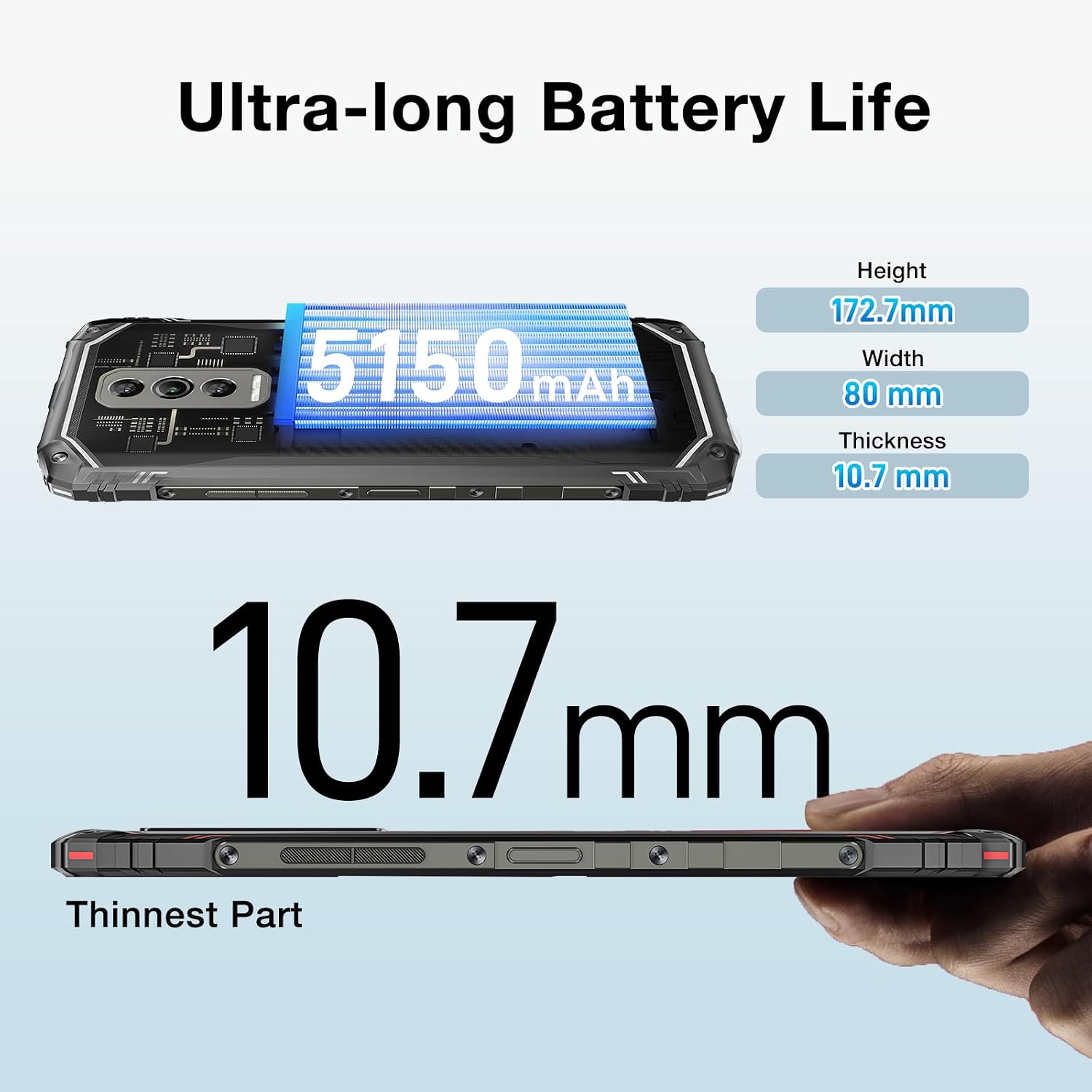
Image: The DOOGEE Blade 10 Ultra highlighting its 5150mAh battery capacity and physical dimensions (Height: 172.7mm, Width: 80mm, Thickness: 10.7mm).
3.6 സ്റ്റോറേജ് മാനേജ്മെൻ്റ്
The device comes with 256GB of internal storage (ROM) and up to 20GB of RAM (8GB physical + 12GB virtual). You can expand storage by up to 2TB using a microSD card. Regularly clear cache and unnecessary fileഒപ്റ്റിമൽ പ്രകടനം നിലനിർത്താൻ.
3.7 വൈഡ്വൈൻ എൽ1 പിന്തുണ
The DOOGEE Blade 10 Ultra supports Widevine L1, enabling high-definition streaming from popular platforms. Enjoy your favorite movies and shows in crisp, clear quality.
4. പരിപാലനം
4.1 നിങ്ങളുടെ ഉപകരണം വൃത്തിയാക്കൽ
Use a soft, lint-free cloth to clean the screen and body of your phone. Avoid using harsh chemicals or abrasive materials that could damage the device. For stubborn smudges, slightly dampen വെള്ളമുള്ള തുണി അല്ലെങ്കിൽ ഒരു സ്ക്രീൻ ക്ലീനർ.
4.2 സോഫ്റ്റ്വെയർ അപ്ഡേറ്റുകൾ
നിങ്ങളുടെ ഉപകരണത്തിൽ ഏറ്റവും പുതിയ ഫീച്ചറുകൾ, സുരക്ഷാ പാച്ചുകൾ, പ്രകടന മെച്ചപ്പെടുത്തലുകൾ എന്നിവ ഉണ്ടെന്ന് ഉറപ്പാക്കാൻ സോഫ്റ്റ്വെയർ അപ്ഡേറ്റുകൾ പതിവായി പരിശോധിച്ച് ഇൻസ്റ്റാൾ ചെയ്യുക. ഇതിലേക്ക് പോകുക ക്രമീകരണങ്ങൾ > സിസ്റ്റം > സിസ്റ്റം അപ്ഡേറ്റ് അപ്ഡേറ്റുകൾ പരിശോധിക്കാൻ.
4.3 സ്റ്റോറേജ് ഒപ്റ്റിമൈസേഷൻ
To keep your phone running smoothly, periodically review and delete unnecessary apps, photos, videos, and files. Utilize cloud storage or transfer large files to a computer to free up internal space.
5. പ്രശ്നപരിഹാരം
If you encounter issues with your DOOGEE Blade 10 Ultra, refer to the following common solutions:
| പ്രശ്നം | പരിഹാരം |
|---|---|
| ഉപകരണം ഓണാക്കുന്നില്ല | Ensure the battery is charged. Connect to the charger for at least 10 minutes, then try powering on. If unresponsive, perform a forced restart by holding the power button for 10-15 seconds. |
| ചാർജിംഗ് പ്രശ്നങ്ങൾ | യുഎസ്ബി കേബിളും ചാർജറും കേടായിട്ടുണ്ടോ എന്ന് പരിശോധിക്കുക. മറ്റൊരു പവർ ഔട്ട്ലെറ്റ് പരീക്ഷിക്കുക. ചാർജിംഗ് പോർട്ട് വൃത്തിയുള്ളതും അവശിഷ്ടങ്ങൾ ഇല്ലാത്തതുമാണെന്ന് ഉറപ്പാക്കുക. |
| മോശം നെറ്റ്വർക്ക് കണക്റ്റിവിറ്റി | Check if airplane mode is off. Restart the device. Verify SIM card is properly inserted. Contact your network provider if the issue persists. |
| ആപ്ലിക്കേഷനുകൾ ക്രാഷ് ആകുകയോ മരവിക്കുകയോ ചെയ്യുന്നു | Clear the app's cache and data (Settings > Apps > [App Name] > Storage). Update the app to the latest version. If the problem continues, uninstall and reinstall the app. |
| Device running slow | ഉപയോഗിക്കാത്ത പശ്ചാത്തല ആപ്പുകൾ അടയ്ക്കുക. കാഷെ മായ്ക്കുക, താൽക്കാലികമായി files. Ensure sufficient storage space is available. Restart the device. |
5.1 ഫാക്ടറി റീസെറ്റ്
If other troubleshooting steps fail, you may need to perform a factory reset. മുന്നറിയിപ്പ്: ഇത് നിങ്ങളുടെ ഫോണിലെ എല്ലാ ഡാറ്റയും മായ്ക്കും. തുടരുന്നതിന് മുമ്പ് പ്രധാനപ്പെട്ട ഡാറ്റയുടെ ബാക്കപ്പ് എടുക്കുക. പോകുക ക്രമീകരണങ്ങൾ > സിസ്റ്റം > റീസെറ്റ് ഓപ്ഷനുകൾ > എല്ലാ ഡാറ്റയും മായ്ക്കുക (ഫാക്ടറി റീസെറ്റ്) കൂടാതെ സ്ക്രീനിലെ നിർദ്ദേശങ്ങൾ പാലിക്കുക.
6 സ്പെസിഫിക്കേഷനുകൾ
Detailed technical specifications for the DOOGEE Blade 10 Ultra:
| ഫീച്ചർ | സ്പെസിഫിക്കേഷൻ |
|---|---|
| മോഡൽ | DOOGEE Blade 10 Ultra |
| ഓപ്പറേറ്റിംഗ് സിസ്റ്റം | ആൻഡ്രോയിഡ് 14 |
| പ്രദർശിപ്പിക്കുക | 6.56-inch HD+ IPS Waterdrop, 90Hz Refresh Rate |
| പ്രോസസ്സർ | Spreadtrum T606 Octa-core 1.6GHz (12nm) |
| റാം | 20GB വരെ (8GB ഫിസിക്കൽ + 12GB വെർച്വൽ) |
| ആന്തരിക സംഭരണം (ROM) | 256 ജിബി |
| വികസിപ്പിക്കാവുന്ന സംഭരണം | മൈക്രോ എസ്ഡി കാർഡ് വഴി 2TB വരെ |
| പ്രധാന ക്യാമറ | 50MP AI |
| മുൻ ക്യാമറ | 8എംപി |
| ബാറ്ററി ശേഷി | 5150mAh |
| നെറ്റ്വർക്ക് ബാൻഡുകൾ | 2G GSM: B2/3/5/8; 3G WCDMA: B1/2/4/5/8; 4G FDD: B1/2/3/4/5/7/8/18/19/20/25/26/28A/28B/66 |
| വൈഫൈ | 2.4G/5G (802.11ac/a/b/g/n) |
| ബ്ലൂടൂത്ത് | BT5.0 |
| എൻഎഫ്സി | പിന്തുണച്ചു |
| ഒ.ടി.ജി | പിന്തുണച്ചു |
| നാവിഗേഷൻ | GPS | ഗ്ലോനാസ് | ഗലീലിയോ | ബീഡോ |
| അളവുകൾ (H x W x T) | 172.7mm x 80mm x 10.7mm |
| നിറം | കറുപ്പ് |

Image: Diagram illustrating the powerful Octa-core 1.6GHz processor, highlighting its boosted performance and reduced consumption.
7. വാറൻ്റിയും പിന്തുണയും
For warranty information, please refer to the warranty card included in your product packaging or visit the official DOOGEE website. For technical support or further assistance, please contact DOOGEE customer service through their official channels.
Ask a question about this manual
Ask about setup, troubleshooting, compatibility, parts, safety, or missing instructions. Manuals+ will review the question and use this page’s manual context to help answer it.