
tectake 403915-1
tectake® Mobile 3-in-1 Air Cooler, Fan, and Humidifier
മോഡൽ: 403915-1
1. ആമുഖം
Thank you for choosing the tectake® Mobile 3-in-1 Air Cooler, Fan, and Humidifier. This versatile appliance is designed to provide a comfortable indoor climate by combining the functions of a fan, air cooler, and humidifier. It features intuitive controls, multiple wind modes, a timer function, and easy portability, making it ideal for various rooms in your home or office.

Image: The tectake mobile air cooler, showcasing its sleek design, control panel, remote, and included ice packs.
2 സുരക്ഷാ വിവരങ്ങൾ
ഉപകരണം ഉപയോഗിക്കുന്നതിന് മുമ്പ് എല്ലാ സുരക്ഷാ നിർദ്ദേശങ്ങളും ശ്രദ്ധാപൂർവ്വം വായിക്കുക. ഈ നിർദ്ദേശങ്ങൾ പാലിക്കുന്നതിൽ പരാജയപ്പെടുന്നത് വൈദ്യുതാഘാതം, തീപിടുത്തം അല്ലെങ്കിൽ ഗുരുതരമായ പരിക്കിന് കാരണമായേക്കാം.
- ഉപകരണം എപ്പോഴും സ്ഥിരതയുള്ളതും നിരപ്പായതുമായ ഒരു പ്രതലത്തിലാണ് സ്ഥാപിച്ചിരിക്കുന്നതെന്ന് ഉറപ്പാക്കുക.
- അപ്ലയൻസ്, ചരട്, പ്ലഗ് എന്നിവ വെള്ളത്തിലോ മറ്റ് ദ്രാവകങ്ങളിലോ മുക്കരുത്.
- Unplug the appliance from the power outlet when not in use, before filling/emptying the water tank, and before cleaning.
- കുട്ടികൾക്കും വളർത്തുമൃഗങ്ങൾക്കും ലഭ്യമാകാതെ സൂക്ഷിക്കുക.
- എയർ ഇൻലെറ്റുകൾ അല്ലെങ്കിൽ ഔട്ട്ലെറ്റുകൾ തടയരുത്.
- നിർദ്ദിഷ്ട വോള്യത്തിൽ മാത്രം ഉപയോഗിക്കുകtage.
- കേടായ ചരടോ പ്ലഗോ ഉപയോഗിച്ച് ഉപകരണം പ്രവർത്തിപ്പിക്കരുത്.
- ഉപകരണം സ്വയം നന്നാക്കാനോ പരിഷ്ക്കരിക്കാനോ ശ്രമിക്കരുത്. യോഗ്യതയുള്ള സേവന ഉദ്യോഗസ്ഥരെ ബന്ധപ്പെടുക.
3. പാക്കേജ് ഉള്ളടക്കം
താഴെ പറയുന്ന ഇനങ്ങൾക്കായി ബോക്സ് ചെക്ക് ചെയ്യുക:
- tectake® Mobile Air Cooler Unit
- റിമോട്ട് കൺട്രോൾ
- 2 x ഐസ് പായ്ക്കുകൾ
- Wall mounting material (screws, anchors, bracket)
4. ഉൽപ്പന്നം കഴിഞ്ഞുview
Familiarize yourself with the main components of your tectake® Air Cooler:
- നിയന്ത്രണ പാനൽ: Intuitive touch-sensitive panel with LED display for easy operation.
- എയർ ഔട്ട്ലെറ്റ്: Front grille with adjustable horizontal and oscillating vertical louvers.
- വാട്ടർ ടാങ്ക്: Located at the bottom, with a visible water level indicator and a 4-liter capacity.
- എയർ ഫിൽട്ടർ: Removable filter located at the rear for easy cleaning.
- കാസ്റ്റർ വീലുകൾ: Four durable wheels for easy mobility, two of which are lockable for stability.
- റിമോട്ട് കൺട്രോൾ: ദൂരെ നിന്ന് സൗകര്യപ്രദമായ പ്രവർത്തനത്തിന്.
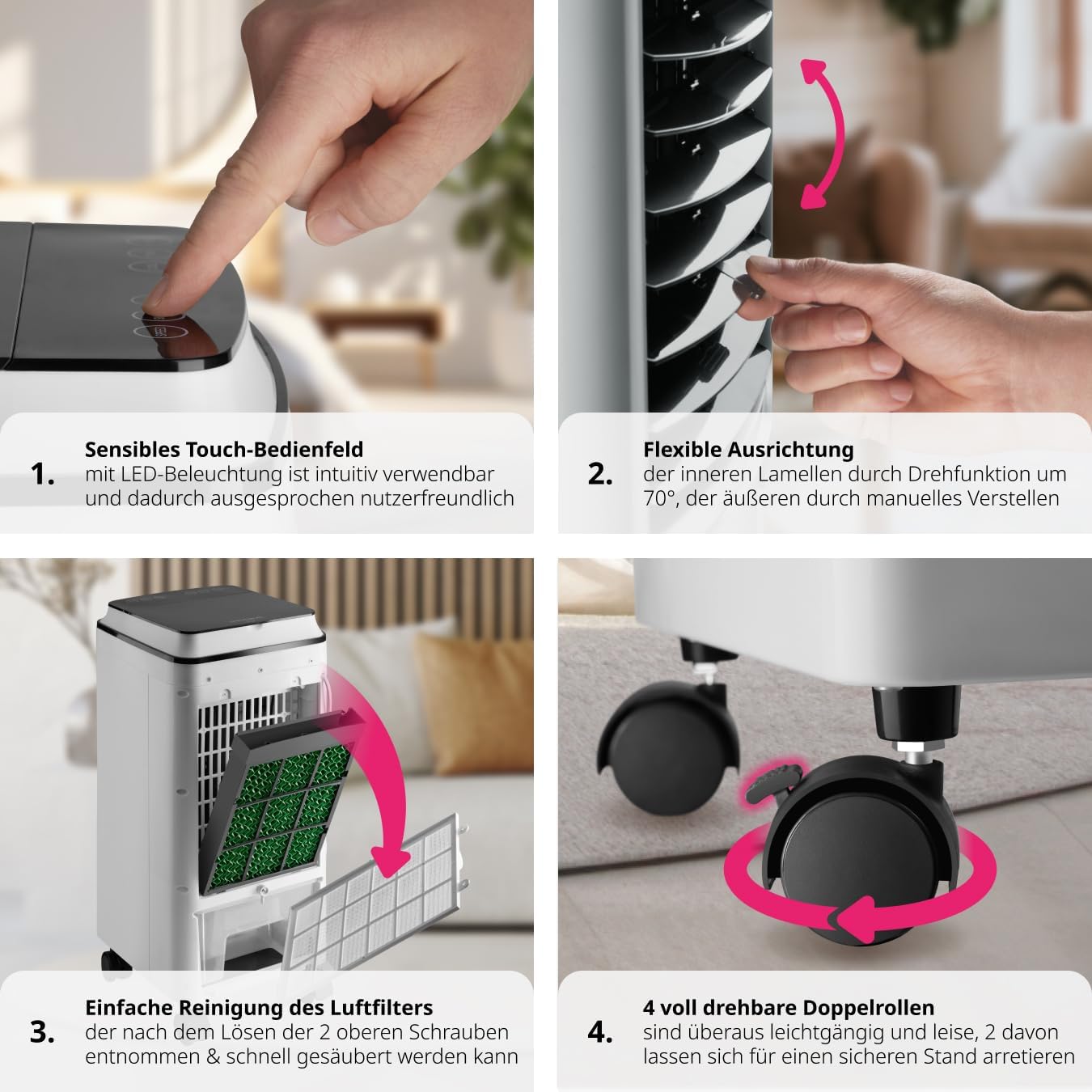
ചിത്രം: ക്ലോസ്-അപ്പ് views of the air cooler's features, including the responsive touch control panel, flexible louvers for airflow direction, the removable air filter for cleaning, and the fully rotatable double caster wheels with locking mechanism.
5. സജ്ജീകരണം
5.1 പ്രാരംഭ പ്ലേസ്മെന്റ്
എയർ കൂളർ ഉറച്ചതും നിരപ്പായതുമായ ഒരു പ്രതലത്തിൽ സ്ഥാപിക്കുക. ശരിയായ വായുസഞ്ചാരത്തിനായി യൂണിറ്റിന് ചുറ്റും മതിയായ ഇടമുണ്ടെന്ന് ഉറപ്പാക്കുക (ചുവരുകളിൽ നിന്നോ ഫർണിച്ചറിൽ നിന്നോ കുറഞ്ഞത് 20 സെന്റീമീറ്റർ).
5.2 വാട്ടർ ടാങ്ക് നിറയ്ക്കൽ
- ഉപകരണം അൺപ്ലഗ് ചെയ്തിട്ടുണ്ടെന്ന് ഉറപ്പാക്കുക.
- യൂണിറ്റിന്റെ താഴെ പിൻഭാഗത്ത് നിന്ന് വാട്ടർ ടാങ്ക് പുറത്തെടുക്കുക.
- Fill the tank with clean tap water, ensuring the water level is between the 'MIN' and 'MAX' indicators. Do not overfill.
- For enhanced cooling, place the two included ice packs (after freezing them) into the water tank.
- സുരക്ഷിതമായി ക്ലിക്ക് ചെയ്യുന്നത് വരെ വാട്ടർ ടാങ്ക് ശ്രദ്ധാപൂർവ്വം അതിന്റെ സ്ഥാനത്തേക്ക് തിരികെ തള്ളുക.

Image: Illustration of the water tank being filled and the placement of the two included ice packs for improved cooling performance.
5.3 പവർ കണക്ഷൻ
Plug the power cord into a suitable electrical outlet (220-240V, 50Hz).
6. പ്രവർത്തന നിർദ്ദേശങ്ങൾ
The air cooler can be operated via the touch control panel on the unit or the remote control.
6.1 നിയന്ത്രണ പാനലും റിമോട്ട് പ്രവർത്തനങ്ങളും
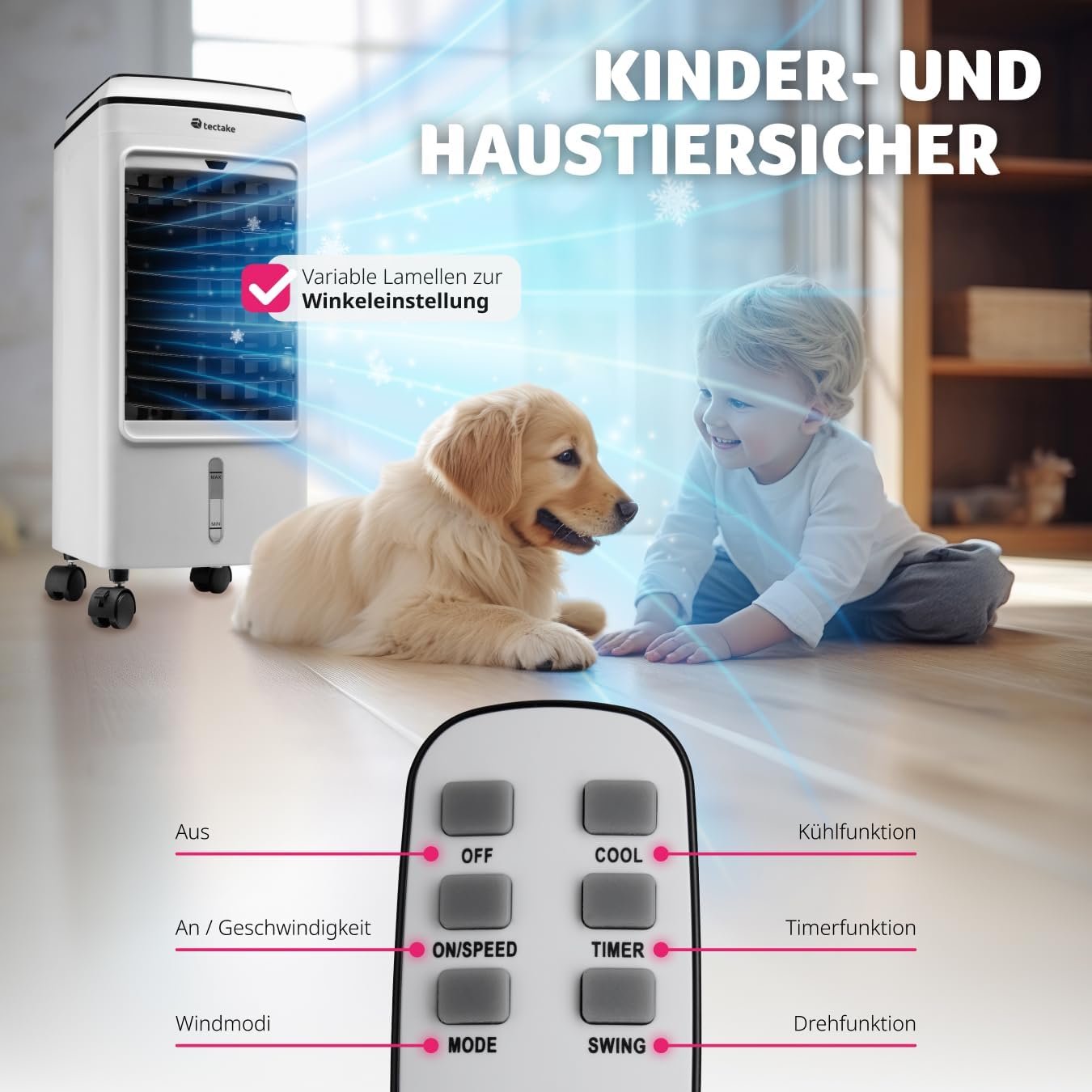
Image: A detailed diagram of the remote control, highlighting buttons for Power (ON/SPEED), Mode (wind modes), Swing (oscillation), Cool (cooling function), and Timer.
- ഓൺ/സ്പീഡ്: Press to turn the unit on. Subsequent presses cycle through fan speeds (Low, Medium, High).
- ഓഫാണ്: യൂണിറ്റ് ഓഫ് ചെയ്യാൻ അമർത്തുക.
- വഴികൾ: Press to select wind mode:
- സാധാരണ: Constant airflow.
- സ്വാഭാവികം: വ്യത്യസ്ത ഫാൻ വേഗത ഉപയോഗിച്ച് സ്വാഭാവിക കാറ്റിനെ അനുകരിക്കുന്നു.
- ഉറക്കം: Gradually reduces fan speed for quiet operation during sleep.
- കൂൾ: Activates the cooling/humidifying function. Ensure the water tank is filled.
- ടൈമർ: Sets the operating time from 1 to 8 hours. The unit will automatically turn off after the set time.
- സ്വിംഗ്: Activates the automatic oscillation of the vertical louvers for wider air distribution.
6.2 Manual Louver Adjustment
The horizontal louvers can be manually adjusted up or down to direct the airflow precisely where needed.
7. പരിപാലനം
പതിവ് അറ്റകുറ്റപ്പണികൾ നിങ്ങളുടെ എയർ കൂളറിന്റെ മികച്ച പ്രകടനവും ദീർഘായുസ്സും ഉറപ്പാക്കുന്നു.
7.1 എയർ ഫിൽട്ടർ വൃത്തിയാക്കൽ
The air filter should be cleaned regularly, especially if the unit is used frequently.
- പവർ ഔട്ട്ലെറ്റിൽ നിന്ന് ഉപകരണം അൺപ്ലഗ് ചെയ്യുക.
- Locate the air filter at the rear of the unit. Loosen the two screws at the top of the filter cover.
- ഫിൽറ്റർ കവർ നീക്കം ചെയ്ത് എയർ ഫിൽറ്റർ ശ്രദ്ധാപൂർവ്വം പുറത്തെടുക്കുക.
- Clean the filter with a soft brush or vacuum cleaner to remove dust. For deeper cleaning, rinse with water and mild detergent, then allow to air dry completely before reinserting.
- Reinsert the dry filter and secure the cover with the screws.

Image: Illustration showing the process of removing the air filter from the back of the unit for cleaning.
7.2 വാട്ടർ ടാങ്ക് വൃത്തിയാക്കൽ
To prevent mold and bacteria growth, clean the water tank regularly.
- ഉപകരണം അൺപ്ലഗ് ചെയ്യുക.
- സജ്ജീകരണ വിഭാഗത്തിൽ വിവരിച്ചിരിക്കുന്നതുപോലെ വാട്ടർ ടാങ്ക് നീക്കം ചെയ്യുക.
- ബാക്കിയുള്ള വെള്ളം ഒഴിക്കുക.
- മൃദുവായ തുണിയും നേരിയ ഡിറ്റർജന്റും ഉപയോഗിച്ച് ടാങ്ക് വൃത്തിയാക്കുക. ശുദ്ധജലം ഉപയോഗിച്ച് നന്നായി കഴുകുക.
- വീണ്ടും ഇടുന്നതിനുമുമ്പ് ടാങ്ക് പൂർണ്ണമായും വായുവിൽ ഉണങ്ങാൻ അനുവദിക്കുക.
7.3 പൊതുവായ ശുചീകരണം
ഒരു സോഫ്റ്റ്, ഡി ഉപയോഗിച്ച് യൂണിറ്റിൻ്റെ പുറംഭാഗം തുടയ്ക്കുകamp തുണി. ഉരച്ചിലുകളുള്ള ക്ലീനറുകളോ ലായകങ്ങളോ ഉപയോഗിക്കരുത്.
7.4 സംഭരണം
If storing the unit for an extended period, ensure the water tank is empty and clean, and the unit is dry. Store in a cool, dry place away from direct sunlight.
8. പ്രശ്നപരിഹാരം
If you encounter issues, please refer to the following table before contacting support:
| പ്രശ്നം | സാധ്യമായ കാരണം | പരിഹാരം |
|---|---|---|
| യൂണിറ്റ് ഓണാക്കുന്നില്ല | പവർ സപ്ലൈ ഇല്ല; പവർ ബട്ടൺ അമർത്തിയിട്ടില്ല. | Check power cord connection; Press the ON/SPEED button. |
| തണുപ്പിക്കൽ പ്രഭാവം ഇല്ല | Water tank empty; COOL function not activated; Ice packs not used. | Fill water tank; Press COOL button; Use frozen ice packs. |
| ദുർബലമായ വായുപ്രവാഹം | Air filter clogged; Air inlets/outlets blocked. | Clean air filter; Ensure clear space around the unit. |
| അസാധാരണമായ ശബ്ദം | Unit not on a level surface; Water tank not properly inserted. | Place on a stable, level surface; Reinsert water tank securely. |
9 സ്പെസിഫിക്കേഷനുകൾ
| ഫീച്ചർ | വിശദാംശങ്ങൾ |
|---|---|
| മോഡൽ നമ്പർ | 403915-1 |
| അളവുകൾ (L x W x H) | ഏകദേശം. 26.5 x 23.5 x 60 സെ |
| ഭാരം | ഏകദേശം 5 കിലോ |
| വൈദ്യുതി ഉപഭോഗം | 75 വാട്ട് |
| വാല്യംtage | 220-240 വോൾട്ട് |
| വാട്ടർ ടാങ്ക് കപ്പാസിറ്റി | 4 ലിറ്റർ |
| ടൈമർ പ്രവർത്തനം | 1-8 മണിക്കൂർ |
| ശബ്ദ നില | 60 dB-യിൽ താഴെ |
| പ്രത്യേക സവിശേഷതകൾ | 3-in-1 (Fan, Air Cooler, Humidifier), 3 Wind Modes, Remote Control, Oscillating Function, Portable with Wheels |

Image: Visual representation of the air cooler's dimensions and key specifications, including weight, power, and cable length.
10. വാറൻ്റിയും പിന്തുണയും
This product comes with a limited warranty. For detailed warranty information or technical support, please refer to the warranty card included in your package or visit the official tectake website. You can also contact tectake customer service for assistance with any product-related inquiries.
കൂടുതൽ വിവരങ്ങൾക്ക്, നിങ്ങൾക്ക് സന്ദർശിക്കാവുന്നതാണ് tectake Store on Amazon.
Ask a question about this manual
Ask about setup, troubleshooting, compatibility, parts, safety, or missing instructions. Manuals+ will review the question and use this page’s manual context to help answer it.