
PROHEAR 037
PROHEAR 037 Bluetooth Hearing Protection Headphones User Manual
മോഡൽ: 037 സീരീസ്
ബ്രാൻഡ്: PROHEAR
1. ആമുഖം
Thank you for choosing PROHEAR 037 Bluetooth Hearing Protection Headphones. This manual provides detailed instructions for the safe and effective use of your new hearing protection device. The PROHEAR 037 series offers advanced hearing protection combined with Bluetooth audio capabilities, allowing you to enjoy music and make calls while working in noisy environments. This product is designed to protect your hearing while providing a comfortable and convenient audio experience.

Figure 1: PROHEAR 037 Bluetooth Hearing Protection Headphones. This image displays both the standard headband version (orange earcups) and the hard hat attachment version (black earcups), highlighting their design and controls.
2 പ്രധാന സവിശേഷതകൾ
- വിപുലമായ ബ്ലൂടൂത്ത് 5.0 സാങ്കേതികവിദ്യ: Provides a smoother, faster, and more stable connection with an effective wireless range of up to 80 feet (24 meters).
- Effective Hearing Protection:
- Orange Model: NRR 25dB (Noise Reduction Rating).
- Hard Hat Attachment Model: SNR 30dB (Single Number Rating).
- ദീർഘകാല ബാറ്ററി: Built-in 1100mAh rechargeable lithium battery offers up to 40 hours of playtime in Bluetooth mode.
- ഉപയോഗിക്കാൻ എളുപ്പമുള്ള നിയന്ത്രണങ്ങൾ: Intuitive buttons allow for easy adjustment of volume, song switching, and call management without removing the earmuffs.
- സുഖപ്രദമായ ഡിസൈൻ: Features soft, breathable ear pads and an ultra-padded headband (for the headband model) for extended wear comfort.
- Wired Audio Mode: Supports infinite playtime via a 3.5mm audio input for non-Bluetooth devices or when the battery is low.
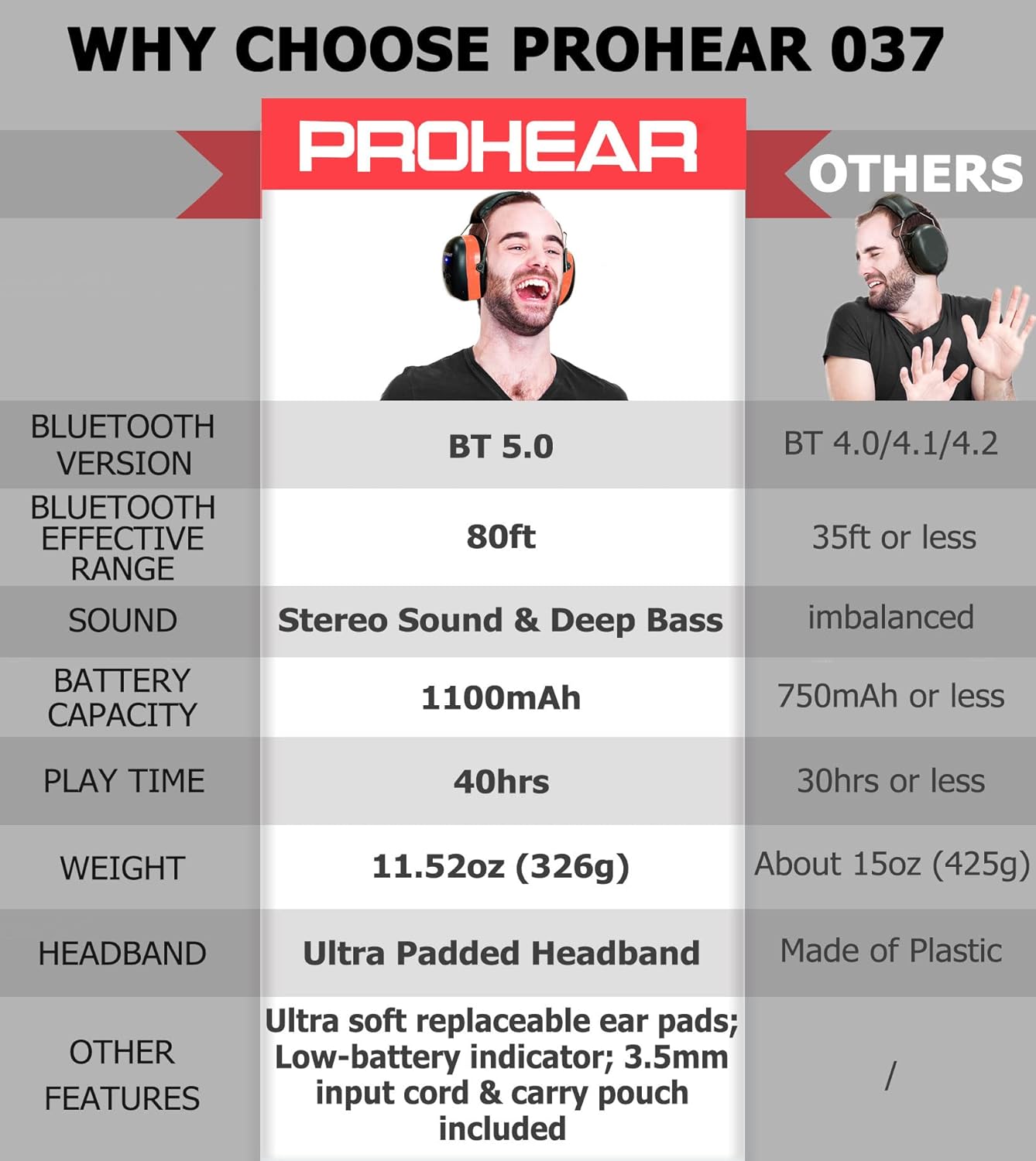
Figure 2: Feature Comparison. This table illustrates key advantages of the PROHEAR 037, including Bluetooth 5.0, 80ft effective range, stereo sound, 1100mAh battery, 40 hours playtime, and ultra-padded headband with soft replaceable ear pads.
3. സജ്ജീകരണം
3.1 ബാറ്ററി ചാർജ് ചെയ്യുന്നു
ആദ്യമായി ഉപയോഗിക്കുന്നതിന് മുമ്പ്, ഹെഡ്ഫോണുകൾ പൂർണ്ണമായും ചാർജ് ചെയ്യുക. പൂർണ്ണമായി ചാർജ് ചെയ്യാൻ ഏകദേശം 4 മണിക്കൂർ എടുക്കും.
- Locate the charging port on the earmuff.
- Connect the provided charging cable to the port and a compatible USB power source (e.g., computer USB port, USB wall adapter).
- The LED indicator will show charging status (refer to the LED indicator section for details). Once fully charged, the indicator will change or turn off.

Figure 3: Battery and Charging Information. This image highlights the 1100mAh rechargeable battery, 4-hour charging time, and 40+ hours of playtime in wireless mode, along with infinite playtime in wired mode.
3.2 ബ്ലൂടൂത്ത് ജോടിയാക്കൽ
To connect your PROHEAR 037 headphones to a Bluetooth-enabled device:
- ഹെഡ്ഫോണുകൾ ഓഫാണെന്ന് ഉറപ്പാക്കുക.
- Press and hold the Power/Multi-function button until the LED indicator flashes blue and red alternately, indicating pairing mode.
- നിങ്ങളുടെ ഉപകരണത്തിൽ (സ്മാർട്ട്ഫോൺ, ടാബ്ലെറ്റ് മുതലായവ), ബ്ലൂടൂത്ത് പ്രവർത്തനക്ഷമമാക്കി ലഭ്യമായ ഉപകരണങ്ങൾക്കായി തിരയുക.
- Select "PROHEAR 037" from the list of found devices.
- കണക്ട് ചെയ്തുകഴിഞ്ഞാൽ, LED ഇൻഡിക്കേറ്റർ സാവധാനം കടും നീലയോ ഫ്ലാഷ് നീലയോ ആയി മാറും.
Note: The Bluetooth 5.0 technology provides a stable connection up to 80 feet (24 meters) in open areas.
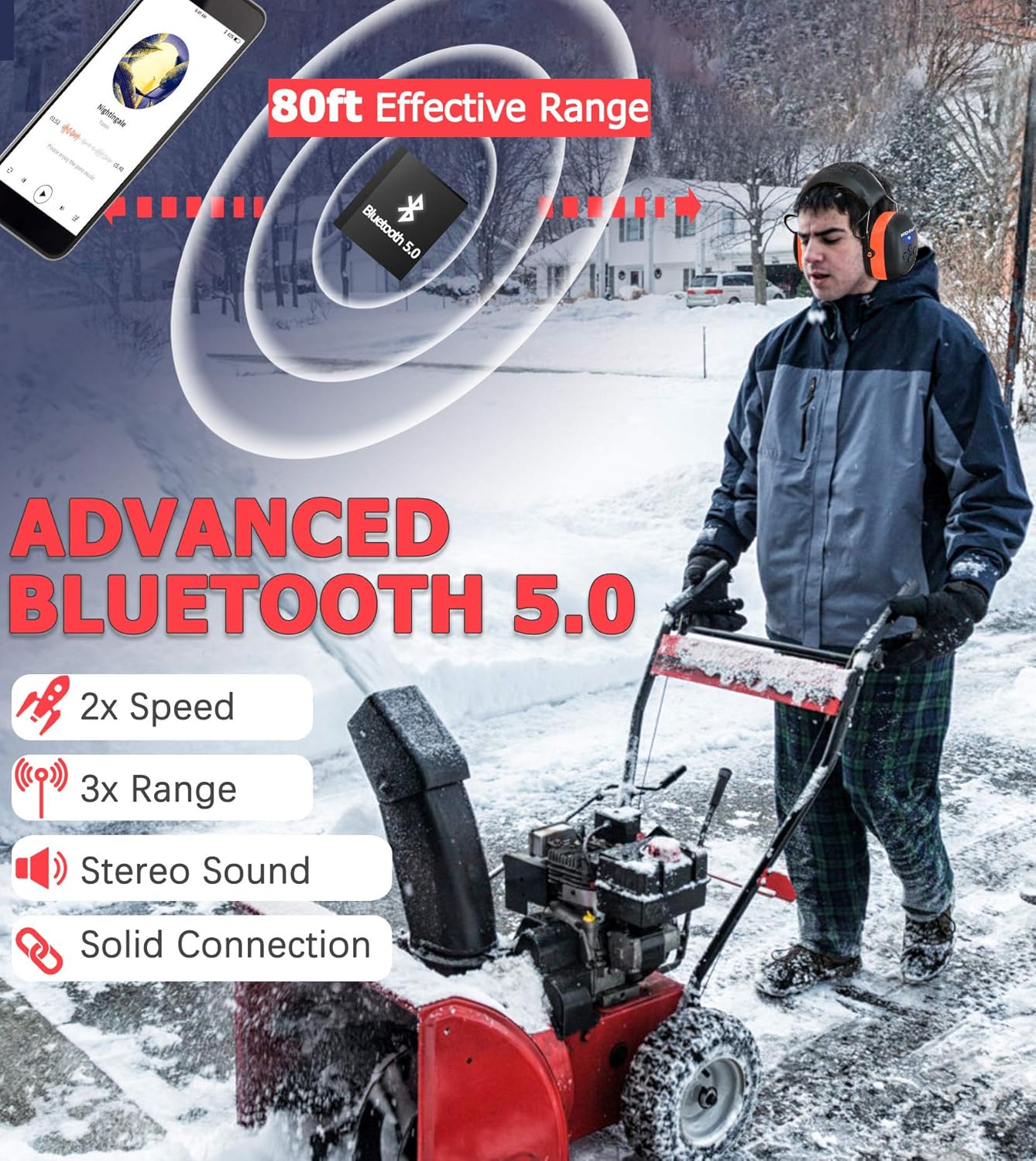
Figure 4: Advanced Bluetooth 5.0 Connectivity. This image demonstrates the 80-foot effective range of the Bluetooth 5.0 connection, emphasizing its speed, range, stereo sound, and solid connection.
3.3 Hard Hat Attachment Installation (for Hard Hat Model)
For the PROHEAR 037 Hard Hat Attachment model, follow these steps to securely attach the earmuffs to a compatible hard hat (hard hat not included):
- Step 1: Easy Installation: Align the attachment clips on the earmuffs with the slots on your hard hat.
- Step 2: Adjustable: Push the earmuffs firmly into the slots until they click into place. Ensure they are securely fastened and can be adjusted up and down.
- Step 3: Usage: Pull the earmuffs down over your ears to achieve a snug fit, ensuring full ear coverage for optimal hearing protection.
- Step 4: Un-usage: When not in use, pivot the earmuffs upwards and away from your ears, allowing them to rest against the hard hat.
Compatible with hard hats such as Pyramex Safety HP50011 HP500 and Dewalt DPG11-W.

Figure 5: Hard Hat Attachment Guide. This image provides a step-by-step visual guide for easy installation, adjustment, proper usage, and storage of the hard hat attachment earmuffs.
4. പ്രവർത്തന നിർദ്ദേശങ്ങൾ
4.1 നിയന്ത്രണങ്ങൾ കഴിഞ്ഞുview
The PROHEAR 037 features intuitive controls located on the earmuff. The "raised part" design allows for easy operation even with work gloves.
- പവർ/മൾട്ടി-ഫംഗ്ഷൻ ബട്ടൺ: Used for powering on/off, play/pause, answering/ending calls.
- വോളിയം കൂട്ടുക/അടുത്ത ട്രാക്ക് ബട്ടൺ: Increases volume, skips to the next song.
- വോളിയം കുറയ്ക്കൽ/മുമ്പത്തെ ട്രാക്ക് ബട്ടൺ: Decreases volume, skips to the previous song.
4.2 പവർ ഓൺ/ഓഫ്
- പവർ ഓൺ: Press and hold the Power/Multi-function button for approximately 3 seconds until you hear a power-on prompt and the LED indicator lights up.
- പവർ ഓഫ്: Press and hold the Power/Multi-function button for approximately 3 seconds until you hear a power-off prompt and the LED indicator turns off.
4.3 മ്യൂസിക് പ്ലേബാക്ക്
- പ്ലേ/താൽക്കാലികമായി നിർത്തുക: പവർ/മൾട്ടി-ഫംഗ്ഷൻ ബട്ടൺ ഹ്രസ്വമായി അമർത്തുക.
- അടുത്ത ട്രാക്ക്: Short press the Volume Up/Next Track button.
- മുമ്പത്തെ ട്രാക്ക്: Short press the Volume Down/Previous Track button.
- വോളിയം കൂട്ടുക: Long press the Volume Up/Next Track button.
- വോളിയം താഴേക്ക്: Long press the Volume Down/Previous Track button.
4.4 കോൾ മാനേജ്മെന്റ്
- ഉത്തരം/അവസാന കോൾ: Short press the Power/Multi-function button when a call comes in or during a call.
- കോൾ നിരസിക്കുക: Long press the Power/Multi-function button when a call comes in.
4.5 Wired Audio Mode
The PROHEAR 037 can be used in wired mode using a 3.5mm audio cable (not included). This mode allows for infinite playtime and is useful when the battery is depleted or for non-Bluetooth devices.
- Connect one end of the 3.5mm audio cable to the audio input port on the earmuff.
- Connect the other end to your audio source (e.g., smartphone, MP3 player).
- In wired mode, the volume and track control must be adjusted directly on your connected audio device. The headphone controls will not function.

Figure 6: Wired Audio Mode. This image illustrates the use of the 3.5mm audio input for infinite playtime, noting that volume adjustment is done via the connected device in this mode.
5. പരിപാലനവും പരിചരണവും
- വൃത്തിയാക്കൽ: മൃദുവായ ഒരു ഡി ഉപയോഗിച്ച് ഇയർമഫുകൾ തുടയ്ക്കുക.amp തുണി. അബ്രാസീവ് ക്ലീനറുകൾ ഉപയോഗിക്കരുത് അല്ലെങ്കിൽ ഉപകരണം വെള്ളത്തിൽ മുക്കരുത്.
- സംഭരണം: നേരിട്ടുള്ള സൂര്യപ്രകാശത്തിൽ നിന്നും കടുത്ത താപനിലയിൽ നിന്നും മാറി തണുത്തതും വരണ്ടതുമായ സ്ഥലത്ത് ഹെഡ്ഫോണുകൾ സൂക്ഷിക്കുക.
- ബാറ്ററി കെയർ: ബാറ്ററി ലൈഫ് വർദ്ധിപ്പിക്കാൻ, പതിവായി ഉപയോഗിക്കുന്നില്ലെങ്കിൽ പോലും, ഹെഡ്ഫോണുകൾ പതിവായി ചാർജ് ചെയ്യുക. ദീർഘനേരം ബാറ്ററി പൂർണ്ണമായും ഡിസ്ചാർജ് ചെയ്യുന്നത് ഒഴിവാക്കുക.
- ഇയർ പാഡ് മാറ്റിസ്ഥാപിക്കൽ: The ultra-soft ear pads are replaceable. Refer to the PROHEAR website or contact customer support for replacement parts and instructions.
6. പ്രശ്നപരിഹാരം
| പ്രശ്നം | സാധ്യമായ കാരണം | പരിഹാരം |
|---|---|---|
| ഹെഡ്ഫോണുകൾ പവർ ഓൺ ചെയ്യുന്നില്ല. | കുറഞ്ഞ ബാറ്ററി. | ഹെഡ്ഫോണുകൾ പൂർണ്ണമായും ചാർജ് ചെയ്യുക. |
| ബ്ലൂടൂത്ത് ഉപകരണവുമായി ജോടിയാക്കാൻ കഴിയില്ല. | ഹെഡ്ഫോണുകൾ ജോടിയാക്കൽ മോഡിൽ ഇല്ല; ഉപകരണം ബ്ലൂടൂത്ത് ഓഫാണ്; ഉപകരണത്തിൽ നിന്ന് വളരെ അകലെയാണ്. | Ensure headphones are in pairing mode (flashing blue/red). Turn on Bluetooth on your device. Move headphones closer to the device (within 80ft). |
| ശബ്ദമില്ല അല്ലെങ്കിൽ കുറഞ്ഞ ശബ്ദമില്ല. | Volume too low on headphones or device; not properly connected; wired mode volume. | Increase volume on both headphones and connected device. Re-pair Bluetooth. If in wired mode, adjust volume on the connected device. |
| ഇടവിട്ടുള്ള കണക്ഷൻ. | Too far from device; interference; obstacles. | Move closer to the connected device. Avoid physical obstacles between headphones and device. |
7 സാങ്കേതിക സവിശേഷതകൾ
| ഫീച്ചർ | സ്പെസിഫിക്കേഷൻ |
|---|---|
| മോഡൽ | PROHEAR 037 Series |
| ബ്ലൂടൂത്ത് പതിപ്പ് | ബ്ലൂടൂത്ത് 5.0 |
| Bluetooth പ്രാപ്തിയുള്ള ശ്രേണി | 80 അടി വരെ (24 മീറ്റർ) |
| നോയ്സ് റിഡക്ഷൻ റേറ്റിംഗ് (NRR) | 25dB (Orange Headband Model) |
| Single Number Rating (SNR) | 30dB (Hard Hat Attachment Model) |
| ബാറ്ററി ശേഷി | 1100mAh റീചാർജ് ചെയ്യാവുന്ന ലിഥിയം ബാറ്ററി |
| പ്ലേടൈം (ബ്ലൂടൂത്ത് മോഡ്) | 40 മണിക്കൂർ വരെ |
| ചാർജിംഗ് സമയം | ഏകദേശം 4 മണിക്കൂർ |
| ഓഡിയോ ഇൻപുട്ട് | 3.5 മിമി ഓക്സ് ഇൻപുട്ട് |
| നിറം | Orange (Headband) / Black (Hard Hat Attachment) |
| ASIN | B0DBQ1TBCB |
| ആദ്യ തീയതി ലഭ്യമാണ് | ജൂലൈ 31, 2024 |
8 സുരക്ഷാ വിവരങ്ങൾ
Proper use of hearing protection is crucial for preventing noise-induced hearing loss. Please read and follow these safety guidelines:
- Always wear the hearing protection in noisy environments where sound levels exceed safe limits.
- Ensure a snug fit over your ears to achieve the stated Noise Reduction Rating (NRR) or Single Number Rating (SNR). Any gaps can significantly reduce effectiveness.
- Do not modify the earmuffs. Modifications may compromise their protective capabilities.
- Keep the earmuffs clean and free from debris that could affect the seal or internal components.
- While using the Bluetooth audio feature, be aware of your surroundings, especially in environments where situational awareness is critical for safety.
- Avoid listening to audio at excessively high volumes for prolonged periods, even with hearing protection, as this can still contribute to hearing fatigue or damage.

Figure 7: Noise Reduction Effectiveness. This image illustrates common noise levels and highlights the PROHEAR 037's NRR 25dB rating, indicating its capability to effectively reduce harmful noise and allow clear audio listening in loud environments.
9. വാറൻ്റിയും പിന്തുണയും
PROHEAR products are designed for durability and performance. For warranty information, technical support, or to purchase replacement parts, please visit the official PROHEAR webസൈറ്റിൽ ബന്ധപ്പെടുകയോ അവരുടെ ഉപഭോക്തൃ സേവന വിഭാഗവുമായി ബന്ധപ്പെടുകയോ ചെയ്യുക. വാറന്റി ക്ലെയിമുകൾക്കുള്ള വാങ്ങലിന്റെ തെളിവായി നിങ്ങളുടെ വാങ്ങൽ രസീത് സൂക്ഷിക്കുക.
Ask a question about this manual
Ask about setup, troubleshooting, compatibility, parts, safety, or missing instructions. Manuals+ will review the question and use this page’s manual context to help answer it.