
Digitek DCL-100 WBC
DIGITEK® DCL-100 WBC 100W Bi-Color Continuous LED Light User Manual
Model: DCL-100 WBC
ആമുഖം
Thank you for choosing the DIGITEK® DCL-100 WBC 100W Bi-Color Continuous LED Light. This professional lighting solution is designed for videography and photography, offering powerful illumination, versatile color temperature control, and innovative special effects. With its robust construction and user-friendly controls, the DCL-100 WBC is an essential tool for content creators seeking high-quality lighting. This manual provides detailed instructions for setup, operation, maintenance, and troubleshooting to ensure optimal performance and longevity of your device.

Figure 1: DIGITEK® DCL-100 WBC 100W Bi-Color Continuous LED Light.
പാക്കേജ് ഉള്ളടക്കം
താഴെ ലിസ്റ്റ് ചെയ്തിരിക്കുന്ന എല്ലാ ഇനങ്ങളും നിങ്ങളുടെ പാക്കേജിൽ ഉൾപ്പെടുത്തിയിട്ടുണ്ടെന്ന് ദയവായി പരിശോധിക്കുക. ഏതെങ്കിലും ഇനങ്ങൾ നഷ്ടപ്പെട്ടിട്ടുണ്ടെങ്കിലോ കേടായിട്ടുണ്ടെങ്കിലോ, ദയവായി ഉപഭോക്തൃ പിന്തുണയുമായി ബന്ധപ്പെടുക.
- DCL-100 WBC LED Light Unit
- പ്രതിഫലനം
- Silicon Diffuser
- ഹാൻഡിൽ ഗ്രിപ്പ്
- ടൈപ്പ് സി കേബിൾ
- കേസ് എടുക്കുക
- Power Adapter (Optional, may vary by region/bundle)

ചിത്രം 2: പാക്കേജ് ഉള്ളടക്കങ്ങളുടെ ദൃശ്യ പ്രാതിനിധ്യം.
ഉൽപ്പന്ന സവിശേഷതകൾ
The DIGITEK® DCL-100 WBC LED Light is equipped with advanced features to enhance your creative workflow:
- ശക്തമായ പ്രകാശം: Delivers 13000LM luminous flux with a high 97+ CRI value for accurate color rendering.
- Versatile Color Temperature: Adjustable from 2700K to 6500K, plus 200 color temperature presets.
- Innovative FX Modes: Features 20 special effects including Paparazzi, Firework, Thunder Flash, and more.
- കരുത്തുറ്റതും ഈടുനിൽക്കുന്നതുമായ രൂപകൽപ്പന: Constructed with high-strength aluminum alloy and durable engineering plastic.
- Efficient Power Options: Includes a 14.8V / 4500mAh Li-ion battery and supports DC power input.
- ഉപയോക്തൃ സൗഹൃദ നിയന്ത്രണങ്ങൾ: Manual adjustments via knobs and buttons, or remote control via the Smartlife APP (up to 60 meters).
- സ്മാർട്ട് കൂളിംഗ് സിസ്റ്റം: Integrated cooling fan and vents ensure optimal performance and prevent overheating.

Figure 3: Key technical specifications and capabilities of the DCL-100 WBC.

Figure 4: Internal cooling system with vents and an inbuilt fan for heat dissipation.
സജ്ജമാക്കുക
- അൺപാക്ക് ചെയ്യുന്നു: ക്യാരി കേസിൽ നിന്ന് എല്ലാ ഘടകങ്ങളും ശ്രദ്ധാപൂർവ്വം നീക്കം ചെയ്യുക.
- Attaching Reflector/Diffuser: Align the reflector or silicon diffuser with the Mini Bowen Mount on the front of the LED light and twist to secure.
- മൗണ്ടിംഗ്:
- Attach the handle grip to the 1/4" mounting screw at the bottom of the light for handheld use.
- For stand mounting, attach the light directly to a compatible light stand using the 1/4" screw thread.
- പവർ കണക്ഷൻ:
- To use with the included battery, ensure the battery is charged.
- For continuous power, connect the power adapter to the DC Power Socket on the unit and plug into a wall outlet.
- The unit also supports 30W PD Type-C charging.

Figure 5: Power input options and specifications.
പ്രവർത്തന നിർദ്ദേശങ്ങൾ
നിയന്ത്രണ പാനൽ ഓവർview

ചിത്രം 6: മുൻഭാഗം view of the control panel and ports.
- LCD സ്ക്രീൻ: Displays current settings such as brightness, color temperature, and FX mode.
- വൈദ്യുതി സ്വിച്ച്: യൂണിറ്റ് ഓൺ/ഓഫ് ചെയ്യുന്നു.
- Dimmer Knob: Adjusts brightness from 0% to 100%.
- Adjustment Knob (CCT/FX):
- In CCT mode, rotates to adjust color temperature (2700K-6500K).
- In FX mode, rotates to select different special effects.
- മോഡ് ബട്ടൺ: Toggles between CCT (Color Temperature) mode and FX (Special Effects) mode.
- Bluetooth Connection Reset Button: Used to reset Bluetooth pairing for app control.
- Max Mode Button: Activates maximum brightness output.
അടിസ്ഥാന പ്രവർത്തനം
- പവർ ഓൺ/ഓഫ്: Press the Power Switch to turn the light on or off.
- തെളിച്ചം ക്രമീകരിക്കൽ: Rotate the Dimmer Knob to increase or decrease the light intensity.
- Changing Color Temperature (CCT Mode):
- Press the Mode button until "CCT" or a color temperature value is displayed on the LCD screen.
- Rotate the Adjustment Knob (CCT/FX) to select your desired color temperature between 2700K and 6500K.
- Using FX Modes:
- Press the Mode button until "FX" or an effect name is displayed on the LCD screen.
- Rotate the Adjustment Knob (CCT/FX) to cycle through the 20 available special effects (e.g., Paparazzi, Firework, Thunder Flash, Candle, Fault Bulb, SOS, Flame, Fade, Camp Fire, Bulb, Pulse, Lightning, TV, Explosion).

ചിത്രം 7: ഉദാamples of special CCT effects for creative lighting.
Smartlife APP Control
The DCL-100 WBC can be controlled remotely via the Smartlife APP, offering extended range and precise adjustments.
- അപ്ലിക്കേഷൻ ഡൗൺലോഡുചെയ്യുക: ചുവടെയുള്ള QR കോഡ് സ്കാൻ ചെയ്യുക അല്ലെങ്കിൽ സന്ദർശിക്കുക സ്മാർട്ട്ആപ്പ്.ടുയ.കോം/സ്മാർട്ട് ലൈഫ് to download the Smartlife App for iOS or Android.
- ജോടിയാക്കൽ:
- നിങ്ങളുടെ മൊബൈൽ ഉപകരണത്തിൽ ബ്ലൂടൂത്ത് പ്രവർത്തനക്ഷമമാക്കിയിട്ടുണ്ടെന്ന് ഉറപ്പാക്കുക.
- Turn on the DCL-100 WBC.
- Open the Smartlife App and follow the on-screen instructions to add a new device. The app should automatically detect the light. If not, press the Bluetooth Connection Reset button on the light.
- റിമോട്ട് കൺട്രോൾ: Once paired, you can adjust brightness, color temperature, and select FX modes directly from your phone, up to 60 meters away.
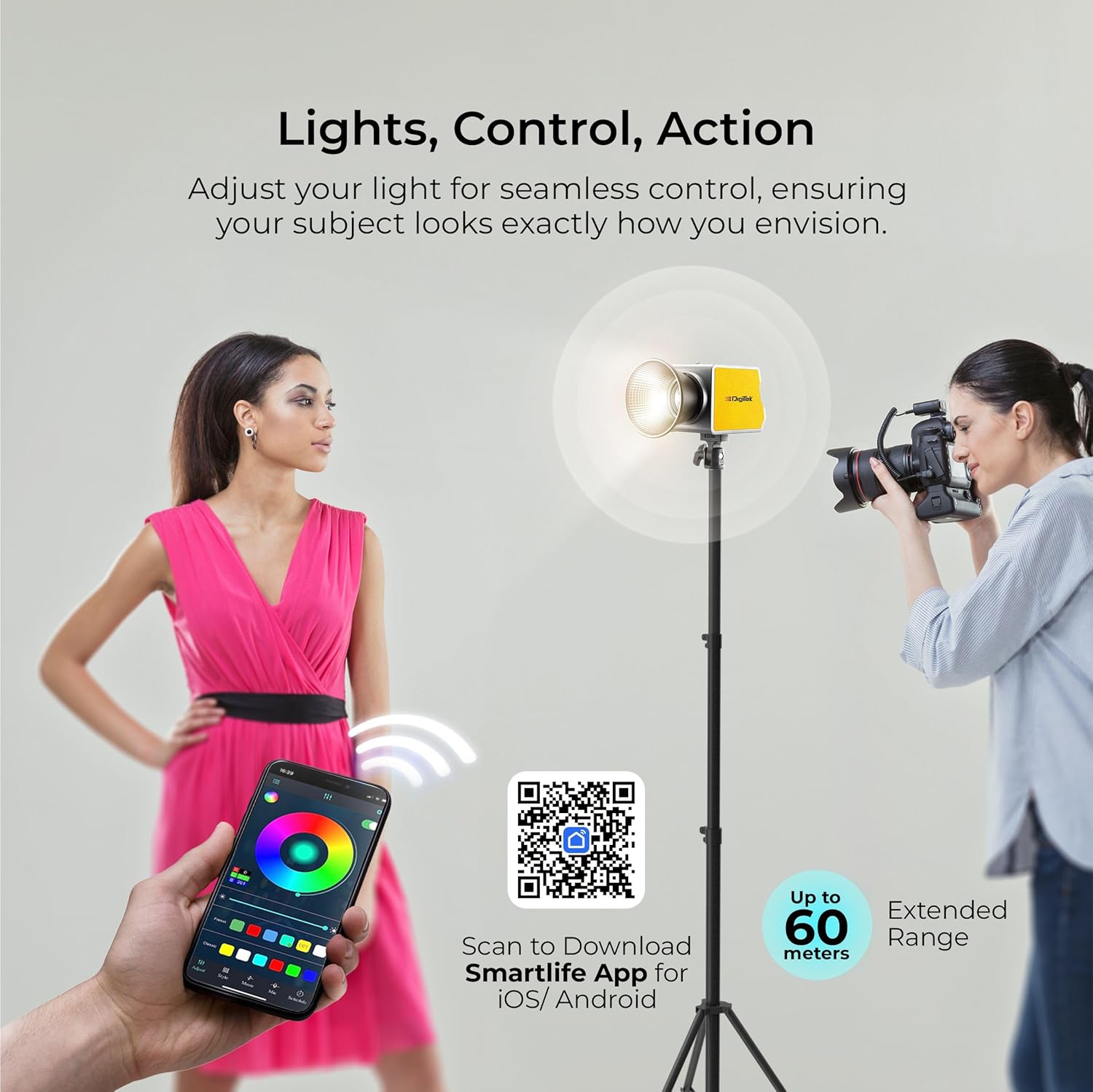
Figure 8: Remote control via Smartlife App for seamless adjustments.
മെയിൻ്റനൻസ്
- വൃത്തിയാക്കൽ: ലൈറ്റിന്റെ പുറംഭാഗം വൃത്തിയാക്കാൻ മൃദുവായതും ഉണങ്ങിയതുമായ തുണി ഉപയോഗിക്കുക. അബ്രസീവ് ക്ലീനറുകളോ ലായകങ്ങളോ ഉപയോഗിക്കരുത്.
- സംഭരണം: When not in use, store the light in its carry case in a cool, dry place, away from direct sunlight and extreme temperatures.
- ബാറ്ററി കെയർ: If using the internal battery, charge it regularly, even if not in use, to maintain battery health. Avoid fully discharging the battery for extended periods.
- വെൻ്റിലേഷൻ: Ensure the vents are clear of obstructions during operation to allow for proper cooling.
ട്രബിൾഷൂട്ടിംഗ്
| പ്രശ്നം | സാധ്യമായ കാരണം | പരിഹാരം |
|---|---|---|
| ലൈറ്റ് ഓണാക്കില്ല. | No power, low battery, or power switch off. | Check power adapter connection. Charge the battery. Ensure power switch is ON. |
| പ്രകാശം മിന്നിമറയുന്നു അല്ലെങ്കിൽ അസ്ഥിരമാണ്. | Loose connection, low battery, or power supply issue. | Check all cable connections. Recharge or replace battery. Try a different power outlet. |
| Cannot connect to Smartlife App. | Bluetooth off, light not in pairing mode, or app issue. | Ensure Bluetooth is on your phone. Press the Bluetooth Connection Reset button on the light. Restart the app or your phone. |
| പ്രകാശം അമിതമായി ചൂടാകുന്നു. | Blocked vents or prolonged use at max power in high ambient temperature. | Ensure vents are clear. Reduce brightness or allow the unit to cool down. |
സ്പെസിഫിക്കേഷനുകൾ
| ഫീച്ചർ | വിശദാംശങ്ങൾ |
|---|---|
| മോഡൽ നമ്പർ | DCL-100 WBC |
| പവർ ഔട്ട്പുട്ട് | 100W |
| തിളങ്ങുന്ന ഫ്ലക്സ് | 13000LM |
| സി.ആർ.ഐ | 97+ |
| വർണ്ണ താപനില | 2700K-6500K (+200 presets) |
| തെളിച്ചം ക്രമീകരിക്കൽ | 0-100% |
| FX മോഡുകൾ | 20 Special FX Modes |
| പവർ ഉറവിടം | 14.8V / 4500mAh Li-ion battery / DC input |
| പവർ ഇൻപുട്ട് | AC100-240V 50/60Hz | DC19V - 4.7A |
| ചാർജിംഗ് പോർട്ട് | 30W PD Type-C |
| നിയന്ത്രണ രീതി | Manual, Smartlife APP (Bluetooth) |
| App Control Range | 60 മീറ്റർ വരെ |
| അളവുകൾ (LxWxH) | 14.5 x 8.6 x 10 സെ.മീ |
| ഭാരം | 900 ഗ്രാം |
| മെറ്റീരിയൽ | High-strength aluminum alloy, engineering plastic |
വാറൻ്റിയും പിന്തുണയും
For warranty information, technical support, or service inquiries, please contact Digitek customer care:
- ടോൾ ഫ്രീ നമ്പർ: 1800-123-544-444
- ഇമെയിൽ: support@digitek.net.in
- നിർമ്മാതാവ്: ഐഎംഎസ് മെർച്ചന്റൈൽസ് പ്രൈവറ്റ് ലിമിറ്റഡ്
വാറൻ്റി ക്ലെയിമുകൾക്കായി നിങ്ങളുടെ വാങ്ങിയതിൻ്റെ തെളിവ് സൂക്ഷിക്കുക.
Ask a question about this manual
Ask about setup, troubleshooting, compatibility, parts, safety, or missing instructions. Manuals+ will review the question and use this page’s manual context to help answer it.