
1. ആമുഖം
Welcome to the user manual for your MAIDeSITe EL2 Pro Art Adjustable Height Desk Frame. This manual provides essential information for the safe assembly, operation, and maintenance of your desk frame. Please read it thoroughly before use and retain it for future reference.
പ്രധാന സവിശേഷതകൾ
- Oval Leg Design: Unique elliptical leg construction for enhanced aesthetics and stability.
- ശക്തമായ ഡ്യുവൽ-മോട്ടോർ സിസ്റ്റം: Ensures stable and durable operation with a lifting speed of 35 mm/s.
- ഉയർന്ന ലോഡ് ശേഷി: 180 കിലോ വരെ താങ്ങാൻ കഴിയും.
- ശാന്തമായ പ്രവർത്തനം: Noise level below 45 decibels for a peaceful work environment.
- ക്രമീകരിക്കാവുന്ന ഉയരം: Range from 72 cm to 120 cm to suit various user preferences.
- Extensible Width: Accommodates tabletops from 100 cm to 220 cm in length and 60 cm to 100 cm in width.
- സ്മാർട്ട് കൺട്രോൾ പാനൽ: Features 4 memory presets, a sit-stand reminder, child safety lock, and a convenient USB charging port.
- ആന്റി-കൊളിഷൻ സിസ്റ്റം: Built-in sensor detects obstacles and stops movement to prevent damage.
- Customized Accessories: Includes 4 lockable universal wheels and metal cable management supports.

The MAIDeSITe EL2 Pro Art Adjustable Height Desk Frame, showcasing its modern design and functionality in a bright office environment.
2. പ്രധാന സുരക്ഷാ നിർദ്ദേശങ്ങൾ
സുരക്ഷിതമായ പ്രവർത്തനം ഉറപ്പാക്കുന്നതിനും പരിക്കുകളോ കേടുപാടുകളോ തടയുന്നതിനും, ദയവായി ഇനിപ്പറയുന്ന സുരക്ഷാ മാർഗ്ഗനിർദ്ദേശങ്ങൾ പാലിക്കുക:
- അസംബ്ലിക്കും ഉപയോഗത്തിനും മുമ്പ് എല്ലാ നിർദ്ദേശങ്ങളും ശ്രദ്ധാപൂർവ്വം വായിക്കുക.
- ജോലി സമയത്ത് കുട്ടികളെയും വളർത്തുമൃഗങ്ങളെയും മേശയിൽ നിന്ന് അകറ്റി നിർത്തുക.
- Ensure there are no obstacles in the desk's path during height adjustment.
- Do not overload the desk. Adhere to the maximum load capacity of 180 kg.
- ഡെസ്ക് ഫ്രെയിമിൽ ഇരിക്കുകയോ നിൽക്കുകയോ ചെയ്യരുത്.
- Keep all electrical components dry and away from liquids.
- Regularly check all screws and connections to ensure they are tight.
- Utilize the built-in anti-collision system and child safety lock features for added security.
- നൽകിയിരിക്കുന്ന പവർ അഡാപ്റ്ററും ഘടകങ്ങളും മാത്രം ഉപയോഗിക്കുക.
3. പാക്കേജ് ഉള്ളടക്കം
Please check the package contents against the list below. If any items are missing or damaged, contact customer support.
- Desk Leg Columns (x2)
- Crossbar/Frame Support
- അടി (x2)
- നിയന്ത്രണ ബോക്സ്
- സ്മാർട്ട് കൺട്രോൾ പാനൽ
- പവർ അഡാപ്റ്ററും കേബിളും
- Cable Management Compartment
- കേബിൾ ബന്ധങ്ങൾ
- Lockable Universal Wheels (Casters) (x4)
- അസംബ്ലി ഹാർഡ്വെയർ (സ്ക്രൂകൾ, ബോൾട്ടുകൾ മുതലായവ)
- ഉപയോക്തൃ മാനുവൽ
4. സജ്ജീകരണവും അസംബ്ലിയും
Assembly of the MAIDeSITe EL2 Pro Art desk frame is designed to be straightforward. A screwdriver is the primary tool required (not included). It is recommended that one person performs the assembly, which typically takes about 1 hour.
അസംബ്ലി ഘട്ടങ്ങൾ:
- ഘടകങ്ങൾ അൺപാക്ക് ചെയ്യുക: പാക്കേജിംഗിൽ നിന്ന് എല്ലാ ഭാഗങ്ങളും ശ്രദ്ധാപൂർവ്വം നീക്കം ചെയ്ത് വൃത്തിയുള്ളതും പരന്നതുമായ പ്രതലത്തിൽ വയ്ക്കുക.
- Attach Feet to Leg Columns: Securely fasten the feet to the bottom of each leg column using the provided hardware.
- Assemble Crossbar: Connect the crossbar sections to form the main frame.
- Mount Leg Columns to Crossbar: Attach the leg columns to the assembled crossbar.
- Install Control Box and Motors: Mount the control box and connect the motor cables to the respective leg columns and the control box.
- നിയന്ത്രണ പാനൽ അറ്റാച്ചുചെയ്യുക: Secure the smart control panel to the underside of your chosen desktop (desktop not included).
- ഡെസ്ക്ടോപ്പ് മൗണ്ട് ചെയ്യുക: Carefully place your desktop onto the assembled frame and secure it using appropriate screws (ensure screw length is suitable for your desktop to avoid piercing through).
- Install Cable Management: Attach the cable management compartment and use cable ties to organize wires.
- Install Casters (Optional): If desired, replace the standard leveling feet with the provided lockable universal wheels.
- പവർ ബന്ധിപ്പിക്കുക: Plug the power adapter into the control box and then into a power outlet.

This diagram illustrates the main components of the desk frame, highlighting the ease of assembly. It shows the two leg columns, the crossbar, and the control unit, indicating that assembly can be completed efficiently.
5. ഓപ്പറേഷൻ
The MAIDeSITe EL2 Pro Art desk frame features an intuitive smart control panel for easy height adjustment and personalized settings.
നിയന്ത്രണ പാനൽ പ്രവർത്തനങ്ങൾ
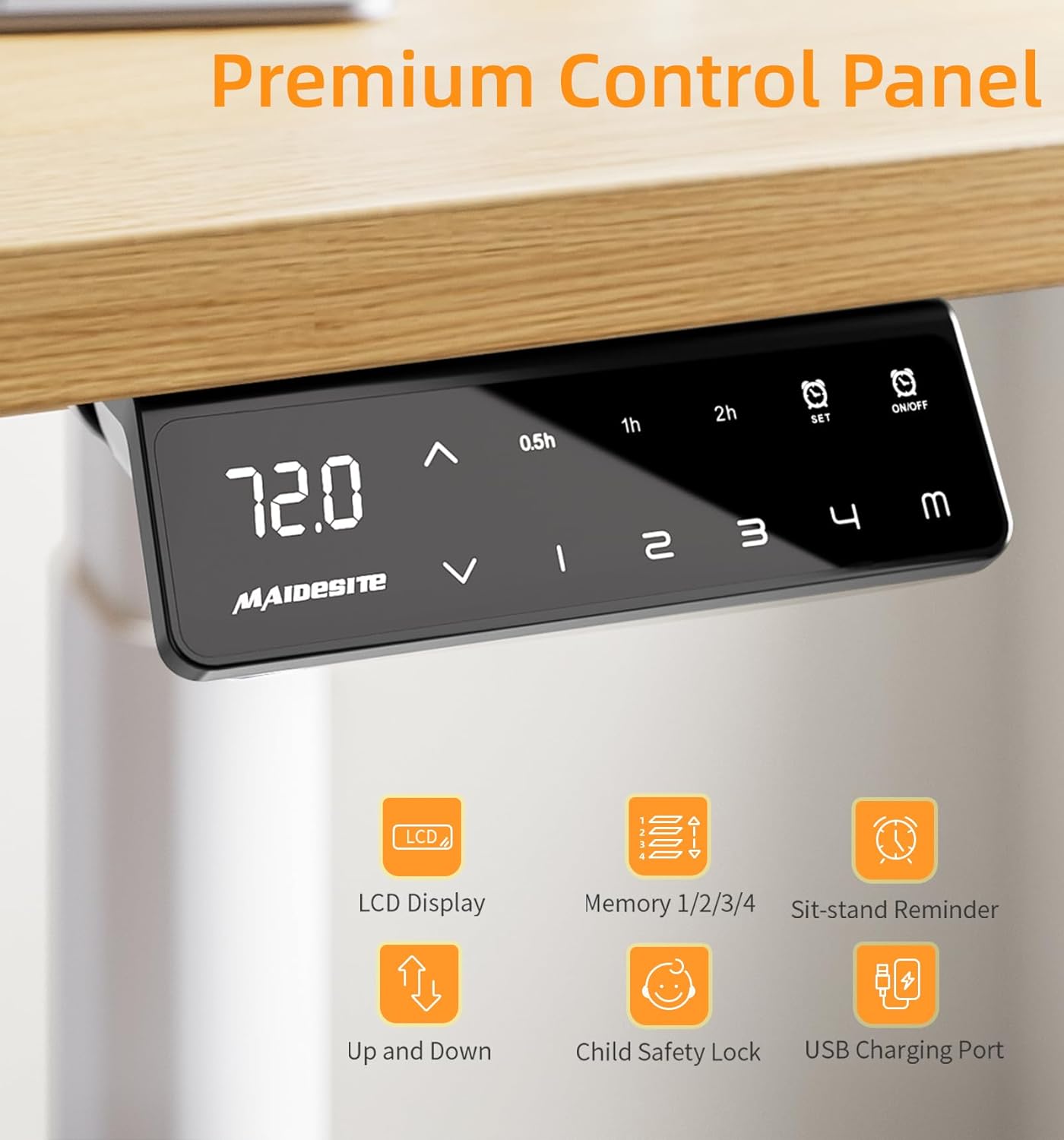
The smart control panel features an LCD display showing the current height. It includes up/down arrows for adjustment, four memory preset buttons (1, 2, 3, 4), a 'SET' button, a timer for sit-stand reminders (0.5h, 1h, 2h), and an On/Off button. A USB charging port is also integrated.
- ഉയരം ക്രമീകരിക്കൽ: ഉപയോഗിക്കുക മുകളിലേക്ക് (▲) ഒപ്പം താഴേക്ക് (▼) arrows to smoothly raise or lower the desk to your desired height. The current height is displayed on the LCD screen.
- മെമ്മറി പ്രീസെറ്റുകൾ (1, 2, 3, 4):
To save a height: Adjust the desk to your preferred height, then press the സെറ്റ് button followed by one of the number buttons (1, 2, 3, അല്ലെങ്കിൽ 4). The height is now saved.
To recall a height: Simply press the corresponding number button (1, 2, 3, അല്ലെങ്കിൽ 4), and the desk will automatically move to the saved position. - Sit-Stand Reminder (0.5h, 1h, 2h): Press the timer button to activate a reminder to change your working position after 0.5, 1, or 2 hours. This promotes healthier work habits.
- കുട്ടികളുടെ സുരക്ഷാ ലോക്ക്: Activate this feature to prevent accidental adjustments, ensuring safety in environments with children. Consult the full manual for specific activation/deactivation steps.
- യുഎസ്ബി ചാർജിംഗ് പോർട്ട്: A convenient USB port is integrated into the control panel for charging your electronic devices.
ആന്റി-കൊളിഷൻ സിസ്റ്റം
The desk frame is equipped with a built-in anti-collision system. This sensor detects obstacles in the desk's path during height adjustment and automatically stops or reverses movement to prevent damage to the desk or objects, and to ensure user safety.

This image demonstrates the anti-collision feature. As the desk lowers, it detects an object (a plant pot) and automatically reverses direction to avoid impact, safeguarding items and users.
6. പരിചരണവും പരിപാലനവും
Proper care and maintenance will extend the life of your MAIDeSITe EL2 Pro Art desk frame.
- വൃത്തിയാക്കൽ: Wipe down the desk frame surfaces with a soft, damp തുണി. അബ്രാസീവ് ക്ലീനറുകൾ, കഠിനമായ രാസവസ്തുക്കൾ അല്ലെങ്കിൽ ലായകങ്ങൾ എന്നിവ ഉപയോഗിക്കുന്നത് ഒഴിവാക്കുക, കാരണം ഇവ ഫിനിഷിന് കേടുവരുത്തും.
- പരിശോധനകൾ: Periodically check all screws, bolts, and connections to ensure they are secure. Tighten any loose fasteners.
- ഇലക്ട്രിക്കൽ ഘടകങ്ങൾ: Keep the control box, motors, and power adapter dry. Do not expose them to water or excessive moisture.
- കേബിൾ മാനേജുമെന്റ്: Regularly check and organize cables to prevent tangling or damage, especially during height adjustments.
7. ട്രബിൾഷൂട്ടിംഗ് ഗൈഡ്
If you encounter any issues with your desk frame, refer to the following common problems and their solutions. For persistent issues, please contact customer support.
| പ്രശ്നം | സാധ്യമായ കാരണം | പരിഹാരം |
|---|---|---|
| ഡെസ്ക് ചലിക്കുന്നില്ല അല്ലെങ്കിൽ നിയന്ത്രണങ്ങളോട് പ്രതികരിക്കുന്നില്ല. | No power, loose connection, child safety lock active. | Check if the power cable is securely plugged into the wall outlet and the control box. Ensure the child safety lock is deactivated. Try unplugging and replugging the power for a system reset. |
| മേശ അസമമായി നീങ്ങുന്നു അല്ലെങ്കിൽ അസാധാരണമായ ശബ്ദങ്ങൾ ഉണ്ടാക്കുന്നു. | Overload, loose components, obstruction. | Reduce the weight on the desk to below 180 kg. Check all assembly screws for tightness. Ensure there are no obstructions in the lifting mechanism. |
| നിയന്ത്രണ പാനലിൽ പിശക് കോഡ് പ്രദർശിപ്പിച്ചിരിക്കുന്നു. | സിസ്റ്റം തകരാറ്, സെൻസർ പ്രശ്നം. | Note the error code and refer to the comprehensive manual (if available) or contact customer support for specific guidance. Often, a power cycle (unplugging for 30 seconds and replugging) can resolve temporary errors. |
| Anti-collision system triggers too frequently. | Sensitivity setting, minor obstructions. | Ensure the area around the desk is clear. Some control panels allow adjustment of anti-collision sensitivity; consult the full manual for instructions. |
8 സാങ്കേതിക സവിശേഷതകൾ
Below are the detailed technical specifications for the MAIDeSITe EL2 Pro Art Adjustable Height Desk Frame:
| ഫീച്ചർ | മൂല്യം |
|---|---|
| മോഡൽ നമ്പർ | EL2 Pro Art |
| ബ്രാൻഡ് | മൈഡ് സൈറ്റ് |
| കുറഞ്ഞ ഉയരം | 72 സെ.മീ |
| പരമാവധി ഉയരം | 120 സെ.മീ |
| Extendable Width | 100 സെ.മീ - 180 സെ.മീ |
| Compatible Tabletop Length | 100 സെ.മീ - 220 സെ.മീ |
| Compatible Tabletop Width | 60 സെ.മീ - 100 സെ.മീ |
| ലിഫ്റ്റിംഗ് മെക്കാനിസം | Electric, Dual Motor |
| ലിഫ്റ്റിംഗ് സ്പീഡ് | 35 മിമി/സെ |
| ശബ്ദ നില | <45 ഡിബി |
| പരമാവധി ലോഡ് കപ്പാസിറ്റി | 180 കി.ഗ്രാം |
| ഉൽപ്പന്ന അളവുകൾ (L x W x H) | 60 x 180 x 120 cm (at max extension) |
| ഉൽപ്പന്ന ഭാരം | 26 കി.ഗ്രാം |
| പ്രത്യേക സവിശേഷതകൾ | Height adjustable, dual motor, oval leg design, 4 memory controls, anti-collision system, USB port, cable management, casters |
| ശുപാർശ ചെയ്യുന്ന അസംബ്ലി വ്യക്തികൾ | 1 |
| അസംബ്ലിക്കുള്ള ശുപാർശിത ഉപകരണങ്ങൾ | സ്ക്രൂഡ്രൈവർ (ഉൾപ്പെടുത്തിയിട്ടില്ല) |

This image visually represents the robust capabilities of the desk frame, emphasizing its 180kg weight capacity, long service life, and incredible stability.
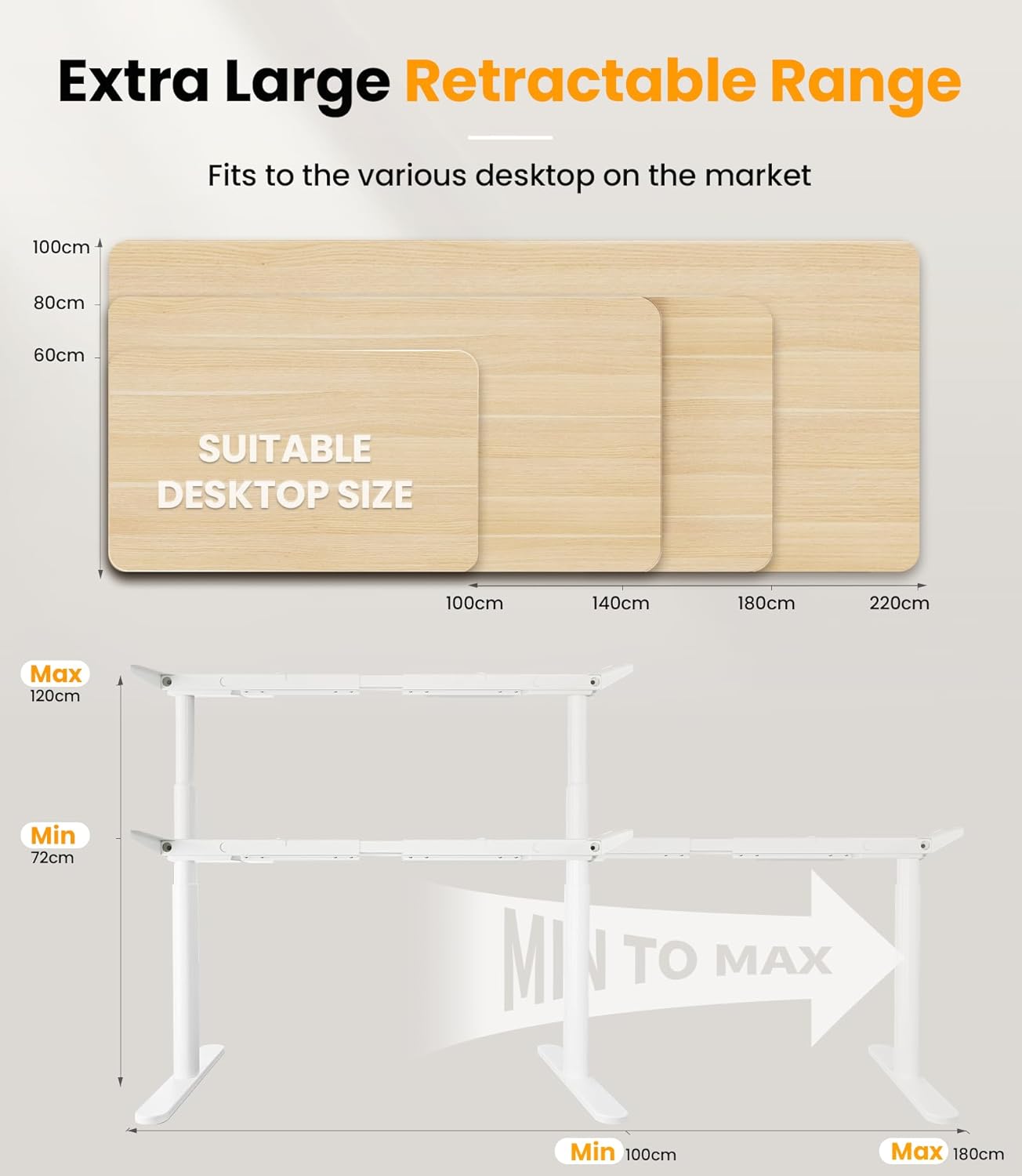
This diagram shows the desk frame's height adjustability from a minimum of 72cm to a maximum of 120cm. It also illustrates the extensible width from 100cm to 180cm, accommodating various desktop sizes.
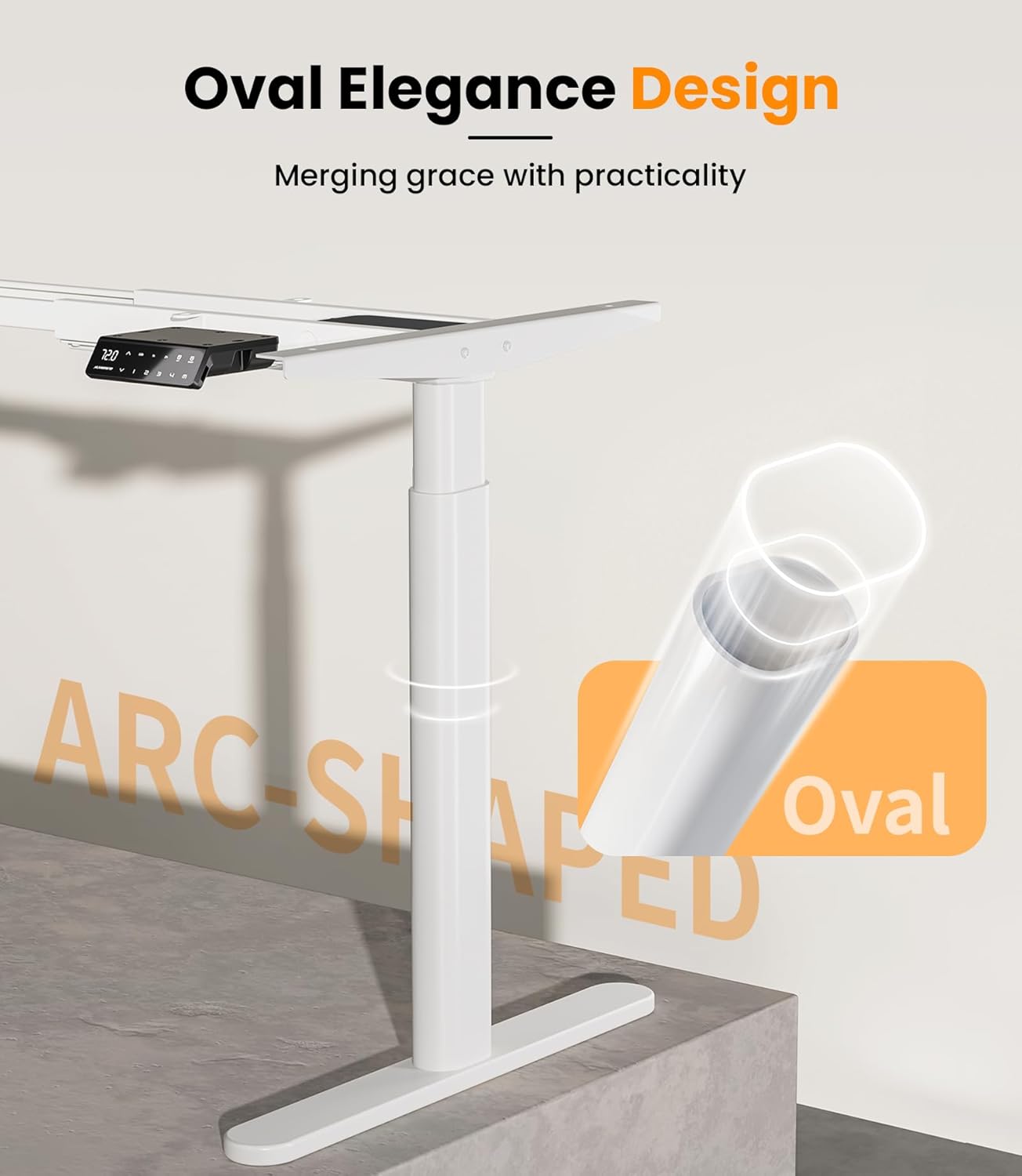
This image highlights the unique oval elegance design of the desk frame's legs, combining aesthetic appeal with practical stability.

This graphic shows the dual-motor mechanism, emphasizing its fast lifting speed of 35mm/s and quiet operation at less than 45dB.
9. വാറന്റി & ഉപഭോക്തൃ പിന്തുണ
The MAIDeSITe EL2 Pro Art Adjustable Height Desk Frame comes with a 5 വർഷത്തെ പരിമിത വാറൻ്റി, ഗുണനിലവാരവും വിശ്വാസ്യതയും ഉറപ്പാക്കുന്നു.
For technical assistance, warranty claims, or any questions regarding your product, please contact MAIDeSITe customer support. Please have your model number (EL2 Pro Art) and purchase information ready when contacting support.
For the most up-to-date support information and contact details, please visit the official MAIDeSITe webസൈറ്റ്.