
1. ആമുഖം
Thank you for choosing the VIFLYKOO EM3390TF Wireless Weather Station. This device provides comprehensive weather information, including indoor and outdoor temperature and humidity, a 5-day weather forecast, moon phases, and atmospheric pressure. With Wi-Fi connectivity and a dedicated app, you can monitor conditions remotely and access additional features. Please read this manual carefully to ensure proper setup and operation.
2. ഉൽപ്പന്നം കഴിഞ്ഞുview
The VIFLYKOO EM3390TF Weather Station consists of a main display unit and a wireless outdoor sensor. The main unit features a color display and various control buttons, while the outdoor sensor transmits environmental data wirelessly.
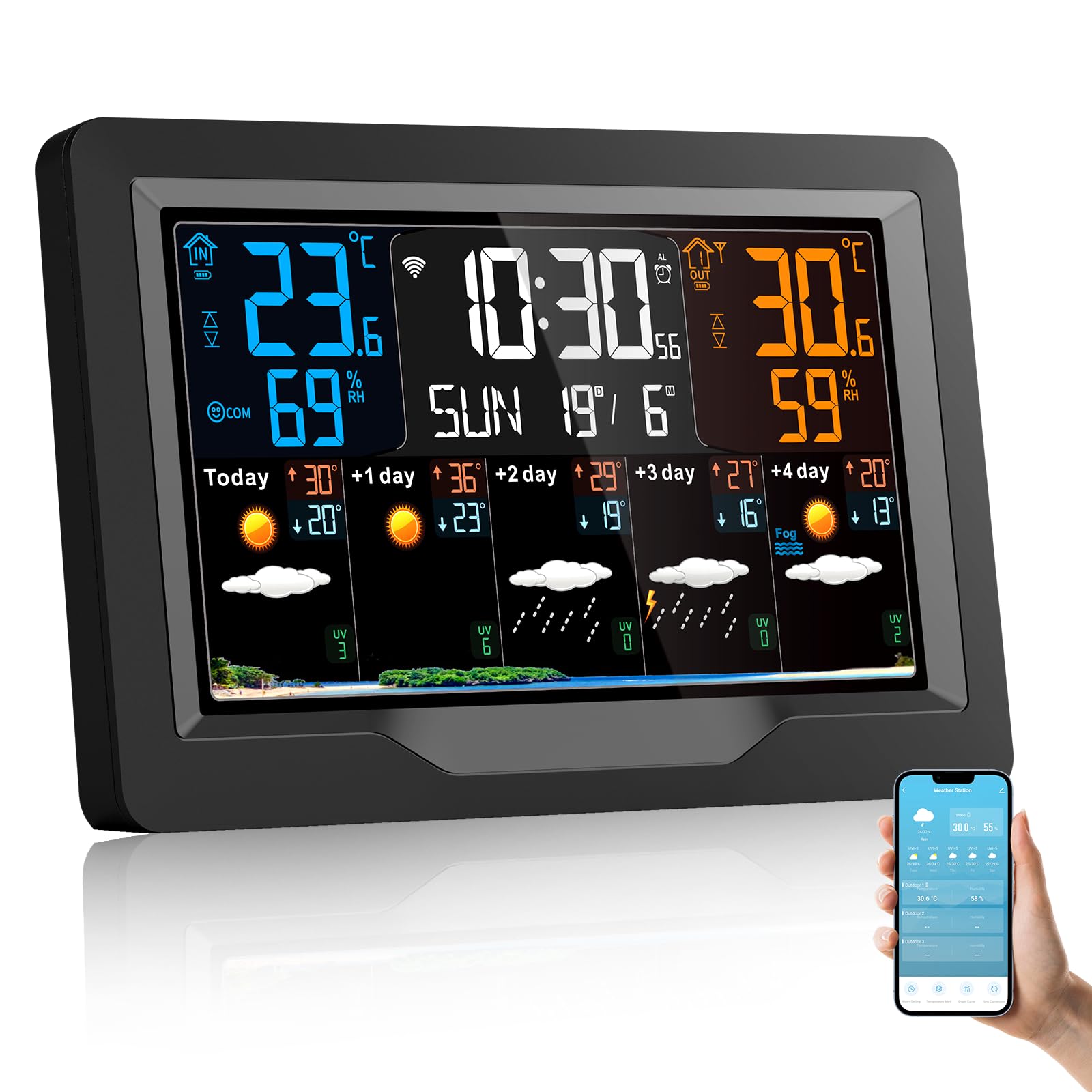
Image: VIFLYKOO EM3390TF Wireless Weather Station main unit and outdoor sensor.

Image: Detailed diagram of the VIFLYKOO EM3390TF Weather Station display and physical components. Labels include: A1: Time, A2: Indoor temperature, A3: Week for today, A4: Indoor humidity, A5: Remote wireless channel, A6: Outdoor temperature, A7: Calendar, A8: Outdoor humidity, A9: Predicted maximum temperature today and in the next 1-4 days, A10: Predicted minimum temperature today and in the next 1-4 days, A11: Weather forecast for today and the next 1-4 days, A12: UV index. B7: Hanging hole, B8: Support frame, B9: Battery compartment, B10: USB charging socket, B11: DC-POWER input jack.
3. സവിശേഷതകൾ
- Multiple Data Displays: Shows indoor/outdoor temperature and humidity, time, date, sunrise/sunset times, moon phase, atmospheric pressure, comfort level, and mold risk.
- 5-Day Weather Forecast: Provides a predictive weather forecast for the upcoming days.
- വൈഫൈ കണക്റ്റിവിറ്റിയും ആപ്പ് നിയന്ത്രണവും: Connects to your 2.4 GHz Wi-Fi network for app control and automatic time synchronization.
- മൾട്ടി-ചാനൽ പിന്തുണ: Capable of receiving data from up to three outdoor sensors (one sensor included).
- ക്രമീകരിക്കാവുന്ന സ്ക്രീൻ തെളിച്ചം: Four levels of screen brightness for optimal viewവിവിധ ലൈറ്റിംഗ് അവസ്ഥകളിൽ ing.
- സ്നൂസുള്ള അലാറം ക്ലോക്ക്: Features three sets of alarms with a five-minute snooze function.
- താപനില മുന്നറിയിപ്പ്: Customizable alerts for temperature changes.
- യുഎസ്ബി ചാർജിംഗ് പോർട്ട്: The main unit includes a USB socket for charging external devices.
- പവർ ഓപ്ഷനുകൾ: Can be powered by DC adapter or 2 AA batteries (for backup).
4. സജ്ജീകരണം
4.1 അൺപാക്കിംഗ്
Carefully remove all components from the packaging. Ensure you have the main weather station unit, one wireless outdoor sensor, a power adapter, and this instruction manual.
4.2 പ്രധാന യൂണിറ്റിന് പവർ നൽകുന്നു
- Connect the provided power adapter to the DC-POWER input jack (B11) on the back of the main unit.
- Plug the adapter into a standard electrical outlet. The display will light up.
- For backup power, open the battery compartment (B9) and insert 2 AA batteries (not included), observing polarity.
4.3 Installing Outdoor Sensor Batteries
- ഔട്ട്ഡോർ സെൻസറിന്റെ പിൻഭാഗത്തുള്ള ബാറ്ററി കമ്പാർട്ട്മെന്റ് തുറക്കുക.
- ശരിയായ ധ്രുവീകരണം ഉറപ്പാക്കാൻ 2 AA ബാറ്ററികൾ (ഉൾപ്പെടുത്തിയിട്ടില്ല) ഇടുക.
- ബാറ്ററി കമ്പാർട്ട്മെൻ്റ് സുരക്ഷിതമായി അടയ്ക്കുക.
4.4 സെൻസർ ജോടിയാക്കൽ
The outdoor sensor should automatically pair with the main unit upon powering both devices. If the outdoor temperature/humidity is not displayed, press the 'CH' button on the main unit to cycle through channels or the 'RESET' button on the outdoor sensor to re-initiate pairing.
4.5 വൈഫൈ കണക്ഷനും ആപ്പ് സജ്ജീകരണവും

Image: Weather station display and smartphone app interface.
- Download the companion app (e.g., Smart Life or Tuya Smart) from your smartphone's app store.
- നിങ്ങളുടെ അക്കൗണ്ടിലേക്ക് രജിസ്റ്റർ ചെയ്യുക അല്ലെങ്കിൽ ലോഗിൻ ചെയ്യുക.
- Follow the in-app instructions to add a new device. This typically involves putting the weather station into pairing mode (refer to the device's specific button combination, often holding a Wi-Fi button for several seconds).
- Ensure your smartphone is connected to a 2.4 GHz Wi-Fi network during the pairing process.
- Once connected, the weather station will synchronize time and date automatically, and you can view data and control settings via the app.
5. പ്രവർത്തന നിർദ്ദേശങ്ങൾ
5.1 പ്രദർശനം പൂർത്തിയായിview
Refer to the detailed diagram in Section 2 for a complete breakdown of the display elements (A1-A12).
5.2 സ്ക്രീൻ തെളിച്ചം ക്രമീകരിക്കുന്നു

Image: Weather station display showing different brightness levels.
Press the light/snooze button on the top of the unit to cycle through the four brightness levels: High, Medium, Low, and Off.
5.3 സമയവും തീയതിയും ക്രമീകരിക്കുക
If connected to Wi-Fi, the time and date will synchronize automatically. If manual adjustment is needed, refer to the specific buttons on your device (usually 'MODE' or 'SET' buttons) and follow the on-screen prompts.
5.4 അലാറം, സ്നൂസ് ഫംഗ്ഷൻ

Image: Weather station with alarm and snooze function.
To set an alarm, press the 'ALARM' button and use the adjustment buttons to set the desired time. To activate the snooze function when an alarm sounds, touch the top of the weather station. The snooze time is five minutes. Press any other button to turn off the alarm.
5.5 Unit Conversion (°C/°F)
Press the '°C/°F' button (if available) or a designated button as per your device's specific controls to switch between Celsius and Fahrenheit temperature units.
5.6 Viewing Multiple Channels

Image: Weather station supporting up to 3 channels for outdoor sensors.
If you have multiple outdoor sensors, press the 'CH' button on the main unit to cycle through the data from each connected sensor (CH1, CH2, CH3).
6. പരിപാലനം
6.1 വൃത്തിയാക്കൽ
മെയിൻ യൂണിറ്റും ഔട്ട്ഡോർ സെൻസറും ഒരു സോഫ്റ്റ്, ഡി ക്ലീനർ ഉപയോഗിച്ച് തുടയ്ക്കുക.amp cloth. Do not use abrasive cleaners or solvents. Ensure no moisture enters the device openings.
6.2 ബാറ്ററി മാറ്റിസ്ഥാപിക്കൽ
Replace batteries in the outdoor sensor when the low battery indicator appears on the main unit's display. For the main unit, replace backup batteries periodically or if the unit loses settings during a power outage.
6.3 സെൻസർ പ്ലേസ്മെന്റ്
Place the outdoor sensor in a shaded, dry location, protected from direct sunlight and rain, to ensure accurate readings. Avoid placing it near heat sources or reflective surfaces. The maximum transmission distance is approximately 60m/196ft in open air.
7. പ്രശ്നപരിഹാരം
- പുറത്തെ താപനില/ഈർപ്പനില വായന ഇല്ല:
Ensure batteries are correctly installed in the outdoor sensor. Press the 'RESET' button on the outdoor sensor. Press the 'CH' button on the main unit to re-scan for sensors. Ensure the sensor is within range (max 60m/196ft) and not obstructed by thick walls or metal objects. - വൈഫൈ കണക്ഷൻ പ്രശ്നങ്ങൾ:
Verify your Wi-Fi network is 2.4 GHz. Ensure the weather station is in pairing mode. Restart your router and the weather station. Check app instructions for specific troubleshooting steps. - കൃത്യമല്ലാത്ത വായനകൾ:
Ensure the outdoor sensor is placed in a suitable location, away from direct sunlight, rain, and heat sources. Compare readings with other reliable thermometers if possible. - Display is dim or off:
Check power adapter connection. Adjust screen brightness using the light/snooze button. Replace backup batteries if using them.
8 സ്പെസിഫിക്കേഷനുകൾ
| ബ്രാൻഡ് | VIFLYKOO |
| മോഡൽ നമ്പർ | EM3390TF |
| ഉൽപ്പന്ന അളവുകൾ | 3 x 20.5 x 13 സെ.മീ; 540 ഗ്രാം |
| കണക്റ്റിവിറ്റി ടെക്നോളജി | വൈഫൈ (2.4 GHz) |
| പവർ ഉറവിടം | Corded Electric, Battery Powered (2 AA for main unit backup, 2 AA for sensor) |
| താപനില കൃത്യത | 1 °C |
| പ്രത്യേക സവിശേഷതകൾ | Alarm, Wireless, Large Display, Adjustable Brightness, Pre-calibrated |
| ഉൾപ്പെടുത്തിയ ഘടകങ്ങൾ | Instruction manual, Transmitter (outdoor sensor), Power cord |
| ശുപാർശ ചെയ്യുന്ന ഉപയോഗങ്ങൾ | Library, Office, Home, Laboratory, Garden, Restaurant |
9. വാറൻ്റിയും പിന്തുണയും
For warranty information or technical support, please refer to the contact details provided with your purchase or visit the official VIFLYKOO webസൈറ്റ്. വാങ്ങിയതിന്റെ തെളിവായി നിങ്ങളുടെ വാങ്ങൽ രസീത് സൂക്ഷിക്കുക.