
ആമുഖം
The VILTROX DC-X2 DSLR Camera Field Monitor is a professional-grade touchscreen monitor designed to enhance your photography and videography experience. Featuring a 2000-nit high-brightness display, 4K full HD 1920x1080 resolution, and a 6-inch IPS panel, it ensures crystal-clear image quality even in challenging lighting conditions. This manual provides detailed instructions for setting up, operating, and maintaining your DC-X2 monitor.
ബോക്സിൽ എന്താണുള്ളത്
Upon unboxing your VILTROX DC-X2 monitor, please verify that all the following components are included:
- DX-X2/D-X3 monitor *1
- ഹാർഡ്-ഷെൽ കാരി കേസ്
- Custom pan-tilt head
- NP-F550 ബാറ്ററി
- Quick-detach sunshade
- Custom screen protector
- HDMI കേബിൾ
- മിനി HDMI കേബിൾ
- ഇലക്ട്രോണിക് മാനുവൽ
- വാറൻ്റി കാർഡ്
- USB-C പവർ കേബിൾ

Image: The VILTROX DC-X2 monitor displayed with its comprehensive set of accessories, including cables, battery, sunshade, and mounting head.
സജ്ജമാക്കുക
1. Attaching the Pan-Tilt Head
Secure the custom pan-tilt head to your camera's hot shoe or a compatible mounting point. Ensure it is firmly tightened to prevent wobbling during use.
2. മോണിറ്റർ മൌണ്ട് ചെയ്യുന്നു
Attach the VILTROX DC-X2 monitor to the pan-tilt head. The monitor features a robust design for secure attachment.
3. മോണിറ്ററിന് പവർ നൽകുന്നു
The DC-X2 supports multiple power supply options:
- NP-F Series Lithium Batteries: Insert a compatible NP-F series battery into the battery slot on the rear of the monitor.
- DC IN 12-18V/2A: Connect the provided DC power adapter to the DC IN port for continuous power.
- Type-C (≥9V/3A): Use a Type-C cable with a power bank or compatible power source for flexible power options.

Image: Visual representation of the three power input options: Type-C, DC IN, and NP-F battery slot.
4. ക്യാമറയിലേക്ക് ബന്ധിപ്പിക്കുന്നു
Connect your DSLR or mirrorless camera to the monitor using the appropriate HDMI or Mini HDMI cable. The monitor supports up to 4K 30Hz input/loop-through.
പ്രവർത്തന നിർദ്ദേശങ്ങൾ
1. പവർ ഓൺ/ഓഫ്
Press and hold the power button located on the side of the monitor to turn it on or off. A green indicator light will confirm power status.
2. ടച്ച്സ്ക്രീൻ ഇന്റർഫേസ്
The DC-X2 features an intuitive touchscreen interface. Tap on icons and slide controls to navigate menus and adjust settings. The main menu provides quick access to various monitoring functions and system settings.
3. Customizable Shortcut Keys
The monitor includes 4 customizable shortcut keys (F1-F4) for quick access to frequently used functions. These can be configured via the system settings menu to suit your personalized usage habits, greatly improving shooting efficiency.

ചിത്രം: ക്ലോസ്-അപ്പ് view of the VILTROX DC-X2 monitor highlighting the four customizable shortcut keys on its side.
Professional Monitoring Features
The DC-X2 monitor is equipped with a comprehensive suite of professional monitoring tools to assist with accurate focus and exposure:
- Parade Waveform: നിങ്ങളുടെ വീഡിയോ സിഗ്നലിന്റെ പ്രകാശമാനതയും ക്രോമിനൻസ് നിലകളും ദൃശ്യവൽക്കരിക്കുന്നു.
- Vector Graph: Displays color information, helping to ensure accurate color balance.
- ബ്രൈറ്റ്നസ് ഹിസ്റ്റോഗ്രാം: Shows the distribution of tones in your image, aiding in exposure control.
- Auxiliary Focus (Focus Peaking): Highlights in-focus areas with a selectable color (e.g., red, green, blue) for precise manual focusing.
- Audio Column (Volume Bar): Displays audio levels to prevent clipping.
- ഇമേജ് ഫ്ലിപ്പ്: Flips the image horizontally or vertically, useful for various camera setups.
- തെറ്റായ നിറം: Uses a spectrum of colors to represent different exposure levels, helping to identify overexposed or underexposed areas.
- Zebra Crossing: Indicates areas of overexposure with zebra stripes.
- Custom 3D LUT: Supports importing and storing custom 3D LUTs via a USB-A interface for on-set color grading and preview.
- Aspect Ratio Markers: Provides various aspect ratio guides (e.g., 4:3, 16:9, 2.35:1) for precise framing.
- Center Mark & Safe Area: Helps with composition and ensuring critical elements are within broadcast-safe zones.
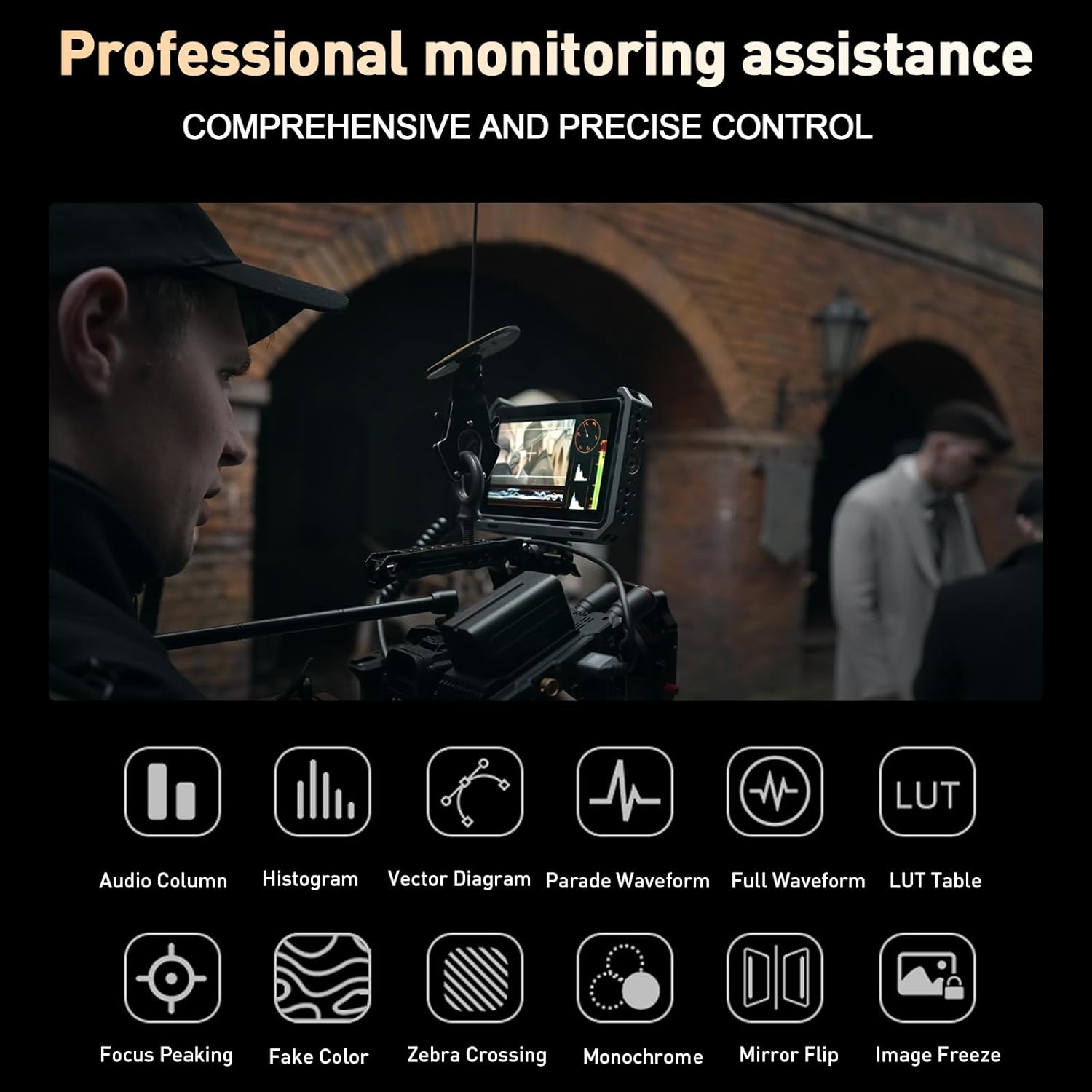
Image: Icons representing the various professional monitoring functions available on the VILTROX DC-X2 monitor.

ചിത്രം: ഒരു ദൃശ്യാവിഷ്കാരംview of the auxiliary monitoring tools, including histogram, vector, parade, full waveform, 3D LUT, focus peaking, false color, and more.
3D LUT Application
The DC-X2 supports importing and storing custom 3D LUTs (Look-Up Tables) from a USB-A drive. This feature allows you to apply specific color grades or camera profiles directly to your monitoring feed, providing a more accurate representation of your final output.
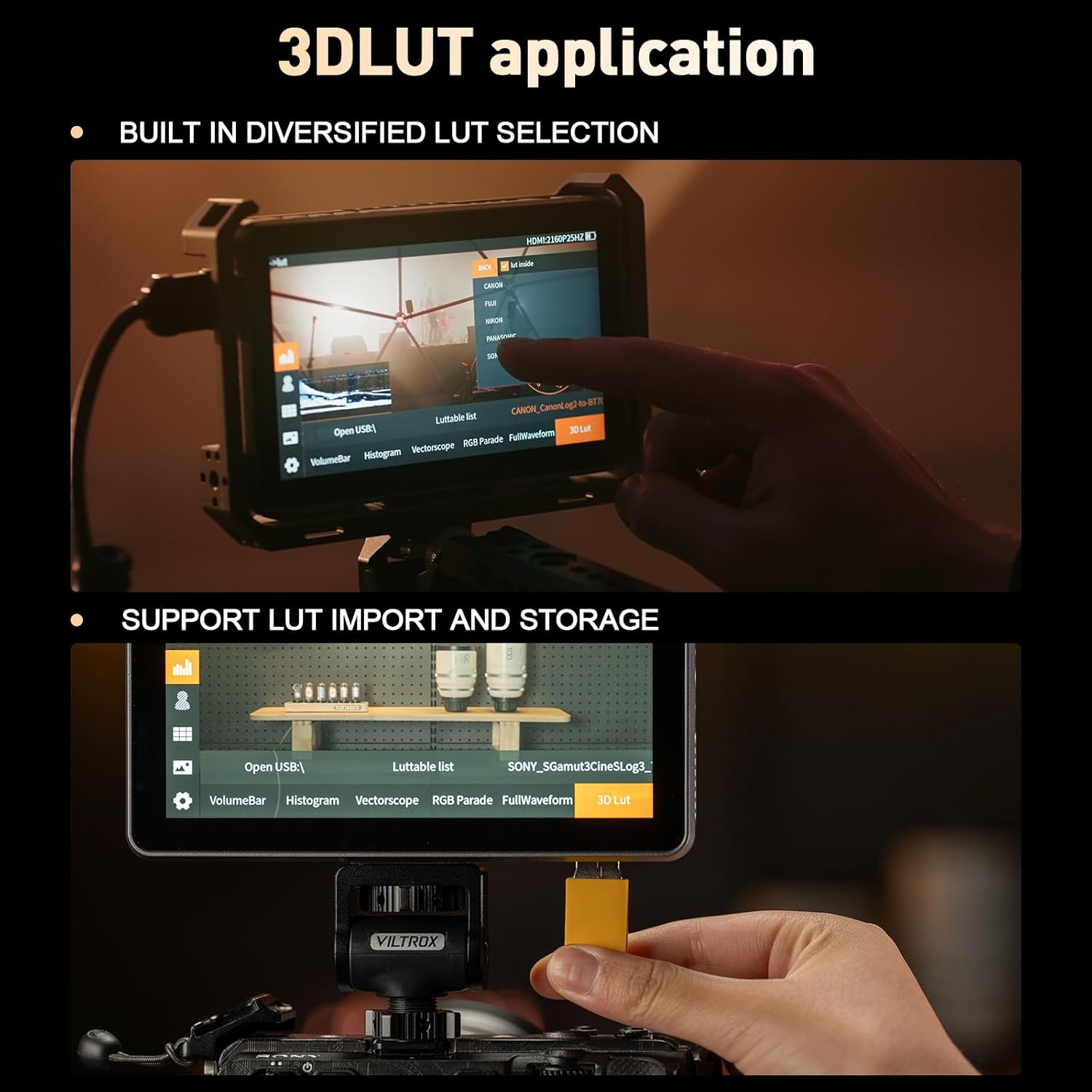
Image: The monitor screen showing the 3D LUT selection menu and a USB drive connected for LUT import.
Sunshade Installation
The VILTROX DC-X2 includes a quick-detach sunshade designed to improve screen visibility in bright outdoor conditions. To install, simply align the sunshade with the monitor's frame and press until it clicks into place. The sunshade can be folded for compact storage and also provides protection for the screen when closed.

Image: The VILTROX DC-X2 monitor shown with its quick-release lens hood attached, demonstrating its use in bright environments.
സ്പെസിഫിക്കേഷനുകൾ
| ഫീച്ചർ | സ്പെസിഫിക്കേഷൻ |
|---|---|
| ഉൽപ്പന്ന അളവുകൾ | 6.1 x 0.98 x 3.86 ഇഞ്ച് |
| ഇനത്തിൻ്റെ ഭാരം | 2.86 പൗണ്ട് |
| ഇനം മോഡൽ നമ്പർ | ഡിസി-എക്സ്2 |
| സ്റ്റാൻഡിംഗ് സ്ക്രീൻ ഡിസ്പ്ലേ വലുപ്പം | 6.0 ഇഞ്ച് |
| വീക്ഷണാനുപാതം | 16:9 |
| റെസലൂഷൻ | 1920 x 1080 (FHD 1080p) |
| ചിത്രത്തിന്റെ തെളിച്ചം | 2000 നിറ്റ് |
| ഇമേജ് ദൃശ്യതീവ്രത അനുപാതം | 1000:1 |
| Viewing കോണുകൾ | 160° |
| വർണ്ണ കാലിബ്രേഷൻ | SRGB/Rec.70 |
| പുതുക്കിയ നിരക്ക് | 30Hz (4K input) / 60Hz (display) |
| മൊത്തം USB പോർട്ടുകൾ | 1 (USB-A for LUT import) |
| വാല്യംtage | 12 വോൾട്ട് (DC) |
| നിർമ്മാതാവ് | വിൽട്രോക്സ് |

Image: A comparison table highlighting the differences and similarities between the VILTROX DC-X2 and DC-X3 models, including display screen, resolution, contrast, brightness, and viewകോണുകൾ.
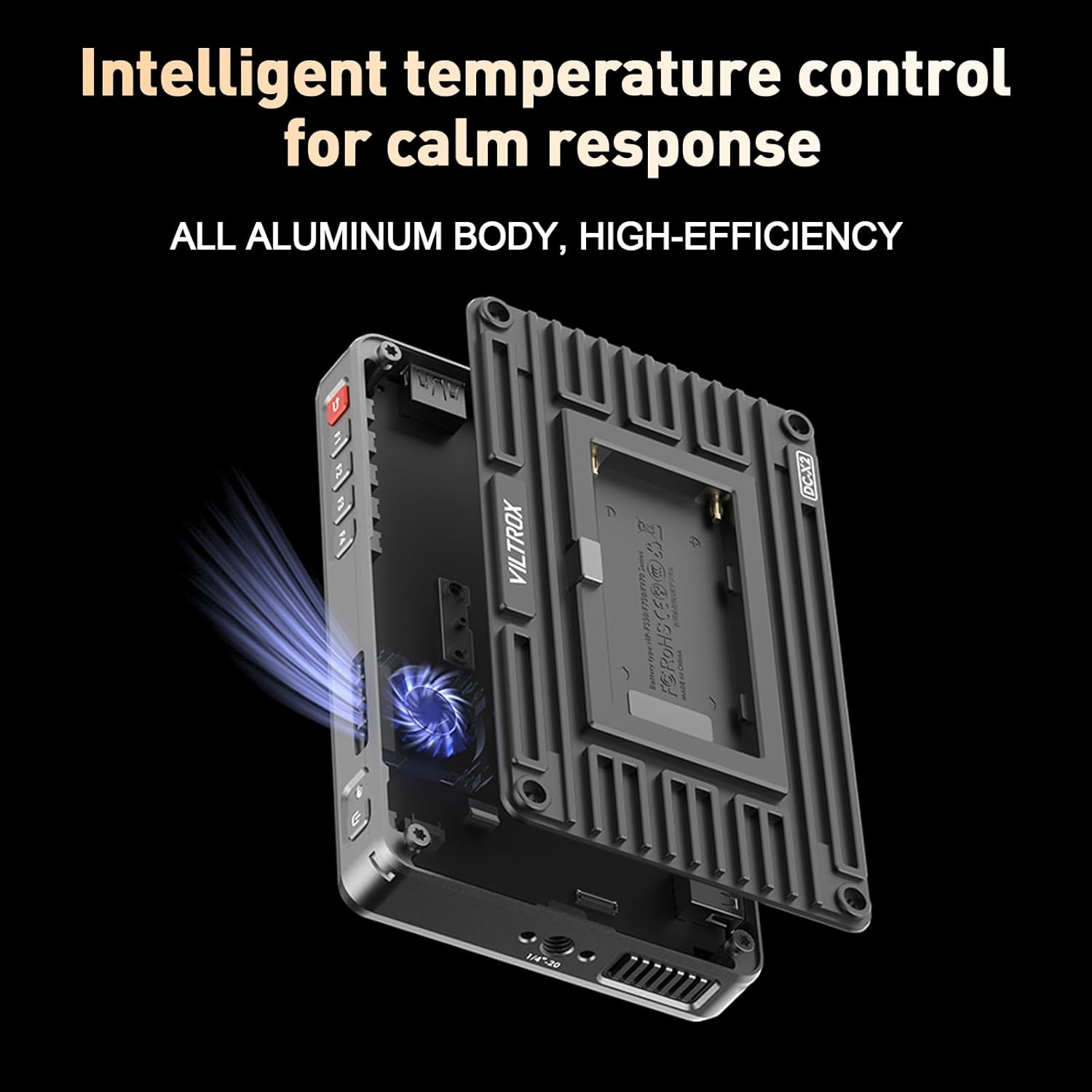
ചിത്രം: പൊട്ടിത്തെറിച്ച ഒരു view of the VILTROX DC-X2 monitor showing its internal cooling fan and all-aluminum body for efficient heat dissipation.
ട്രബിൾഷൂട്ടിംഗ്
If you encounter any issues with your VILTROX DC-X2 monitor, please refer to the following common troubleshooting steps:
- ശക്തിയില്ല: Ensure the battery is fully charged or the DC power adapter is securely connected. Check the power source.
- സിഗ്നലില്ല: Verify that the HDMI/Mini HDMI cable is correctly connected to both the camera and the monitor. Ensure the camera's output settings are compatible with the monitor's input (e.g., 4K 30Hz).
- Screen Flickering/Distortion: Check cable connections. Try a different HDMI cable. Ensure the monitor's firmware is up to date.
- ടച്ച്സ്ക്രീൻ പ്രതികരിക്കുന്നില്ല: Power cycle the device. If the issue persists, perform a factory reset via the system settings menu.
- അമിത ചൂടാക്കൽ: Ensure the monitor's fan is not obstructed. Operate in a well-ventilated area. The intelligent temperature control system is designed to manage heat effectively.
For more detailed troubleshooting or issues not listed here, please consult the electronic manual provided or contact VILTROX customer support.
വാറൻ്റി & പിന്തുണ
The VILTROX DC-X2 DSLR Camera Field Monitor comes with a standard manufacturer's warranty. Please refer to the warranty card included in your package for specific terms and conditions regarding coverage and duration.
For technical support, product inquiries, or warranty claims, please visit the official VILTROX website or contact their customer service department. Contact information can typically be found on the warranty card or the VILTROX brand store on Amazon.
കുറിപ്പ്: വാറന്റി ആവശ്യങ്ങൾക്കായി വാങ്ങിയതിന്റെ തെളിവായി നിങ്ങളുടെ വാങ്ങൽ രസീത് സൂക്ഷിക്കുക.