
1. ആമുഖം
This manual provides comprehensive instructions for the installation, operation, and maintenance of your SCS Sentinel MVE0100 swing gate opener and the AAA0045 wireless coding keypad. This system is designed to automate two-leaf swing gates, offering convenience and enhanced security for your property. Please read this manual carefully before installation and use to ensure proper functioning and safety.
The MVE0100 gate opener is suitable for gates up to 4 meters long and weighing up to 400 kg in total (200 kg maximum per leaf). The AAA0045 wireless keypad provides secure access control with a personal code, featuring a range of 50 meters and sensitive touch keys.
2. സുരക്ഷാ നിർദ്ദേശങ്ങൾ
Always prioritize safety during installation, operation, and maintenance. Failure to follow these instructions may result in injury or damage to the equipment.
- Ensure all electrical connections are performed by a qualified professional and comply with local regulations.
- ഏതെങ്കിലും അറ്റകുറ്റപ്പണികൾ അല്ലെങ്കിൽ അറ്റകുറ്റപ്പണികൾ നടത്തുന്നതിന് മുമ്പ് വൈദ്യുതി വിച്ഛേദിക്കുക.
- പ്രവർത്തന സമയത്ത് കുട്ടികളെയും വളർത്തുമൃഗങ്ങളെയും ഗേറ്റ് ഏരിയയിൽ നിന്ന് അകറ്റി നിർത്തുക.
- Do not attempt to repair damaged components yourself. Contact qualified service personnel.
- Ensure the gate path is clear of obstructions before operating.
- Regularly check safety devices such as photocells and obstacle detection for proper function.
3. പാക്കേജ് ഉള്ളടക്കം
പാക്കേജിൽ എല്ലാ ഘടകങ്ങളും ഉണ്ടെന്ന് ഉറപ്പാക്കുക:
- SCS Sentinel MVE0100 Gate Opener (2 actuators)
- നിയന്ത്രണ യൂണിറ്റ്
- SCS Sentinel AAA0045 Wireless Keypad
- 2 റിമോട്ട് കൺട്രോളുകൾ
- Mounting Hardware (brackets, screws, etc.)
- നിർദ്ദേശ മാനുവൽ (ഈ പ്രമാണം)
4. സജ്ജീകരണവും ഇൻസ്റ്റാളേഷനും
The installation process for the MVE0100 gate opener involves three main steps: mechanical installation, electrical connection, and programming. The AAA0045 keypad offers simple wireless installation.
4.1. Mechanical Installation of the Gate Opener
Securely attach the MVE0100 actuators to your swing gate and gate posts. Ensure proper alignment and clearance for smooth operation. Refer to the detailed diagrams in the separate installation guide for precise measurements and mounting points.
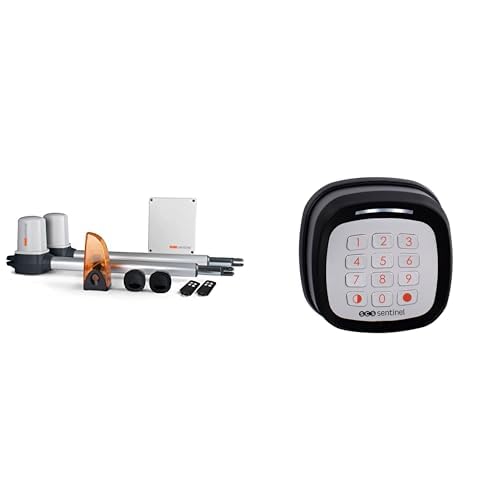
ചിത്രം 1: ഉദാample of a gate opener actuator mounted on a gate. This image illustrates the physical component of the MVE0100 system.
4.2. വൈദ്യുതി ബന്ധം
Connect the gate opener system to a 24V power supply. All electrical wiring should be done in accordance with the provided wiring diagram and by a qualified electrician to prevent electrical hazards and ensure correct functionality. Connect the control unit, actuators, and any optional accessories like photocells or flashing lights.
4.3. Programming and Synchronization
After mechanical and electrical installation, program the control unit. This involves teaching the system the gate's travel limits and synchronizing the remote controls. Follow the step-by-step instructions in the control unit's specific programming guide. Key programming features include:
- Learning Cycle: The system learns the gate's full opening and closing positions.
- റിമോട്ട് കൺട്രോൾ ജോടിയാക്കൽ: Pair the included remote controls with the control unit.
- പാരാമീറ്റർ അഡ്ജസ്റ്റ്മെന്റ്: Adjust settings such as opening speed, closing delay, and obstacle sensitivity.
4.4. AAA0045 Wireless Keypad Installation
The AAA0045 wireless keypad is designed for easy surface-mount installation. It operates on 2 CR2032 batteries (not included). Mount the keypad in a convenient location within 50 meters of the gate opener's control unit.
- Insert 2 CR2032 batteries into the keypad.
- Mount the keypad securely to a wall or post using appropriate screws.
- Follow the keypad's specific instructions to program your personal access code and link it to the gate opener's control unit.
5. പ്രവർത്തന നിർദ്ദേശങ്ങൾ
Your SCS Sentinel gate opener system offers various ways to control your gate.
5.1. റിമോട്ട് കൺട്രോളുകൾ ഉപയോഗിക്കൽ
Press the designated button on your remote control to activate the gate. A single press typically initiates an open/stop/close cycle. Ensure you are within range (usually up to 50 meters, depending on environmental factors).
5.2. Using the AAA0045 Wireless Keypad
To open the gate using the keypad:
- സെൻസിറ്റീവ് ടച്ച് കീകൾ ഉപയോഗിച്ച് നിങ്ങളുടെ സ്വകാര്യ ആക്സസ് കോഡ് നൽകുക.
- Press the confirmation key (usually indicated by a checkmark or 'Enter').
- The gate will begin to open.
The keypad supports both total gate opening for vehicles and partial (pedestrian) opening for individuals on foot, bicycles, or scooters. Refer to the keypad's specific manual for programming pedestrian access codes.
5.3. പ്രധാന സവിശേഷതകളും പ്രവർത്തനങ്ങളും
- Total Opening: രണ്ട് ഗേറ്റുകളും പൂർണ്ണമായും തുറന്നിരിക്കുന്നു.
- Partial (Pedestrian) Opening: കാൽനടയാത്രക്കാർക്ക് പ്രവേശനം അനുവദിക്കുന്നതിനായി ഒരു ഗേറ്റ് ലീഫ് ഭാഗികമായി തുറക്കുന്നു.
- യാത്രയുടെ അവസാനം വേഗത കുറയുന്നു: The gate slows down before reaching its fully open or closed position for smoother operation.
- തടസ്സം കണ്ടെത്തൽ: The system detects obstructions in the gate's path and stops or reverses movement to prevent damage or injury.
- ഓട്ടോമാറ്റിക് ക്ലോസിംഗ്: The gate can be programmed to close automatically after a set delay.
- മാനുവൽ റിലീസ്: In case of power failure, the gate can be manually unlocked and operated. Refer to the control unit manual for the location and operation of the manual release mechanism.
6. പരിപാലനം
Regular maintenance ensures the longevity and reliable operation of your gate opener system.
- പ്രതിമാസ: Check the gate's mechanical components (hinges, wheels, tracks) for wear and tear. Lubricate moving parts as recommended by the gate manufacturer.
- ത്രൈമാസിക: Inspect the gate opener actuators for any signs of damage or loose connections. Clean photocells to ensure they are free from dirt or spiderwebs. Test the obstacle detection safety feature.
- വാർഷികം: Have a qualified technician perform a thorough inspection of the entire system, including electrical connections and safety features.
- Keypad Batteries: Replace the CR2032 batteries in the AAA0045 keypad when the indicator light dims or operation becomes unreliable.
7. പ്രശ്നപരിഹാരം
If you encounter issues with your gate opener, refer to the following common problems and solutions:
| പ്രശ്നം | സാധ്യമായ കാരണം | പരിഹാരം |
|---|---|---|
| Gate does not respond to remote/keypad. | No power; remote/keypad batteries low; remote/keypad out of range; remote/keypad not paired. | Check power supply; replace batteries; move closer to the gate; re-pair remote/keypad (refer to programming section). |
| ഗേറ്റ് അപ്രതീക്ഷിതമായി നിൽക്കുകയോ പിന്നോട്ട് മാറുകയോ ചെയ്യുന്നു. | Obstruction detected; safety sensor (photocell) blocked or misaligned. | Clear the gate path; clean and align photocells. |
| ഗേറ്റ് ഭാഗികമായി തുറക്കുന്നു/അടയുന്നു. | Travel limits not set correctly; mechanical obstruction. | Perform a new learning cycle for travel limits; check for mechanical obstructions. |
| കീപാഡ് പ്രതികരിക്കുന്നില്ല. | Low batteries; out of range; incorrect code entered. | Replace CR2032 batteries; move closer to the control unit; ensure correct code entry. |
If the problem persists after attempting these solutions, please contact SCS Sentinel customer support or a qualified technician.
8 സ്പെസിഫിക്കേഷനുകൾ
| ഫീച്ചർ | വിശദാംശങ്ങൾ |
|---|---|
| Model (Gate Opener) | MVE0100 |
| Model (Wireless Keypad) | AAA0045 |
| വൈദ്യുതി വിതരണം | 24V |
| പരമാവധി. ഗേറ്റ് നീളം | Up to 4 meters (total for two leaves) |
| പരമാവധി. ഗേറ്റ് ഭാരം | Up to 400 kg (total for two leaves, 200 kg per leaf) |
| Keypad Range | 50 മീറ്റർ വരെ |
| Keypad Batteries | 2 x CR2032 (ഉൾപ്പെടുത്തിയിട്ടില്ല) |
| ASIN | B0DCPDYRNY |
| ആദ്യം ലഭ്യമായ തീയതി | ഓഗസ്റ്റ് 9, 2024 |
9. വാറൻ്റിയും പിന്തുണയും
Information regarding the specific warranty period and terms for the SCS Sentinel MVE0100 gate opener and AAA0045 wireless keypad is typically provided with your purchase documentation or on the manufacturer's official webസൈറ്റ്. വാറന്റി ക്ലെയിമുകൾക്കായി നിങ്ങളുടെ വാങ്ങലിന്റെ തെളിവ് സൂക്ഷിക്കുക.
For technical support, troubleshooting assistance beyond this manual, or to inquire about spare parts, please contact SCS Sentinel customer service. Contact details can usually be found on the product packaging or the official SCS Sentinel webസൈറ്റ്.
Note: Spare parts availability information is not provided in the product specifications.