
1. ആമുഖം
Thank you for choosing the ECLIPSE AVN-LBS01 Car Navigation System. This manual provides essential information for the proper installation, operation, and maintenance of your device. Please read this manual thoroughly before using the product to ensure safe and optimal performance. Keep this manual in a safe place for future reference.
2 സുരക്ഷാ വിവരങ്ങൾ
Always observe the following safety precautions to prevent injury, damage to the device, or damage to your vehicle.
- ഡ്രൈവിംഗ് സുരക്ഷ: Do not operate the navigation system or view the screen while driving. Always pull over to a safe location before making adjustments or inputting destinations.
- ഇൻസ്റ്റലേഷൻ: Installation should be performed by a qualified professional to avoid electrical shorts, damage to vehicle wiring, or improper mounting. Ensure all connections are secure.
- വൈദ്യുതി വിതരണം: This unit is designed for a 12V DC negative ground electrical system. Do not connect it to any other voltagഇ അല്ലെങ്കിൽ ധ്രുവീകരണം.
- വെൻ്റിലേഷൻ: യൂണിറ്റിന് ചുറ്റും മതിയായ വായുസഞ്ചാരം ഉറപ്പാക്കുക. വെന്റിലേഷൻ തുറസ്സുകൾ തടയരുത്.
- വൃത്തിയാക്കൽ: വൃത്തിയാക്കാൻ മൃദുവായതും ഉണങ്ങിയതുമായ തുണി ഉപയോഗിക്കുക. അബ്രസീവ് ക്ലീനറുകളോ ലായകങ്ങളോ ഉപയോഗിക്കരുത്.
3. പാക്കേജ് ഉള്ളടക്കം
ഇൻസ്റ്റാളേഷനുമായി മുന്നോട്ടുപോകുന്നതിനുമുമ്പ് എല്ലാ ഇനങ്ങളും പാക്കേജിൽ ഉണ്ടെന്ന് ഉറപ്പാക്കുക.
- ECLIPSE AVN-LBS01 Main Unit
- ജിപിഎസ് ആൻ്റിന
- മൈക്രോഫോൺ
- പ്രധാന വയറിംഗ് ഹാർനെസ്
- Various Connection Cables (e.g., RCA, USB, Steering Wheel Control)
- മൗണ്ടിംഗ് സ്ക്രൂകളും ആക്സസറികളും

ചിത്രം 3.1: Various wiring harnesses and connectors included with the ECLIPSE AVN-LBS01 car navigation system. This image shows a comprehensive set of cables for power, audio, video, and data connections, essential for integrating the unit into a vehicle's electrical system.

ചിത്രം 3.2: GPS antenna and microphone for the ECLIPSE AVN-LBS01 car navigation system. The GPS antenna is crucial for accurate location tracking, while the microphone enables hands-free communication and voice commands.
4. സജ്ജീകരണവും ഇൻസ്റ്റാളേഷനും
Proper installation is crucial for the performance and safety of your car navigation system. It is highly recommended that installation be performed by a professional.
4.1. പ്രധാന യൂണിറ്റ് കഴിഞ്ഞുview

ചിത്രം 4.1: ഫ്രണ്ട് view of the ECLIPSE AVN-LBS01 car navigation system. This image displays the 7V screen, control buttons (TILT, MENU, Current Location), and the overall aesthetic of the unit when installed in a dashboard.

ചിത്രം 4.2: മുകളിൽ view of the ECLIPSE AVN-LBS01 car navigation system showing the product label. The label indicates the model number AVN-LBS01(R), manufacturing origin (Made in China), power requirement (12V), and serial number (FDI202203118595). It also includes information regarding Bluetooth trademark ownership.
4.2. പിൻ പാനൽ കണക്ഷനുകൾ
The rear panel of the AVN-LBS01 unit provides various ports for connecting power, antennas, and external devices.

ചിത്രം 4.3: പിൻഭാഗം view of the ECLIPSE AVN-LBS01 car navigation system showing connection ports. Key ports include MIC (microphone input), GPS (GPS antenna input), TV (TV antenna input), and various multi-pin connectors for power, speakers, and other vehicle interfaces.
4.3. വയറിംഗ് കണക്ഷനുകൾ
Connect the main wiring harness and other cables as follows:
- ശക്തിയും ഗ്രൗണ്ടും: Connect the yellow wire (constant 12V), red wire (accessory 12V), and black wire (ground) to the corresponding vehicle wiring.
- സ്പീക്കർ utsട്ട്പുട്ടുകൾ: Connect the speaker wires to your vehicle's speakers, ensuring correct polarity.
- ജിപിഎസ് ആന്റിന: Connect the GPS antenna to the dedicated GPS port on the rear of the unit. Position the antenna in a location with a clear view ആകാശത്തിൻ്റെ.
- മൈക്രോഫോൺ: Connect the microphone to the MIC input port. Route the microphone cable to a suitable location for clear voice pickup.
- Vehicle Signals: Connect the SPEED (vehicle pulse), REVERSE, and PARKING wires to the corresponding vehicle signals. The parking brake connection is a safety feature that may restrict certain functions while the vehicle is in motion.
- മറ്റ് കണക്ഷനുകൾ: Connect any additional cables for steering wheel controls, external amplifiers, or video inputs/outputs as required.
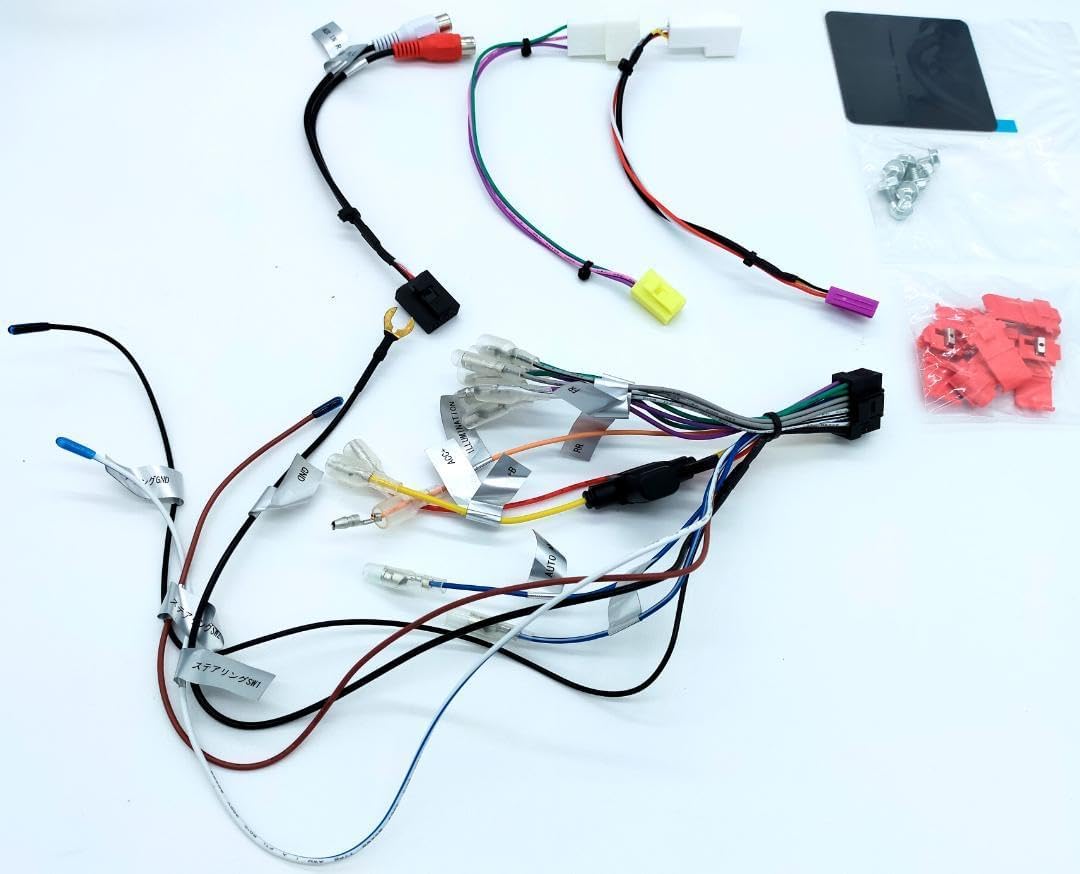
ചിത്രം 4.4: വിശദമായി view of the main wiring harness for the ECLIPSE AVN-LBS01 car navigation system. This image highlights various labeled wires such as SPEED (vehicle pulse), REVERSE, and PARKING, which are critical for proper navigation and safety feature operation.
4.4. യൂണിറ്റ് മൌണ്ട് ചെയ്യുന്നു
Secure the main unit into the vehicle's dashboard opening using the provided mounting brackets and screws. Ensure the unit is firmly seated and does not obstruct any vehicle controls or airbags.

ചിത്രം 4.5: വശം view of the ECLIPSE AVN-LBS01 car navigation system showing mounting points. This perspective illustrates the screw holes and chassis design for secure installation within a vehicle's dashboard.

ചിത്രം 4.6: എതിർവശം view of the ECLIPSE AVN-LBS01 car navigation system showing mounting points. Similar to Image 4.5, this view provides additional detail on the chassis structure and mounting options.
5. പ്രവർത്തന നിർദ്ദേശങ്ങൾ
This section covers the basic operation of your ECLIPSE AVN-LBS01 car navigation system.
5.1. പവർ ഓൺ/ഓഫ്
To power on the unit, turn your vehicle's ignition to the ACC or ON position. The unit will typically power on automatically. To power off, turn the ignition to the OFF position.
5.2. Display Controls
The unit features a 7V type touchscreen display. Use the physical buttons for quick access to common functions.
- TILT Button: Press this button to adjust the screen angle for optimal viewing and to reduce glare.
- മെനു ബട്ടൺ: Press to access the main menu, where you can select various functions such as navigation, audio, video, and settings.
- +/- ബട്ടണുകൾ: Typically used for volume control or zooming in/out on the map.
- Current Location Button: Press to quickly display your current position on the map.

ചിത്രം 5.1: Angled top-front view of the ECLIPSE AVN-LBS01 car navigation system showing the tilt mechanism. This image demonstrates how the screen can be adjusted for better visibility, highlighting the 'TILT' button on the front panel.
5.3. നാവിഗേഷൻ പ്രവർത്തനങ്ങൾ
The AVN-LBS01 comes with 2022 Autumn Edition map data. Access navigation features through the main menu.
- ലക്ഷ്യസ്ഥാന ഇൻപുട്ട്: Use the touchscreen keyboard to enter addresses, points of interest (POIs), or coordinates.
- റൂട്ട് മാർഗ്ഗനിർദ്ദേശം: Follow on-screen directions and voice prompts for turn-by-turn navigation.
- മാപ്പ് View: 2D, 3D മാപ്പുകൾക്കിടയിൽ മാറുക views, zoom levels, and display options.
- ട്രാഫിക് വിവരങ്ങൾ: If supported, the system may display real-time traffic updates to help avoid congestion.
5.4. ഓഡിയോ/വീഡിയോ പ്ലേബാക്ക്
The unit supports various audio and video playback options. Refer to the on-screen menu for available sources (e.g., radio, USB, Bluetooth audio, external AV input).
6. പരിപാലനം
പതിവ് അറ്റകുറ്റപ്പണികൾ നിങ്ങളുടെ നാവിഗേഷൻ സിസ്റ്റത്തിന്റെ ദീർഘായുസ്സും ഒപ്റ്റിമൽ പ്രകടനവും ഉറപ്പാക്കുന്നു.
- സ്ക്രീൻ ക്ലീനിംഗ്: മൃദുവായ, ലിന്റ് രഹിത തുണി ഉപയോഗിച്ച് സ്ക്രീൻ സൌമ്യമായി തുടയ്ക്കുക. കഠിനമായ പാടുകൾക്ക്, ചെറുതായി dampen the cloth with water or a screen-safe cleaner. Do not spray cleaner directly onto the screen.
- യൂണിറ്റ് വൃത്തിയാക്കൽ: Use a dry, soft cloth to wipe the exterior of the unit. Avoid using harsh chemicals or abrasive materials.
- സോഫ്റ്റ്വെയർ അപ്ഡേറ്റുകൾ: നിർമ്മാതാവിന്റെ website or contact support for available map data and software updates.
7. പ്രശ്നപരിഹാരം
If you encounter issues with your AVN-LBS01, refer to the following common problems and solutions.
| പ്രശ്നം | സാധ്യമായ കാരണം | പരിഹാരം |
|---|---|---|
| ശക്തിയില്ല | അയഞ്ഞ വൈദ്യുതി കണക്ഷൻ, ഫ്യൂസ് പൊട്ടി, വാഹനത്തിന്റെ ഇഗ്നിഷൻ ഓഫാണ്. | Check power wiring, inspect vehicle fuses, ensure ignition is on. |
| GPS സിഗ്നൽ ഇല്ല | GPS antenna not connected, antenna obstructed, driving in an area with poor satellite reception. | ജിപിഎസ് ആന്റിന സുരക്ഷിതമായി ബന്ധിപ്പിച്ചിട്ടുണ്ടെന്നും വ്യക്തമായ ഒരു കണക്ഷൻ ഉണ്ടെന്നും ഉറപ്പാക്കുക. view ആകാശത്തിന്റെ. തുറസ്സായ സ്ഥലത്തേക്ക് നീങ്ങുക. |
| ടച്ച്സ്ക്രീൻ പ്രതികരിക്കുന്നില്ല | System freeze, dirty screen, calibration issue. | Restart the unit (turn vehicle ignition off and on). Clean the screen. If issue persists, consult a professional. |
| ഓഡിയോ ഇല്ല | ശബ്ദം വളരെ കുറവാണ്, മ്യൂട്ട് സജീവമാക്കി, സ്പീക്കർ വയറിംഗ് പ്രശ്നം. | Increase volume, check mute settings, verify speaker connections. |
ഈ പരിഹാരങ്ങൾ പരീക്ഷിച്ചതിന് ശേഷവും പ്രശ്നം നിലനിൽക്കുകയാണെങ്കിൽ, ദയവായി ഉപഭോക്തൃ പിന്തുണയെയോ യോഗ്യതയുള്ള ഒരു സേവന സാങ്കേതിക വിദഗ്ദ്ധനെയോ ബന്ധപ്പെടുക.
8 സ്പെസിഫിക്കേഷനുകൾ
| ഫീച്ചർ | വിശദാംശങ്ങൾ |
|---|---|
| മോഡൽ നമ്പർ | AVN-LBS01 |
| ഡിസ്പ്ലേ തരം | 7V Type Touchscreen |
| മാപ്പ് ഡാറ്റ | 2022 Autumn Edition |
| വൈദ്യുതി വിതരണം | 12V DC (നെഗറ്റീവ് ഗ്രൗണ്ട്) |
| നിർമ്മാണ ഉത്ഭവം | ചൈനയിൽ നിർമ്മിച്ചത് |
| ASIN | B0DCW68M8N |
| ഇനം നമ്പർ | m49798662797 |
| സീരിയൽ നമ്പർ | FDI202203118595 |
| ബ്ലൂടൂത്ത് | Bluetooth® word mark and logos are registered trademarks owned by Bluetooth SIG, Inc. |
9. വാറൻ്റിയും പിന്തുണയും
For warranty information, please refer to the warranty card included with your product or contact your retailer. For technical support, product inquiries, or service, please contact the authorized ECLIPSE service center or your point of purchase. Keep your purchase receipt and serial number handy when contacting support.