ഉൽപ്പന്നം കഴിഞ്ഞുview
This document provides instructions for the installation, operation, and maintenance of the Laptop Keyboard for MEDION AKOYA S4402 MD63410 Swiss SW with Backlit Black. This keyboard is designed as a replacement part for compatible laptop models, offering a Swiss (SW) layout and integrated backlighting for improved visibility in low-light conditions.
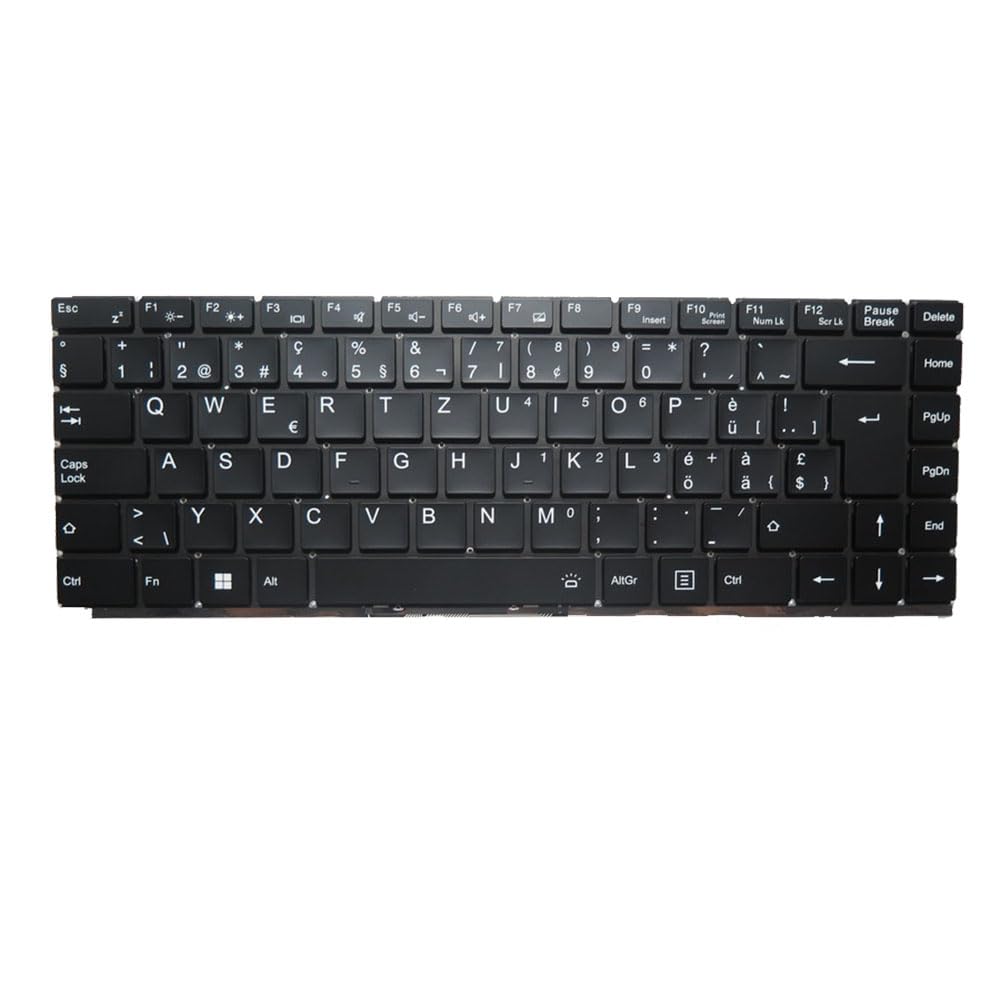
ചിത്രം: മുൻഭാഗം view of the Laptop Keyboard for MEDION AKOYA S4402 MD63410. The keyboard features a black finish with white key legends, including a full alphanumeric section, function keys (F1-F12), navigation keys, and a numeric keypad. The layout is Swiss (SW), indicated by specific characters like '§', '€', 'é', 'à', 'ö', 'ä', 'ü', and '£'. The keyboard includes dedicated keys for backlight control (likely via Fn combinations) and standard laptop keyboard functions.
സ്പെസിഫിക്കേഷനുകൾ
| ഫീച്ചർ | വിശദാംശങ്ങൾ |
|---|---|
| ഉൽപ്പന്ന തരം | Laptop Keyboard Replacement Part |
| അനുയോജ്യത | MEDION AKOYA S4402 MD63410 |
| ലേഔട്ട് | Swiss (SW) |
| ബാക്ക്ലൈറ്റ് | അതെ |
| നിറം | കറുപ്പ് |
| ഉൽപ്പന്ന അളവുകൾ | 11.81 x 7.87 x 3.94 ഇഞ്ച് |
| ഇനത്തിൻ്റെ ഭാരം | 1.76 പൗണ്ട് |
| നിർമ്മാതാവ് | ജനറിക് |
| മോഡൽ നമ്പർ | MD63410-5. |
| മാതൃരാജ്യം | ചൈന |
സജ്ജീകരണവും ഇൻസ്റ്റാളേഷനും
Installing a laptop keyboard typically requires technical expertise and careful handling of internal components. It is highly recommended to consult your laptop's official service manual or seek professional assistance for installation to avoid damage to your device.
General Guidelines (Consult Professional for Specific Steps):
- പവർ ഓഫ്: Ensure the laptop is completely powered off and disconnected from all power sources, including the battery.
- വേർപെടുത്തുക: Carefully disassemble the laptop components that obstruct access to the keyboard. This may involve removing the bottom cover, battery, optical drive, or top case, depending on the laptop model.
- Disconnect Old Keyboard: Locate the keyboard ribbon cable connector on the motherboard. Gently unlatch the connector and disconnect the old keyboard's cable.
- പഴയ കീബോർഡ് നീക്കം ചെയ്യുക: Unscrew or unclip the old keyboard from its housing.
- പുതിയ കീബോർഡ് ഇൻസ്റ്റാൾ ചെയ്യുക: Position the new keyboard into the housing. Ensure it fits correctly and all mounting points align.
- പുതിയ കീബോർഡ് ബന്ധിപ്പിക്കുക: Carefully insert the new keyboard's ribbon cable into the connector on the motherboard and secure the latch. Ensure the cable is not bent or creased.
- പുനഃസംയോജനം: Reassemble the laptop components in reverse order. Double-check all connections before fully closing the laptop.
- ടെസ്റ്റ് പ്രവർത്തനം: Power on the laptop and test all keyboard keys, including the backlight function, to ensure proper installation.
നിരാകരണം: Improper installation can lead to damage to your laptop. The manufacturer is not responsible for any damage incurred during self-installation.
പ്രവർത്തന നിർദ്ദേശങ്ങൾ
This keyboard functions as a standard laptop keyboard with additional features specific to the Swiss (SW) layout and integrated backlighting.
പ്രധാന പ്രവർത്തനങ്ങൾ:
- സ്റ്റാൻഡേർഡ് ആൽഫാന്യൂമെറിക് കീകൾ: അക്ഷരങ്ങൾ, അക്കങ്ങൾ, ചിഹ്നങ്ങൾ എന്നിവ ടൈപ്പ് ചെയ്യാൻ ഉപയോഗിക്കുന്നു.
- ഫംഗ്ഷൻ കീകൾ (F1-F12): These keys often have secondary functions (e.g., volume control, screen brightness, Wi-Fi toggle) when pressed in combination with the Fn key. Refer to your laptop's specific documentation for exact Fn key combinations.
- ബാക്ക്ലൈറ്റ് നിയന്ത്രണം: The keyboard features integrated backlighting. Typically, the backlight can be toggled on/off or adjusted in brightness using a specific Fn key combination (e.g., എഫ്എൻ + എഫ്എക്സ്, where Fx is a function key with a backlight icon). Locate the key with a backlight symbol (often resembling a sun or light bulb) to control this feature.
- Swiss (SW) Layout Specifics: This keyboard includes characters and symbols specific to the Swiss layout, such as '§', '€', 'é', 'à', 'ö', 'ä', 'ü', and '£'. Familiarize yourself with the placement of these characters.
- നാവിഗേഷൻ കീകൾ: Includes Home, End, PgUp (Page Up), PgDn (Page Down), and arrow keys for document navigation.
മെയിൻ്റനൻസ്
ശരിയായ അറ്റകുറ്റപ്പണികൾ നിങ്ങളുടെ കീബോർഡിന്റെ ആയുസ്സ് വർദ്ധിപ്പിക്കുകയും മികച്ച പ്രകടനം ഉറപ്പാക്കുകയും ചെയ്യും.
- വൃത്തിയാക്കൽ: Regularly clean the keyboard surface with a soft, lint-free cloth slightly dampened with water or a mild, non-abrasive cleaning solution. Avoid spraying liquids directly onto the keyboard.
- പൊടി നീക്കം: Use compressed air to remove dust and debris from between the keys. Hold the can upright and spray in short bursts.
- ചോർച്ച ഒഴിവാക്കുക: Protect the keyboard from liquid spills, which can cause permanent damage.
- മൃദുവായ ഉപയോഗം: Avoid excessive force when typing to prevent premature wear on the keys.
ട്രബിൾഷൂട്ടിംഗ്
If you encounter issues with your keyboard, consider the following common troubleshooting steps:
- കീബോർഡ് പ്രതികരിക്കുന്നില്ല:
- Ensure the keyboard ribbon cable is securely connected to the motherboard.
- നിങ്ങളുടെ ലാപ്ടോപ്പ് പുനരാരംഭിക്കുക.
- Check device drivers in your operating system. Reinstall or update if necessary.
- പ്രവർത്തിക്കാത്ത ചില കീകൾ:
- Check for physical obstructions or debris under the non-functional keys.
- If multiple keys in a specific area are not working, it might indicate a cable connection issue or a defect in the keyboard itself.
- ബാക്ക്ലൈറ്റ് പ്രവർത്തിക്കുന്നില്ല:
- Ensure the backlight function is enabled via the appropriate Fn key combination.
- Check your laptop's BIOS/UEFI settings for keyboard backlight options.
- തെറ്റായി ടൈപ്പ് ചെയ്ത അക്ഷരങ്ങൾ:
- Verify that the correct keyboard layout (Swiss SW) is selected in your operating system settings.
If issues persist after attempting these steps, professional diagnosis and repair may be required.
വാറൻ്റിയും പിന്തുണയും
ഈ ഉൽപ്പന്നം എ 90 ദിവസത്തെ വാറൻ്റി വാങ്ങിയ തീയതി മുതൽ. ഈ വാറന്റി നിർമ്മാണ വൈകല്യങ്ങൾ ഉൾക്കൊള്ളുകയും സാധാരണ ഉപയോഗത്തിൽ വിവരിച്ചിരിക്കുന്നതുപോലെ ഉൽപ്പന്നം പ്രവർത്തിക്കുന്നുവെന്ന് ഉറപ്പാക്കുകയും ചെയ്യുന്നു.
ഇനിപ്പറയുന്ന കാരണങ്ങളാൽ ഉണ്ടാകുന്ന നാശനഷ്ടങ്ങൾ വാറന്റി കവർ ചെയ്യുന്നില്ല:
- Improper installation or handling.
- Accidental damage, spills, or physical abuse.
- അനധികൃത അറ്റകുറ്റപ്പണികൾ അല്ലെങ്കിൽ പരിഷ്കാരങ്ങൾ.
- സാധാരണ തേയ്മാനം.
For warranty claims or technical support, please contact the seller or retailer from whom you purchased this product. Ensure you have your proof of purchase readily available.


